Request and Response Design
TL;DR
Every API request has three places to put data — path parameters (which resource), query parameters (how to filter), and the request body (the payload). Every response needs the right status code and a well-structured body. Getting these conventions right makes your API predictable, secure, and easy to debug.
Three Places to Put Data (And When to Use Each)
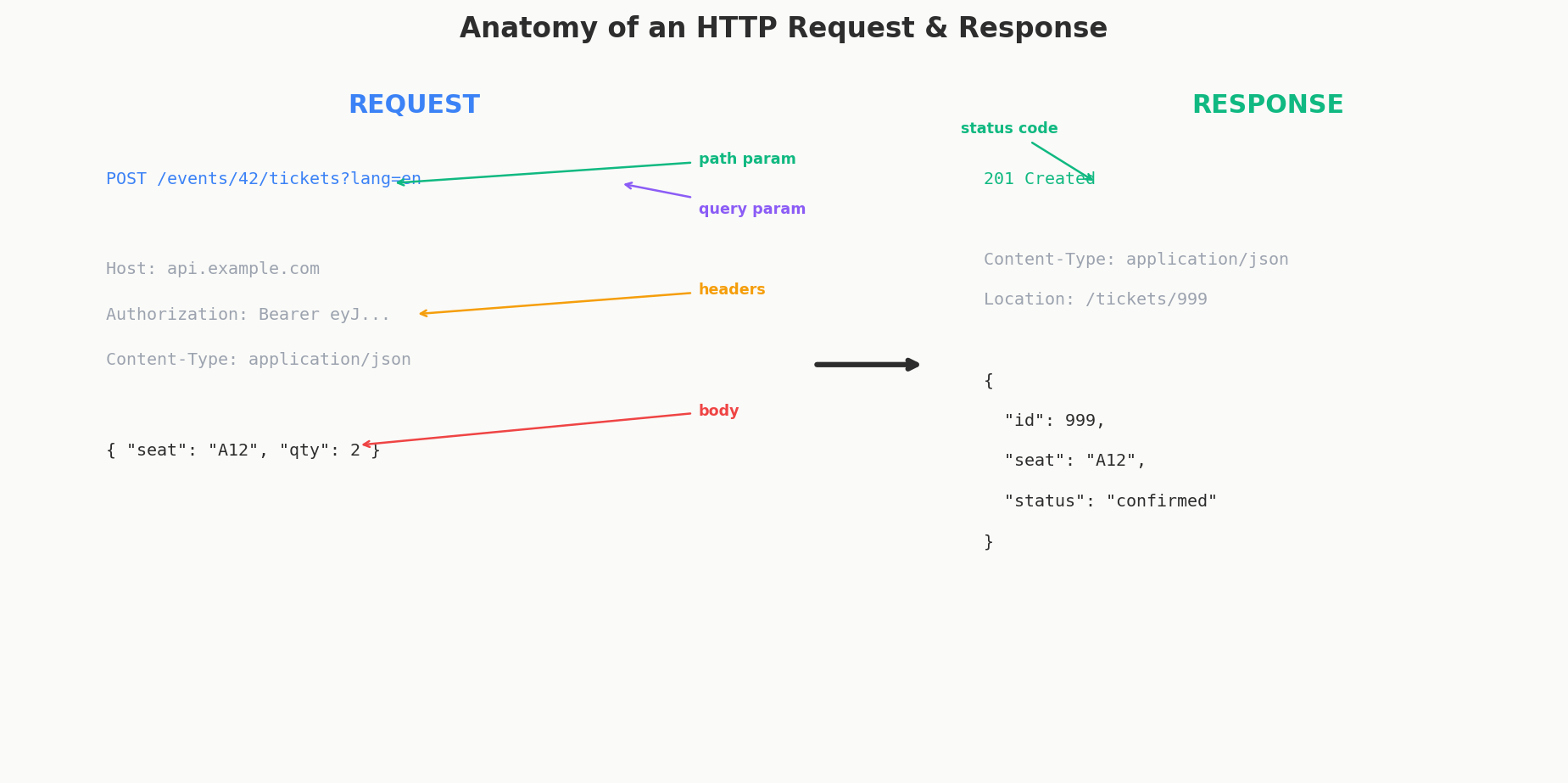
When you send an API request, data can go in exactly three places. Think of it like mailing a package:
- Path parameters are the address on the envelope — they tell the system where you're going. Which resource? Which specific item?
- Query parameters are special instructions written on the label — "fragile," "signature required," "leave at door." They modify how the request is handled.
- Request body is the contents inside the package — the actual stuff you're sending.
Each has a clear purpose, and mixing them up creates confusion.
Path Parameters: Structural Identification
Path parameters identify which resource you're talking about. They're required and structural — remove them and the URL breaks.
GET /events/123           # event_id = 123 (path param)
GET /events/123/bookings  # event_id = 123, all bookings (path param)
DELETE /bookings/456      # booking_id = 456 (path param)
Rules for path parameters: - Always required — the URL doesn't make sense without them - Identify a specific resource or a parent in a hierarchy - Usually IDs (numeric or UUID)
Query Parameters: Optional Modifiers
Query parameters filter, sort, paginate, or otherwise modify what comes back. They're optional — the URL still works without them, it just returns a broader result.
GET /events?city=NYC&date=2025-08-15 # filter by city and date
GET /events?sort=date&order=desc # sort descending by date
GET /events?page=2&limit=20 # pagination
GET /tickets?event_id=123§ion=VIP # filter tickets
Rules for query parameters: - Always optional — removing them gives a broader or default result - Used for filtering, sorting, pagination, and feature flags - Never for identifying a specific, required resource
Request Body: The Payload
The request body carries the actual data you're sending — the new resource to create, the fields to update, the settings to change.
POST /events/123/bookings
Content-Type: application/json

{
  "ticket_ids": [789, 790],
  "payment_method": "card_ending_4242",
  "special_requests": "Wheelchair accessible seating"
}
Rules for the request body: - Used with POST, PUT, and PATCH (never GET or DELETE in practice) - Contains structured data (usually JSON) - Represents the "what" — the actual content being sent
A Complete Example: All Three Working Together
Here's all three in one request — creating a booking for event 123, with an email notification:
POST /events/123/bookings?notify=true
Content-Type: application/json
Authorization: Bearer eyJhbGciOiJSUzI1NiIs...

{
  "ticket_ids": [789, 790],
  "payment_method": "card_ending_4242"
}
Breaking it down:
| Data | Location | Why |
|---|---|---|
123 (event ID) |
Path parameter | Structural — identifies which event |
notify=true |
Query parameter | Optional modifier — whether to send confirmation email |
ticket_ids, payment_method |
Request body | The payload — what the booking contains |
| Bearer token | Authorization header | Authentication — who is making the request |
The Gray Area: Where Does "notify" Go?
This is a real design question that comes up in practice. Should notify=true be a query parameter or in the request body?
Both can work, but here's the guideline:
| Put it in the query string when... | Put it in the body when... |
|---|---|
| It controls behavior (how the server processes the request) | It's part of the resource data (what gets stored) |
| It's a flag or toggle | It's a complex object or nested data |
| It doesn't get persisted | It gets saved to the database |
Examples: ?notify=true, ?dry_run=true, ?async=true |
Examples: {"email": "..."}, {"settings": {...}} |
notify=true controls server behavior (send an email) but isn't part of the booking itself. That makes it a good fit for a query parameter.
Security: Where User Identity Should Come From
This is a critical security point that many junior developers get wrong.
Never pass the user's identity in the request body. Don't do this:
POST /events/123/bookings
{
  "user_id": 789,        # WRONG — never trust the client
  "ticket_ids": [101, 102]
}
Why? Because any client can put any user_id in the body. A malicious user could create bookings under someone else's account by simply changing the number.
The user's identity should always come from the JWT token in the Authorization header. The server extracts it server-side:
POST /events/123/bookings
Authorization: Bearer eyJhbGciOiJSUzI1NiIs...

{
  "ticket_ids": [101, 102]
}
Server-side:
@app.route('/events/<event_id>/bookings', methods=['POST'])
def create_booking(event_id):
    # Extract user from verified JWT — NOT from request body
    user = get_current_user_from_token()
    user_id = user['uid']

    data = request.get_json()
    ticket_ids = data['ticket_ids']

    # Create booking with the authenticated user's ID
    booking = create_booking(event_id, user_id, ticket_ids)
    return jsonify(booking), 201
The JWT is cryptographically signed by your auth provider (Firebase, Auth0, etc.). The server verifies the signature before extracting the user ID. The client can't forge it.
The rule: anything that determines who is making the request (user ID, permissions, roles) should come from the verified auth token, never from the request body. The request body is for what they want to do, not who they are.
Interview Tip
If you're designing an API in an interview and you put user_id in the request body, expect the interviewer to push back. Saying "actually, the user ID should come from the JWT — we never trust the client for identity" is a strong signal that you understand API security fundamentals.
Designing Responses: Status Codes
Every HTTP response has two parts: a status code and a body. The status code is a three-digit number that tells the client what happened at a high level before it even looks at the body.
The Three Buckets You Need to Know
You don't need to memorize all 60+ HTTP status codes. You need to understand three buckets:
| Range | Meaning | Who's at fault? |
|---|---|---|
| 2xx | Success — it worked | Nobody, everything's fine |
| 4xx | Client error — you messed up | The client sent a bad request |
| 5xx | Server error — we messed up | The server failed internally |
That's the core mental model. If something goes wrong, the first question is always: is it a 4xx or a 5xx? This determines whether the client should fix their request and retry, or whether the server team needs to investigate.
The Status Codes That Actually Matter
Here are the codes you'll use 95% of the time:
| Code | Name | When to Use | Example |
|---|---|---|---|
| 200 | OK | Successful GET, PUT, PATCH | GET /events/123 returns the event |
| 201 | Created | Successful POST that created a resource | POST /events/123/bookings created a booking |
| 204 | No Content | Successful DELETE (nothing to return) | DELETE /bookings/456 — done, no body |
| 400 | Bad Request | Client sent invalid data | Missing required field, wrong data type |
| 401 | Unauthorized | No valid authentication | Missing or expired JWT token |
| 403 | Forbidden | Authenticated but not allowed | Non-admin trying to delete an event |
| 404 | Not Found | Resource doesn't exist | GET /events/99999 — no such event |
| 409 | Conflict | Request conflicts with current state | Trying to book already-sold tickets |
| 422 | Unprocessable Entity | Valid JSON but semantically wrong | Booking date is in the past |
| 429 | Too Many Requests | Rate limited | Client sent too many requests |
| 500 | Internal Server Error | Something broke on the server | Unhandled exception, database crash |
| 503 | Service Unavailable | Server is overloaded or down | Planned maintenance, capacity issues |
401 vs 403: The Classic Confusion
- 401 Unauthorized — "I don't know who you are." The request has no valid auth token, or the token is expired. Fix: log in again.
- 403 Forbidden — "I know who you are, and you're not allowed." The token is valid, but this user doesn't have permission. Fix: get the right permissions (or accept you can't access this).
Think of it like a nightclub. 401 is "you don't have an ID." 403 is "I see your ID, and you're not on the VIP list."
400 vs 422: When the Client Sends Bad Data
- 400 Bad Request — The request is structurally broken. Malformed JSON, missing required fields, wrong Content-Type. The server can't even parse what you sent.
- 422 Unprocessable Entity — The request is structurally fine (valid JSON, all fields present) but semantically wrong. You're trying to book an event in the past, or you're requesting more tickets than exist.
In practice, many APIs use 400 for both cases, and that's acceptable. But if you want to be precise, 400 means "I can't read this" and 422 means "I can read this, but it doesn't make sense."
Error Response Design: Be Helpful, Not Leaky
When something goes wrong, your error response should help the developer fix the problem — without leaking internal details.
A Good Error Response Structure
{
  "error": {
    "code": "TICKETS_UNAVAILABLE",
    "message": "The requested tickets are no longer available.",
    "details": [
      {
        "field": "ticket_ids",
        "issue": "Ticket 789 was sold to another customer at 2025-03-15T14:22:00Z"
      }
    ]
  }
}
The structure has three levels: - code — A machine-readable error code the client can switch on (not the HTTP status code — this is your application-level code) - message — A human-readable description the developer can understand - details — Optional array with field-level specifics
What NOT to Put in Error Messages
{
  "error": "SQL error: SELECT * FROM bookings WHERE id = '456';
            ERROR 1045 (28000): Access denied for user 'admin'@'db-prod-3.internal'"
}
This leaks your database technology (MySQL), your internal hostnames (db-prod-3.internal), and a username (admin). An attacker now knows your stack, your infrastructure naming scheme, and a valid database username.
The rule: error messages should help the API consumer fix their request. They should never reveal internal implementation details — database queries, stack traces, internal service names, or infrastructure topology.
| Leaky (bad) | Safe (good) |
|---|---|
"SQL syntax error in query..." |
"Invalid request format" |
"Redis connection timeout to cache-03.internal" |
"Service temporarily unavailable" |
"NullPointerException at BookingService.java:142" |
"An internal error occurred. Please try again." |
"User admin@company.com not found in users table" |
"User not found" |
Log the full details server-side for debugging. Return sanitized messages to the client.
Batch API Error Responses
What happens when a single request contains multiple operations and some succeed while others fail? This is common in batch APIs.
POST /events/123/bookings/batch
{
  "bookings": [
    {"ticket_id": 789, "payment": "card_4242"},
    {"ticket_id": 790, "payment": "card_4242"},
    {"ticket_id": 791, "payment": "card_4242"}
  ]
}
If ticket 791 is sold out but 789 and 790 are available, what do you return?
Option 1: All-or-Nothing (Simpler)
Fail the entire batch if any item fails. Return a 4xx with details about what went wrong.
HTTP/1.1 409 Conflict
{
  "error": {
    "code": "PARTIAL_AVAILABILITY",
    "message": "Not all tickets are available.",
    "details": [
      {"ticket_id": 789, "status": "available"},
      {"ticket_id": 790, "status": "available"},
      {"ticket_id": 791, "status": "sold_out"}
    ]
  }
}
Pros: Simple, predictable. The client knows: either everything worked, or nothing did. Cons: One bad item blocks the whole batch.
Option 2: Partial Success (More Flexible)
Process what you can and report per-item results. Use 207 Multi-Status or 200 with a structured body:
HTTP/1.1 207 Multi-Status
{
  "results": [
    {"ticket_id": 789, "status": "success", "booking_id": 1001},
    {"ticket_id": 790, "status": "success", "booking_id": 1002},
    {"ticket_id": 791, "status": "failed", "error": {
      "code": "TICKET_SOLD_OUT",
      "message": "Ticket 791 is no longer available.",
      "retryable": false
    }}
  ],
  "summary": {
    "total": 3,
    "succeeded": 2,
    "failed": 1
  }
}
Pros: More efficient — successful items don't need to be retried. Cons: More complex for the client to handle.
Retryable vs Non-Retryable Errors
In batch responses (and in general), it's extremely helpful to tell the client whether retrying will help:
| Error | Retryable? | Why |
|---|---|---|
| Ticket sold out | No | The state won't change by retrying |
| Rate limited (429) | Yes | Wait and try again |
| Server error (500) | Yes | Might be a transient failure |
| Invalid payment method | No | Client needs to fix the data |
| Database timeout | Yes | Transient infrastructure issue |
Including a retryable boolean in your error responses saves clients from implementing retry logic for errors that will never succeed.
Content-Type and Accept Headers
Two headers that govern how data is formatted:
- Content-Type — Tells the server what format the request body is in. Almost always
application/jsonfor modern APIs. - Accept — Tells the server what format the client wants the response in. Usually
application/json.
POST /events/123/bookings
Content-Type: application/json        # "I'm sending you JSON"
Accept: application/json              # "Please respond with JSON"
Authorization: Bearer eyJhbG...       # "Here's who I am"

{
  "ticket_ids": [789, 790]
}
If the server can't produce the requested format, it should return 406 Not Acceptable. If the server can't parse the request body format, it should return 415 Unsupported Media Type.
In practice, most modern APIs only support JSON, so these headers are often implied. But including them is good practice and shows attention to detail in interviews.
Putting It All Together: A Complete Request-Response Cycle
Let's trace a complete flow for booking tickets:
Request:
POST /events/123/bookings?notify=email
Content-Type: application/json
Accept: application/json
Authorization: Bearer eyJhbGciOiJSUzI1NiIs...
Idempotency-Key: 7f3a2b1c-4d5e-6f7a-8b9c-0d1e2f3a4b5c

{
  "ticket_ids": [789, 790],
  "payment_method": "card_ending_4242",
  "special_requests": "Aisle seats preferred"
}
Successful Response:
HTTP/1.1 201 Created
Content-Type: application/json
Location: /events/123/bookings/456

{
  "id": 456,
  "event_id": 123,
  "user_id": 789,
  "tickets": [
    {"id": 789, "section": "Floor", "row": "A", "seat": 14},
    {"id": 790, "section": "Floor", "row": "A", "seat": 15}
  ],
  "total": 350.00,
  "status": "confirmed",
  "created_at": "2025-03-15T14:30:00Z"
}
Error Response (tickets sold out):
HTTP/1.1 409 Conflict
Content-Type: application/json

{
  "error": {
    "code": "TICKETS_UNAVAILABLE",
    "message": "One or more requested tickets are no longer available.",
    "details": [
      {"ticket_id": 789, "status": "available"},
      {"ticket_id": 790, "status": "sold_out"}
    ],
    "retryable": false
  }
}
Notice everything we covered in action: path parameters for the resource hierarchy, query parameters for behavior modifiers, request body for the payload, JWT for authentication, idempotency key for retry safety, proper status codes, and structured error responses.
Interview Tip
In system design interviews, interviewers care about whether you understand the buckets — 2xx means success, 4xx means the client messed up, 5xx means the server messed up. You don't need to recite every code. Knowing 200, 201, 400, 401, 404, and 500 covers the vast majority of real-world scenarios. If you can additionally explain 409 (conflict) and why your error responses should be structured and actionable, you're ahead of most candidates.
Interview Expectations: Junior vs. Senior
- Junior/Mid-level: Returns flat JSON responses. Might forget wrapper objects, leading to array-only responses that are hard to extend later. Uses HTTP 200 for everything or only 200/400/500.
- Senior/Staff: Wraps lists in standard envelopes (e.g.,
{"data": [...], "metadata": {...}}) for future extensibility. Uses precise HTTP status codes (201 Created, 202 Accepted, 409 Conflict). Never includes PII in URLs (likeGET /users/email@test.com) and strictly separates internal database models from API DTOs.