Query Patterns That Break at Scale
TL;DR
Some query patterns work fine with 10,000 rows but collapse at 10 million. The N+1 problem, offset pagination, COUNT(*) on huge tables, and connection exhaustion are the four horsemen. Learn to spot them before they become production incidents.
The Ticking Time Bomb
Your app works beautifully in development. Fast queries, snappy UI. Then you launch. Traffic grows. Data grows. And one day, your database CPU hits 100% and your on-call engineer gets paged at 3 AM.
The query that worked at 10K rows is now scanning 10M rows. The pagination that was instant on page 1 is crawling on page 500. The connection pool that handled 10 users is exhausted by 1,000.
These problems are predictable. Let's learn to spot them.
The N+1 Query Problem
What It Is
You query a list of posts, then for each post, make a separate query to get the author. 1 query for posts + N queries for authors = N+1 queries.
# The N+1 problem in action
posts = db.query("SELECT * FROM posts LIMIT 50")  # 1 query

for post in posts:
    author = db.query(f"SELECT * FROM users WHERE id = {post.user_id}")  # 50 queries!
    post.author = author
51 database round trips to load one page. Each round trip has network latency (even on localhost, that's ~0.1ms). At 50 posts, it's tolerable. At 500? It's 5 seconds of pure waiting.
ORMs like SQLAlchemy, ActiveRecord, and Hibernate make this easy to accidentally create because they lazily load relationships by default.
Four Solutions
1. Eager loading (JOIN):
SELECT posts.*, users.username, users.avatar_url
FROM posts
JOIN users ON posts.user_id = users.id
LIMIT 50;
2. Batch loading (WHERE IN):
-- First query: get posts
SELECT * FROM posts LIMIT 50;
-- Second query: get all authors at once
SELECT * FROM users WHERE id IN (1, 2, 3, 5, 8, 13, ...);
3. DataLoader pattern: Used in GraphQL and modern ORMs. Batches individual lookups within a single tick/request cycle into one query automatically.
4. Subquery:
SELECT * FROM users WHERE id IN (
    SELECT DISTINCT user_id FROM posts ORDER BY created_at DESC LIMIT 50
);
Interview Tip
If you mention an ORM or describe loading related data in a system design interview, proactively say "I'd use eager loading or batch loading to avoid the N+1 problem." It shows you've built real systems.
Offset Pagination — The Silent Killer
How Offset Works
-- Page 1 (fast)
SELECT * FROM posts ORDER BY created_at DESC LIMIT 20 OFFSET 0;

-- Page 100 (slow!)
SELECT * FROM posts ORDER BY created_at DESC LIMIT 20 OFFSET 1980;
For page 100, the database must: 1. Scan and sort 2,000 rows 2. Discard the first 1,980 3. Return 20
The deeper you paginate, the more work gets thrown away. At offset 100,000, you're scanning and discarding 100,000 rows to return 20.
Real performance numbers:
| Depth | Offset Pagination | Cursor Pagination |
|---|---|---|
| Page 1 | ~0.5ms | ~0.5ms |
| Page 100 | ~5ms | ~0.5ms |
| Page 1,000 | ~35ms | ~0.5ms |
| Page 10,000 | ~87ms | ~0.5ms |
At depth 10,000, offset is 174x slower than cursor.
Cursor-Based Pagination (The Fix)
Instead of "skip N rows," use a cursor — the last value you saw:
-- First page
SELECT * FROM posts
ORDER BY created_at DESC
LIMIT 20;

-- Next page (cursor = timestamp of last item)
SELECT * FROM posts
WHERE created_at < '2024-03-15T10:30:00Z'
ORDER BY created_at DESC
LIMIT 20;
With an index on created_at, this is a simple range scan. No scanning and discarding. Constant time regardless of depth.
The trade-off: You can't jump to "page 500" directly — you can only go forward/backward from a cursor. For infinite scroll feeds, that's perfect. For "go to page X" interfaces, you need offset (or accept the performance cost).
Here's what the API response looks like:
{
  "data": [
    {"id": "post_981", "content": "...", "created_at": "2024-03-15T10:30:00Z"},
    {"id": "post_980", "content": "...", "created_at": "2024-03-15T10:28:12Z"}
  ],
  "next_cursor": "2024-03-15T10:28:12Z",
  "has_more": true
}
The client sends ?cursor=2024-03-15T10:28:12Z for the next page. The server uses WHERE created_at < cursor — a simple index range scan every time, no matter how deep.
Keyset Pagination for Ties
If multiple rows share the same created_at, the cursor is ambiguous. Fix with a composite cursor:
SELECT * FROM posts
WHERE (created_at, id) < ('2024-03-15T10:30:00Z', 12345)
ORDER BY created_at DESC, id DESC
LIMIT 20;
This requires an index on (created_at, id) and guarantees uniqueness.
Real-Time Insertions and Duplicate Items
There's a subtle edge case with cursor pagination on live data. If a new post is inserted while a user is scrolling, the insertion shifts items forward. With offset pagination, this causes the user to see the same item twice (or skip one). With cursor pagination using timestamps or UUIDs, the cursor is stable — it references a fixed point, so new insertions above the cursor don't affect the next page.
This is another reason cursor pagination is preferred for feeds with real-time insertions (social media timelines, chat message history, notification lists).
Aggregation at Scale
COUNT(*) Is Expensive
On a post with 3 million likes, this scans 3 million rows (even with an index, it must count each qualifying entry). Doing this on every page load is a disaster.
Solutions:
1. Pre-computed counters (most common):
Store like_count on the posts table. Increment/decrement atomically on each like/unlike. Accept minor drift, reconcile periodically.
2. Approximate counts (HyperLogLog):
For very large counts where exact numbers don't matter (unique visitors, distinct values), HyperLogLog gives ~2% accuracy with a fixed 12KB of memory. Redis supports this natively with PFADD and PFCOUNT.
3. Cached counts: Compute the count periodically (every minute, every hour) and cache the result. Show "~3.2M likes" instead of "3,247,891 likes."
Aggregation Across Partitions
If your data is partitioned or sharded, aggregations become scatter-gather operations: query each partition, sum the results. This is inherently expensive. Pre-compute when possible.
Connection Exhaustion
The Problem
Every database connection consumes resources: - ~10MB of RAM per connection on PostgreSQL - A worker process or thread on the database server - File descriptors, socket buffers
PostgreSQL typically supports 100-500 max connections. With 50 microservice instances, each wanting 20 connections: 1,000 connections. You've exceeded the limit.
Connection Pooling — The Solution
Client-side pooling (HikariCP, SQLAlchemy pool): Each application instance maintains a small pool of reusable connections. Instead of opening/closing a connection per query, you borrow one from the pool and return it when done. Avoids the overhead of TCP handshake + authentication per query.
Server-side pooling (PgBouncer): Sits between all application instances and the database. Multiplexes thousands of client connections into a small number of real database connections.
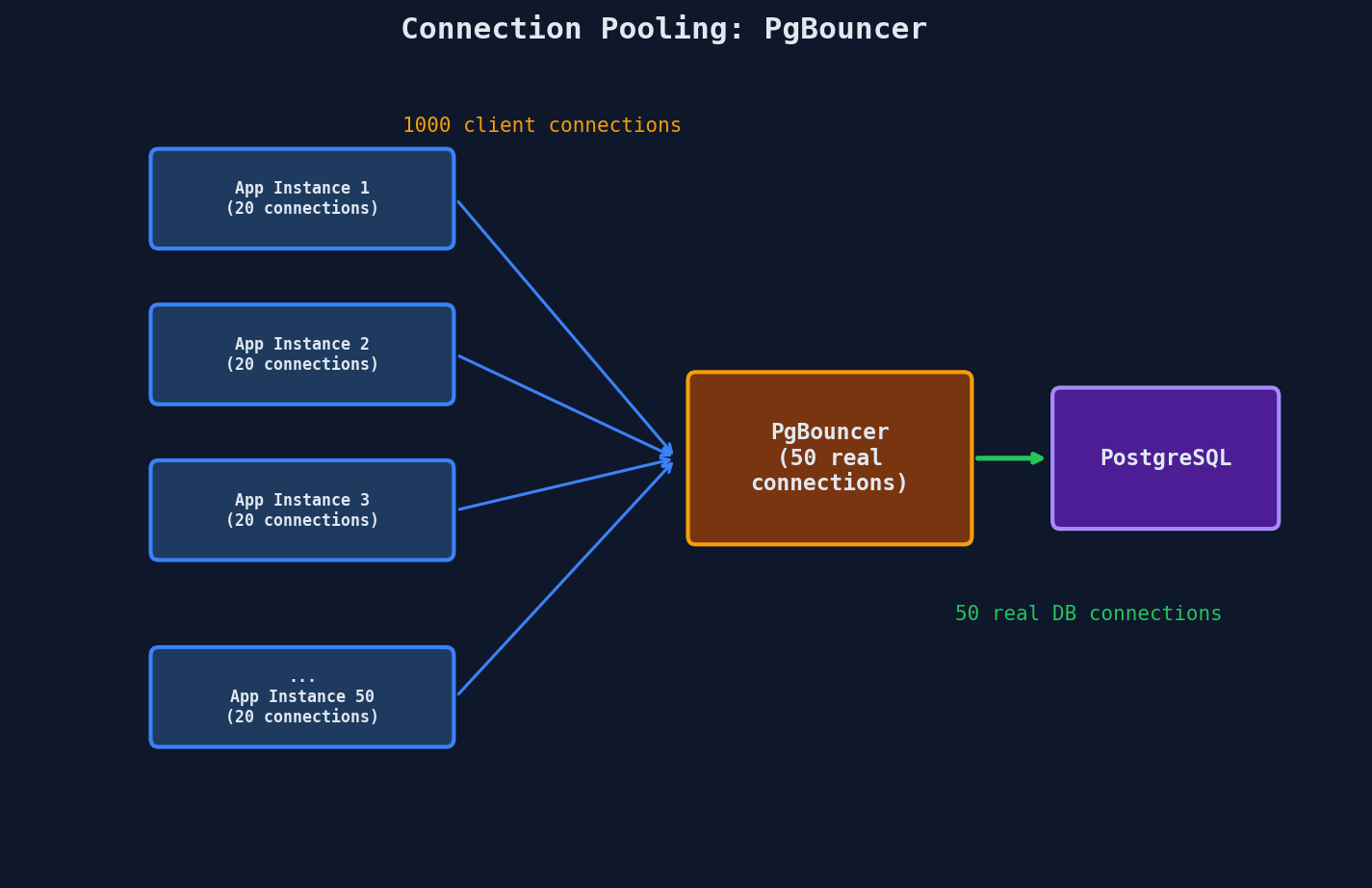
PgBouncer's transaction mode is the most efficient: a real connection is allocated only for the duration of a transaction, then returned to the pool. Between queries, no connection is held.
Best practice: Use both. HikariCP for fast local reuse within each application instance. PgBouncer for protecting the database from connection storms across all instances.
Read Replicas
When read load overwhelms a single server, add read replicas — copies of the database that handle read queries:
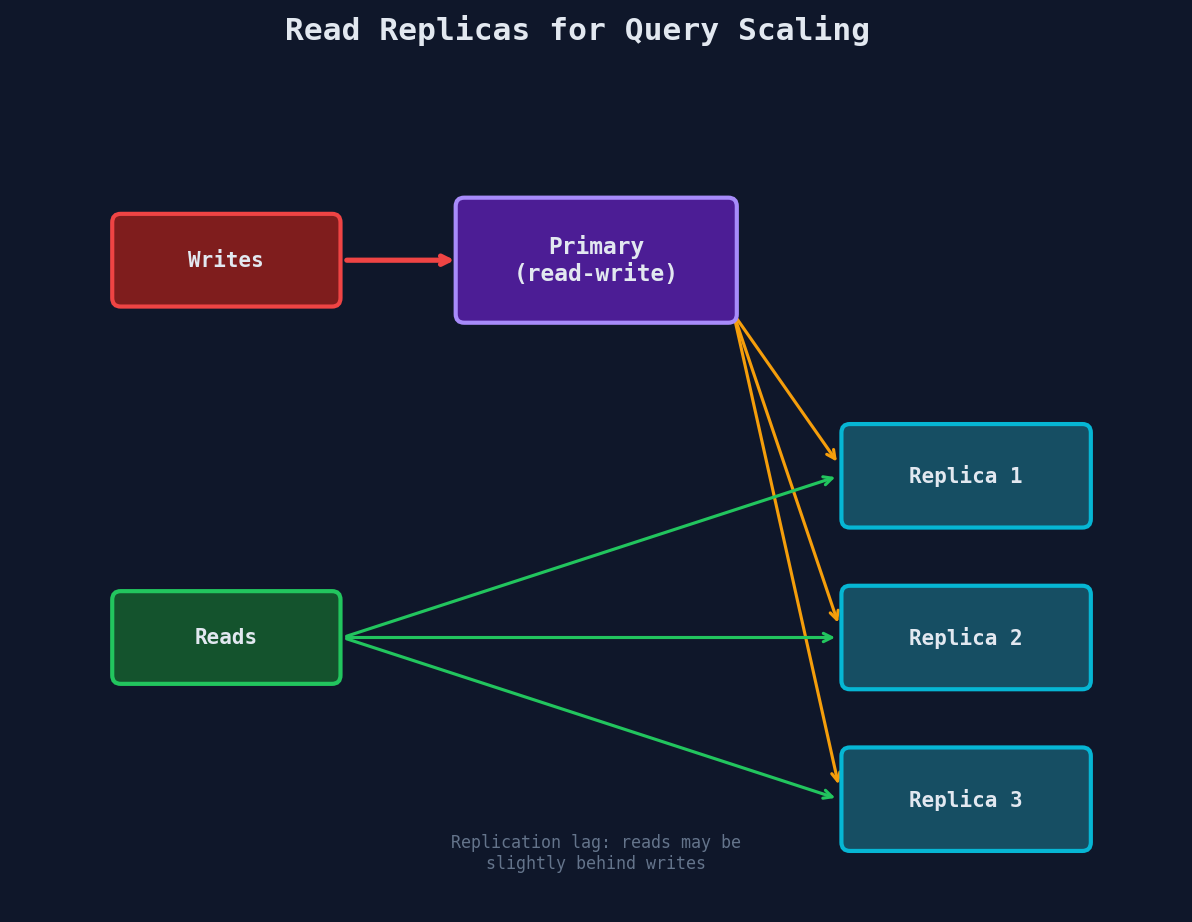
Replication lag: Replicas are eventually consistent — there's a delay (milliseconds to seconds) between a write on the primary and its appearance on replicas.
Read-your-writes consistency: After a user updates their profile, route their reads to the primary for a few seconds to ensure they see their own changes. Other users can read from replicas (slight staleness is fine).
Interview Tip
When discussing database scaling, mention connection pooling and read replicas before jumping to sharding. "First, I'd add PgBouncer for connection pooling and read replicas to handle read traffic. If that's not enough, then I'd consider sharding." That shows you understand the scaling ladder.
Quick Recap
| Problem | Symptom | Fix |
|---|---|---|
| N+1 queries | N+1 round trips for N items | Eager loading, batch loading |
| Offset pagination | Queries slow down as page number increases | Cursor-based pagination |
| COUNT(*) at scale | Slow aggregation on millions of rows | Pre-computed counters, HyperLogLog |
| Connection exhaustion | "too many connections" errors | PgBouncer + HikariCP |
| Read bottleneck | Primary can't handle read load | Read replicas with replication-aware routing |