Presigned URLs
TL;DR
A presigned URL is a self-contained permission slip: your server signs a URL with its secret key (locally, no network call to S3), embeds constraints like max file size and content type, and hands it to the client. The client uploads directly to S3 using that URL. For downloads, use presigned URLs for one-off files or signed CDN cookies for streaming (one cookie covers all segment requests). The server never touches the bytes in either direction.
The Ticket Booth Analogy
Think of a concert venue. You don't walk up to the stage and ask the band if you can come in. You go to the ticket booth, show your ID, get a wristband, and walk through the gate. The gate checks the wristband -- not your identity.
Presigned URLs work the same way:
- Client authenticates with your API server (shows ID)
- Server verifies permissions, generates a presigned URL (issues wristband)
- Client uses the URL to upload/download directly from S3 (walks through the gate)
- S3 validates the URL signature (checks the wristband) -- no callback to your server
The gate (S3) never calls the ticket booth (your server) to verify. The wristband (signed URL) contains all the proof it needs.
How Presigned URLs Actually Work
Here's the critical detail that trips people up in interviews:
No network call to S3
Generating a presigned URL does not make a network call to S3. Your server computes an HMAC signature locally using your AWS secret key. It takes ~0.1ms. S3 doesn't know the URL exists until someone uses it.
The server constructs a URL and signs it with HMAC-SHA256:
When S3 receives a request with this URL, it reconstructs the same StringToSign from the request parameters, computes the HMAC with your secret key (which S3 also has), and checks if the signatures match.
Anatomy of a Presigned URL
Every query parameter has a purpose:
https://my-bucket.s3.us-east-1.amazonaws.com/uploads/user_42/video.mp4
  ?X-Amz-Algorithm=AWS4-HMAC-SHA256
  &X-Amz-Credential=AKIA.../20250315/us-east-1/s3/aws4_request
  &X-Amz-Date=20250315T103000Z
  &X-Amz-Expires=3600
  &X-Amz-SignedHeaders=host;content-type
  &X-Amz-Signature=a1b2c3d4e5f6...
| Parameter | Purpose |
|---|---|
X-Amz-Algorithm |
Signing algorithm (always AWS4-HMAC-SHA256) |
X-Amz-Credential |
Access key ID + date + region + service + request type |
X-Amz-Date |
When the URL was generated (UTC) |
X-Amz-Expires |
Seconds until URL expires (max 604800 = 7 days) |
X-Amz-SignedHeaders |
Which headers are included in the signature |
X-Amz-Signature |
The HMAC-SHA256 signature itself |
If anyone tampers with the key, content type, or expiry -- the signature won't match and S3 rejects the request with 403 Forbidden.
The Upload Flow
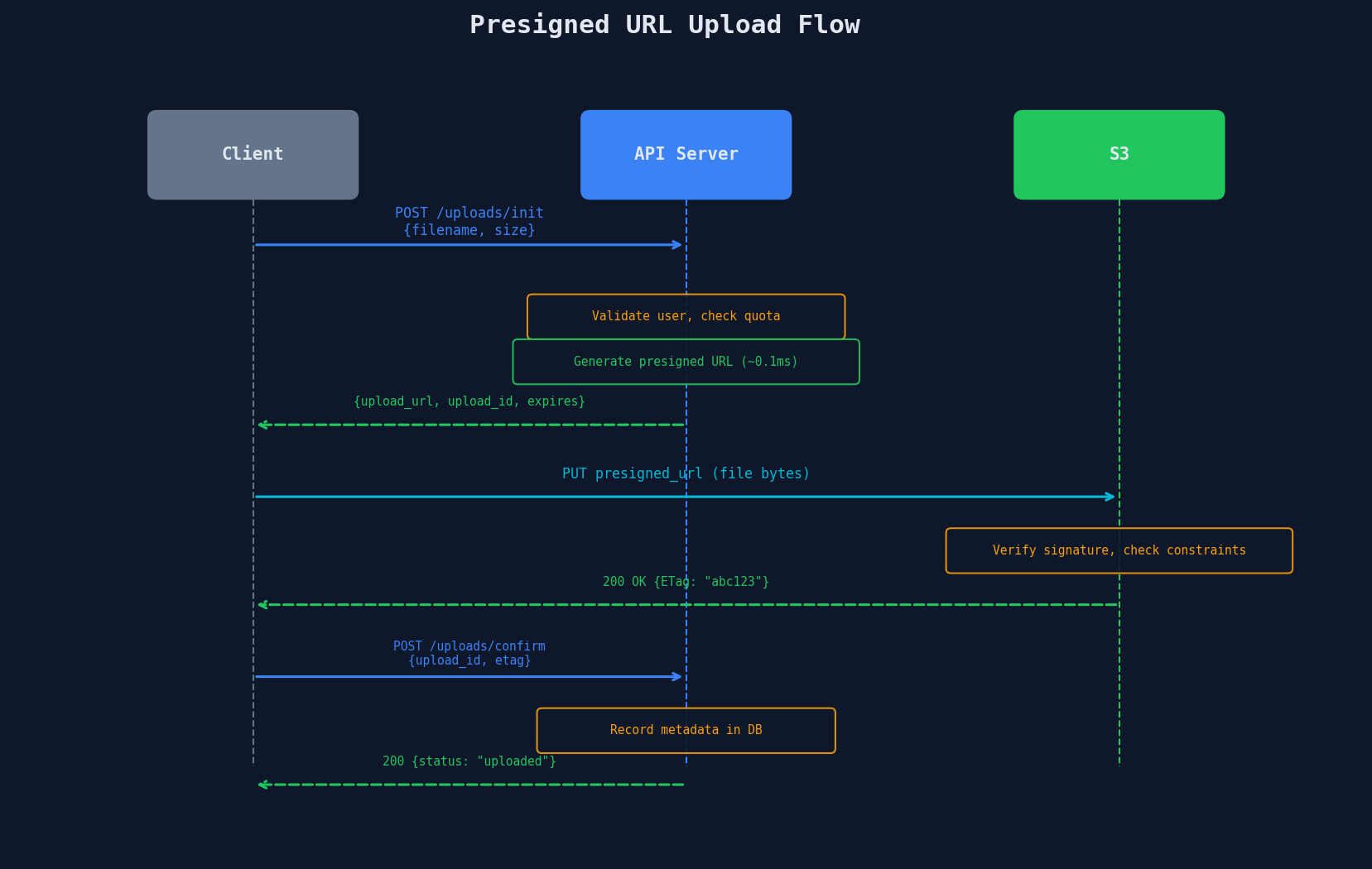
The confirmation step is essential. Without it, your database has no record that the upload succeeded. The ETag acts as a receipt -- the client proves S3 accepted the file.
Server-Side Implementation
import boto3
from botocore.config import Config

s3_client = boto3.client("s3", config=Config(signature_version="s3v4"))

@app.route("/api/uploads/init", methods=["POST"])
def init_upload():
    user = get_current_user()
    filename = request.json["filename"]
    content_type = request.json["content_type"]
    size = request.json["size"]

    # Validate constraints
    if size > 5 * 1024**3:  # 5GB max for single PUT
        return jsonify({"error": "File too large. Use chunked upload."}), 400

    upload_id = str(uuid.uuid4())
    s3_key = f"uploads/{user.id}/{upload_id}/{filename}"

    # Generate presigned URL -- NO network call to S3
    presigned_url = s3_client.generate_presigned_url(
        "put_object",
        Params={
            "Bucket": "my-bucket",
            "Key": s3_key,
            "ContentType": content_type,
        },
        ExpiresIn=3600,  # 1 hour
        HttpMethod="PUT",
    )

    # Store pending upload in DB
    db.uploads.insert({
        "id": upload_id,
        "user_id": user.id,
        "s3_key": s3_key,
        "status": "pending",
        "created_at": datetime.utcnow(),
    })

    return jsonify({
        "upload_id": upload_id,
        "upload_url": presigned_url,
        "expires_in": 3600,
    }), 200
Presigned POST: Fine-Grained Constraints
For uploads, presigned POST policies give you tighter control than presigned PUT:
# Presigned POST with constraints
presigned_post = s3_client.generate_presigned_post(
    Bucket="my-bucket",
    Key=s3_key,
    Fields={
        "Content-Type": content_type,
    },
    Conditions=[
        ["content-length-range", 1, 100 * 1024 * 1024],  # 1B to 100MB
        ["starts-with", "$Content-Type", "image/"],        # images only
        {"x-amz-meta-user-id": user.id},                   # custom metadata
    ],
    ExpiresIn=3600,
)
| Constraint | What It Enforces |
|---|---|
content-length-range |
Min/max file size (S3 rejects if outside range) |
starts-with Content-Type |
Allowed MIME type prefix |
x-amz-meta-* |
Custom metadata attached to the object |
ExpiresIn |
URL expiration in seconds |
PUT vs POST presigning
generate_presigned_url (PUT) is simpler but can't enforce content-length-range. generate_presigned_post (POST) supports full policy conditions. For uploads where you care about file size limits, prefer POST.
Download: Presigned URLs vs. Signed CDN URLs
For downloads, you have two options depending on whether a CDN sits in front of storage.
Option 1: Presigned S3 URLs (Simple)
download_url = s3_client.generate_presigned_url(
    "get_object",
    Params={"Bucket": "my-bucket", "Key": s3_key},
    ExpiresIn=900,  # 15 minutes
)
Good for infrequent, authenticated downloads. Every request hits S3 directly.
Option 2: Signed CDN URLs/Cookies (Streaming & High Traffic)
When a CDN (CloudFront, Fastly) sits in front of S3, you sign the CDN URL instead. The edge validates the signature using a public key -- no origin roundtrip.
from cryptography.hazmat.primitives import hashes, serialization
from cryptography.hazmat.primitives.asymmetric import padding
import base64

def sign_cloudfront_url(url, key_pair_id, private_key_pem, expires):
    policy = json.dumps({
        "Statement": [{
            "Resource": url,
            "Condition": {"DateLessThan": {"AWS:EpochTime": expires}}
        }]
    })
    # Sign with RSA private key
    private_key = serialization.load_pem_private_key(private_key_pem, password=None)
    signature = private_key.sign(policy.encode(), padding.PKCS1v15(), hashes.SHA1())
    return f"{url}?Policy={b64(policy)}&Signature={b64(signature)}&Key-Pair-Id={key_pair_id}"
Signed Cookies vs. Signed URLs
This matters a lot for streaming video:
| Feature | Signed URL | Signed Cookie |
|---|---|---|
| Scope | One specific file | All files matching a path pattern |
| Best for | Single file download | Streaming video (100s of segment files) |
| URL changes | Every file gets a unique signed URL | Same cookie covers /videos/abc/* |
| Player compatibility | Requires custom URL injection | Standard players work -- cookie sent automatically |
| Implementation | Simpler | Requires Set-Cookie from your domain |
Why cookies win for streaming
An HLS video stream might request 500+ .ts segment files. With signed URLs, your player needs a signed URL for each segment. With a signed cookie scoped to /videos/{id}/*, one cookie covers all 500 requests automatically. The browser sends the cookie with every request -- the player doesn't even know authentication exists.
# One cookie covers the entire stream
response.set_cookie(
    "CloudFront-Policy", b64_policy,
    domain=".cdn.example.com",
    path=f"/videos/{video_id}/",
    secure=True,
    httponly=True,
    max_age=7200  # 2 hours -- enough for a movie
)
Security Considerations
Presigned URLs are bearer tokens. Anyone with the URL can use it.
| Risk | Mitigation |
|---|---|
| URL leaked/shared | Short expiry (15-60 min for uploads, 1-4 hrs for downloads) |
| Wrong content type uploaded | POST policy with Content-Type condition |
| Oversized file | POST policy with content-length-range |
| Replay attack | Single-use: set expiry short, confirm upload server-side |
| Unauthorized access | Authenticate user before generating URL |
| Expired credentials | Use IAM roles (auto-rotate), not static keys |
Never expose your AWS secret key to the client
The client receives the presigned URL, not your credentials. The signature proves the URL was generated by someone with the secret key, but the key itself is never transmitted.
The Confirmation Step Matters
What happens if the client gets a presigned URL but never uploads? Or uploads but your server doesn't know?
@app.route("/api/uploads/confirm", methods=["POST"])
def confirm_upload():
    upload_id = request.json["upload_id"]
    upload = db.uploads.find_one({"id": upload_id, "user_id": user.id})

    # Verify the object actually exists in S3
    try:
        head = s3_client.head_object(Bucket="my-bucket", Key=upload["s3_key"])
    except s3_client.exceptions.NoSuchKey:
        return jsonify({"error": "Upload not found in storage"}), 404

    # Update metadata with actual file info from S3
    db.uploads.update(upload_id, {
        "status": "uploaded",
        "size_bytes": head["ContentLength"],
        "etag": head["ETag"],
        "confirmed_at": datetime.utcnow(),
    })

    return jsonify({"id": upload_id, "status": "uploaded"}), 200
For uploads that never confirm, run a cleanup job (covered in Lesson 4) to delete orphaned S3 objects.
Interview Tip
What interviewers are listening for
When you say "the client uploads directly to S3 using a presigned URL," immediately follow up with: "The server generates the URL locally in ~0.1ms with no network call to S3 -- it signs the request parameters with the secret key using HMAC-SHA256." This proves you understand the mechanism, not just the API call. Then mention the confirmation step: the client notifies the server after upload so metadata stays consistent.
Key Takeaways
| Concept | Details |
|---|---|
| No network call | Presigned URL generation is a local HMAC signature (~0.1ms) |
| Self-contained | URL embeds all auth info; S3 validates independently |
| POST vs PUT | POST supports content-length-range; PUT is simpler |
| Expiry | 15-60 min for uploads, 1-4 hrs for downloads |
| CDN downloads | Signed URLs for single files, signed cookies for streaming |
| Confirmation | Client must notify server after upload to sync metadata |