CDN and Edge Caching
TL;DR
A CDN (Content Delivery Network) caches your content at edge servers around the world, so users read from a server nearby instead of hitting your origin across the globe. Cache-Control headers determine what gets cached and for how long. CDN caching handles static content beautifully, but personalized or rapidly-changing data needs different strategies.
Your Origin Server Is in Virginia. Your User Is in Tokyo.
Let's talk about a problem that no amount of database optimization can fix: the speed of light.
Light in a fiber optic cable travels at roughly 200,000 km/s. Virginia to Tokyo is about 11,000 km. Round trip through the real internet (not a straight line), you're looking at ~200ms of pure network latency — before your server even starts processing the request.
That's 200ms of your user staring at a blank screen, and you haven't even queried the database yet.
Now put a cached copy of that response on a server in Tokyo. Same request, same response, but the round trip drops to ~5ms.
That's what a CDN does.
What a CDN Actually Does
A CDN is a globally distributed network of servers (called edge servers or Points of Presence — PoPs) that cache copies of your content close to your users.
The major CDNs operate at staggering scale:
| CDN | Points of Presence | Countries |
|---|---|---|
| Cloudflare | 310+ | 120+ |
| AWS CloudFront | 450+ | 90+ |
| Akamai | 4,100+ | 130+ |
When a user requests a resource, the CDN routes them to the nearest edge server. If that edge has a cached copy, it serves it immediately. If not, it fetches from your origin, caches the response, and then serves it.
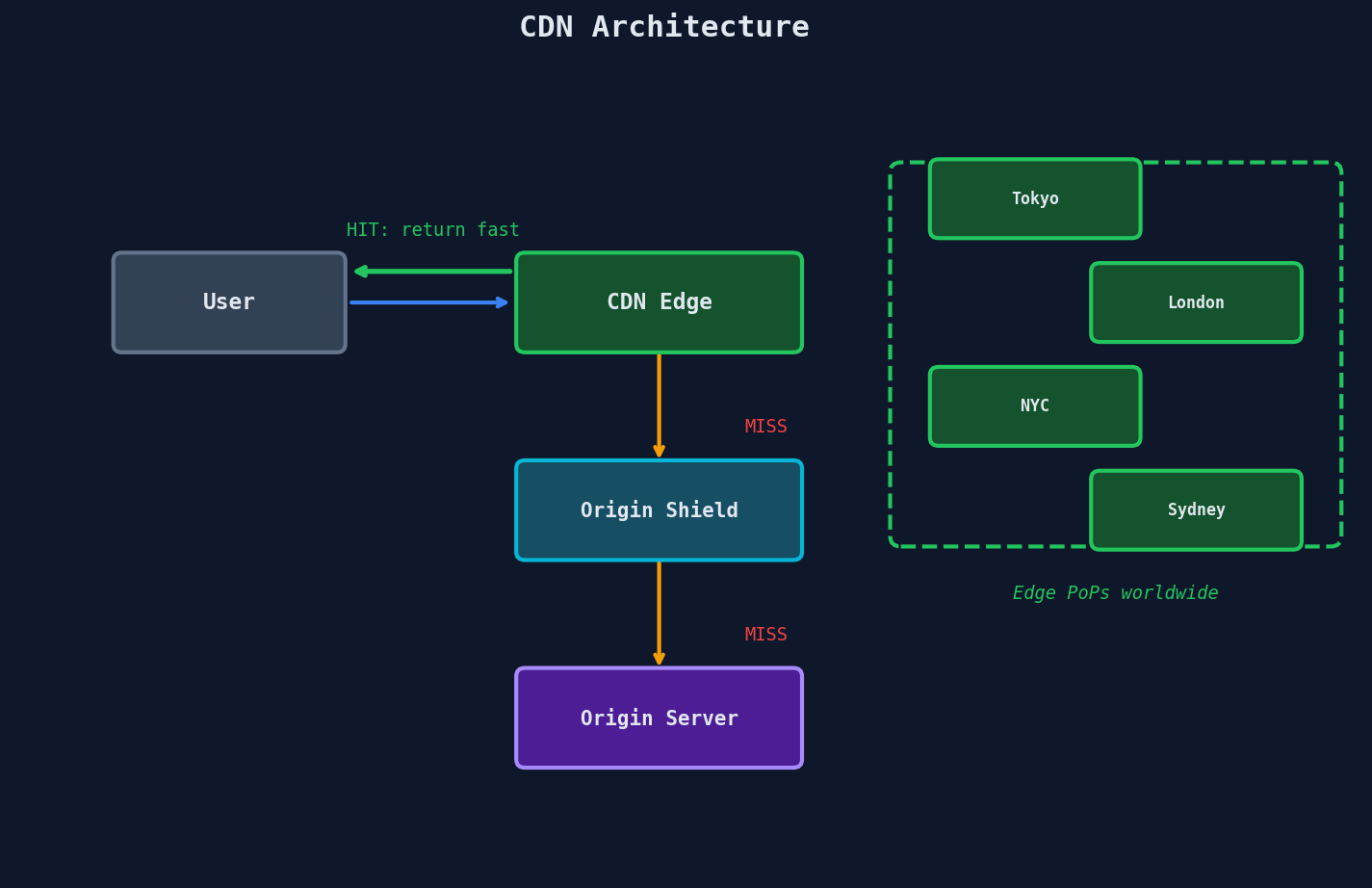
After that first request, every subsequent user in Tokyo asking for the same URL gets the cached copy. The origin never sees those requests. This is the fundamental insight: CDN caching turns a global latency problem into a local one, and it absorbs read traffic that would otherwise crush your origin.
Think about the read-scaling implications. If your product catalog page gets 10,000 requests per second globally, and your CDN hit ratio is 95%, your origin only sees 500 requests per second instead of 10,000. The CDN absorbed 9,500 reads. That's the difference between needing a fleet of servers and needing one.
Cache-Control Headers — The Language of CDN Caching
Your CDN doesn't just magically know what to cache. You tell it, using HTTP Cache-Control headers. This is the contract between your server and every cache layer (browser, CDN edge, proxy) between you and the user.
Here are the headers you actually need to know:
The Essential Directives
| Directive | What It Does |
|---|---|
max-age=3600 |
Browser AND CDN cache for 1 hour |
s-maxage=86400 |
CDN caches for 24 hours (overrides max-age for shared caches only) |
stale-while-revalidate=60 |
Serve stale content for 60s while fetching a fresh copy in the background |
private |
Only the browser may cache — CDN must NOT cache (user-specific data) |
no-store |
Never cache anywhere, period (sensitive data like bank balances) |
immutable |
Content will never change — don't even bother revalidating |
The power move is s-maxage combined with stale-while-revalidate. Your CDN caches aggressively, but when the TTL expires, the first user still gets a fast (stale) response while the edge fetches a fresh copy behind the scenes. Nobody waits.
What to Set for Each Content Type
| Content Type | Cache-Control Header | Why |
|---|---|---|
| Static assets (JS, CSS, images) | max-age=31536000, immutable |
Fingerprinted filenames mean the URL changes when content changes. Cache forever. |
| API responses (product catalog) | s-maxage=300, stale-while-revalidate=60 |
CDN caches 5 min, serves stale for 60s during refresh. Users see fast responses. |
| User-specific data (profile, cart) | private, max-age=0 |
Different per user — CDN must not cache. Browser can hold briefly. |
| Sensitive data (banking) | no-store |
Never written to disk or memory by any cache. |
Setting Headers in Practice
Express.js (Node):
// Static assets — cache forever (use fingerprinted filenames!)
app.use('/static', express.static('public', {
    maxAge: '1y',
    immutable: true
}));

// API endpoint — CDN caches 5 minutes, stale-while-revalidate
app.get('/api/products', (req, res) => {
    res.set('Cache-Control', 's-maxage=300, stale-while-revalidate=60');
    res.json(products);
});

// User-specific — no CDN caching
app.get('/api/me/cart', (req, res) => {
    res.set('Cache-Control', 'private, max-age=0');
    res.json(cart);
});
Flask (Python):
from flask import make_response, jsonify

@app.route('/api/products')
def get_products():
    response = make_response(jsonify(products))
    response.headers['Cache-Control'] = 's-maxage=300, stale-while-revalidate=60'
    return response

@app.route('/api/me/cart')
def get_cart():
    response = make_response(jsonify(cart))
    response.headers['Cache-Control'] = 'private, max-age=0'
    return response
The Vary Header Matters
If your response changes based on a request header (e.g., Accept-Language or Accept-Encoding), add a Vary header. Vary: Accept-Encoding tells the CDN to cache separate copies for gzip vs. brotli. Without it, a Japanese user might get the English cached copy.
CDN Cache Hit Ratio — The Number That Tells You Everything
Your cache hit ratio is the percentage of requests served from the edge without touching your origin. This single metric determines whether your CDN is saving you or just adding a hop.
| Hit Ratio | Verdict | Origin Load Reduction |
|---|---|---|
| < 50% | Something is wrong | Minimal |
| 50-80% | Decent, room to improve | Moderate |
| 80-95% | Good | Significant |
| > 95% | Excellent | Origin barely touched |
| > 99% | Elite (static-heavy sites) | Origin is practically idle |
Why Your Hit Ratio Is Low (and How to Fix It)
Problem: Short TTLs. If you set s-maxage=10, the edge re-fetches from origin every 10 seconds. Bump it up, and use stale-while-revalidate to keep responses fresh without sacrificing speed.
Problem: Too many unique URLs. If every request has unique query strings like ?user_id=123×tamp=1712345678, every single request is a cache miss. Normalize your URLs — strip unnecessary params, sort the remaining ones, or configure your CDN to ignore certain query parameters.
Problem: Frequent purges. If you're purging the entire cache every time any content changes, you're throwing away the warm cache for millions of URLs. Use targeted purges — invalidate only the specific URLs that changed.
Problem: Low-traffic long-tail content. If you have 10 million product pages and 9 million of them get one visit per week, those pages will never stay warm in cache. This is structural — CDNs work best for popular content. For long-tail pages, consider pre-warming the cache by proactively fetching URLs, or accept that origin will handle these requests directly.
Tiered Caching — Shielding Your Origin
Here's a problem with a flat CDN topology. You have 300+ edge PoPs around the world. A piece of content expires from cache. All 300 edges independently fetch from your origin.
That's 300 origin requests for the same piece of content, all at once. This is called the thundering herd problem at the CDN level.
The solution is tiered caching (also called origin shielding).
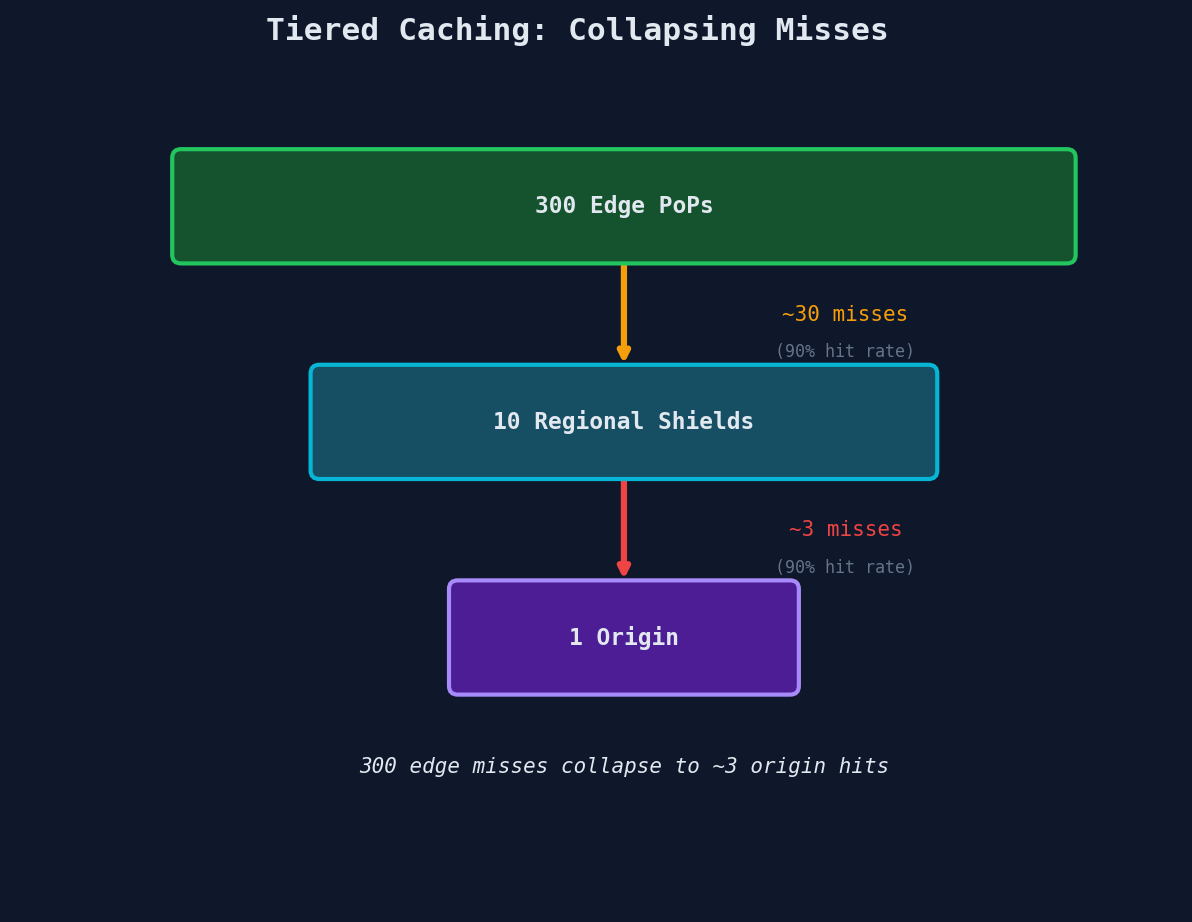
Without shielding: 300 edge misses → 300 origin requests.
With shielding: 300 edge misses → ~10 regional shield requests → typically 1 origin request (the first shield to miss fetches from origin, the rest hit the shield's cache).
This is a massive reduction. Your origin goes from handling hundreds of redundant requests to handling one.
Most major CDNs support shielding as a configuration option. CloudFront calls it Origin Shield. Cloudflare achieves this automatically with their Tiered Cache feature. Akamai calls it SureRoute. The names differ, but the architecture is the same: add a caching layer between edge and origin to collapse redundant fetches.
Cache Purge — When Content Changes
When you update content, you need to invalidate the cached copies. This is called a cache purge or cache invalidation.
| CDN | Global Purge Speed | Method |
|---|---|---|
| Cloudflare | ~150ms | API call, dashboard, or Workers |
| CloudFront | 60-90 seconds | Invalidation API |
| Akamai | ~5 seconds | Fast Purge API |
Cloudflare's ~150ms global purge is remarkable — you can update content and know that every edge server worldwide has the new version in under a second.
Purge Strategies
Purge by URL: Invalidate a specific URL. Best for targeted updates. Purge by tag: Tag responses (e.g., Cache-Tag: product-123) and purge all URLs with that tag. Best for related content. Purge everything: Nuclear option. Use sparingly — your hit ratio will crater.
When NOT to Use a CDN
CDNs are powerful, but they're not a universal solution. Here's where they fall apart:
Personalized content. If the response is different for every user — their feed, their recommendations, their dashboard — you can't cache one version and serve it to everyone. You'd need a separate cached copy per user, which defeats the purpose.
Rapidly changing data. Stock prices, live sports scores, auction countdowns. If the data is stale in seconds, even a 10-second TTL means users see wrong information. Use WebSockets or Server-Sent Events for real-time data — caching is the wrong tool here.
Authenticated content with per-user access control. If different users have access to different content, you'd need signed URLs or token-based edge authentication. Possible, but complex — and a misconfiguration means leaking private content.
Long-tail content with no repeat access. If you have 50 million unique URLs and each one is accessed once per month, nothing stays warm in cache. Your hit ratio will be near 0%, and the CDN is just adding latency (extra hop to edge, miss, fetch from origin anyway).
Don't CDN Everything
CDNs are for read-heavy, shared, relatively-static content. If the content is personalized, rapidly changing, or accessed too infrequently to stay cached, a CDN adds complexity without benefit. Match the tool to the access pattern.
Fan-Out on Write vs. Fan-Out on Read
This is the capstone concept for this entire chapter. Every read-scaling strategy we've discussed — caching, read replicas, CDN — is fundamentally about making reads cheap. But there's a deeper architectural decision that determines how hard reads are in the first place.
Consider Twitter's timeline. When you open the app, you see tweets from everyone you follow, sorted chronologically. There are two fundamentally different ways to build this, and each one makes a different trade-off between write cost and read cost:
Fan-Out on Write (Push Model)
When a user tweets, immediately push that tweet into the timeline cache of every follower.
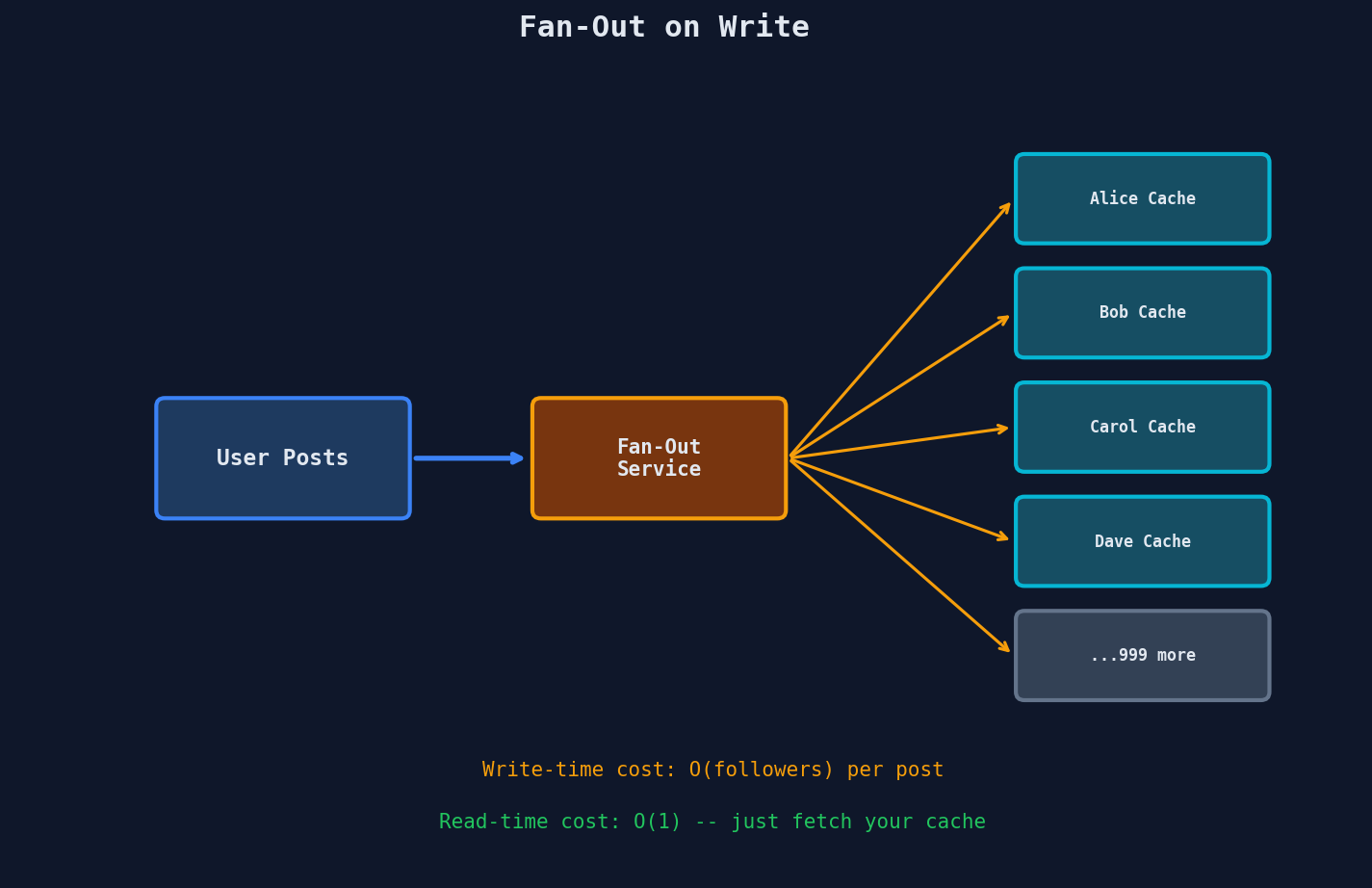
When Follower A opens their timeline: just read their pre-built timeline cache. It's already assembled.
| Aspect | Fan-Out on Write |
|---|---|
| Write cost | High — 1 tweet × N followers = N writes |
| Read cost | Low — timeline is pre-built, single read |
| Latency on read | Fast — just fetch the cache |
| Latency on write | Slow — must fan out to all followers |
| Storage | High — duplicate data in every follower's cache |
Fan-Out on Read (Pull Model)
Store the tweet once. When a user opens their timeline, fetch tweets from all people they follow and merge them on the fly.
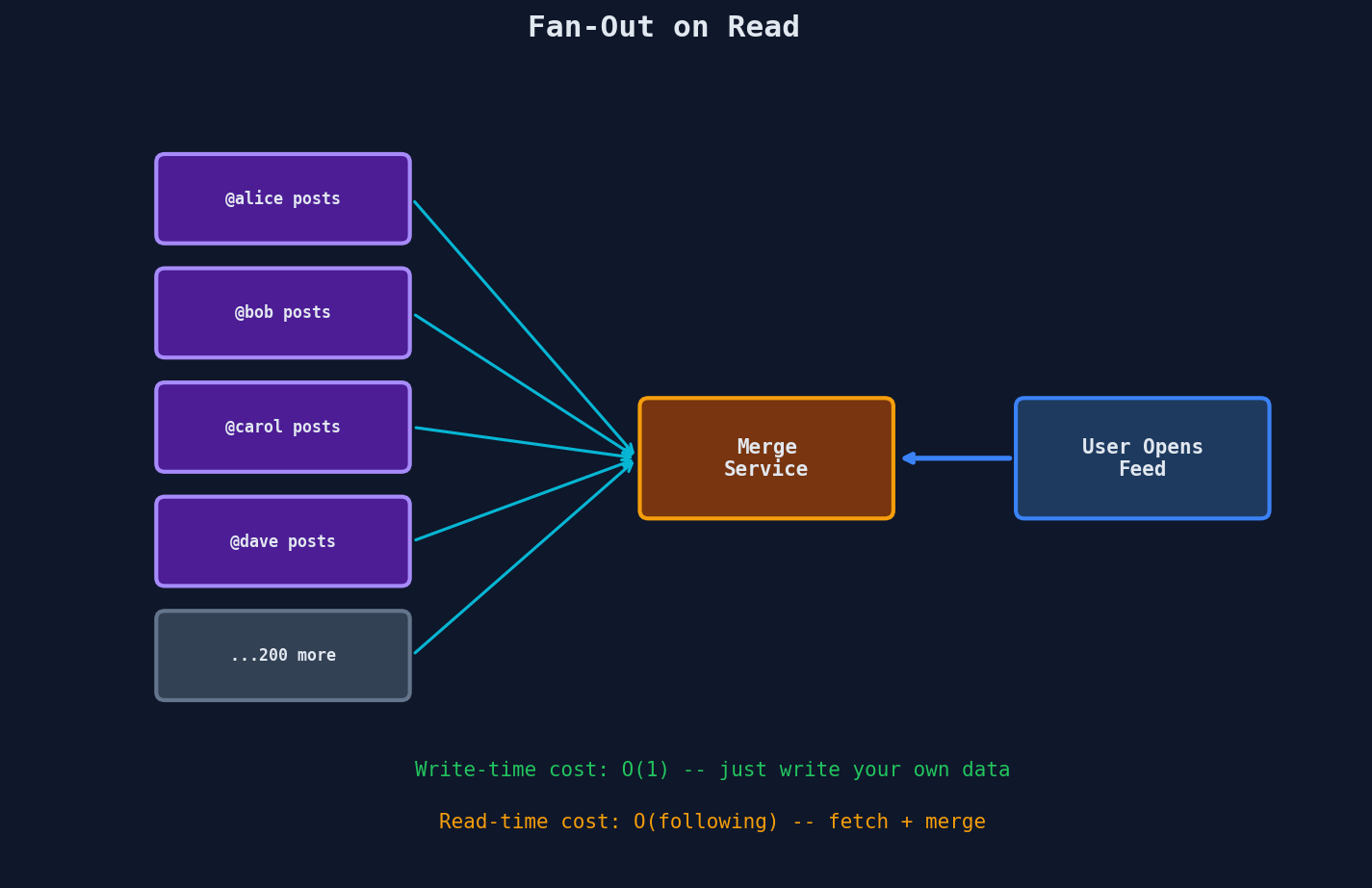
When the user tweets: just store it once. Done.
| Aspect | Fan-Out on Read |
|---|---|
| Write cost | Low — store tweet once |
| Read cost | High — fetch from N sources and merge |
| Latency on read | Slow — must gather and merge on every read |
| Latency on write | Fast — single write |
| Storage | Low — no duplication |
The Hybrid Approach (What Twitter Actually Does)
Neither extreme works at scale. A celebrity with 50 million followers posting a tweet would trigger 50 million writes in the push model. But pulling and merging tweets from 500 followees on every timeline load is expensive in the pull model.
The solution: hybrid fan-out.
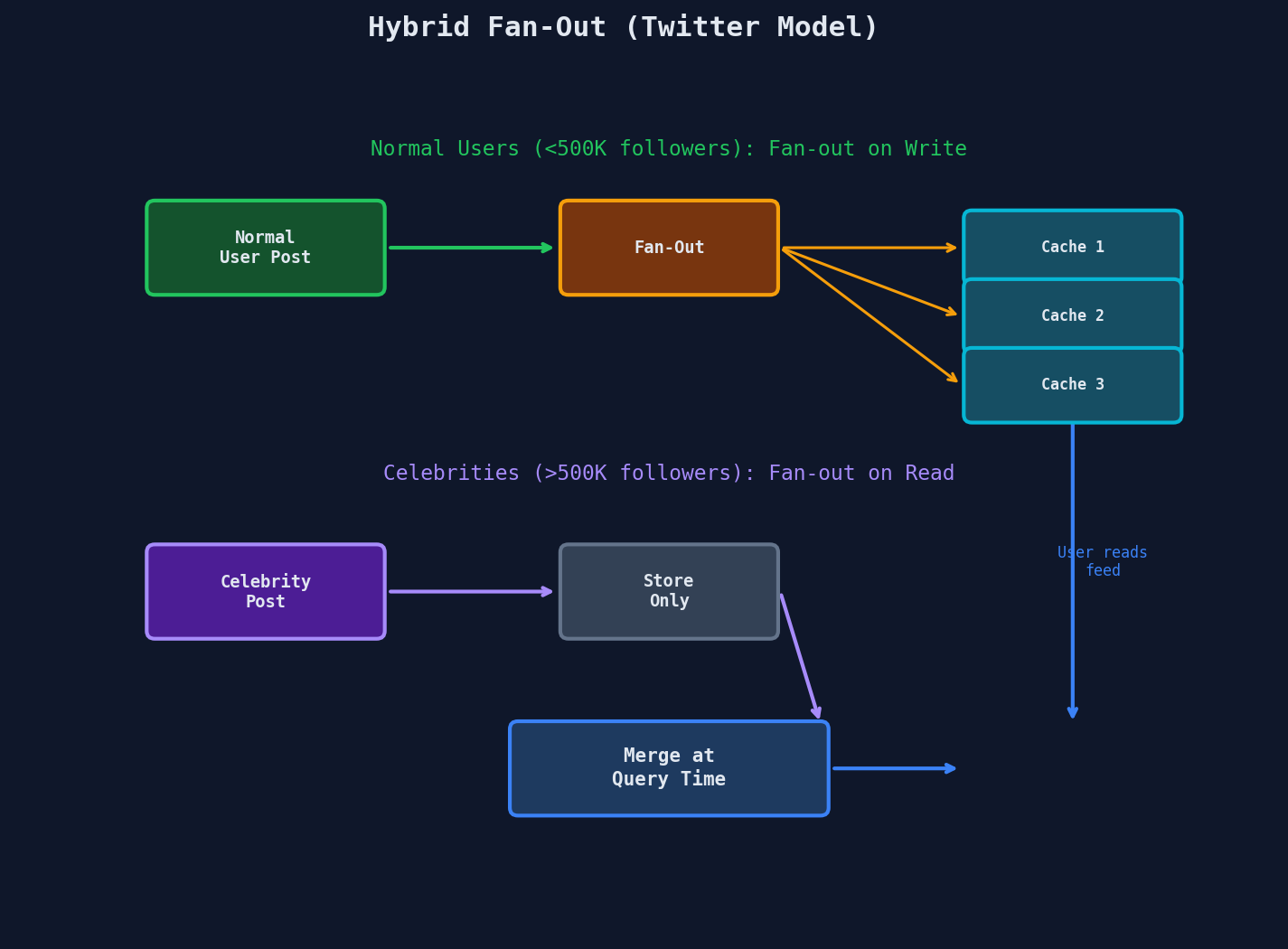
- Normal users (< 500K followers): fan-out on write. The write cost is manageable, and reads are instant.
- Celebrities (> 500K followers): fan-out on read. Their tweets are fetched and merged at query time for each reader.
- Timeline assembly: merge the pre-built cache (from normal users) with freshly-fetched celebrity tweets.
This is the trade-off in its purest form: you're choosing where to pay the cost — at write time or at read time. The hybrid approach pays the cheaper cost in each case.
Side-by-Side Comparison
┌─────────────────────────────────────────────────────────┐
│              Fan-Out on Write vs. Read                  │
├─────────────────────┬───────────────────────────────────┤
│                     │  Write    │  Read     │  Storage  │
├─────────────────────┼───────────┼───────────┼───────────┤
│ Fan-out on WRITE    │  Expensive│  Cheap    │  High     │
│ (push to followers) │  O(N)    │  O(1)     │  O(N×M)   │
├─────────────────────┼───────────┼───────────┼───────────┤
│ Fan-out on READ     │  Cheap    │  Expensive│  Low      │
│ (pull on open)      │  O(1)    │  O(N)     │  O(M)     │
├─────────────────────┼───────────┼───────────┼───────────┤
│ Hybrid              │  Moderate │  Moderate │  Moderate │
│ (best of both)      │  varies  │  varies   │  varies   │
└─────────────────────┴───────────┴───────────┴───────────┘

N = number of followers/followees
M = number of tweets
This pattern shows up everywhere, not just social media timelines. Any system with a "create content → many readers" structure faces this same trade-off:
- News feed — push articles to subscriber caches or fetch on load?
- Notification systems — pre-build notification lists or query on open?
- Email newsletters — pre-render per user or render on open?
- E-commerce product updates — push updated prices to all regional caches or let each cache fetch on miss?
The right answer is almost always "it depends on the ratio." If writers are rare and readers are many, fan-out on write. If the fan-out factor is enormous (millions of followers), hybrid. If reads are infrequent or the content changes constantly, fan-out on read.
Proof Points
Real numbers from production systems:
-
Cloudflare purges cached content globally in ~150ms. That means you can update a page and know every user worldwide sees the new version in under a second.
-
Netflix Open Connect takes CDN to the extreme: they embed custom CDN servers inside ISP networks. Result: ~90% of Netflix traffic never crosses the public internet — it's served from a box sitting in your ISP's data center.
-
Twitter's fan-out system processes approximately 400,000 tweets per minute during peak times. For an average user with ~300 followers, the fan-out on write completes in under 5 seconds. For celebrities, the hybrid approach avoids fan-out writes entirely.
-
Akamai serves roughly 30% of all internet traffic on any given day — the majority of the web's reads never reach an origin server.
-
Facebook uses the hybrid fan-out approach for its News Feed. For users with a "normal" number of friends, updates are fanned out on write to pre-built timeline caches. For pages and public figures with millions of followers, the fan-out happens on read.
Interview Tip
The fan-out question is the capstone of read scaling. If you can articulate the write-vs-read fan-out trade-off and suggest the hybrid approach, you've demonstrated mastery of this entire chapter. Whenever you see a system with a "one writer, many readers" pattern — timelines, feeds, notifications, newsletters — reach for this framework. Name the trade-off, explain the extremes, and propose the hybrid.
Structure your answer: (1) describe fan-out on write and its cost, (2) describe fan-out on read and its cost, (3) explain why neither extreme works at scale, (4) propose the hybrid with a concrete threshold. That four-step structure shows systematic thinking.