Entity-Relationship Modelling
TL;DR
Start with your system's requirements, pull out the "nouns" — those are your entities. Figure out how they connect — those are your relationships. Each entity becomes a table. Each relationship becomes either a foreign key column or a junction table.
Think of It Like Organizing a Filing Cabinet
Imagine you just started a small business. You've got customers, orders, and products. Right now everything is in one giant notebook — customer names next to order details next to product prices, all jumbled together.
The moment you try to update a customer's phone number, you realize it's written in twelve different places. Miss one and your data is inconsistent.
A filing cabinet solves this. One drawer for customers. One for orders. One for products. Each drawer has folders organized the same way. When a customer changes their phone number, you update one folder.
Entity-relationship modelling is exactly this process, but for databases. Identify the things you care about, give each its own table, and define how they connect.
Step 1: Find Your Entities
An entity is a distinct "thing" your system needs to track. In a system design interview, your entities almost always emerge from the requirements.
"Design Instagram" → Users, Posts, Comments, Likes, Followers
"Design Uber" → Users, Drivers, Rides, Locations, Payments
"Design an e-commerce platform" → Users, Products, Orders, OrderItems, Payments, Reviews
Each entity gets its own table. Each instance of that entity (one specific user, one specific order) becomes a row.
Interview Tip
In the "Core Entities" phase of a system design interview, literally just list the nouns. Don't overthink it. "The core entities are Users, Posts, Comments, and Likes. Each maps to a table." That's enough to move forward.
Step 2: Define Attributes
Each entity has attributes — the properties that describe it. For a users table:
CREATE TABLE users (
    id BIGINT PRIMARY KEY,
    username VARCHAR(50) UNIQUE NOT NULL,
    email VARCHAR(100) UNIQUE NOT NULL,
    display_name VARCHAR(100),
    bio TEXT,
    avatar_url VARCHAR(500),
    created_at TIMESTAMP DEFAULT NOW()
);
For a posts table:
CREATE TABLE posts (
    id BIGINT PRIMARY KEY,
    user_id BIGINT NOT NULL REFERENCES users(id),
    content TEXT,
    media_url VARCHAR(500),
    like_count INTEGER DEFAULT 0,
    created_at TIMESTAMP DEFAULT NOW()
);
Notice like_count — that's a denormalized field. We could always compute it with SELECT COUNT(*) FROM likes WHERE post_id = ?, but storing it directly on the post avoids an expensive count query on every page load. We'll cover this trade-off deeply in the Denormalization lesson.
Step 3: Define Relationships
This is where things get interesting. Entities don't exist in isolation — they connect to each other. There are three types of relationships, and each one is implemented differently.
One-to-Many (1:N) — The Most Common
"A user has many posts. A post belongs to one user."
Implementation: Put a foreign key on the "many" side pointing to the "one" side.
users (one)              posts (many)
┌────┬──────────┐       ┌────┬─────────┬──────────────┐
│ id │ username │       │ id │ user_id │ content      │
├────┼──────────┤       ├────┼─────────┼──────────────┤
│  1 │ alice    │◄──────│  1 │    1    │ Hello world! │
│  2 │ bob      │◄──┐   │  2 │    1    │ Another post │
└────┴──────────┘   └───│  3 │    2    │ Bob's post   │
                        └────┴─────────┴──────────────┘
The user_id column in posts is the foreign key. Alice (user 1) has two posts. Bob (user 2) has one.
More 1:N examples:
- A post has many comments → comments.post_id references posts.id
- An order has many items → order_items.order_id references orders.id
- A department has many employees → employees.department_id references departments.id
Many-to-Many (M:N) — The Junction Table
"A user can like many posts. A post can be liked by many users."
You can't put a single foreign key on either side — a user doesn't have just one liked post, and a post doesn't have just one liker. You need a junction table (also called a join table or bridge table).
CREATE TABLE likes (
    id BIGINT PRIMARY KEY,
    user_id BIGINT NOT NULL REFERENCES users(id),
    post_id BIGINT NOT NULL REFERENCES posts(id),
    created_at TIMESTAMP DEFAULT NOW(),
    UNIQUE(user_id, post_id)  -- prevent duplicate likes
);
users          likes (junction)        posts
┌────┬───────┐ ┌─────────┬─────────┐  ┌────┬──────────────┐
│ id │ name  │ │ user_id │ post_id │  │ id │ content      │
├────┼───────┤ ├─────────┼─────────┤  ├────┼──────────────┤
│  1 │ alice │◄│    1    │    1    │►─│  1 │ Hello world! │
│  2 │ bob   │◄│    1    │    2    │►─│  2 │ Bob's post   │
│  3 │ carol │◄│    2    │    1    │►─│  3 │ Carol's post │
└────┴───────┘ │    3    │    2    │►─└────┴──────────────┘
               └─────────┴─────────┘
Alice liked posts 1 and 2. Bob liked post 1. Carol liked post 2.
More M:N examples:
- Users follow users → follows(follower_id, following_id)
- Students enroll in courses → enrollments(student_id, course_id)
- Products belong to categories → product_categories(product_id, category_id)
The junction table often carries its own data. The likes table has a created_at timestamp. A follows table might have a status field (pending, accepted). An enrollments table might have a grade.
One-to-One (1:1) — Less Common
"A user has one profile. A profile belongs to one user."
You could store all profile fields directly in the users table. But if the profile data is large, optional, or accessed separately, a separate table makes sense:
CREATE TABLE profiles (
    id BIGINT PRIMARY KEY,
    user_id BIGINT UNIQUE NOT NULL REFERENCES users(id),
    bio TEXT,
    website VARCHAR(500),
    location VARCHAR(100)
);
The UNIQUE constraint on user_id enforces the one-to-one relationship — each user can have at most one profile.
When to split into a separate table: - The data is optional (many users might not have a profile) - The data is large (avoid loading heavy BLOBs with every user query) - Different access patterns (profile data accessed much less frequently)
When to keep in the same table: - The data is always accessed together - It's small and always present
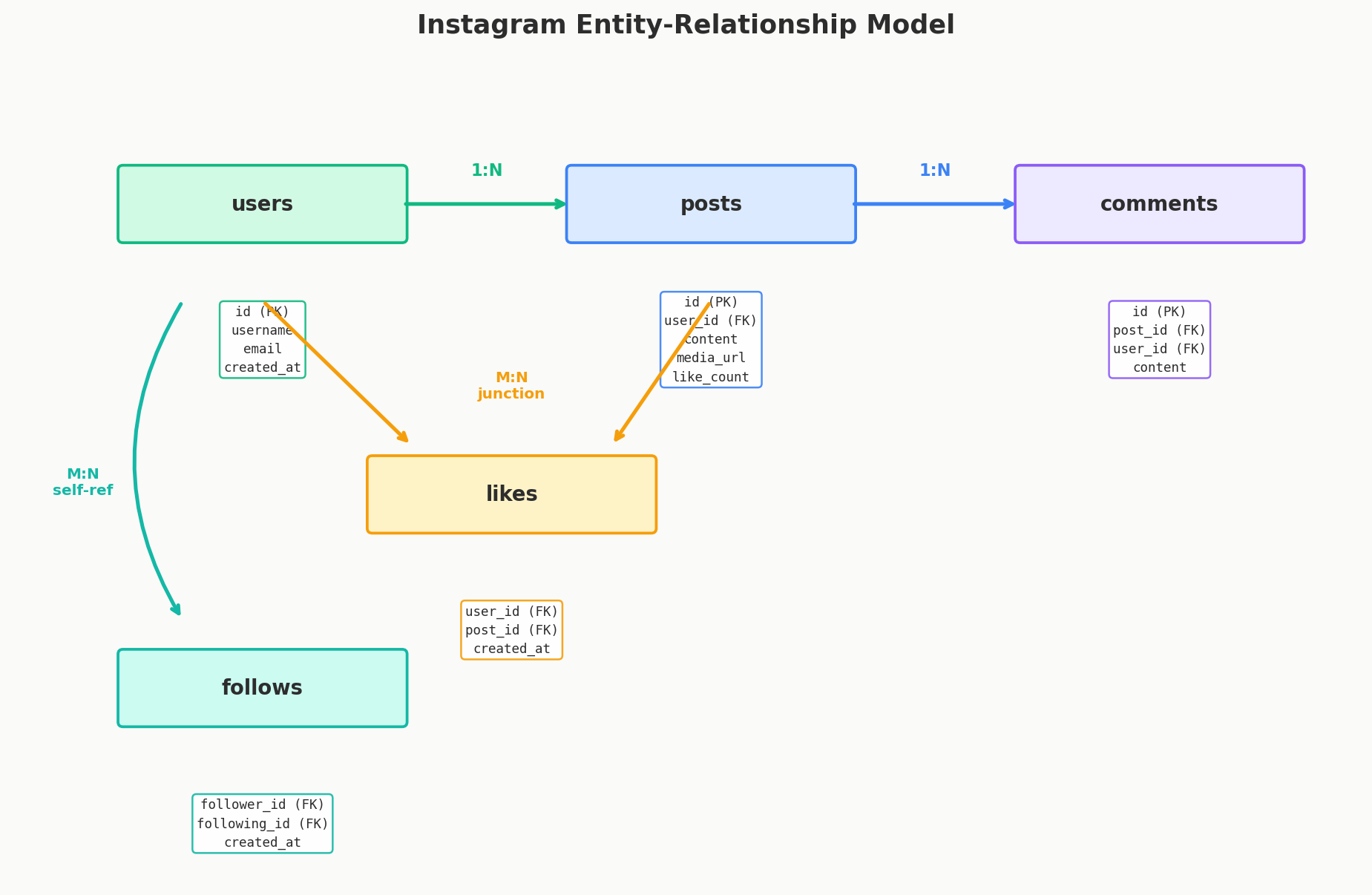
Putting It All Together — Instagram Schema
Let's model a simplified Instagram. Requirements: - Users can create posts with images - Users can like and comment on posts - Users can follow other users
┌──────────┐       ┌──────────┐       ┌──────────────┐
│  users   │       │  posts   │       │   comments   │
├──────────┤       ├──────────┤       ├──────────────┤
│ id (PK)  │◄──┐   │ id (PK)  │◄──┐   │ id (PK)      │
│ username │   └───│ user_id  │   └───│ post_id      │
│ email    │       │ content  │       │ user_id ──►  │
│created_at│       │ media_url│       │ content      │
└──────────┘       │like_count│       │ created_at   │
     ▲             │created_at│       └──────────────┘
     │             └──────────┘
     │
     │    ┌──────────────┐       ┌──────────────┐
     │    │    likes     │       │   follows    │
     │    ├──────────────┤       ├──────────────┤
     └────│ user_id      │       │ follower_id  │──► users.id
          │ post_id ──►  │       │ following_id │──► users.id
          │ created_at   │       │ created_at   │
          └──────────────┘       └──────────────┘
Relationships: - User → Posts: 1:N (user_id FK on posts) - User → Comments: 1:N (user_id FK on comments) - Post → Comments: 1:N (post_id FK on comments) - User ↔ Likes ↔ Post: M:N (junction table) - User ↔ Follows ↔ User: M:N self-referential (junction table with two FKs to the same table)
This is the same schema structure used by most social media system design problems. The specifics change (tweets vs posts, playlists vs albums) but the patterns repeat.
Common Mistakes
Putting everything in one table: A "posts_with_comments" table that stores both post and comment data in the same row. This makes queries awkward and violates normalization.
Forgetting the junction table for M:N: Trying to store likes as an array column on posts (liked_by: [1, 2, 3]). This works in document databases but breaks relational integrity and makes queries like "show all posts liked by user X" painful.
No primary key: Every table needs one. No exceptions.
Wrong side for the foreign key: The FK goes on the "many" side. Posts have user_id, not users have post_id.
Quick Recap
| Relationship | Implementation | Example |
|---|---|---|
| 1:N | FK on the "many" side | posts.user_id → users.id |
| M:N | Junction table with two FKs | likes(user_id, post_id) |
| 1:1 | FK with UNIQUE constraint | profiles.user_id → users.id |
Interview Tip
After listing your core entities, draw the relationships as arrows between them. Say "users to posts is one-to-many, users to likes to posts is many-to-many through a junction table." Then move on. Don't spend five minutes on the schema — the interviewer wants to see you think about it, not perfect it.