Versioning and Compatibility
TL;DR
APIs evolve, but you can't break existing clients every time you ship a change. Versioning lets you introduce breaking changes safely. URL versioning (/v1/events) is the simplest and safest choice for interviews. Forward compatibility means designing APIs that won't break when you add new features. Backward compatibility means old clients keep working with new API versions. And HATEOAS is making a comeback because AI agents need discoverable APIs.
The Restaurant Menu Analogy
Imagine you run a restaurant. You've had the same menu for two years. Hundreds of third-party apps (Uber Eats, DoorDash, Grubhub) have integrated with your ordering system based on that menu.
Now you want to restructure the menu. You want to rename "Appetizers" to "Starters," combine "Lunch" and "Dinner" into one section, and remove the "Kids Menu."
If you just swap the menus overnight, every delivery app breaks. Orders fail. Revenue drops. Angry phone calls follow.
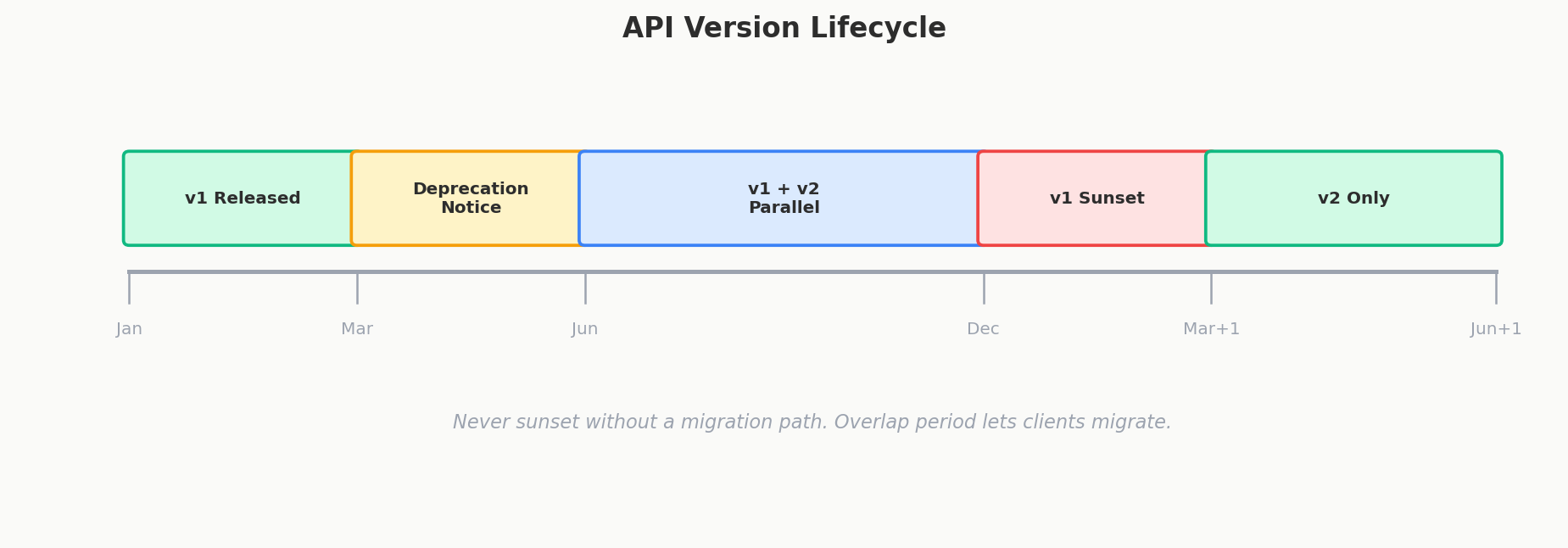
The smart move? Print a new version of the menu. Keep the old version available. Tell partners: "The new menu is available now. The old one will work until December. Please switch when you're ready."
That's API versioning. Same problem, same solution.
Why Versioning Matters
APIs are contracts. When a mobile app calls GET /events/123 and expects { "name": "Concert", "date": "2024-06-15" }, that's a promise. If you suddenly change date to event_date or remove the name field, every app that depends on that response breaks.
Not every change requires a new version. The key question is: does this change break existing clients?
| Change | Breaking? | Needs New Version? |
|---|---|---|
| Add a new field to response | No | No |
| Add a new optional query parameter | No | No |
| Add a new endpoint | No | No |
| Remove a field from response | Yes | Yes |
| Rename a field | Yes | Yes |
| Change a field's type (string to int) | Yes | Yes |
| Make an optional field required | Yes | Yes |
| Change the URL structure | Yes | Yes |
The pattern: adding is safe, removing/changing is dangerous.
The Four Versioning Strategies
1. URL Versioning (The Most Common)
The version lives right in the URL:
This is the most widely used approach, and for good reason.
Pros:
- Impossible to miss — the version is right there in the URL, visible in browser bars, logs, and documentation
- Easy to test — paste the URL in a browser and you see which version you're hitting
- Easy to route — load balancers and API gateways can route
/v1/*and/v2/*to different services - Simple mental model — "v1 is the old API, v2 is the new API"
Cons:
- URL pollution — every endpoint now has a version prefix
- Harder to sunset — when you want to remove v1, you need to update every client that hardcoded the URL
- Philosophical objection — purists argue the version isn't part of the resource identity (the event is the same event regardless of API version)
Real-world examples: Stripe (/v1/charges), Twitter (/2/tweets), GitHub (/v3/repos).
2. Header Versioning
The version is passed in a custom HTTP header:
Or using a vendor-specific header:
Pros:
- Clean URLs — the resource path stays pure (
/events/123) - Follows HTTP conventions — headers are the "right" place for metadata
- Date-based versioning — Stripe uses
Stripe-Version: 2024-06-15, which makes the evolution timeline clear
Cons:
- Less visible — you can't see the version by looking at a URL in your browser
- Harder to test — you need
curlor Postman to set headers; can't just click a link - Easy to forget — clients might omit the header, and you need a default behavior
3. Query Parameter Versioning
The version is a query parameter:
This is a middle ground — visible in the URL but not baked into the path structure. It's less common and generally considered less clean than the other approaches.
4. Content Negotiation
The version is part of the Accept header's media type:
This is the most "RESTful" approach according to purists, but it's rarely used in practice because it's cumbersome and unfamiliar to most developers.
Which Should You Use?
| Strategy | Visibility | Ease of Use | URL Cleanliness | Interview Safety |
|---|---|---|---|---|
| URL path | High | Easy | Lower | Best |
| Header | Low | Moderate | High | Good |
| Query param | Medium | Easy | Medium | Okay |
| Content negotiation | Low | Hard | High | Avoid |
Interview Tip
URL versioning is the safe default in interviews. It's the most widely understood, the easiest to explain, and no interviewer will question it. If asked "why not headers?", say: "URL versioning is more explicit, easier to test, and simpler to route at the infrastructure level." Most interviewers don't even expect you to mention versioning — including it at all is a positive signal.
Forward Compatibility: Designing APIs That Don't Break
Forward compatibility means your API design anticipates future changes so you don't need breaking changes as often.
Use Enums Instead of Booleans
This is the single most impactful forward-compatibility rule.
What happens when you need a third state? Maybe users can be "active," "inactive," or "suspended." With a boolean, you're stuck. Adding is_suspended alongside is_active creates ambiguous states (what does is_active: true, is_suspended: true mean?).
Now adding "suspended" is trivial — it's just a new enum value. Old clients that only know about "active" and "inactive" can handle unknown values gracefully (treat them as "inactive" or ignore them).
This pattern extends everywhere:
| Boolean (Fragile) | Enum (Forward-Compatible) |
|---|---|
is_premium: true |
tier: "premium" (later: "enterprise", "trial") |
is_published: true |
visibility: "public" (later: "unlisted", "private", "archived") |
is_urgent: true |
priority: "high" (later: "critical", "medium", "low") |
Make New Fields Optional
When you add a field to a request body, never make it required. Old clients don't know it exists and can't send it.
// v1 request
{ "name": "Concert", "date": "2024-06-15" }

// v1.1 — added "timezone" field (optional, defaults to UTC)
{ "name": "Concert", "date": "2024-06-15", "timezone": "America/New_York" }
Old clients continue sending just name and date. The server uses the default timezone. No breakage.
Use Additive Changes Whenever Possible
Before creating a new version, ask: "Can I express this change by adding something rather than changing or removing something?"
- Need a new data format? Add a new field alongside the old one, deprecate the old.
- Need to restructure the response? Add a new endpoint (e.g.,
/v1/events/123/details) rather than changing the existing one. - Need to change behavior? Add a query parameter to opt into the new behavior.
Backward Compatibility: Old Clients Still Work
Backward compatibility means clients built for the old version keep working when you deploy the new version.
What's Safe
- Adding fields to responses — old clients ignore unknown fields (they should)
- Adding new endpoints — old clients never call them
- Adding optional query parameters — old clients don't send them, server uses defaults
- Widening accepted values — if a field accepted
["active", "inactive"]and now accepts["active", "inactive", "suspended"], old clients are fine
What Breaks
- Removing fields from responses — clients crash on
event.nameifnameis gone - Renaming fields —
datetoevent_datebreaks any client readingdate - Changing field types —
"price": "19.99"(string) to"price": 19.99(number) breaks parsing - Making optional fields required — old clients don't send the field, requests fail
- Narrowing accepted values — if a field accepted
"music"as a category and you remove it, old requests fail
The Deprecation Strategy
When you need to make a breaking change, don't just flip the switch. Give clients time:
- Announce deprecation — mark the old field/endpoint as deprecated in docs and response headers (
Deprecation: true) - Support both versions — run old and new side by side
- Set a sunset date — "v1 will be removed on 2025-06-01" (use the
SunsetHTTP header) - Monitor usage — track how many clients still use the deprecated version
- Remove when safe — only after usage drops to near zero
Semantic Versioning for APIs
Some teams apply semver to APIs:
- Major (v1 to v2): breaking changes
- Minor (v1.1): new features, backward-compatible
- Patch (v1.1.1): bug fixes
In practice, most public APIs only expose the major version (/v1/, /v2/) and handle minor/patch changes internally without versioning.
Real-World: How Stripe Does It
Stripe is the gold standard for API versioning. Their approach:
- Every API version is permanently supported — they never remove old versions
- Each version is identified by a date (
2024-06-15) - When you create a Stripe account, your API version is locked to the current date
- You can upgrade your version in the dashboard, but you're never forced to
- Stripe maintains backward compatibility transforms — internally, the latest code runs, and a compatibility layer transforms responses to match older versions
This means Stripe's backend has one codebase, and a versioning layer adapts the output. It's complex to build but offers an incredible developer experience.
HATEOAS: Self-Documenting APIs
HATEOAS (Hypermedia as the Engine of Application State) is a REST principle where API responses include links to related actions and resources.
Instead of the client hardcoding what it can do with a resource, the API tells it:
{
  "id": 123,
  "name": "Summer Concert",
  "status": "confirmed",
  "_links": {
    "self": { "href": "/events/123" },
    "cancel": { "href": "/events/123/cancel", "method": "POST" },
    "tickets": { "href": "/events/123/tickets" },
    "venue": { "href": "/venues/456" }
  }
}
The client doesn't need to know that canceling an event means POST /events/123/cancel. The API tells it. If the event is already canceled, the cancel link disappears — the client knows that action isn't available.
Why Most APIs Skip It
HATEOAS adds verbosity to every response and complexity to both the server (generating links) and the client (parsing and following them). For a frontend you control, it's overkill — your React app already knows the API structure.
The AI-Driven Resurgence
Here's why HATEOAS is suddenly relevant again: autonomous AI agents.
When a human developer integrates with your API, they read your documentation once and hardcode the endpoints. But an AI agent navigating your API doesn't have hardcoded knowledge. It needs to discover what actions are available by reading the response.
HATEOAS responses are perfect for this. An AI agent can:
GET /— discover top-level resources- Follow the
eventslink to browse events - See that event 123 has a
booklink - Follow it to create a booking
- See that the booking has a
cancellink if cancellation is allowed
No documentation needed. No hardcoded URLs. The API is self-navigating. As AI agents become more common in API interactions, HATEOAS moves from "academic nicety" to "practical necessity."
Interview Tip
Mentioning HATEOAS in an interview is a power move. Most candidates don't know it exists. You don't need to advocate for it in every design — just mention it when discussing API discoverability or when the interviewer asks about REST maturity levels. Bonus points if you connect it to the AI agent trend.
Interview Expectations: Junior vs. Senior
- Junior/Mid-level: Mentions adding
/v1/or/v2/to the URL. Might assume breaking changes are fine as long as the version number is bumped. - Senior/Staff: Avoids breaking changes at all costs. Proposes additive-only changes to schemas (e.g., adding a new field while keeping the old one). If versioning is required, discusses the trade-offs of URI path versioning vs header versioning (Accept header). Understands that every new API version doubles the maintenance burden.