Why Sync Breaks Down
TL;DR
Synchronous request-response works until it doesn't. Long-running operations hit HTTP timeouts, tie up server threads, give users zero feedback, and turn retries into duplicate work. The fix: accept the request immediately with 202 Accepted, process in the background, and notify when done. This single pattern unlocks every async system you'll ever build.
The PDF Report That Broke Production
Picture this. Your product manager wants an "Export to PDF" button on the analytics dashboard. Simple enough. User clicks the button, your API crunches six months of transaction data, renders charts, assembles a 40-page PDF, and streams it back.
It works beautifully in staging with 500 rows. Then a customer with 2.3 million transactions clicks the button in production.
POST /api/reports/generate
Content-Type: application/json

{
  "report_type": "annual_summary",
  "date_range": { "start": "2024-01-01", "end": "2024-12-31" },
  "include_charts": true
}
45 seconds later, the user sees this:
They click again. And again. Three identical report jobs are now grinding your database.
The Four Ways Sync Falls Apart
1. HTTP Timeouts Are a Hard Wall
Most production stacks enforce timeouts at multiple layers:
| Layer | Typical Timeout | Configurable? |
|---|---|---|
Browser fetch |
300s (varies) | Yes |
| Load balancer (ALB/ELB) | 60s | Yes (up to 4000s) |
Nginx proxy_read_timeout |
60s | Yes |
| API framework (Gunicorn) | 30s | Yes |
| Database query timeout | 30s | Yes |
The shortest timeout wins. Even if your API server is patient, the load balancer will kill the connection.
2. No Progress Feedback
Synchronous means the user stares at a spinner with no idea whether the operation is 5% done or 95% done. No progress bar. No estimated time. Just hope.
3. Retries Create Duplicates
When users get a timeout, they do what every human does -- retry. Now you have three identical expensive operations running simultaneously, each consuming CPU and database connections.
4. Server Resources Are Hostage
Each in-flight request holds a thread (or connection slot). A synchronous report taking 45 seconds means that thread is unavailable for 45 seconds. Ten concurrent report requests can exhaust your worker pool, blocking simple health checks and fast API calls.
# Gunicorn with 4 workers, 2 threads each = 8 concurrent requests
# 8 users generating reports = ZERO capacity for anything else
gunicorn app:app --workers 4 --threads 2
Sync vs. Async: The Before and After
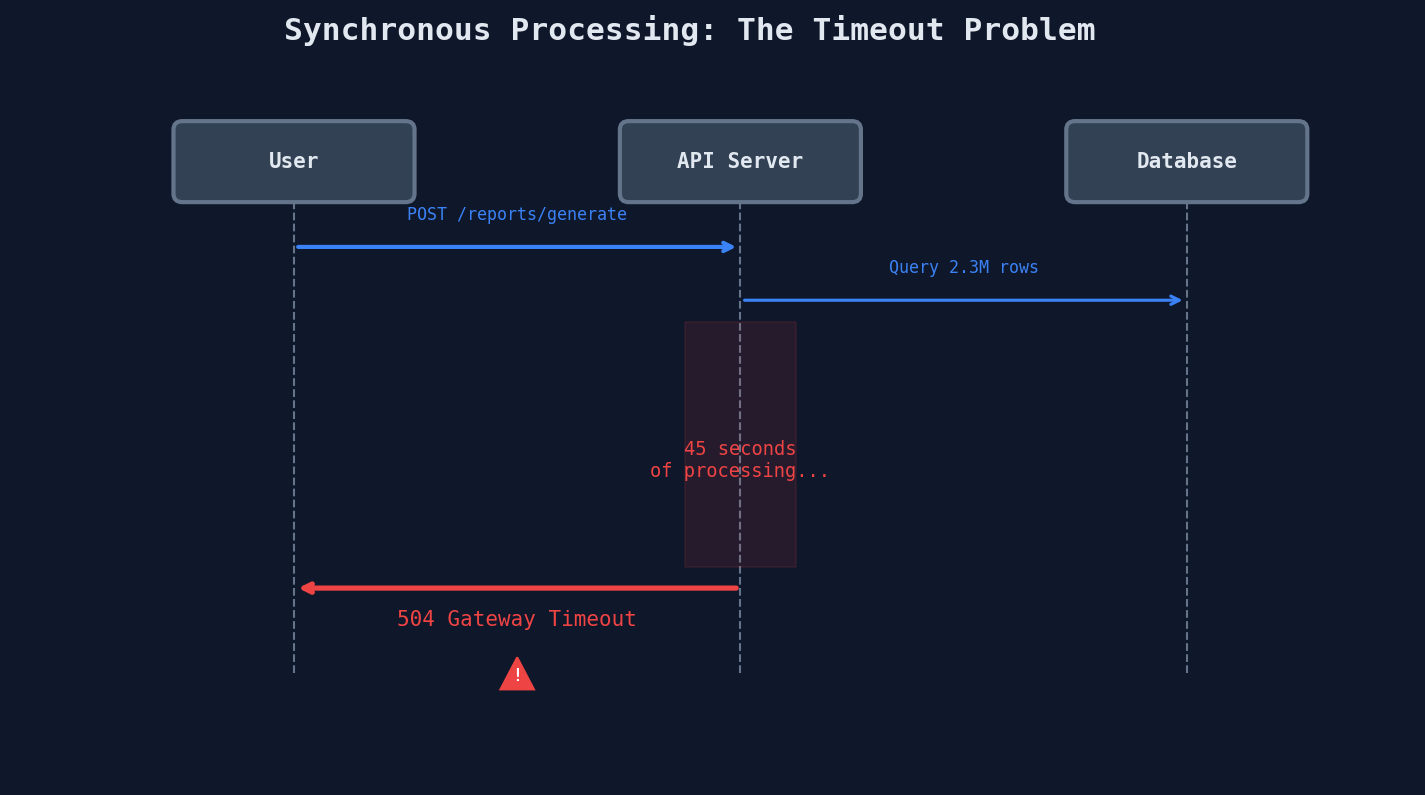
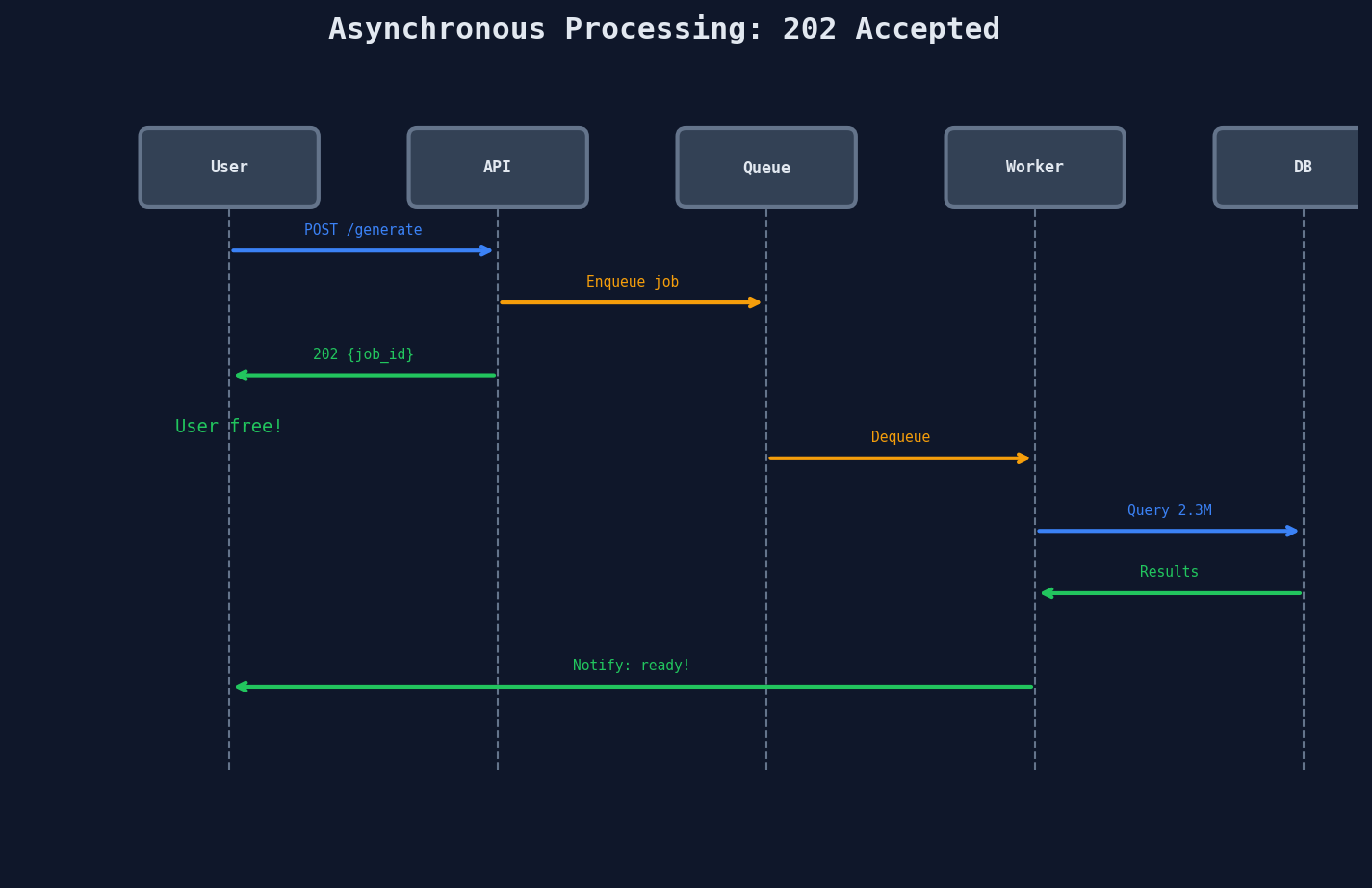
The difference is who waits. In sync, the user waits. In async, a background worker waits -- and the user goes on with their life.
The 202 Accepted Pattern
This is the foundational async pattern. Every system you'll design in interviews uses some version of this.
from flask import Flask, jsonify, request
import uuid

app = Flask(__name__)

@app.route("/api/reports/generate", methods=["POST"])
def generate_report():
    job_id = str(uuid.uuid4())

    # Store job metadata
    db.jobs.insert({
        "id": job_id,
        "type": "report",
        "status": "pending",
        "payload": request.json,
        "created_at": datetime.utcnow()
    })

    # Enqueue for background processing
    queue.send_message({"job_id": job_id, "type": "report"})

    # Return immediately -- the user doesn't wait
    return jsonify({
        "job_id": job_id,
        "status": "pending",
        "status_url": f"/api/jobs/{job_id}"
    }), 202  # 202 Accepted, NOT 200 OK
202 means 'I heard you,' not 'it's done'
200 OK means the work is complete. 202 Accepted means the request was valid and has been accepted for processing, but the result isn't available yet. This distinction matters in interviews.
Which Operations Need Async?
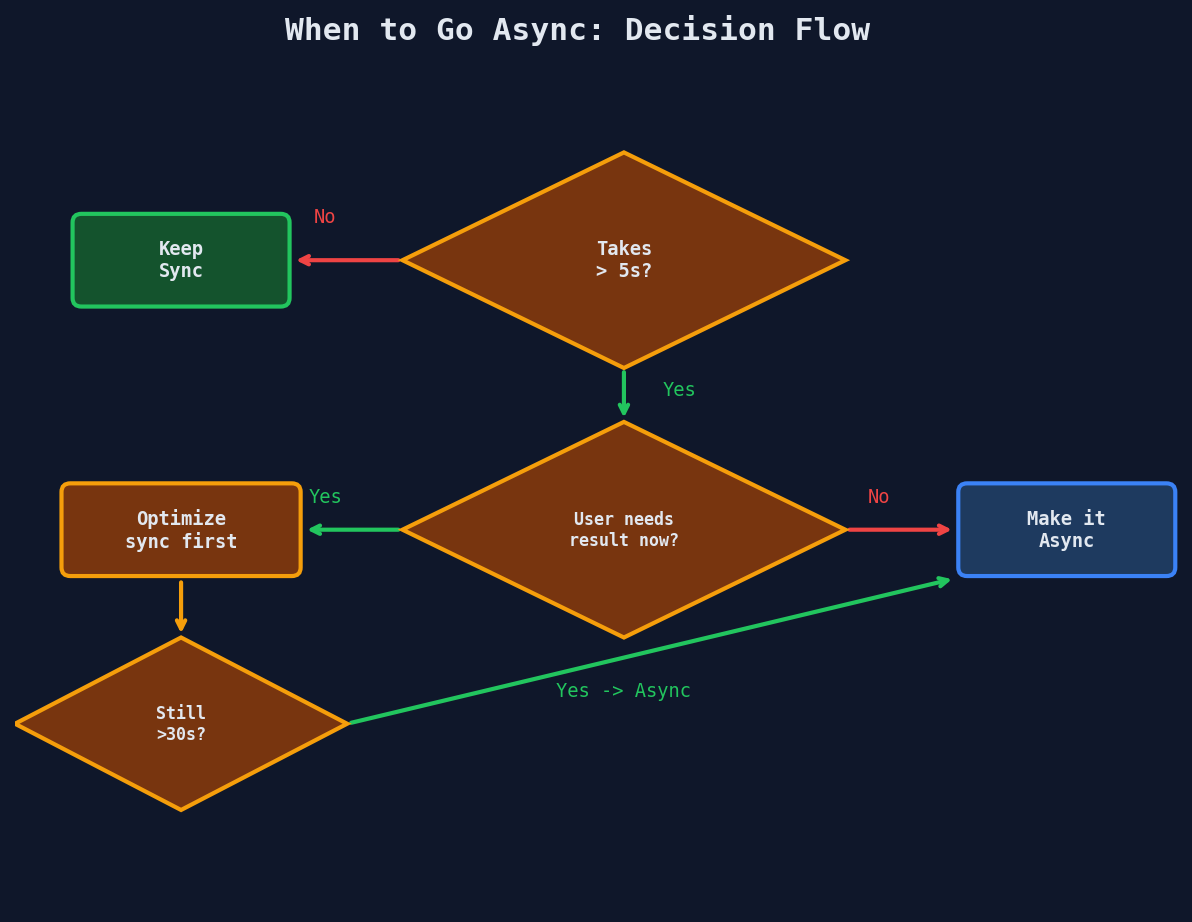
Not everything needs a queue. Here's the decision framework:
Always async:
| Operation | Why | Typical Duration |
|---|---|---|
| Video transcoding | CPU-intensive, multiple formats | 30s - 30min |
| Bulk CSV/data import | Millions of rows, validation | 10s - 10min |
| Report generation | Heavy queries, rendering | 5s - 5min |
| Email campaigns | Rate limits, thousands of recipients | Minutes - hours |
| Image processing | Resizing, thumbnails, ML inference | 2s - 60s |
| Payment reconciliation | External API calls, retries | 5s - 60s |
| Search index rebuild | Full reindex of content | Minutes - hours |
Keep sync:
- User login / token generation (~50ms)
- Reading a single record (~10ms)
- Simple writes with validation (~100ms)
- Checking permissions (~20ms)
The Basic Async Architecture
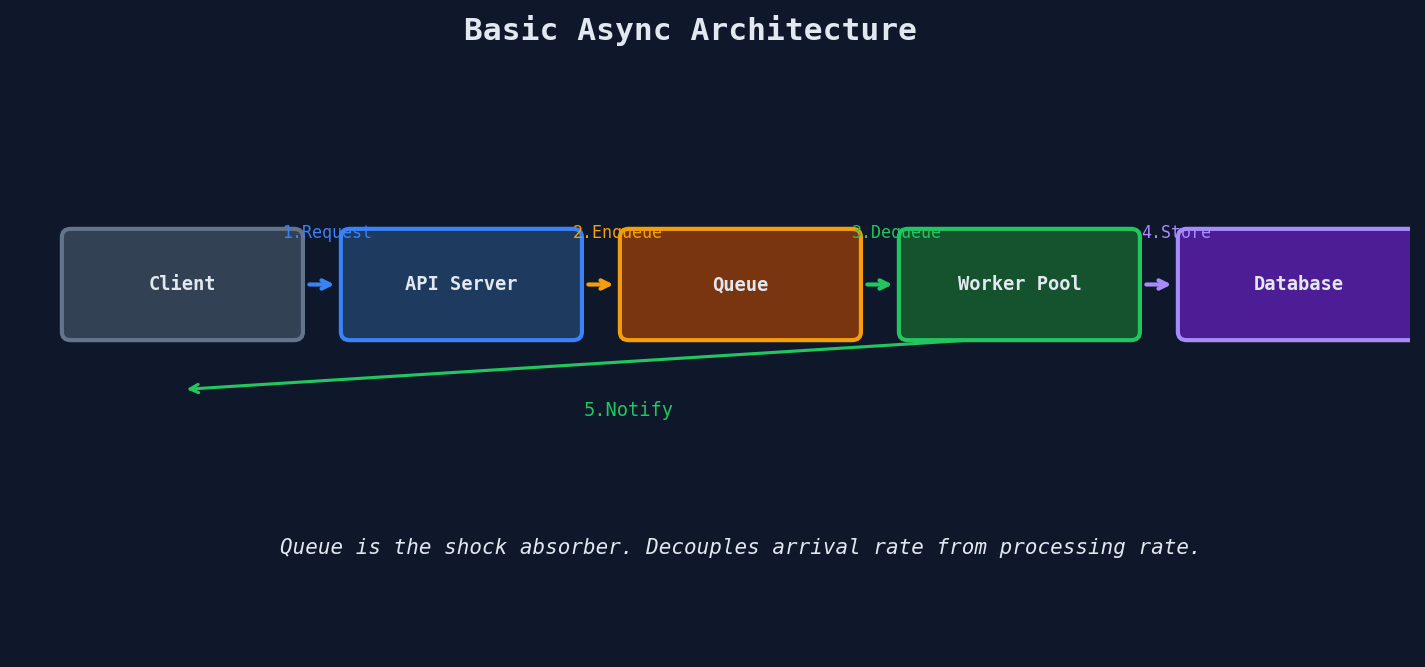
Every async system is a variation of this five-component pattern:
| Component | Responsibility |
|---|---|
| API Server | Validates input, creates job record, enqueues message, returns 202 |
| Message Queue | Durably stores pending work, delivers to available workers |
| Worker Pool | Picks up jobs, does the heavy processing |
| Database | Stores job status, progress, and results |
| Notification | Tells the client the work is done (poll, SSE, WebSocket, email) |
The queue is the shock absorber. It decouples the rate at which work arrives from the rate at which work gets done. During a traffic spike, the queue grows. Workers drain it at their own pace.
What Goes Wrong Without a Queue
Without a queue, the API server IS the worker. This creates a tight coupling between arrival rate and processing capacity.
Traffic spike hits:
  Sync:  100 requests × 45s each = need 100 threads for 45 seconds
  Async: 100 requests × 10ms each = enqueue in 1 second, workers process at their own pace
Shopify processes over 80 billion background jobs per year. Every order triggers async jobs for inventory updates, email confirmations, webhook deliveries, and analytics. None of that happens inside the HTTP request.
The Interview Tell
When an interviewer describes a feature that sounds like it takes more than a few seconds -- "users can upload a video and we need to generate thumbnails in 5 resolutions" -- they're testing whether you'll:
- Recognize that sync won't work
- Propose the accept-and-process-later pattern
- Design the queue, worker, and notification flow
The next four lessons break down each component: queue selection, failure handling, progress tracking, and worker scaling.
The one-liner for interviews
"We accept the request synchronously, return a job ID, process asynchronously via a message queue, and notify the client on completion -- either through polling, SSE, or webhooks depending on the use case."
Key Takeaways
| Concept | Details |
|---|---|
| Sync ceiling | ~30s before timeouts start killing requests |
| 202 Accepted | HTTP status meaning "received, processing later" |
| Queue as shock absorber | Decouples arrival rate from processing rate |
| Async candidates | Anything > 5s that doesn't need an immediate response |
| Five components | API Server, Queue, Workers, Database, Notification |