Schema Design and Queries
TL;DR
A GraphQL schema is the contract between client and server — it defines every type of data available, how types relate to each other, and what operations clients can perform. Clients read data with queries, write data with mutations, and subscribe to real-time updates with subscriptions. The schema is strongly typed, which means mistakes are caught before a single line of resolver code runs.
The Schema Is the Contract
Think of a GraphQL schema like the menu at a restaurant. The menu tells you exactly what's available, what each dish contains, and what substitutions are allowed. You can't order something that's not on the menu — but you can mix and match from anything that is.
In REST, the "contract" between client and server is usually documentation — a Swagger page, a README, maybe some Postman collections. The problem is that documentation goes stale. The server might return fields the docs don't mention, or remove fields the client depends on.
A GraphQL schema is executable documentation. It's not a separate artifact that can drift — it is the API. If the schema says a field exists, it exists. If a field is marked non-nullable, the server guarantees it will always return a value. The schema is checked at build time, at request time, and by every tool in the ecosystem.
Scalar Types: The Building Blocks
Every GraphQL schema is built from scalar types — the atomic values that don't break down further.
| Scalar Type | What It Is | Example |
|---|---|---|
String |
UTF-8 text | "Taylor Swift Eras Tour" |
Int |
32-bit signed integer | 70000 |
Float |
Double-precision floating point | 249.99 |
Boolean |
True or false | true |
ID |
Unique identifier (serialized as String) | "evt_501" |
You can also define custom scalars for things like DateTime, URL, or Email — but the five above come built in.
Defining Types: The Ticketmaster Schema
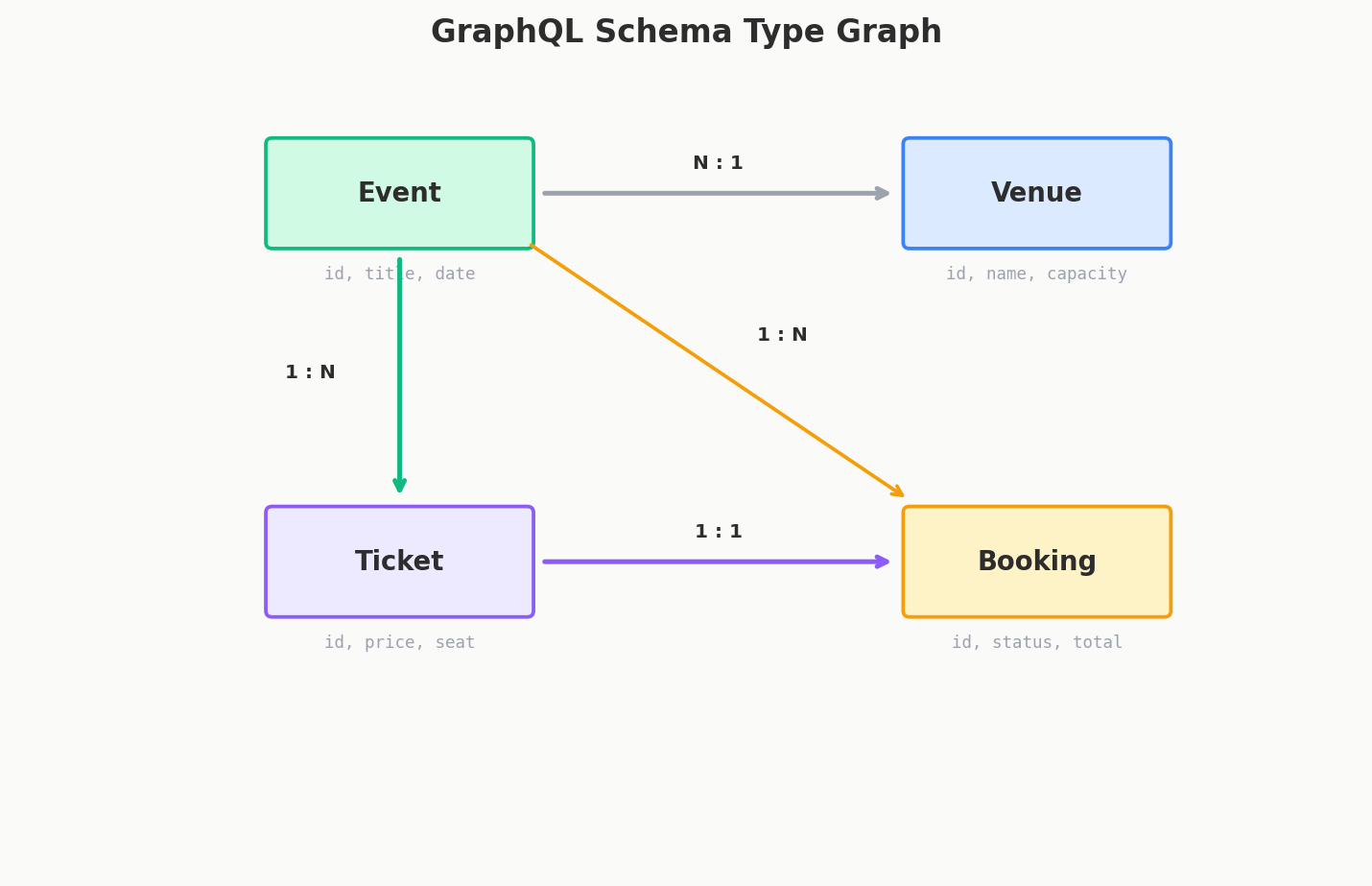
Let's build a real schema for our Ticketmaster example. We need events, venues, and tickets.
type Event {
  id: ID!
  name: String!
  date: String!
  description: String
  venue: Venue!
  availableTickets: [Ticket!]!
  totalTickets: Int!
  isSoldOut: Boolean!
}

type Venue {
  id: ID!
  name: String!
  city: String!
  state: String!
  capacity: Int!
  events: [Event!]!
}

type Ticket {
  id: ID!
  event: Event!
  section: String!
  row: String
  seat: Int
  price: Float!
  status: TicketStatus!
}

enum TicketStatus {
  AVAILABLE
  RESERVED
  SOLD
}
Let's unpack what's happening here.
The ! Operator: Non-Nullable
In GraphQL, every field is nullable by default. That means unless you explicitly say otherwise, any field can return null. The ! operator marks a field as non-nullable — the server promises it will always return a value.
This is the opposite of most programming languages where things are non-null by default. It's a deliberate design choice: it makes the schema resilient. If a resolver fails for one field, GraphQL can return null for that field instead of blowing up the entire response.
Reading the Type Annotations
Here's where it gets slightly tricky. Let's decode [Ticket!]!:
| Annotation | Meaning | Can the list be null? | Can items be null? |
|---|---|---|---|
[Ticket] |
Nullable list of nullable tickets | Yes | Yes |
[Ticket!] |
Nullable list of non-null tickets | Yes | No |
[Ticket]! |
Non-null list of nullable tickets | No | Yes |
[Ticket!]! |
Non-null list of non-null tickets | No | No |
So availableTickets: [Ticket!]! means: "This field always returns a list (never null), and every item in that list is a valid Ticket (never null). The list might be empty, but it will exist."
Interview Tip
The ! annotation comes up in interviews more than you'd expect. If someone asks you to design a GraphQL schema, confidently using ! in the right places shows you understand the nullability model. A good rule of thumb: make IDs and names non-nullable, make descriptions and optional metadata nullable.
Enums
Enums define a fixed set of allowed values. In our schema, TicketStatus can only be AVAILABLE, RESERVED, or SOLD. If a client tries to set it to "PENDING", the schema rejects the request before any code runs. This is way safer than passing around raw strings.
Relationships
Notice how Event has a venue: Venue! field, and Venue has an events: [Event!]! field. These are relationships — they tell GraphQL that types are connected. The client can traverse these relationships to any depth in a single query.
This is fundamentally different from REST, where relationships are expressed as IDs ("venueId": 88) and the client has to make a separate request to resolve them.
Queries: Reading Data
The Query type is the entry point for all read operations. It defines what data clients can ask for:
type Query {
  event(id: ID!): Event
  events(city: String, limit: Int = 10): [Event!]!
  venue(id: ID!): Venue
  searchEvents(query: String!, first: Int = 20): [Event!]!
}
A few things to notice:
- Arguments:
event(id: ID!)takes a requiredidargument. The client must provide it. - Default values:
limit: Int = 10means if the client doesn't specify a limit, it defaults to 10. - Nullable return:
event(id: ID!): Event(no!on the return type) means the event might not exist — it can returnnull. - Non-nullable list return:
events(...): [Event!]!means this always returns a list, even if it's empty.
Here's how a client would use these queries:
# Get a single event with its venue and tickets
query GetEventDetails {
  event(id: "501") {
    name
    date
    description
    venue {
      name
      city
      capacity
    }
    availableTickets {
      section
      row
      price
      status
    }
    isSoldOut
  }
}

# Search for events in a city
query FindConcerts {
  searchEvents(query: "concert", first: 5) {
    name
    date
    venue {
      name
      city
    }
  }
}
The beauty here is that GetEventDetails asks for description and capacity while FindConcerts skips them entirely. Same schema, different queries, different response shapes. The mobile app can ask for less, the web app can ask for more.
Query Variables
Hardcoding values like "501" in the query is fine for examples, but real applications use variables:
The variables are sent alongside the query:
This separates the query structure from the data, making queries reusable and preventing injection attacks (GraphQL variables are typed and validated by the schema).
Mutations: Writing Data
If queries are GET requests, mutations are POST/PUT/DELETE. They modify data on the server:
type Mutation {
  createBooking(input: BookingInput!): BookingResult!
  cancelBooking(bookingId: ID!): CancelResult!
  updateEvent(id: ID!, input: UpdateEventInput!): Event!
}

input BookingInput {
  eventId: ID!
  ticketIds: [ID!]!
  paymentMethodId: String!
}

input UpdateEventInput {
  name: String
  date: String
  description: String
}

type BookingResult {
  success: Boolean!
  booking: Booking
  error: String
}

type CancelResult {
  success: Boolean!
  refundAmount: Float
  error: String
}
Input Types
Notice the input keyword. Input types are special types used exclusively for arguments. They look like regular types but they can only contain scalar fields and other input types — no circular references to output types like Event or Venue.
Why separate them? Because the data you send to create something is almost never the same shape as the data you get back. When booking tickets, you send ticket IDs and a payment method. You get back a full Booking object with confirmation numbers, timestamps, and status.
Calling a Mutation
mutation BookTickets($input: BookingInput!) {
  createBooking(input: $input) {
    success
    booking {
      id
      confirmationCode
      tickets {
        section
        row
        seat
      }
      totalPrice
    }
    error
  }
}
{
  "variables": {
    "input": {
      "eventId": "501",
      "ticketIds": ["tkt_1001", "tkt_1002"],
      "paymentMethodId": "pm_stripe_abc123"
    }
  }
}
The mutation returns data just like a query does. You can ask for exactly the fields you need from the result. This is different from REST, where a POST might return the entire created object whether you need all of it or not.
Interview Tip
Mutations should be named as verbs describing the action — createBooking, cancelBooking, updateEvent — not generic names like mutateBooking. Also, wrapping mutation responses in a result type (like BookingResult) with success, error, and optional data fields is a widely adopted pattern. It lets the client distinguish between "the request worked but the booking failed" and "the request itself failed."
Subscriptions: Real-Time Updates (Brief)
Subscriptions are GraphQL's mechanism for real-time data. They use WebSockets under the hood:
type Subscription {
  ticketStatusChanged(eventId: ID!): Ticket!
  newEventInCity(city: String!): Event!
}
A client subscribes, and the server pushes updates whenever the data changes:
Subscriptions are powerful for features like live seat maps ("Section A just sold out!") or auction-style pricing. We won't go deep on subscriptions here — just know they exist and follow the same typed schema pattern as queries and mutations.
Fragments: Reusable Field Sets
When you find yourself requesting the same set of fields in multiple queries, fragments let you define them once and reuse them:
fragment EventSummary on Event {
  id
  name
  date
  isSoldOut
  venue {
    name
    city
  }
}

query UpcomingEvents {
  events(city: "Los Angeles", limit: 5) {
    ...EventSummary
    availableTickets {
      price
    }
  }
}

query SearchResults {
  searchEvents(query: "jazz") {
    ...EventSummary
    description
  }
}
The ...EventSummary syntax spreads the fragment's fields into the query. Both queries get id, name, date, isSoldOut, and venue { name, city }, but each adds its own extra fields on top.
Fragments aren't just a convenience — they help keep your frontend code DRY. If the EventCard component always needs the same five fields, define an EventCardFields fragment and use it everywhere that component appears.
The Response Format
Every GraphQL response follows the same structure:
If something goes wrong, you get partial data plus errors:
{
  "data": {
    "event": {
      "name": "Taylor Swift Eras Tour",
      "date": "2026-06-15",
      "venue": null
    }
  },
  "errors": [
    {
      "message": "Venue service unavailable",
      "path": ["event", "venue"],
      "locations": [{ "line": 5, "column": 3 }]
    }
  ]
}
This is one of GraphQL's underrated features: partial responses. If the venue service is down, you still get the event data. The errors array tells you exactly which field failed and why. In REST, a single downstream failure would typically result in a 500 error for the entire request.
The path field is especially useful — it tells you exactly where in the query tree the error occurred, making debugging much easier.
Introspection: The Schema Describes Itself
Here's something REST can't do natively. You can query a GraphQL API to discover its own schema:
This introspection capability is what powers tools like GraphiQL and Apollo Studio. You connect to a GraphQL endpoint and instantly see every type, every field, every argument, and every relationship — with documentation built right into the schema via description strings.
"""
A live event that can be attended and ticketed.
"""
type Event {
  """
  The unique identifier for this event.
  """
  id: ID!

  """
  The display name of the event.
  """
  name: String!
}
Those triple-quoted strings become documentation that introspection queries can return. Your API is self-documenting by design.
Interview Tip
In production, you should disable introspection in public-facing APIs. It's a goldmine for attackers trying to understand your data model. Keep it enabled in development and staging, turn it off in production — or restrict it to authenticated admin users.
The Full Ticketmaster Schema
Putting it all together, here's what a complete schema for our ticketing platform looks like:
# Scalars
scalar DateTime

# Enums
enum TicketStatus {
  AVAILABLE
  RESERVED
  SOLD
}

# Types
type Event {
  id: ID!
  name: String!
  date: DateTime!
  description: String
  venue: Venue!
  availableTickets: [Ticket!]!
  totalTickets: Int!
  isSoldOut: Boolean!
}

type Venue {
  id: ID!
  name: String!
  city: String!
  state: String!
  capacity: Int!
  events: [Event!]!
}

type Ticket {
  id: ID!
  event: Event!
  section: String!
  row: String
  seat: Int
  price: Float!
  status: TicketStatus!
}

type Booking {
  id: ID!
  confirmationCode: String!
  tickets: [Ticket!]!
  totalPrice: Float!
  createdAt: DateTime!
}

# Input Types
input BookingInput {
  eventId: ID!
  ticketIds: [ID!]!
  paymentMethodId: String!
}

input UpdateEventInput {
  name: String
  date: DateTime
  description: String
}

# Result Types
type BookingResult {
  success: Boolean!
  booking: Booking
  error: String
}

type CancelResult {
  success: Boolean!
  refundAmount: Float
  error: String
}

# Root Types
type Query {
  event(id: ID!): Event
  events(city: String, limit: Int = 10): [Event!]!
  venue(id: ID!): Venue
  searchEvents(query: String!, first: Int = 20): [Event!]!
}

type Mutation {
  createBooking(input: BookingInput!): BookingResult!
  cancelBooking(bookingId: ID!): CancelResult!
  updateEvent(id: ID!, input: UpdateEventInput!): Event!
}

type Subscription {
  ticketStatusChanged(eventId: ID!): Ticket!
}
That's your entire API surface in one file. Any client can look at this schema and know exactly what data is available, what operations are supported, and what shape every response will take.
Quick Recap
| Concept | What It Does | Key Detail |
|---|---|---|
| Schema | Defines all types, queries, and mutations | It's the executable contract — not just docs |
| Scalar types | Atomic values (String, Int, Boolean, ID, Float) | You can define custom scalars too |
! operator |
Marks a field as non-nullable | Fields are nullable by default |
[Type!]! |
Non-null list of non-null items | Guarantees a list where every item exists |
| Queries | Read operations | Entry point is the Query type |
| Mutations | Write operations | Use input types for arguments, result types for responses |
| Subscriptions | Real-time push updates | Built on WebSockets |
| Fragments | Reusable field sets | Keep your queries DRY |
| Introspection | Schema describes itself | Disable in production |
Interview Expectations: Junior vs. Senior
- Junior/Mid-level: Can write basic GraphQL queries and define simple schema types. Often treats the GraphQL schema exactly like a relational SQL database schema.
- Senior/Staff: Designs schemas for the client's needs (product-driven), not the database's normalized structure. Understands the importance of standardizing mutations (returning the modified object) and handling errors with structured error boundaries rather than relying on top-level HTTP status codes, since GraphQL typically returns 200 OK even on failure.