N+1 Problem and Pitfalls
TL;DR
GraphQL's flexibility comes with real tradeoffs. The biggest is the N+1 problem — where fetching a list of N items triggers N additional database queries for related data. The fix is the DataLoader pattern (batching). Other pitfalls include broken HTTP caching, query depth attacks, harder monitoring, and field-level authorization complexity. Know these tradeoffs and you'll know when GraphQL is the right tool and when it's overkill.
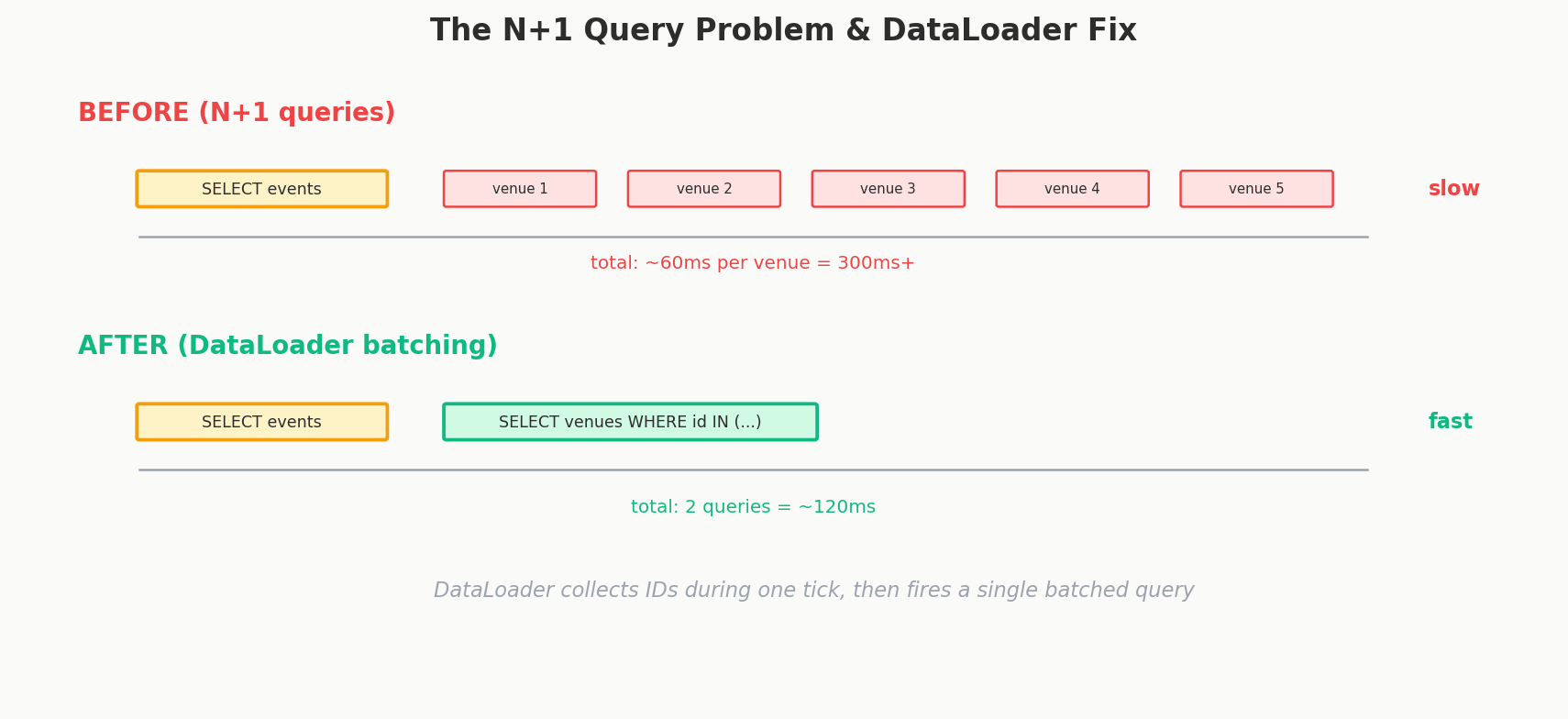
The N+1 Problem: Death by a Thousand Queries
Let's go back to our Ticketmaster example. A client sends this perfectly reasonable query:
Looks simple, right? Get 100 events in LA, with venue info for each. But here's what happens behind the scenes on the server.
How Resolvers Work
In GraphQL, every field has a resolver — a function that fetches the data for that field. The server processes the query top-down:
-
Step 1: The
eventsresolver runs. It executes 1 database query:SELECT * FROM events WHERE city = 'Los Angeles' LIMIT 100. You get back 100 events. -
Step 2: For each of those 100 events, GraphQL calls the
venueresolver. Each resolver sees its parent event'svenueIdand fetches the venue:SELECT * FROM venues WHERE id = ?.
That's 100 separate database queries for venues. Plus the 1 query for events.
Total: 101 database queries for what looks like one simple GraphQL query.
This is the N+1 problem. You make 1 query to get a list of N items, then N additional queries to resolve a related field on each item. For 100 events, that's 1 + 100 = 101 queries. For 1000 events, it's 1001.
Query: events (1 DB query → 100 events)
  └─ venue for event 1  (1 DB query)
  └─ venue for event 2  (1 DB query)
  └─ venue for event 3  (1 DB query)
  ...
  └─ venue for event 100 (1 DB query)

Total: 101 database queries
Why GraphQL Makes This Easy to Create
Here's the critical nuance, and this comes from a real discussion in the engineering community:
The N+1 problem is NOT unique to GraphQL. REST can have it too. If you have a REST endpoint that returns a list of events with venueId fields, and your server-side code loops through each event to fetch its venue, you have the exact same problem.
The difference is that GraphQL makes N+1 much easier to accidentally create. Here's why:
| Factor | REST | GraphQL |
|---|---|---|
| Who controls the query shape? | Server — you write optimized queries ahead of time | Client — any client can request any combination of fields |
| When do you write the data-fetching logic? | At endpoint design time, where you can optimize | At resolver time, where each resolver is independent |
| Can a new client trigger N+1 without code changes? | No — the server query is fixed | Yes — a new nested query can trigger it |
In REST, you control the server-side query. When you build GET /events?city=LA, you write a JOIN or a batched query because you know the response shape. In GraphQL, each resolver is a standalone function. The venue resolver doesn't know it's about to be called 100 times — it just knows it needs to fetch one venue.
Interview Tip
If someone says "GraphQL has the N+1 problem and REST doesn't," correct them. Say: "N+1 can happen in any layered data fetching system. The difference is that REST servers typically write optimized queries upfront because the response shape is fixed, while GraphQL resolvers compose dynamically, making it easier to introduce N+1 accidentally. The solution in both cases is batching."
The Solution: DataLoader
The standard fix for GraphQL's N+1 problem is the DataLoader pattern, originally created by Facebook (of course).
The idea is simple: instead of fetching one venue at a time, collect all the venue IDs needed in a single execution tick, then batch them into one query.
How DataLoader Works Step by Step
Without DataLoader:
venue resolver called with venueId: 10 → SELECT * FROM venues WHERE id = 10
venue resolver called with venueId: 22 → SELECT * FROM venues WHERE id = 22
venue resolver called with venueId: 10 → SELECT * FROM venues WHERE id = 10  (duplicate!)
venue resolver called with venueId: 35 → SELECT * FROM venues WHERE id = 35
... 96 more individual queries
With DataLoader:
venue resolver called with venueId: 10 → queued
venue resolver called with venueId: 22 → queued
venue resolver called with venueId: 10 → queued (will be deduped)
venue resolver called with venueId: 35 → queued
... 96 more queued

End of tick → DataLoader fires:
SELECT * FROM venues WHERE id IN (10, 22, 35, ...) → 1 query for all unique IDs
Results distributed back to each resolver
101 queries become 2. One for events, one for all venues.
DataLoader in Code
Here's what this looks like in practice (JavaScript/Node.js, since that's the most common GraphQL server environment):
const DataLoader = require('dataloader');

// Batch function: takes an array of IDs, returns venues in the same order
const venueLoader = new DataLoader(async (venueIds) => {
  const venues = await db.query(
    'SELECT * FROM venues WHERE id IN (?)',
    [venueIds]
  );
  // Must return results in the same order as the input IDs
  const venueMap = new Map(venues.map(v => [v.id, v]));
  return venueIds.map(id => venueMap.get(id));
});

// Resolver uses the loader instead of direct DB queries
const resolvers = {
  Event: {
    venue: (event) => venueLoader.load(event.venueId)
  }
};
DataLoader does two things:
- Batching: Collects all
.load()calls within a single tick of the event loop and fires the batch function once with all collected IDs. - Caching: If
venueId: 10is requested twice in the same request, DataLoader returns the cached result from the first fetch. This is per-request caching, not a long-lived cache.
The Numbers
| Approach | DB Queries for 100 Events + Venues |
|---|---|
| Naive (no DataLoader) | 101 (1 + 100) |
| With DataLoader | 2 (1 + 1 batched) |
| REST with optimized JOIN | 1 (single JOIN query) |
DataLoader doesn't quite match a hand-optimized SQL JOIN, but 2 queries is perfectly acceptable for the flexibility GraphQL provides. And if you really need a single query, you can write a custom resolver that uses a JOIN — nothing stops you.
Caching: GraphQL's Achilles Heel
In REST, caching is almost free. Every endpoint has a unique URL, and the HTTP ecosystem has decades of caching infrastructure built around URLs:
GET /events/501 → Cache-Control: max-age=300, ETag: "abc123"
GET /venues/88  → Cache-Control: max-age=3600
CDNs, browser caches, reverse proxies — they all understand this. A CDN can cache /events/501 at the edge and serve it to thousands of clients without hitting your server.
GraphQL breaks all of this. Every request is:
Same URL every time. HTTP caches can't distinguish between different queries because they all hit the same endpoint with different POST bodies. CDNs are designed to cache GET requests by URL — they don't inspect POST bodies.
Caching Solutions
This is a real problem, but there are real solutions:
| Solution | How It Works | Trade-off |
|---|---|---|
| Persisted queries | Hash each query at build time, send the hash instead of the full query. Server maps hash → query. Can use GET requests with the hash as a URL parameter. | Requires build step; can't use ad-hoc queries |
| Apollo Client cache | Client-side normalized cache. Stores entities by __typename + id and deduplicates across queries. |
Only helps the individual client, not the server |
| CDN-level caching | Services like Apollo Router or Stellate parse GraphQL queries and cache at the edge based on types and fields. | Adds infrastructure complexity |
| Response caching | Cache entire responses server-side keyed by query hash + variables. | Stale data risk; hard to invalidate granularly |
Interview Tip
If an interviewer asks about GraphQL's downsides, caching should be the first thing you mention. It's the most significant operational difference from REST. Follow it with "but here's how teams solve it" and mention persisted queries.
Security: Query Depth Attacks
In REST, you control every response. Nobody can ask your /users endpoint to return nested data 10 levels deep. In GraphQL, a malicious client can send this:
query MaliciousQuery {
  events(limit: 100) {
    venue {
      events {
        venue {
          events {
            venue {
              events {
                name
              }
            }
          }
        }
      }
    }
  }
}
This query bounces between Event → Venue → Event → Venue and could generate millions of database queries and return gigabytes of data. It's essentially a denial-of-service attack through your own API.
Security Solutions
| Solution | What It Does |
|---|---|
| Query depth limiting | Reject queries deeper than N levels (typically 5-10) |
| Query complexity analysis | Assign a "cost" to each field; reject queries exceeding a total cost budget |
| Persisted queries only | Only allow pre-approved queries in production; block arbitrary queries entirely |
| Rate limiting | Limit requests per client, but also limit total query cost per time window |
| Timeout | Kill query execution that exceeds a time limit |
The most robust approach is persisted queries — your frontend app registers all its queries at build time, and the production server only accepts those known query hashes. This completely eliminates the depth attack vector because attackers can't send arbitrary queries.
Field-Level Authorization
REST authorization is relatively straightforward: you put auth middleware on endpoints. /admin/users checks for admin role, /users/me checks for a valid session. Each endpoint has one access level.
GraphQL is more nuanced. Because clients compose queries freely, different fields within the same query might have different access levels:
query {
  event(id: "501") {
    name              # public
    date              # public
    venue {
      name            # public
      revenue         # admin only
      internalNotes   # admin only
    }
    availableTickets {
      section         # public
      price           # public
      costPrice       # admin only
    }
  }
}
A regular user should see name and price but not revenue or costPrice. This means authorization happens at the field level, not the endpoint level.
This is more granular than REST (which is a good thing — you get finer-grained access control), but it's also more complex to implement. Every sensitive field needs its own authorization check, and you need to be careful about error handling: do you return null for unauthorized fields? An error? Omit them entirely?
Most GraphQL frameworks handle this with schema directives:
type Venue {
  name: String!
  revenue: Float @auth(requires: ADMIN)
  internalNotes: String @auth(requires: ADMIN)
}
The @auth directive runs an authorization check before resolving the field. If the check fails, the field returns null and an error is added to the response's errors array.
Performance Monitoring: Harder Than REST
With REST, monitoring is simple. You can track:
- Response time for
GET /events/501→ 45ms on average - Error rate for
POST /bookings→ 0.2% 500 errors
Each endpoint is a distinct unit you can monitor independently.
With GraphQL, every request hits POST /graphql. Your monitoring dashboard shows one endpoint with wildly varying response times — some queries take 10ms, others take 5 seconds. You can't tell them apart without parsing the query body.
| REST Monitoring | GraphQL Monitoring |
|---|---|
| Response time per endpoint | Response time per query (need to parse/log query names) |
| Error rate per endpoint | Error rate per field (errors are embedded in response body) |
| Standard HTTP status codes | Always 200 — errors are in the JSON body |
| Any APM tool works out of the box | Need GraphQL-aware tools (Apollo Studio, etc.) |
That last point is particularly annoying: GraphQL almost always returns HTTP 200, even when things go wrong. The errors are inside the response body, not in the HTTP status code. This means standard alerting on 5xx status codes won't catch GraphQL errors.
Schema Evolution: Easy to Add, Hard to Remove
Adding new fields to a GraphQL schema is trivial and backward-compatible. Existing queries don't request the new field, so they're unaffected:
# Before
type Event {
  id: ID!
  name: String!
  date: String!
}

# After — no breaking change
type Event {
  id: ID!
  name: String!
  date: String!
  imageUrl: String    # new field, nullable, no existing query breaks
}
Removing fields is much harder. You can't just delete a field — any client still querying it will break. Instead, you deprecate it:
type Event {
  id: ID!
  name: String!
  date: String!
  imageUrl: String
  thumbnailUrl: String @deprecated(reason: "Use imageUrl instead")
}
Deprecated fields still work but show warnings in tools like GraphiQL. You have to wait until all clients have migrated before actually removing them. This is both better and worse than REST versioning — you don't need /v1/, /v2/, /v3/, but you need to track field-level usage across all clients.
When GraphQL Is Overkill
GraphQL solves real problems, but it adds real complexity. Here's when you probably don't need it:
| Situation | Why REST Is Simpler |
|---|---|
| Single client (e.g., one web app) | No over-fetching/under-fetching problem — you control both sides |
| Simple CRUD | If every screen maps 1:1 to a resource, REST endpoints are simpler |
| Small team | GraphQL has a learning curve; schema design, DataLoaders, monitoring tools |
| File uploads | GraphQL handles file uploads awkwardly; REST multipart forms just work |
| Heavy caching needs | If your app is read-heavy and CDN caching is critical, REST's URL-based caching is vastly simpler |
| Most interviews | Unless the question specifically asks about GraphQL, default to REST. It's simpler to explain and less can go wrong in a 45-minute discussion. |
Interview Tip
Saying "I'd use GraphQL here" without explaining why is a red flag. Always start with the problem (diverse clients, over-fetching, rapid frontend iteration) and then present GraphQL as the solution. If the problem doesn't exist, recommend REST.
When GraphQL Shines
For balance, here's when GraphQL is the right call:
| Situation | Why GraphQL Wins |
|---|---|
| Multiple client types (mobile, web, third-party) | Each client queries exactly the data it needs |
| Rapid frontend iteration | Frontend devs add fields to queries without waiting for backend changes |
| Complex, interconnected data | Deep relationships traversed in a single query |
| API for external developers | GitHub's v4 API lets integrators get exactly what they need |
| Microservice aggregation | GraphQL gateway federates across multiple backend services |
Putting It All Together: The Tradeoff Matrix
| Concern | REST | GraphQL |
|---|---|---|
| Over-fetching | Common | Solved |
| Under-fetching | Common | Solved |
| N+1 queries | Can happen, but server-controlled | Can happen, easier to trigger accidentally |
| HTTP caching | Built-in, free | Broken by default, needs workarounds |
| Security | Endpoint-level, straightforward | Query depth attacks, needs cost analysis |
| Authorization | Endpoint-level | Field-level (more granular but more complex) |
| Monitoring | Standard tools work | Needs GraphQL-aware tooling |
| Schema evolution | Version the entire API | Deprecate individual fields |
| Learning curve | Low | Medium-high |
| Tooling | Mature, universal | Growing, but less universal |
The right answer is almost never "use GraphQL for everything" or "never use GraphQL." It's about understanding the tradeoffs and picking the right tool for your specific situation. If your clients are diverse and your data is deeply connected, GraphQL pays for its complexity. If your API is simple and serves one client, REST keeps things straightforward.
Quick Recap
| Pitfall | Impact | Solution |
|---|---|---|
| N+1 problem | 1 + N database queries for list + related data | DataLoader (batching + deduplication) |
| Broken HTTP caching | CDNs can't cache POST /graphql | Persisted queries, client-side cache, CDN plugins |
| Query depth attacks | Malicious nested queries = DoS | Depth limits, complexity analysis, persisted queries |
| Field-level auth | Different fields need different access levels | Schema directives (@auth) |
| Monitoring blindness | All requests hit one endpoint, always 200 | GraphQL-aware APM tools, query naming |
| Schema removal | Can't delete fields without breaking clients | Deprecation + usage tracking |
Interview Expectations: Junior vs. Senior
- Junior/Mid-level: Might struggle to explain the N+1 query problem deeply. Might propose caching at the HTTP layer, not realizing GraphQL makes this extremely difficult.
- Senior/Staff: Highlights N+1 as the primary operational risk of adopting GraphQL and proactively introduces solutions like DataLoader to batch and deduplicate queries per request. Has strategies for securing the graph via query depth limiting or query cost analysis to prevent DoS attacks.