Composite & Specialized Indexes
TL;DR
A composite index on (a, b, c) can answer queries on (a), (a, b), and (a, b, c) — but NOT on (b) alone. An index that already holds every column a query needs lets the database skip the heap lookup — that's a covering index. Partial indexes shrink index size by indexing only the rows you care about. And sometimes the best index strategy is to NOT add one.
The Filing Cabinet Analogy
Picture a filing cabinet in an office. The drawers are labeled by department (Engineering, Sales, Marketing). Inside each drawer, folders are sorted by last name. Inside each folder, documents are sorted by date.
If someone asks "find all documents from the Engineering department" — easy, open the Engineering drawer. "Find Engineering documents for someone named Garcia" — still easy, open the Engineering drawer, jump to G. "Find Engineering documents for Garcia from March 2024" — perfect, you can navigate all three levels.
But if someone asks "find all documents from March 2024 across all departments" — you're stuck. The filing cabinet is organized department-first, so you'd have to open every drawer and scan every folder. The date sort only helps within a specific person's folder.
That's exactly how composite indexes work. The column order determines which queries the index can serve.
Composite Indexes — Column Order Is Everything
A composite index (also called a multi-column index) is a single index on multiple columns. The columns are sorted hierarchically — first by column 1, then by column 2 within ties, then by column 3 within those ties.
This creates a B-tree sorted like this:
user_id=1, status='active', created_at='2024-01-15'
user_id=1, status='active', created_at='2024-02-20'
user_id=1, status='cancelled', created_at='2024-01-30'
user_id=2, status='active', created_at='2024-03-01'
user_id=2, status='shipped', created_at='2024-03-05'
...
The Leftmost Prefix Rule
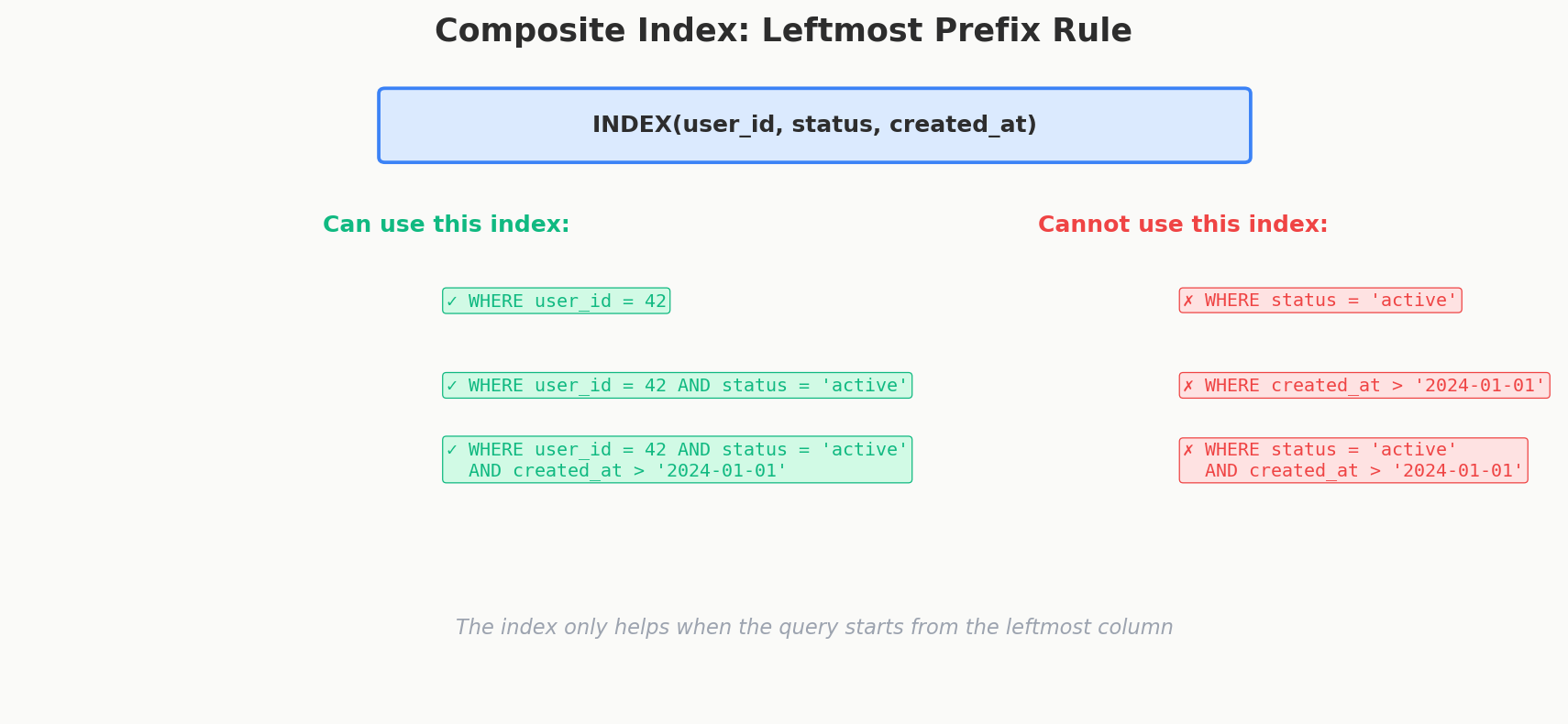
The index can be used for queries that filter on a leftmost prefix of the index columns:
| Query Filter | Uses Index? | Why |
|---|---|---|
WHERE user_id = 5 |
Yes | Matches the first column |
WHERE user_id = 5 AND status = 'active' |
Yes | Matches the first two columns |
WHERE user_id = 5 AND status = 'active' AND created_at > '2024-01-01' |
Yes | Matches all three columns |
WHERE status = 'active' |
No | Skips the first column — can't navigate the tree |
WHERE created_at > '2024-01-01' |
No | Skips the first two columns |
WHERE user_id = 5 AND created_at > '2024-01-01' |
Partial | Uses user_id, but can't skip status to use created_at efficiently |
This is the most common indexing mistake in production systems. Someone creates INDEX(a, b, c) and wonders why their WHERE b = ? query is still doing a sequential scan.
Spot it with EXPLAIN
Never guess whether an index is used — ask the database. Prefix any query with EXPLAIN to see the planner's chosen access path: Index Scan using idx_... means your index is working; Seq Scan means it isn't. EXPLAIN ANALYZE actually runs the query and adds real row counts and timings. Checking the plan is the single most useful habit in query tuning — and a great thing to mention in an interview.
A modern wrinkle: PostgreSQL 18, MySQL 8.0, and Oracle support an index skip scan, which can use an index even when the query skips the leading column — but only when that column has very few distinct values, so the engine can cheaply step through each one. Treat it as a fallback the optimizer may find, not something to design for. The leftmost-prefix rule is still how you should reason about column order.
How to Choose Column Order
The general strategy for ordering columns in a composite index:
- Equality columns first — columns compared with
=go at the front - Range columns last — columns compared with
>,<,BETWEENgo at the end - High cardinality first (among equality columns) —
user_idbeforestatusbecause it narrows the search more
For the query WHERE user_id = ? AND status = ? AND created_at > ?:
user_id— equality, high cardinality → firststatus— equality, low cardinality → secondcreated_at— range → last
Interview Tip
When an interviewer asks you to design indexes for a table, ask about the query patterns first. The index should be designed for the query, not the other way around. Say: "What are the most common queries? Let me design the index to match the WHERE clause and ORDER BY."
Covering Indexes — Never Touch the Heap
The Problem: The Expensive Heap Lookup
A normal index lookup has two steps: (1) traverse the index to find the row pointer, (2) follow the pointer to the heap page to get the actual row data. That second step — the heap lookup — is an extra random disk read per row.
Say you have this index and query:
CREATE INDEX idx_orders_user_status
ON orders(user_id, status);

SELECT user_id, status, total_amount
FROM orders
WHERE user_id = 5 AND status = 'active';
The database uses the index to quickly find all rows matching user_id = 5 AND status = 'active'. But the query also needs total_amount, which isn't in the index. So for every matching row, the database has to jump back to the heap page to grab total_amount. If there are 500 matching rows, that's 500 extra random disk reads. This is called a key lookup (SQL Server) or heap fetch (PostgreSQL).
MySQL/InnoDB has no heap
InnoDB tables are clustered on the primary key — the table is the primary-key B-tree, with full rows stored in its leaves. There is no separate heap. A secondary index leaf doesn't store a physical row pointer; it stores the indexed columns plus the primary-key value. So the "extra lookup" is a second B-tree descent into the clustered index, keyed by primary key.
Two consequences: every InnoDB secondary index implicitly contains the primary-key columns (a query selecting only indexed columns plus the PK is covered for free), and MySQL has no INCLUDE clause — you make an index covering simply by adding the columns as ordinary key columns.
Same Index, Different Queries — The Key Insight
A covering index isn't a special type of index you create. It's a property that describes the relationship between an index and a specific query. An index "covers" a query when it contains every column the query needs — in the SELECT, WHERE, JOIN, and ORDER BY clauses.
Consider this composite index:
Query A — this index IS covering:
SELECT status, created_at FROM orders WHERE user_id = 5;
-- ✅ user_id, status, created_at are ALL in the index → index-only scan, no heap lookup
Query B — this SAME index is NOT covering:
SELECT total_amount FROM orders WHERE user_id = 5;
-- ❌ total_amount is NOT in the index → database must visit the heap for every row
The index didn't change. The query changed. "Covering" is a property of the (index, query) pair, not the index alone.
Making an Index Covering with INCLUDE
If you want the index to cover Query B above without making total_amount part of the sort key, PostgreSQL and SQL Server offer the INCLUDE clause:
The INCLUDE columns are stored in the leaf pages only — they aren't part of the B-tree's sort order. You can't filter or sort on them through the index, but they're available for retrieval. This keeps the index key small (faster tree traversal) while still covering queries that select those columns.
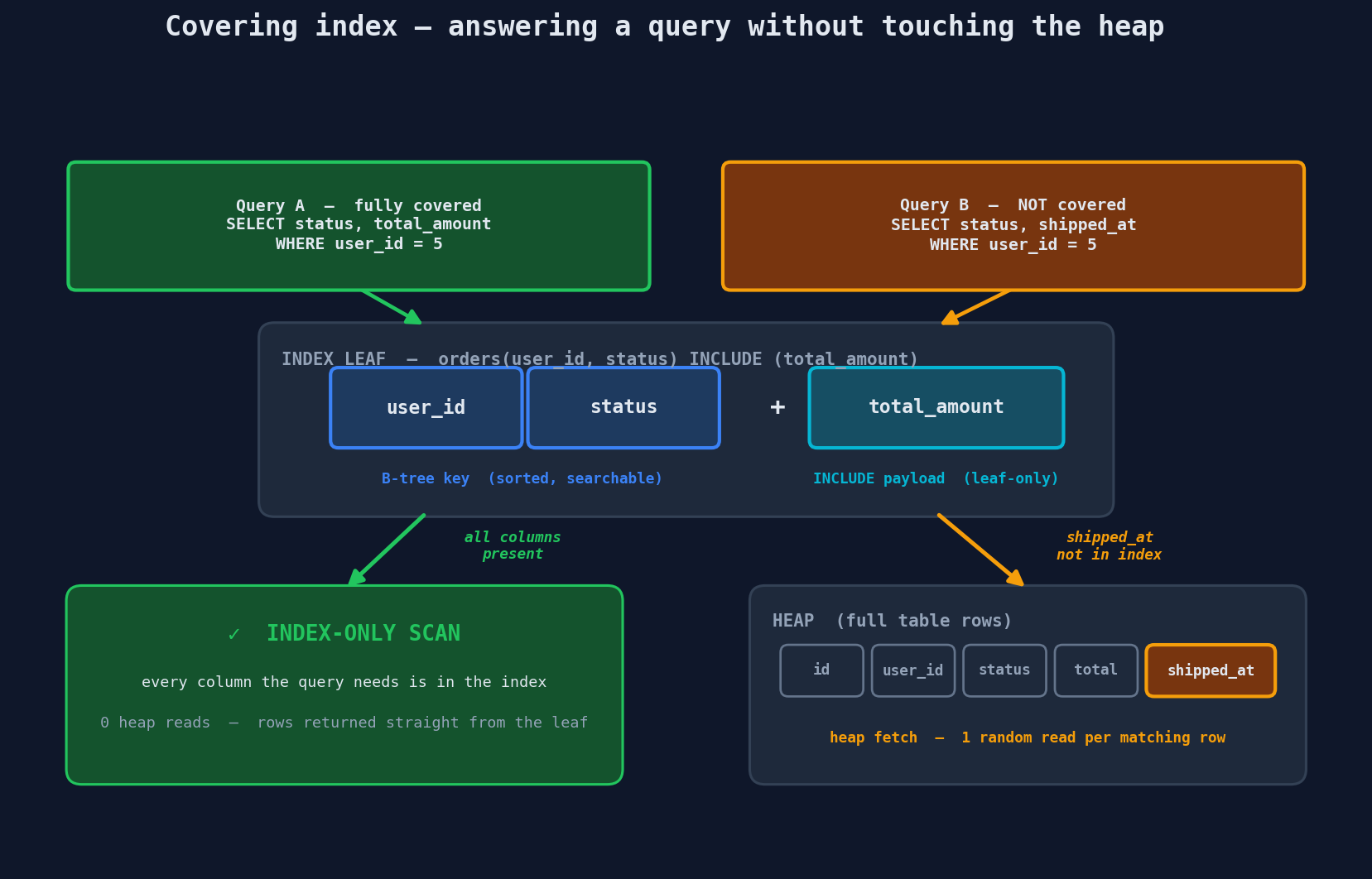
The trade-off: covering indexes are larger because they store more data. But for hot queries that run thousands of times per second, eliminating the heap lookup is a significant win.
Two Gotchas with Covering Indexes
Covering indexes are fragile. Add one more column to a SELECT and your carefully crafted covering index is no longer covering — the database silently falls back to heap lookups and the performance boost disappears. When you change queries, re-check your indexes.
INCLUDE column order doesn't matter. Unlike key columns (where order is everything), the order of INCLUDE columns is irrelevant. They're stored as an unordered payload at the leaf level — they don't participate in tree navigation at all.
Verifying Coverage — and a PostgreSQL Caveat
Run EXPLAIN ANALYZE and look at the scan node. A covered query shows an Index Only Scan:
That Heap Fetches: 0 is the prize — zero trips to the heap.
But notice the database reports heap fetches, which means an index-only scan doesn't always avoid the heap entirely. PostgreSQL still has to confirm each row is visible to your transaction (MVCC). It checks the visibility map — a compact bitmap marking which heap pages are "all-visible." If a row's page is all-visible, no heap access; if it isn't — common right after inserts or updates, before VACUUM catches up — PostgreSQL falls back to a heap fetch for that row. So an index-only scan is a best-effort optimization, not a guarantee. Keep hot tables well-vacuumed so Heap Fetches stays near zero.
Composite vs Covering — They Aren't Separate Types
This is the point that trips people up. These terms describe different dimensions of the same index:
- Composite = a structural property — "this index has multiple key columns"
- Covering = a behavioral property — "this index has every column a specific query needs"
They're not mutually exclusive. A single index can be:
| Scenario | Composite? | Covering? |
|---|---|---|
INDEX(a) answering SELECT a WHERE a = 1 |
No (single column) | Yes |
INDEX(a, b) answering SELECT a, b, c WHERE a = 1 |
Yes | No (c is missing) |
INDEX(a, b, c) answering SELECT b, c WHERE a = 1 |
Yes | Yes |
INDEX(a) INCLUDE(b) answering SELECT b WHERE a = 1 |
No (single key column) | Yes |
When someone says "create a covering index," they mean: identify what columns a critical query needs and make sure they're all present in the index — either as key columns or via INCLUDE.
Partial Indexes — Index Only What Matters
Most tables have data you rarely query. In an orders table, maybe 95% of orders are status = 'completed' and you almost never look them up. The queries you care about are for status = 'pending' or status = 'processing'.
A partial index indexes only a subset of rows:
This index is dramatically smaller than a full index because it only includes the ~5% of rows where status is pending. Smaller index = fewer pages = faster lookups = less memory consumed in the buffer pool.
Partial indexes are perfect for:
- Active/inactive flags:
WHERE is_active = true(most users are inactive) - Unprocessed queues:
WHERE processed_at IS NULL - Soft deletes:
WHERE deleted_at IS NULL(most rows aren't deleted) - Recent data:
WHERE created_at > '2024-01-01'
The predicate must be immutable
A partial index's WHERE clause has to be constant — you cannot write WHERE created_at > now(). That makes the "recent data" case a trap: the hardcoded '2024-01-01' cutoff slowly stops meaning "recent" as time passes, and the index keeps growing. A rolling window needs a scheduled job to DROP and re-CREATE the index with a fresh cutoff — or a different tool entirely (see BRIN below).
GIN Indexes — For JSON and Arrays
PostgreSQL's GIN (Generalized Inverted Index) is designed for columns that contain multiple values — like JSON documents, arrays, or full-text search vectors.
-- Index a JSONB column
CREATE INDEX idx_products_tags ON products USING GIN(metadata);

-- Now this query uses the index:
SELECT * FROM products WHERE metadata @> '{"color": "red"}';
A GIN index works like the index at the back of a textbook. Instead of mapping "page number to content," it maps "content to page numbers." For a JSONB column, it maps every key and value in the JSON to the rows that contain them.
GIN is also used for array containment queries:
-- Find products tagged with both 'electronics' and 'sale'
SELECT * FROM products WHERE tags @> ARRAY['electronics', 'sale'];
GIN also powers fast substring search. A B-tree is useless for a leading-wildcard LIKE '%term%' — but with the pg_trgm extension, a GIN index breaks text into 3-character trigrams and indexes those:
CREATE EXTENSION pg_trgm;
CREATE INDEX idx_users_name_trgm ON users USING GIN(name gin_trgm_ops);

-- A leading-wildcard search that can now use an index:
SELECT * FROM users WHERE name ILIKE '%garcia%';
The downside: GIN indexes are expensive to update because inserting one row might add dozens of index entries (one per JSON key/value, array element, or trigram).
GiST Indexes — For Geospatial Queries
GiST (Generalized Search Tree) indexes handle data types that don't fit neatly into a B-tree's linear sort order — most commonly geometric and geospatial data.
-- With PostGIS extension
CREATE INDEX idx_restaurants_location
ON restaurants USING GiST(location);

-- Find restaurants within 1km of a point
SELECT name FROM restaurants
WHERE ST_DWithin(location, ST_MakePoint(-73.985, 40.748), 1000);
GiST indexes partition space into overlapping regions, allowing efficient "nearest neighbor" and "within radius" queries. Without a GiST index, a proximity query would have to calculate the distance to every single row — an O(N) operation.
BRIN Indexes — Tiny Indexes for Huge, Ordered Tables
A BRIN (Block Range Index) inverts the B-tree's philosophy. Instead of one entry per row, it stores a tiny summary — the min and max value — for each range of physical blocks (128 pages by default).
To answer WHERE created_at BETWEEN ? AND ?, the database scans the summaries, skips every block range whose min/max can't overlap the target, and reads only the survivors. BRIN is lossy — it narrows the search to candidate blocks and then rechecks each row — but the index itself is astonishingly small: kilobytes to index a table a B-tree would need gigabytes for.
The catch: BRIN only helps when the column's values are physically correlated with row order. It shines on append-only data where that happens for free — event logs, time-series, IoT readings, an orders table queried by created_at. On a randomly-ordered column (say, email), every block range spans the whole value space, nothing can be skipped, and BRIN is useless. That correlation requirement is exactly why BRIN is the right tool for the rolling time-window problem partial indexes handle so awkwardly.
Bloom Filters — Probabilistic "Maybe" Checks
A Bloom filter isn't an index in the traditional sense. It's a space-efficient probabilistic data structure that answers one question: "Is this element possibly in the set?"
A Bloom filter can tell you: - "Definitely not here" — 100% certain, skip this file/page - "Possibly here" — might be a false positive, need to check
It can never give a false negative. If the Bloom filter says "not here," the element is guaranteed absent.
Bloom filters are used heavily inside LSM tree databases (Cassandra, RocksDB) to avoid reading SSTables that definitely don't contain the key. They're also used in PostgreSQL (via the bloom extension) for multi-column approximate matching.
Without Bloom filter:                With Bloom filter:
Check SSTable 1 → not here           Bloom says "no"  → skip
Check SSTable 2 → not here           Bloom says "no"  → skip
Check SSTable 3 → not here           Bloom says "no"  → skip
Check SSTable 4 → FOUND              Bloom says "maybe" → check → FOUND

4 disk reads                          1 disk read
Interview Tip
If you mention Cassandra or any LSM-tree database in an interview, follow up with "and it uses Bloom filters to minimize read amplification." That's a detail that separates someone who's read the docs from someone who understands the internals.
When NOT to Index
Every index you add has costs: slower writes, more disk space, more memory pressure on the buffer pool. Here's when adding an index is the wrong move:
Write-heavy tables: If a table has 5 indexes, every INSERT does roughly 6 writes — one to the heap and one to each index. For a logging table receiving 100,000 inserts per second, those extra writes add up fast. UPDATEs can be worse: in PostgreSQL, unless an update qualifies as a HOT (heap-only tuple) update, it writes a new row version plus a new entry in every index — even indexes whose columns didn't change.
Small tables: A table with 1,000 rows fits in a handful of pages. A sequential scan of 5 pages is faster than traversing a B-tree (which involves navigating multiple levels). The query planner knows this and will ignore your index.
Low cardinality columns: An index on a gender column with 3 distinct values is nearly useless. The index points to ~33% of the table for each value — the database would rather just scan the whole table.
Rarely queried columns: An index that nobody queries is pure waste — it slows down writes and consumes disk space for zero benefit.
| Situation | Should You Index? | Why |
|---|---|---|
| Column in frequent WHERE clauses | Yes | Direct lookup benefit |
| Column in JOIN conditions | Yes | Speeds up join lookups |
| Column in ORDER BY | Often yes | Avoids expensive sorts |
| Write-heavy table, rarely read | Probably not | Write cost outweighs read benefit |
| Table with < 1,000 rows | No | Sequential scan is faster |
| Column with < 10 distinct values | Rarely | Low selectivity = index ignored |
| Column only in SELECT (not WHERE) | No (unless covering) | Index only helps filter/sort |
The Interview Index Selection Strategy
When an interviewer asks about indexes for a table, follow this framework:
- Identify the hot queries — what does the application query most?
- Look at WHERE and JOIN columns — those are index candidates
- Check ORDER BY — can an index provide the sort order?
- Consider composite indexes — one index serving multiple queries beats multiple single-column indexes
- Check for covering potential — can you add INCLUDE columns to avoid heap lookups?
- Consider the write load — every index costs on writes
Then verify: run the real query under EXPLAIN ANALYZE and confirm the planner actually picks your index. An index the optimizer ignores is just write overhead.
Quick Recap
| Concept | What It Is | Best For |
|---|---|---|
| Composite index | Index on multiple columns, sorted hierarchically. Obeys the leftmost prefix rule. | Queries filtering/sorting on multiple columns together |
| Covering index | Not a separate type — a property of any index that contains every column a query needs, eliminating heap lookups. A composite index can be covering for one query and not another. | High-frequency queries on specific column sets. Use INCLUDE to add non-key columns for coverage. |
| Partial index | Indexes only rows matching a condition | Sparse lookups (active users, unprocessed items) |
| GIN index | Inverted index for multi-valued columns | JSONB, arrays, full-text and substring (LIKE) search |
| GiST index | Spatial partitioning tree | Geospatial queries, range types |
| BRIN index | Min/max summary per block range — tiny and lossy | Huge tables whose physical order correlates with the column (time-series, logs) |
| Bloom filter | Probabilistic "definitely not" / "maybe" check | Reducing read amplification in LSM trees |
Further reading: For a quick-reference summary, see the standalone Database Indexing article.