Chunked and Resumable Uploads
TL;DR
Large files should be split into chunks and uploaded in parallel. If the connection drops, the client asks the server which chunks it already has and sends only the missing ones. S3 multipart upload is the cloud-native implementation: minimum 5MB per part, up to 10,000 parts, maximum 5GB per part, maximum 5TB per object. The key vocabulary -- upload ID, part number, ETag, fingerprint -- maps directly to interview discussions.
The 25GB Problem
A filmmaker uploads a 25GB raw footage file. The upload runs for 47 minutes, reaches 99%, and the hotel Wi-Fi drops for 3 seconds.
With a single-PUT upload: start over. All 25GB, from byte zero.
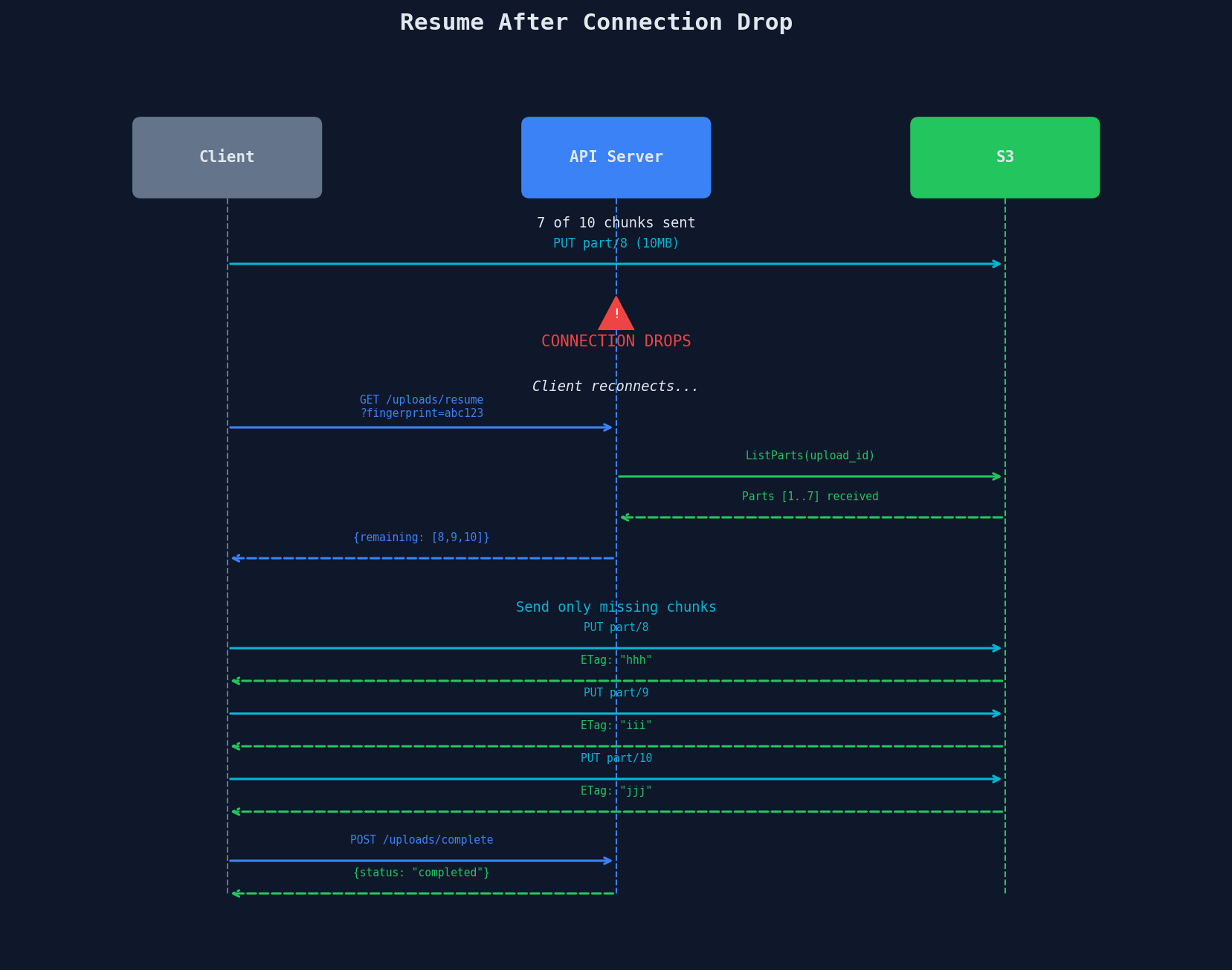
With chunked resumable upload: reconnect, ask "which chunks do you have?", send the remaining 1%.
That's the difference between a product people tolerate and a product people trust.
The Chunked Upload Protocol
Every chunked upload system follows the same three-phase protocol:
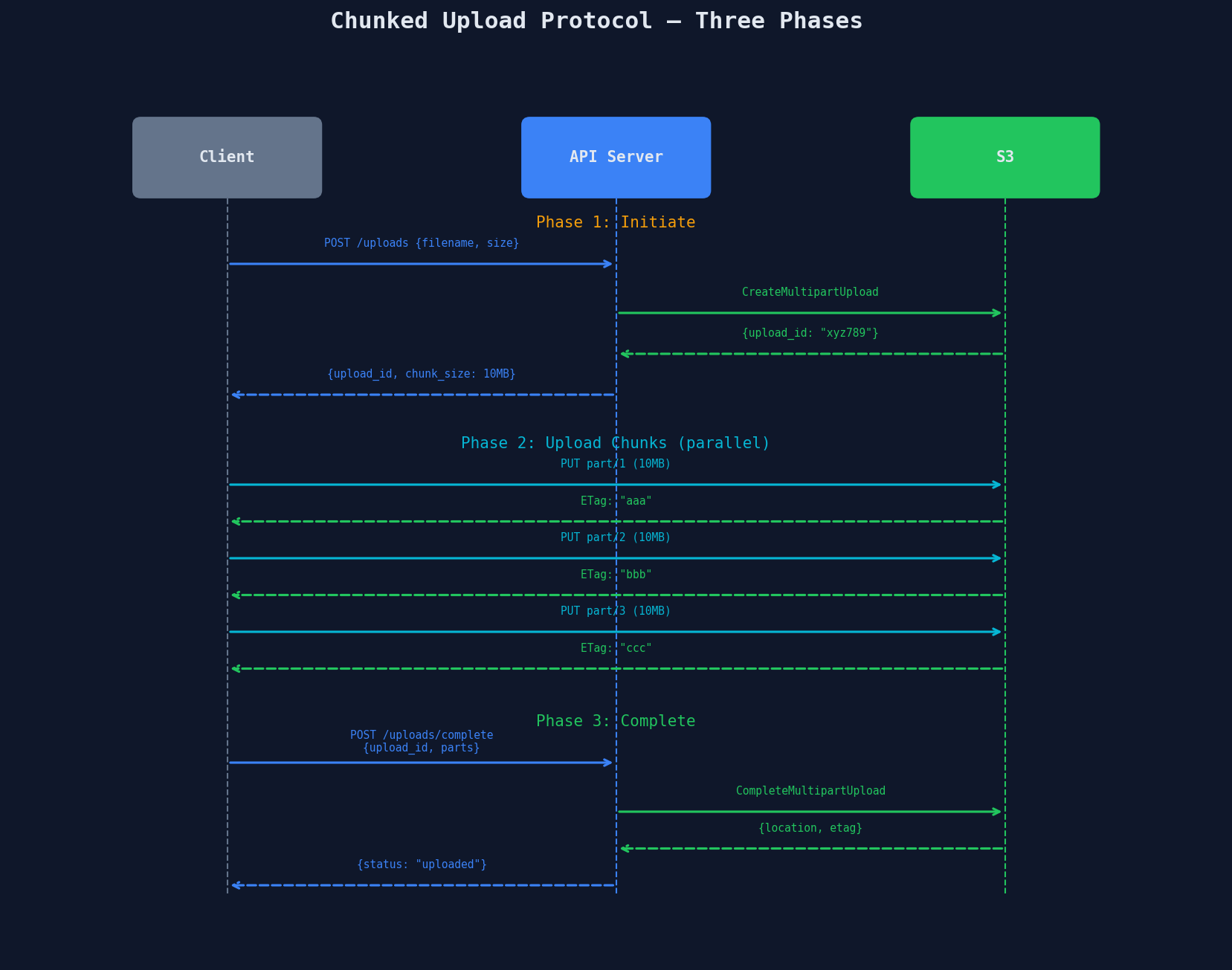
Phase 1: Initiate
The client tells the server what it's uploading. The server creates a multipart upload session and returns an upload ID.
@app.route("/api/uploads", methods=["POST"])
def initiate_upload():
    user = get_current_user()
    filename = request.json["filename"]
    size = request.json["size"]
    content_type = request.json["content_type"]

    s3_key = f"uploads/{user.id}/{uuid.uuid4()}/{filename}"

    # Create multipart upload session
    response = s3_client.create_multipart_upload(
        Bucket="my-bucket",
        Key=s3_key,
        ContentType=content_type,
    )
    upload_id = response["UploadId"]

    # Calculate chunk size and count
    chunk_size = max(10 * 1024**2, size // 9999)  # At least 10MB, max 10K parts
    total_chunks = math.ceil(size / chunk_size)

    # Store upload session
    db.uploads.insert({
        "upload_id": upload_id,
        "user_id": user.id,
        "s3_key": s3_key,
        "total_chunks": total_chunks,
        "chunk_size": chunk_size,
        "status": "in_progress",
    })

    # Generate presigned URLs for each chunk
    chunk_urls = []
    for part_num in range(1, total_chunks + 1):
        url = s3_client.generate_presigned_url(
            "upload_part",
            Params={
                "Bucket": "my-bucket",
                "Key": s3_key,
                "UploadId": upload_id,
                "PartNumber": part_num,
            },
            ExpiresIn=3600,
        )
        chunk_urls.append({"part_number": part_num, "url": url})

    return jsonify({
        "upload_id": upload_id,
        "chunk_size": chunk_size,
        "total_chunks": total_chunks,
        "chunk_urls": chunk_urls,
    }), 200
Phase 2: Upload Chunks in Parallel
The client splits the file and uploads chunks concurrently. Each successful upload returns an ETag -- the server's receipt for that chunk.
// Client-side: parallel chunk upload
async function uploadChunks(file, chunkUrls, chunkSize) {
    const CONCURRENT_LIMIT = 4;
    const parts = [];

    // Process chunks in batches of 4
    for (let i = 0; i < chunkUrls.length; i += CONCURRENT_LIMIT) {
        const batch = chunkUrls.slice(i, i + CONCURRENT_LIMIT);
        const results = await Promise.all(
            batch.map(({ part_number, url }) => {
                const start = (part_number - 1) * chunkSize;
                const end = Math.min(start + chunkSize, file.size);
                const chunk = file.slice(start, end);

                return fetch(url, { method: "PUT", body: chunk })
                    .then(res => ({
                        PartNumber: part_number,
                        ETag: res.headers.get("ETag"),
                    }));
            })
        );
        parts.push(...results);
        onProgress((i + batch.length) / chunkUrls.length * 100);
    }
    return parts;
}
Phase 3: Complete
The client sends all part numbers and ETags. S3 assembles the chunks into a single object.
@app.route("/api/uploads/complete", methods=["POST"])
def complete_upload():
    upload_id = request.json["upload_id"]
    parts = request.json["parts"]  # [{PartNumber: 1, ETag: "aaa"}, ...]

    upload = db.uploads.find_one({"upload_id": upload_id})

    # Tell S3 to assemble the parts
    s3_client.complete_multipart_upload(
        Bucket="my-bucket",
        Key=upload["s3_key"],
        UploadId=upload_id,
        MultipartUpload={
            "Parts": sorted(parts, key=lambda p: p["PartNumber"])
        },
    )

    db.uploads.update(upload_id, {"status": "completed"})
    return jsonify({"status": "completed"}), 200
The Resume Vocabulary
These four terms show up in every chunked upload system. Nail the terminology:
| Term | What It Is | Who Creates It |
|---|---|---|
| Upload ID | Session ticket for this upload. All chunks reference it. | Server (from S3) |
| Part Number | Index of this chunk (1-based). Determines assembly order. | Client |
| ETag | Server receipt for a chunk. MD5 hash of the chunk content. | S3 (on successful PUT) |
| Fingerprint | Client-side ID for the file -- typically hash(name + size + lastModified). Used to match a file to an existing upload session after app restart. |
Client |
The fingerprint is the clever part. When the user reopens the app, the client computes the fingerprint of the file they're trying to upload. If it matches an in-progress upload session, the client can resume instead of starting fresh.
Resume After Connection Drop
@app.route("/api/uploads/resume", methods=["GET"])
def resume_upload():
    fingerprint = request.args["fingerprint"]

    # Find the in-progress upload matching this file
    upload = db.uploads.find_one({
        "fingerprint": fingerprint,
        "user_id": get_current_user().id,
        "status": "in_progress",
    })

    if not upload:
        return jsonify({"resumable": False}), 404

    # Ask S3 which parts it already has
    response = s3_client.list_parts(
        Bucket="my-bucket",
        Key=upload["s3_key"],
        UploadId=upload["upload_id"],
    )
    received = [p["PartNumber"] for p in response.get("Parts", [])]
    remaining = [n for n in range(1, upload["total_chunks"] + 1) if n not in received]

    # Generate fresh presigned URLs for remaining chunks only
    chunk_urls = []
    for part_num in remaining:
        url = s3_client.generate_presigned_url(
            "upload_part",
            Params={
                "Bucket": "my-bucket",
                "Key": upload["s3_key"],
                "UploadId": upload["upload_id"],
                "PartNumber": part_num,
            },
            ExpiresIn=3600,
        )
        chunk_urls.append({"part_number": part_num, "url": url})

    return jsonify({
        "resumable": True,
        "upload_id": upload["upload_id"],
        "received_parts": received,
        "remaining_urls": chunk_urls,
    }), 200
S3 Multipart Upload Limits
These numbers come up in sizing discussions:
| Parameter | Limit |
|---|---|
| Minimum part size | 5MB (except the last part) |
| Maximum part size | 5GB |
| Maximum parts | 10,000 |
| Maximum object size | 5TB (10,000 x 5GB per part, but S3 caps total object at 5TB) |
| Upload ID lifetime | No expiry -- but incomplete uploads incur storage costs |
| Concurrent uploads | No limit per bucket (but 3,500 PUT/s per prefix) |
Incomplete multipart uploads cost money
S3 stores each uploaded part. If you initiate a multipart upload and never complete or abort it, those parts sit in S3 and you pay for them. Set a lifecycle policy to auto-abort incomplete uploads after a few days:
Choosing a Chunk Size
The chunk size balances competing concerns:
| Factor | Small Chunks (5MB) | Large Chunks (100MB) |
|---|---|---|
| Parallelism | More concurrent uploads possible | Fewer connections |
| Resume granularity | Lose at most 5MB on failure | Lose at most 100MB on failure |
| HTTP overhead | More requests = more overhead | Fewer requests |
| Max file size | 50GB (10K x 5MB) | 1TB (10K x 100MB), capped at 5TB |
| Progress bar smoothness | Very smooth | Jumpy updates |
A reasonable default: 10MB chunks for files under 50GB, scaling up to 100MB for very large files. This keeps the part count well under 10,000 and the resume penalty small.
The tus Protocol: An Open Standard
Instead of building your own resumable upload protocol, consider tus -- an open protocol adopted by Vimeo, Cloudflare, and others.
# tus protocol in 4 HTTP requests

# 1. Create upload
POST /files HTTP/1.1
Upload-Length: 26843545600
Tus-Resumable: 1.0.0

HTTP/1.1 201 Created
Location: /files/abc123

# 2. Upload a chunk
PATCH /files/abc123 HTTP/1.1
Upload-Offset: 0
Content-Length: 10485760

HTTP/1.1 204 No Content
Upload-Offset: 10485760

# 3. Check progress (after reconnect)
HEAD /files/abc123 HTTP/1.1

HTTP/1.1 200 OK
Upload-Offset: 10485760
Upload-Length: 26843545600

# 4. Resume from where we left off
PATCH /files/abc123 HTTP/1.1
Upload-Offset: 10485760
Key advantages: standardized protocol, client libraries for every platform, server implementations for most languages, and built-in checksum verification.
Progress Tracking
Chunked uploads give you natural progress granularity:
def calculate_progress(upload_id):
    upload = db.uploads.find_one({"upload_id": upload_id})
    parts = s3_client.list_parts(
        Bucket="my-bucket", Key=upload["s3_key"], UploadId=upload_id
    )
    received = len(parts.get("Parts", []))
    total = upload["total_chunks"]

    return {
        "percent": round(received / total * 100, 1),
        "chunks_uploaded": received,
        "chunks_total": total,
        "bytes_uploaded": received * upload["chunk_size"],
        "bytes_total": upload["total_size"],
    }
The client can also track intra-chunk progress using XMLHttpRequest.upload.onprogress for a smooth progress bar that updates within each chunk, not just between them.
Interview Tip
The three-sentence summary
"For large file uploads, I'd use chunked multipart upload. The client splits the file into 10MB parts and uploads them in parallel using presigned URLs. If the connection drops, the client asks the server which parts were received and resends only the missing ones -- so a 25GB file that fails at 99% only re-uploads the last chunk, not the whole file."
Follow up with the S3 constraints if asked: 5MB minimum part size, 5GB max part size, 10K max parts, 5TB max object size.
Key Takeaways
| Concept | Details |
|---|---|
| Three phases | Initiate (get upload ID) -> Upload parts (parallel) -> Complete (assemble) |
| ETag | Server receipt per chunk; MD5 hash of chunk content |
| Fingerprint | Client-side file ID for matching to existing upload sessions |
| Resume | ListParts to check what S3 has, send the rest |
| S3 limits | 5MB min part, 5GB max part, 10K max parts, 5TB max object |
| Chunk size | 10MB default balances parallelism, resume cost, and request overhead |
| tus protocol | Open standard for resumable uploads with broad adoption |