Life of a Web Request
TL;DR
When you type a URL and hit enter, at least 10 separate messages fly back and forth before you see a single pixel. Understanding this journey shows you where latency hides and where things break.
You Type a URL. Then What?
You type www.example.com into your browser and press enter. A page appears. Feels instant, right?
Under the hood, your browser just had a very busy 200 milliseconds. Let's follow every step.
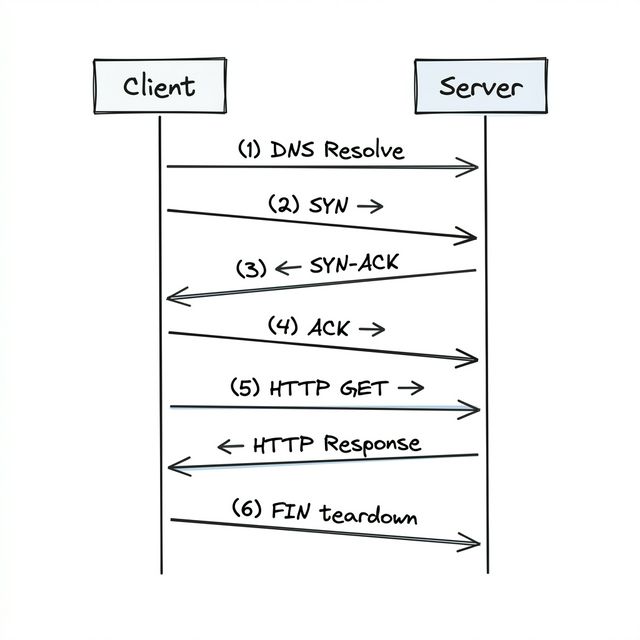
Step 1: Finding the Address (DNS)
Your browser doesn't know where www.example.com lives. It needs a street address — in internet terms, an IP address like 93.184.216.34.
So it asks a DNS server. DNS is basically the phone book of the internet. You give it a name ("example.com"), it gives you back a number ("93.184.216.34").
Your browser actually checks several places before asking a DNS server: - Its own cache ("did I look this up recently?") - Your operating system's cache - Your router's cache - Your ISP's DNS server
Only if nobody has the answer does the request travel further up the chain. Once found, the result gets cached so next time it's instant.
Step 2: Establishing a Connection (TCP Handshake)
Now your browser knows the IP address. But before it can send anything, it needs to set up a reliable connection. Think of it like making a phone call — before you can talk, someone has to pick up.
This happens through a three-way handshake:
- Your browser says "Hey, can we talk?" (sends a SYN packet)
- The server says "Sure, I'm ready" (sends back a SYN-ACK packet)
- Your browser says "Great, let's go" (sends an ACK packet)
That's three messages back and forth before a single byte of your actual request has been sent. If the server is on another continent, each of those messages takes time — the speed of light isn't infinite.
Step 3: Asking for the Page (HTTP Request)
With the connection established, your browser finally sends the actual request:
This is like saying: "Hey server, please give me the homepage."
Step 4: The Server Does Its Thing
The server receives the request and does whatever work it needs to — query a database, run some logic, build an HTML page.
Here's a funny truth: this step is usually the only part of the latency that most developers think about. "My API is slow" usually means "my server code is slow." But as you can see, there's a whole bunch of overhead on either side.
Step 5: Getting the Response
The server sends back the page content along with a status code (like 200 OK meaning "here you go, everything's fine").
Step 6: Hanging Up (TCP Teardown)
Once everything's been received, the connection gets closed through a four-way handshake:
- Client: "I'm done sending" (FIN)
- Server: "Got it" (ACK)
- Server: "I'm done too" (FIN)
- Client: "Got it, bye" (ACK)
Unless the connection uses keep-alive (which modern browsers do by default), this entire dance repeats for every single request. Images, CSS files, JavaScript — each one used to require its own handshake. That's why HTTP/2 and keep-alive were such big improvements — they let you reuse the same connection.
Why This Matters (Three Big Takeaways)
This isn't just trivia. There are three insights here that'll show up throughout this entire course.
1. The Layers Are Doing Heavy Lifting for You
Notice how you never had to think about routing, packet ordering, or retransmission? You just said fetch('/api/users') in your code, and layers 3 and 4 handled everything underneath. That's the layered model from the last lesson, working exactly as designed.
2. One "Request" = Many Packets
You made one request and got one response. But underneath, at least 10 separate packets were exchanged (DNS lookup, TCP handshake, the request itself, the response, and TCP teardown). Each one adds a tiny bit of latency.
Most of the time, you can ignore this. But when your servers are in New York and your users are in Tokyo, those tiny bits add up to hundreds of milliseconds. And if a single page needs 5 sequential API calls, you're paying that cost 5 times.
3. Connections Cost Memory
Both the client and the server have to remember the TCP connection — it sits in memory on both sides. That's not free. A server with 10,000 simultaneous connections has 10,000 chunks of memory dedicated to tracking them.
This is exactly why persistent connections matter for real-time systems. When we get to WebSockets in Chapter 4, you'll see how they keep a single connection alive instead of creating new ones over and over.
A Quick Word on IP Addresses
Before we move to the transport layer, let's nail down IP addresses since they came up twice already.
Every device on the internet gets an IP address. There are two kinds:
- Public IPs — Visible on the open internet. When you visit a website, your request is routed to the server's public IP. Internet backbone routers know that addresses starting with
17.x.x.xbelong to Apple, for example, and route traffic accordingly. - Private IPs — Used inside private networks (your home WiFi, a company's data center). Not reachable from the outside internet. Your laptop's
192.168.1.xaddress is a private IP.
How does your device get an IP address? Usually through a protocol called DHCP — when your device joins a network, it asks "what's my address?" and a DHCP server assigns one.
For system design, you mostly just need to know that public IPs exist and that DNS translates domain names into them. Private IPs become important when you're designing the internals of a system — services inside your cloud network talk to each other via private IPs.
Interview Tip
The classic question "what happens when you type a URL into your browser?" used to be a popular interview question at Big Tech companies. It's less common now, but understanding this flow will help you reason about latency, connection overhead, and failure points throughout any system design discussion.