Scaling Workers
TL;DR
A queue without properly scaled workers is just a growing to-do list. Use priority queues to process payments before analytics. Use fan-out/fan-in to split one massive job into parallel sub-jobs and aggregate the results. Autoscale workers based on queue depth, not CPU. And keep workers healthy with heartbeats, graceful shutdown on SIGTERM, and rate-limited processing to protect downstream services.
Priority Queues: Not All Jobs Are Equal
A payment refund that's stuck behind 10,000 analytics events is a customer support nightmare. Priority queues ensure critical work gets processed first.
The Priority Tiers
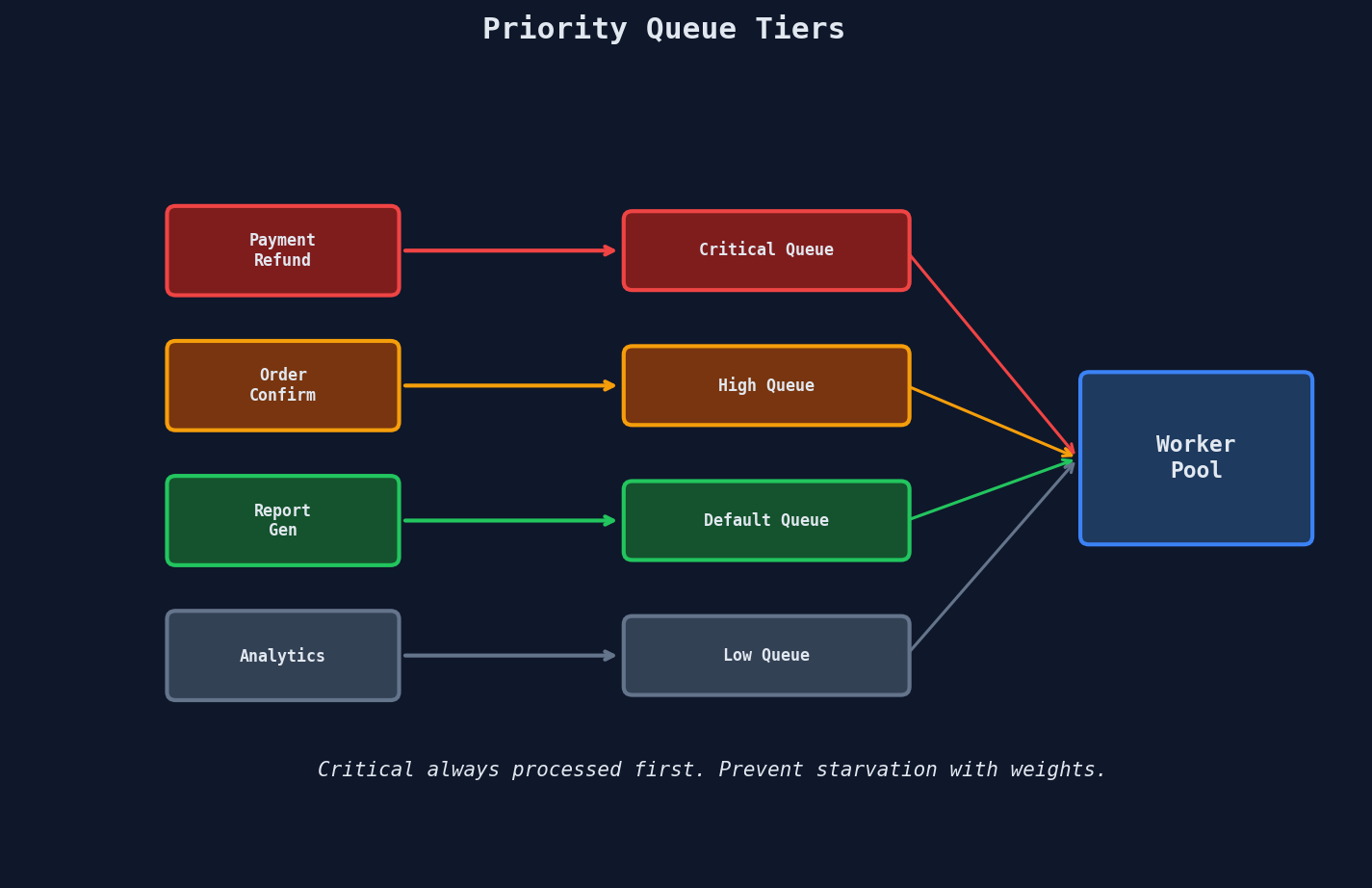
| Priority | Examples | SLA |
|---|---|---|
| Critical | Payment processing, refunds, security alerts | < 30 seconds |
| High | Order confirmation emails, webhook delivery | < 2 minutes |
| Default | Report generation, CSV exports | < 15 minutes |
| Low | Analytics aggregation, cache warming, thumbnails | < 1 hour |
Implementation: Separate Queues vs. Single Queue
Approach 1: Separate queues per priority (recommended for SQS)
PRIORITY_QUEUES = {
    "critical": "jobs-critical",
    "high":     "jobs-high",
    "default":  "jobs-default",
    "low":      "jobs-low",
}

def worker_loop():
    """Always drain higher priority queues first."""
    while True:
        for priority in ["critical", "high", "default", "low"]:
            messages = sqs.receive_message(
                QueueUrl=PRIORITY_QUEUES[priority],
                MaxNumberOfMessages=10,
                WaitTimeSeconds=1  # short poll per queue
            )
            if messages.get("Messages"):
                for msg in messages["Messages"]:
                    process(msg)
                    sqs.delete_message(
                        QueueUrl=PRIORITY_QUEUES[priority],
                        ReceiptHandle=msg["ReceiptHandle"]
                    )
                break  # restart from critical after processing
        else:
            # All queues empty -- long poll on default
            time.sleep(2)
Approach 2: Native priority (RabbitMQ, BullMQ)
// BullMQ: lower number = higher priority
await queue.add("refund", { orderId: "123" }, { priority: 1 });
await queue.add("report", { userId: "456" }, { priority: 5 });
await queue.add("analytics", { event: "click" }, { priority: 10 });
Preventing Starvation
Pure priority ordering can starve low-priority jobs indefinitely during sustained load. Two defenses:
Weighted fair queuing: Process 6 from critical, 3 from high, 2 from default, 1 from low in each cycle.
WEIGHTS = {"critical": 6, "high": 3, "default": 2, "low": 1}

def weighted_worker_loop():
    while True:
        for priority, count in WEIGHTS.items():
            messages = receive_messages(PRIORITY_QUEUES[priority], max_count=count)
            for msg in messages:
                process(msg)
Age-based promotion: If a low-priority job has been waiting more than 30 minutes, promote it to default.
def promote_stale_jobs():
    """Run every 5 minutes. Promotes jobs waiting too long."""
    stale = db.jobs.find({
        "status": "pending",
        "priority": "low",
        "created_at": {"$lt": datetime.utcnow() - timedelta(minutes=30)}
    })
    for job in stale:
        move_to_queue(job["id"], from_queue="jobs-low", to_queue="jobs-default")
Fan-out / Fan-in: Parallelizing Big Jobs
Some jobs are too large for a single worker. A 2-hour video needs thumbnails at 20 timestamps. A million-row CSV needs validation. A monthly report needs data from 12 partitions.
The pattern: split one job into N parallel sub-jobs (fan-out), process them concurrently, then aggregate when all complete (fan-in).
Fan-out
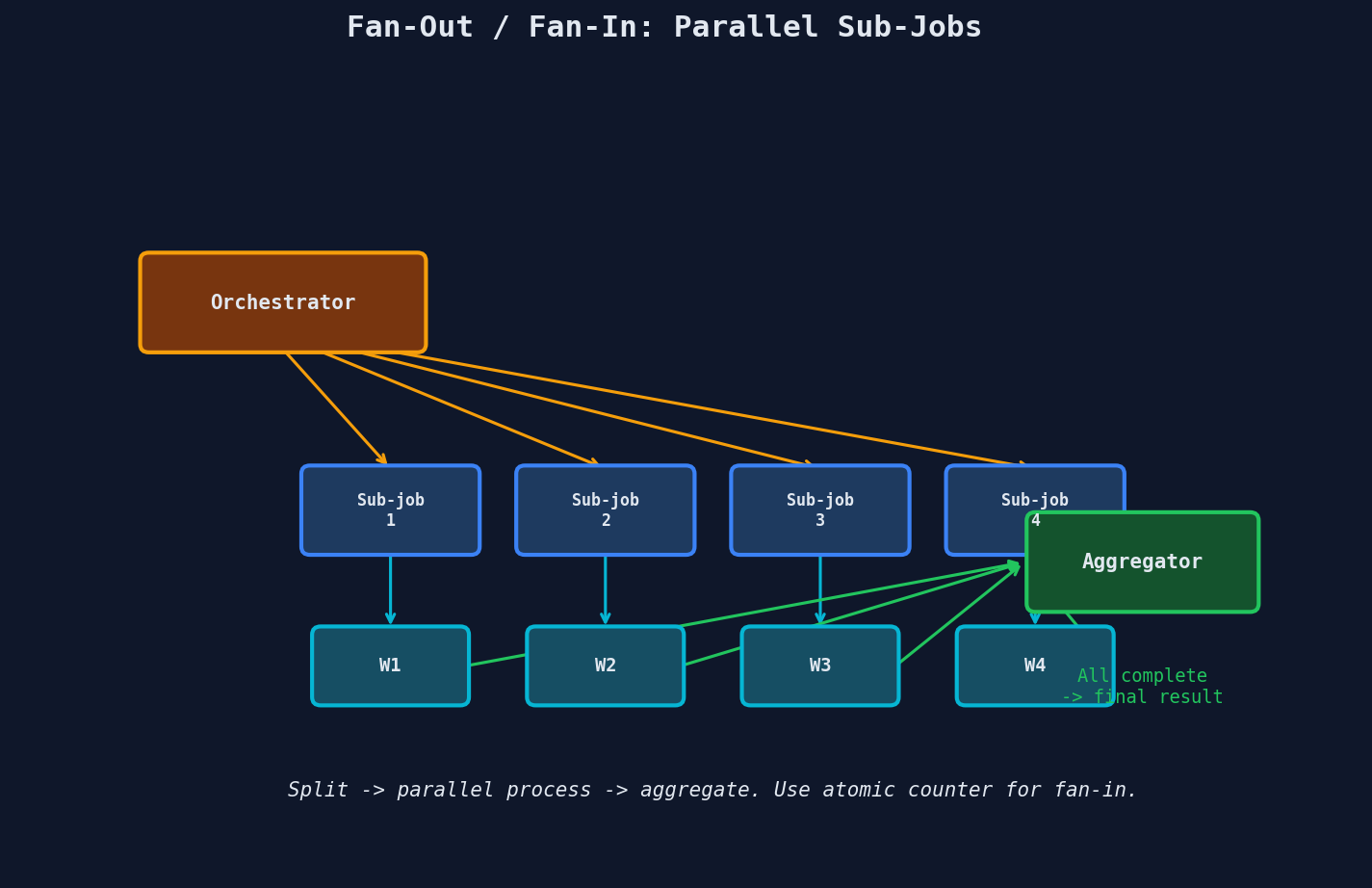
def fan_out_video_processing(job_id: str, video_url: str):
    """Split video into chunks and process in parallel."""
    duration = get_video_duration(video_url)
    chunk_size = 30  # seconds per chunk
    num_chunks = math.ceil(duration / chunk_size)

    # Create parent job tracking record
    db.fan_out_jobs.insert({
        "parent_job_id": job_id,
        "total_sub_jobs": num_chunks,
        "completed_sub_jobs": 0,
        "results": {}
    })

    # Enqueue sub-jobs
    for i in range(num_chunks):
        sub_job = {
            "parent_job_id": job_id,
            "sub_job_index": i,
            "video_url": video_url,
            "start_time": i * chunk_size,
            "end_time": min((i + 1) * chunk_size, duration),
        }
        queue.send_message(json.dumps(sub_job))
Fan-in: The Atomic Counter
The tricky part: knowing when all sub-jobs are done. Use an atomic counter -- the last worker to finish triggers the aggregation.
def on_sub_job_complete(parent_job_id: str, sub_job_index: int, result: dict):
    """Called when a sub-job finishes. Uses atomic increment to detect completion."""

    # Atomic increment -- returns the NEW value after increment
    completed = r.hincrby(f"fan_in:{parent_job_id}", "completed", 1)

    # Store this sub-job's result
    r.hset(f"fan_in:{parent_job_id}", f"result:{sub_job_index}", json.dumps(result))

    # Check if all sub-jobs are done
    total = int(r.hget(f"fan_in:{parent_job_id}", "total"))

    if completed == total:
        # This worker is the last one -- trigger aggregation
        aggregate_results(parent_job_id)


def aggregate_results(parent_job_id: str):
    """Combine all sub-job results into the final output."""
    fan_in_data = r.hgetall(f"fan_in:{parent_job_id}")

    results = {}
    for key, value in fan_in_data.items():
        if key.startswith("result:"):
            index = int(key.split(":")[1])
            results[index] = json.loads(value)

    # Combine in order
    final_output = combine_video_chunks(sorted(results.items()))
    job_service.complete_job(parent_job_id, {"output_url": final_output})

    # Cleanup
    r.delete(f"fan_in:{parent_job_id}")
Race condition without atomics
If you read the counter, increment in application code, and write back, two workers can both read "19 of 20", both increment to 20, and both trigger aggregation. Redis HINCRBY is atomic -- it returns the value after the increment, so exactly one worker sees the final count.
Fan-out Failure Handling
What if sub-job 7 out of 20 fails?
| Strategy | Trade-off |
|---|---|
| Fail entire job | Simple but wasteful -- 19 successful chunks are discarded |
| Retry sub-job only | Efficient but needs per-sub-job retry tracking |
| Partial result | Return what completed, mark missing chunks (works for analytics, not video) |
| Timeout + partial | Wait N minutes, then aggregate whatever finished |
YouTube processes 500+ hours of video uploaded every minute. Each upload fans out into dozens of sub-jobs: thumbnail generation, multiple resolution transcodes (360p through 4K), content moderation, caption extraction, and copyright detection -- all running in parallel.
Autoscaling: Match Workers to Load
Static worker counts waste money (over-provisioned during quiet periods) or drop jobs (under-provisioned during spikes). Autoscale based on queue depth.
Queue Depth-Based Scaling (AWS)
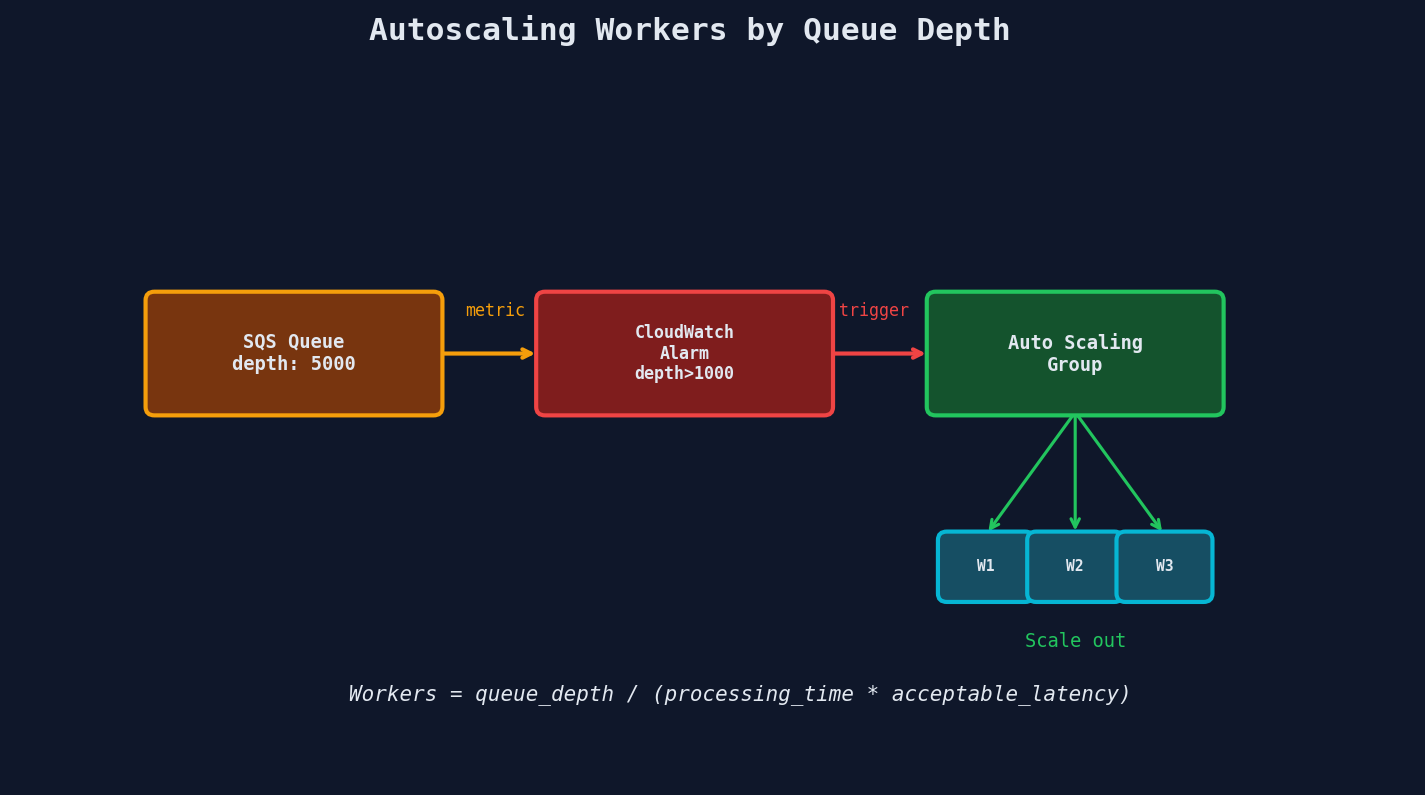
The formula AWS recommends:
Desired capacity = Queue depth / (Processing time per message * Acceptable latency)

Example:
  Queue depth:        10,000 messages
  Processing time:    2 seconds per message
  Acceptable latency: 5 minutes (300 seconds)

  Desired capacity = 10,000 / (2 * 300) = ~17 workers
Kubernetes KEDA
KEDA (Kubernetes Event-Driven Autoscaling) scales pods based on external metrics -- queue depth, HTTP request rate, cron schedules, or custom metrics.
apiVersion: keda.sh/v1alpha1
kind: ScaledObject
metadata:
  name: report-worker
spec:
  scaleTargetRef:
    name: report-worker-deployment
  minReplicaCount: 1       # always keep 1 running
  maxReplicaCount: 50      # never exceed 50
  cooldownPeriod: 300      # wait 5 min before scaling down
  triggers:
    - type: aws-sqs-queue
      metadata:
        queueURL: https://sqs.us-east-1.amazonaws.com/123/report-jobs
        queueLength: "5"   # target 5 messages per pod
        awsRegion: us-east-1
queueLength: "5" means KEDA targets 5 messages per pod. If there are 100 messages in the queue, KEDA scales to 20 pods.
Scheduled Scaling
Some load is predictable. E-commerce gets hammered on Black Friday. B2B SaaS sees spikes at 9 AM when users arrive.
# Kubernetes CronHPA or AWS Scheduled Scaling
apiVersion: autoscaling/v2
kind: HorizontalPodAutoscaler
metadata:
  name: report-worker-scheduled
spec:
  behavior:
    scaleUp:
      policies:
        - type: Pods
          value: 10
          periodSeconds: 60    # add up to 10 pods per minute
    scaleDown:
      stabilizationWindowSeconds: 300  # wait 5 min before scaling down
Shopify scales their background job infrastructure by 10x ahead of Black Friday, processing over 80 billion jobs per year. The combination of pre-scaling and reactive autoscaling keeps their queue depths manageable even during the most extreme traffic events of the year.
Worker Health and Reliability
Heartbeats: Proving You're Still Working
Long-running jobs risk exceeding the queue's visibility timeout. The worker should extend the timeout periodically.
import threading

def heartbeat(message, interval=60):
    """Extend visibility timeout while processing."""
    def _beat():
        while not heartbeat.done:
            sqs.change_message_visibility(
                QueueUrl=QUEUE_URL,
                ReceiptHandle=message["ReceiptHandle"],
                VisibilityTimeout=120  # extend by 2 minutes
            )
            time.sleep(interval)

    heartbeat.done = False
    thread = threading.Thread(target=_beat, daemon=True)
    thread.start()
    return heartbeat

def process_with_heartbeat(message):
    hb = heartbeat(message, interval=60)
    try:
        do_long_work(message)  # might take 20 minutes
    finally:
        hb.done = True
Graceful Shutdown: Handling SIGTERM
When autoscaling removes a worker or a deployment rolls out new code, the orchestrator sends SIGTERM. The worker should finish its current job before exiting -- not drop it mid-process.
import signal
import sys

shutdown_requested = False

def handle_sigterm(signum, frame):
    global shutdown_requested
    shutdown_requested = True
    print("SIGTERM received. Finishing current job, then shutting down...")

signal.signal(signal.SIGTERM, handle_sigterm)

def worker_main():
    while not shutdown_requested:
        message = receive_message(wait_time=5)
        if message:
            process(message)     # finish this job
            acknowledge(message)
        # Loop checks shutdown_requested before picking up next job

    print("Graceful shutdown complete.")
    sys.exit(0)
Kill deadline
Kubernetes sends SIGTERM, then waits terminationGracePeriodSeconds (default: 30s) before sending SIGKILL. If your jobs take longer than 30 seconds, increase this value or your jobs will be killed mid-processing.
Rate-Limited Processing: Protecting Downstream
Your workers might be able to process 1,000 jobs per second, but the downstream API you're calling has a rate limit of 100 requests per second. Without throttling, your workers will get rate-limited, waste retries, and potentially get banned.
import time
from threading import Lock

class TokenBucket:
    """Rate limiter using the token bucket algorithm."""

    def __init__(self, rate: float, capacity: int):
        self.rate = rate          # tokens per second
        self.capacity = capacity  # max burst size
        self.tokens = capacity
        self.last_refill = time.monotonic()
        self.lock = Lock()

    def acquire(self):
        with self.lock:
            now = time.monotonic()
            elapsed = now - self.last_refill
            self.tokens = min(self.capacity, self.tokens + elapsed * self.rate)
            self.last_refill = now

            if self.tokens >= 1:
                self.tokens -= 1
                return True
            return False

    def wait_and_acquire(self):
        while not self.acquire():
            time.sleep(0.01)

# Limit to 50 API calls per second
limiter = TokenBucket(rate=50, capacity=50)

def rate_limited_worker(message):
    limiter.wait_and_acquire()
    call_external_api(message)
Monitoring What Matters
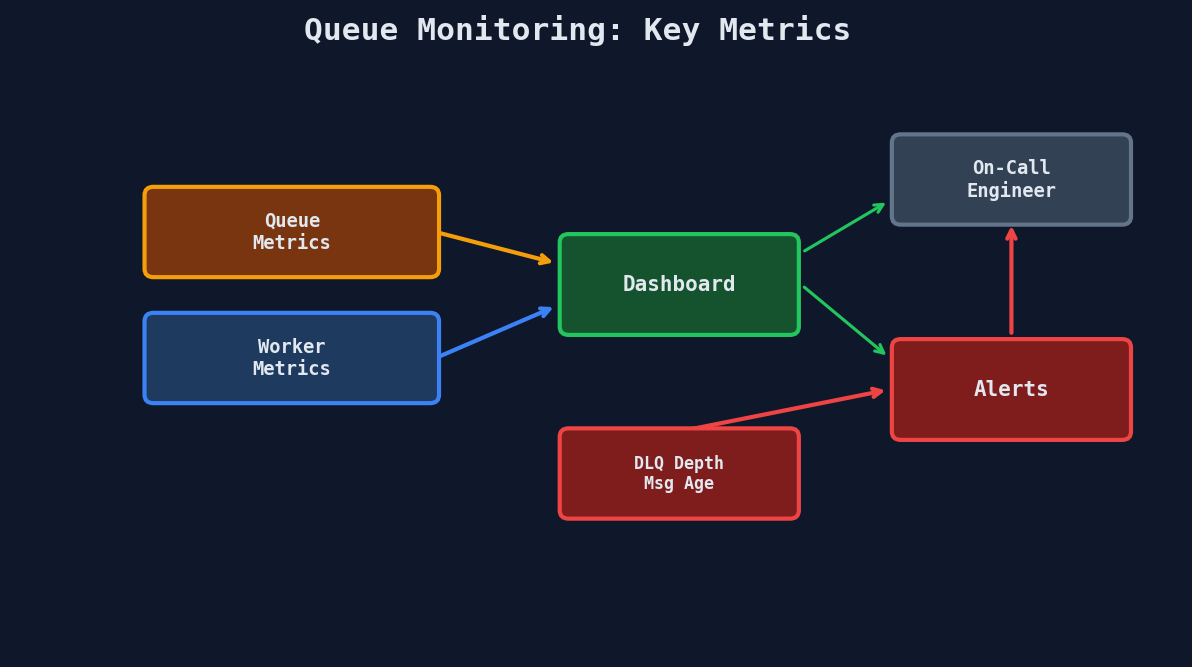
| Metric | Alert Threshold | Why |
|---|---|---|
| Queue depth | Steadily growing | Workers can't keep up with producers |
| Message age | Oldest message > SLA | Jobs are stuck or processing too slowly |
| DLQ depth | > 0 | Failed jobs need investigation |
| Worker error rate | > 5% | Bug in consumer code or downstream failure |
| Processing duration P99 | > 2x normal | Performance regression or bad data |
| Worker utilization | < 20% for 30 min | Over-provisioned, scale down |
The Complete Scaling Playbook
| Load Level | Workers | Strategy |
|---|---|---|
| Quiet (< 100 msg/min) | 1-2 | Minimum replicas, long polling |
| Normal (100-1K msg/min) | 3-10 | Queue depth autoscaling |
| Spike (1K-10K msg/min) | 10-50 | Aggressive scale-up, short cooldown |
| Extreme (10K+ msg/min) | 50-200 | Pre-scaled + reactive, fan-out for large jobs |
| Black Friday | Pre-scale 10x | Scheduled scaling days before, reactive on top |
Key Takeaways
| Concept | Details |
|---|---|
| Priority queues | Critical > High > Default > Low; prevent starvation with weights |
| Fan-out/fan-in | Split big jobs into parallel sub-jobs; use atomic counter for aggregation |
| Autoscaling | Queue depth / (processing time * SLA) = desired worker count |
| Graceful shutdown | Handle SIGTERM, finish current job, then exit |
| Rate limiting | Token bucket protects downstream services from worker throughput |
| Heartbeats | Extend visibility timeout for long-running jobs |