Pagination
TL;DR
You can't return a million records in one API response. Pagination splits large datasets into pages. Offset-based pagination is simple and lets users jump to any page, but data shifts cause duplicates and missed records. Cursor-based pagination is stable under writes and performs consistently, but you can't "jump to page 5." Use offset for admin dashboards, cursor for feeds and real-time data.
The Library Analogy
Imagine you walk into a library with 100,000 books and ask the librarian: "Show me all your books." The librarian doesn't dump 100,000 books on the counter. Instead, they show you 20 at a time. "Here are books 1 through 20. Want more? I'll grab the next 20."
That's pagination. Every API that returns a list of things needs it. Without pagination, a single request for "all users" could return gigabytes of data, overwhelm the client, and crush the server.
The question isn't whether to paginate — it's how.
Offset-Based Pagination: Simple and Familiar
Offset-based pagination works exactly like you'd flip through a book catalog. You say "skip the first 20 records and give me the next 10."
This translates directly to a SQL query:
The database skips the first 20 rows and returns the next 10. Clean, simple, intuitive.
How Clients Navigate
The response typically includes metadata so the client knows where it is:
From this, the client can calculate:
- Current page: offset / limit + 1 = page 3
- Total pages: ceil(total / limit) = 544 pages
- Next page: offset + limit = 30
- Previous page: offset - limit = 10
Users can jump to any page — just set offset = (page - 1) * limit. This is why Google search results have those clickable page numbers at the bottom.
The Pros
| Advantage | Why It Matters |
|---|---|
| Simple to implement | One query, two parameters |
| Random page access | Users can jump to page 5, page 50, page 500 |
| Familiar UX | Every website with page numbers uses this |
| Easy to calculate total pages | SELECT COUNT(*) gives you the total |
The Data Shift Problem (This Is What Breaks It)
Here's the critical flaw, and it's the one that comes up in interviews.
You're browsing a list of events sorted by newest first. You load page 1 (items 1-10). While you're reading page 1, someone publishes a new event. That new event becomes item 1 in the database.
Now you request page 2 (offset=10&limit=10). What happens?
Every existing record shifted down by one position. The item that was at position 10 (last on your page 1) is now at position 11 (first on page 2). You see it again.
And the item that was at position 11 (first on the old page 2)? It's now at position 12. You see it on page 2. But what about position 21? The item there shifted to position 22 — and if you later request page 3 at offset 20, the item that was at position 20 is now at position 21. You might miss it entirely.
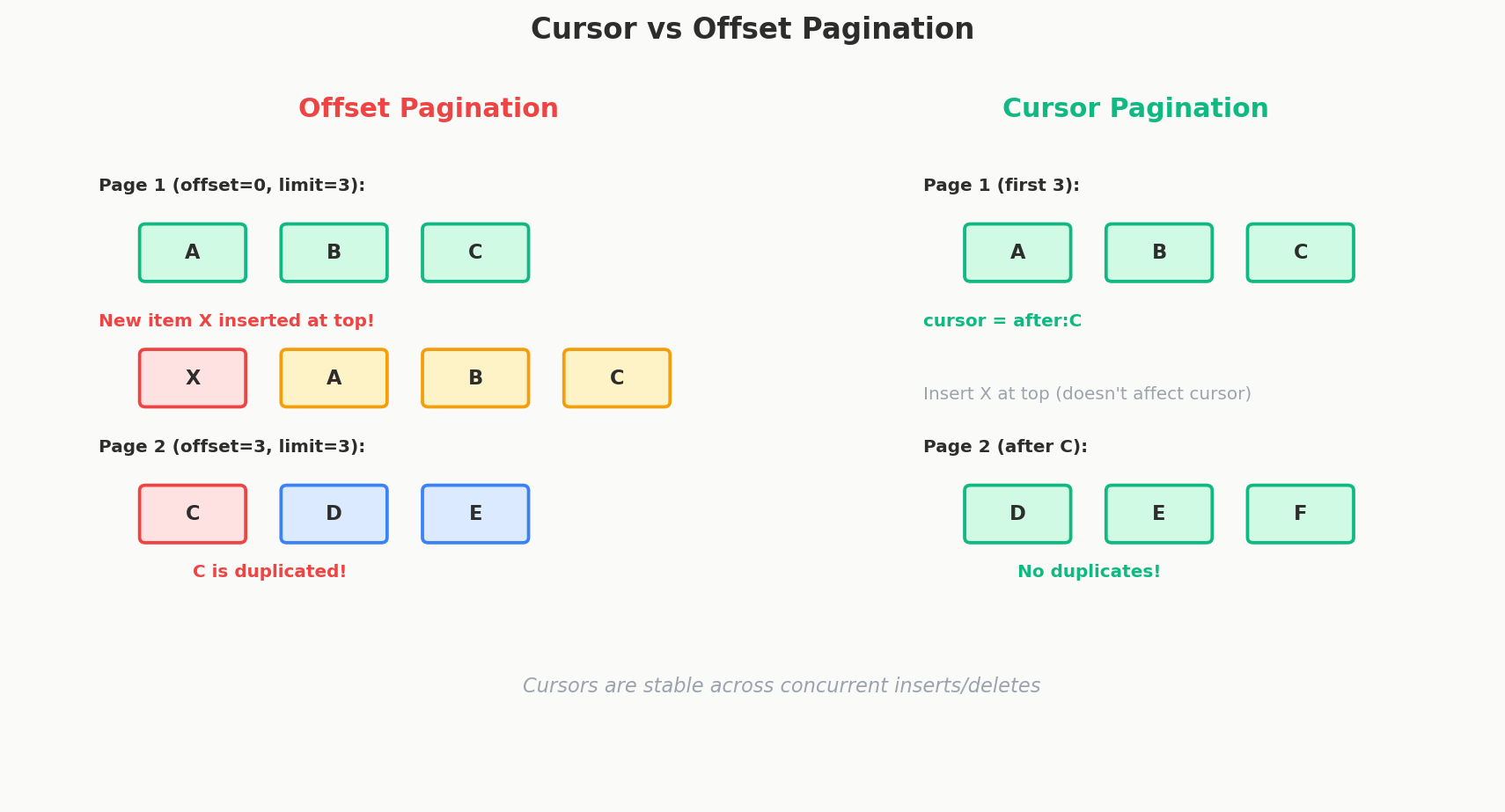
Here is a concrete picture of what happens:
Before insert:
Page 1: [A, B, C, D, E]  (offset=0, limit=5)
Page 2: [F, G, H, I, J]  (offset=5, limit=5)

New record Z is inserted at the top:
Page 1: [Z, A, B, C, D]  (offset=0, limit=5)
Page 2: [E, F, G, H, I]  (offset=5, limit=5)  ← E appears again!
Page 3: [J, K, L, M, N]  (offset=10, limit=5)
You loaded page 1 and saw A through E. You now request page 2 and see E again. Meanwhile, J silently moved from page 2 to page 3 — you never saw it.
Performance at Scale
There is another problem. OFFSET 1000000 means the database has to count through a million rows before it can start returning results. It doesn't magically "jump" to position 1,000,000. It scans and discards.
For a table with millions of records, high offsets can be painfully slow:
OFFSET 10    → fast (scan 10 rows, return 10)
OFFSET 10000 → slower (scan 10,000 rows, return 10)
OFFSET 1000000 → very slow (scan 1,000,000 rows, return 10)
Real-World Usage
Despite these flaws, offset pagination is everywhere. Google search results, Amazon product listings, admin dashboards — anywhere users expect numbered pages. For datasets that don't change frequently or where occasional duplicates are acceptable, offset is perfectly fine.
Cursor-Based Pagination: Stable Under Chaos
Cursor-based pagination takes a fundamentally different approach. Instead of saying "skip N records," you say "give me records after this specific record."
The cursor is an opaque token — typically a Base64-encoded reference to the last record the client saw. The client doesn't know (or care) what's inside it. The server decodes it and uses it as a pointer.
How It Works Under the Hood
When the server receives a cursor, it decodes it to find the last record's position. Let's say the cursor decodes to {"id": 123}:
Notice there's no OFFSET. Instead of counting from the start, the database jumps directly to the right position using an index. This is O(log n) instead of O(n) — a massive performance difference at scale.
The response includes the next cursor:
The client stores next_cursor and passes it in the next request. No page numbers, no offsets — just "give me the next batch."
Why It's Stable Under Writes
Let's replay the data shift scenario with cursor-based pagination.
You load the first page and see items A through E. Your cursor now points to E. Someone inserts a new record Z at the top.
When you request the next page using the cursor "give me records after E," the database returns F through J. Exactly the records you haven't seen yet. The insert of Z doesn't affect anything because the cursor anchors to a specific record, not a position count.
Before insert:
Page 1: [A, B, C, D, E]  → cursor points to E

New record Z is inserted at the top:
Request: "records after E"
Page 2: [F, G, H, I, J]  ← Correct! No duplicates, no missed records.
Can Cursors Use Non-ID Fields?
Yes. Cursors can reference any field, as long as it produces a unique, stable ordering. Common choices:
| Cursor Field | Works? | Notes |
|---|---|---|
| Auto-incrementing ID | Yes | Natural order, unique, perfect |
| Created timestamp | Yes, if unique | Add a tiebreaker (ID) for records with identical timestamps |
| Composite key (timestamp + ID) | Yes | Most robust approach for sorted feeds |
| Name (alphabetical) | Risky | Not unique — multiple records named "John" break it |
| Random field | No | No stable ordering |
A composite cursor for a feed sorted by date might look like:
The query becomes:
SELECT * FROM events
WHERE (created_at, id) < ('2024-06-15T10:30:00Z', 456)
ORDER BY created_at DESC, id DESC
LIMIT 10;
This handles ties perfectly — if two events have the same timestamp, the ID breaks the tie.
Cursor Edge Cases
These are the tricky scenarios that show up in discussions and interviews:
What if a new record is inserted before the cursor?
The client never sees it. If you're scrolling through a feed and someone publishes a new post above where you are, your pagination continues forward without ever fetching it. This is usually fine for feeds — the client can "pull to refresh" to see new content at the top.
What if the cursor record is deleted?
This depends on your implementation. Two common approaches:
- Use the next valid record: If the cursor pointed to record 123 and it's been deleted, find the nearest record that still exists and start from there. This is the most robust approach.
- Return an error: Tell the client the cursor is invalid and they should start over. Simpler, but worse UX.
Most production systems use approach 1. The cursor encodes enough information (like a timestamp) that the server can find the right position even if the exact record is gone.
Keyset Pagination: Cursor's Under-the-Hood Sibling
You'll sometimes hear keyset pagination mentioned alongside cursors. They're closely related.
Keyset pagination is the database technique: using a WHERE clause to filter by the last-seen key instead of using OFFSET. Cursor pagination is the API pattern built on top of it: encoding that key into an opaque token and passing it between client and server.
Think of keyset as the implementation detail and cursor as the API design pattern.
Offset vs Cursor: The Comparison
| Feature | Offset | Cursor |
|---|---|---|
| Jump to specific page | Yes | No |
| Stable under writes | No (data shift problem) | Yes |
| Performance at high pages | Degrades (O(n) scan) | Constant (index lookup) |
| Implementation complexity | Simple | Moderate |
| Total count available | Yes (COUNT(*)) |
Not easily |
| Works with any sort order | Yes | Only with indexed, unique fields |
| Typical UX | Page numbers (1, 2, 3...) | "Load more" / infinite scroll |
Avoid Nested Pagination
One common trap: don't paginate within paginated results. For example:
If you're paginating posts AND paginating comments within each post, you've created a nightmare. The client has to track page state for every post on the current page of posts. If a post shifts between pages (data shift problem), the comment pagination state is lost.
Instead, either: - Return a fixed number of comments inline (e.g., top 3) with a link to "view all comments" - Paginate at only one level — posts are paginated, comments for a specific post are fetched separately
When to Use Which
Use offset when: - Data doesn't change frequently (archival data, reports) - Users need to jump to specific pages (admin dashboards, search results) - Dataset is small enough that high-offset performance isn't a concern - You need a "total results" count
Use cursor when: - Data changes frequently (social feeds, notifications, chat messages) - Users scroll linearly (infinite scroll, "load more" buttons) - Dataset is large and performance matters - Consistency matters more than random page access
Use both:
- Some APIs offer both. The /events endpoint might support cursor for the mobile app's infinite scroll and offset for the admin dashboard's page-numbered table. Same data, different access patterns.
Interview Tip
In a system design interview, the most important thing is that you include pagination at all. Many candidates forget it entirely. Whether you choose offset or cursor matters less than demonstrating that you thought about it. That said, if the problem involves a real-time feed (Twitter timeline, notifications), cursor is the right answer. If it's a search results page, offset is fine.
Interview Expectations: Junior vs. Senior
- Junior/Mid-level: Expected to add basic pagination (
?offset=0&limit=20) to list endpoints. Might struggle if asked how it performs with millions of rows. - Senior/Staff: Proactively chooses cursor-based pagination (
?cursor=xyz) for feeds/real-time data to prevent the data shift problem (duplicates/missing items when new data is inserted). Understands that high-offset queries force the database to scan and discard rows (O(N)), while cursor pagination utilizes index lookups (O(log N)).