Retries, Dead Letters, Poison Messages
TL;DR
Messages fail. Your retry strategy determines whether failures recover gracefully or cascade into outages. Use exponential backoff with jitter to avoid thundering herds. Route messages that exhaust retries to a dead letter queue for investigation. Watch for poison messages that crash consumers on every attempt. And the question interviewers love most: the dual-write problem -- what happens when the DB write succeeds but the queue write fails?
Why Messages Fail
Before picking a retry strategy, understand why messages fail. The failure type determines the correct response.
| Failure Type | Example | Retryable? | Strategy |
|---|---|---|---|
| Transient | Network blip, DB connection reset, 503 from downstream | Yes | Retry with backoff |
| Throttled | Rate limit hit (429), API quota exceeded | Yes | Retry with longer backoff |
| Bug in consumer | NullPointerException, missing field | No | Fix code, replay from DLQ |
| Invalid message | Corrupted JSON, missing required fields | No | Send to DLQ immediately |
| Downstream outage | Payment provider is down for 2 hours | Yes | Retry with long delays, circuit breaker |
Retrying non-retryable errors wastes resources
If a message has invalid JSON, retrying it 5 times with exponential backoff just delays the inevitable. Validate early and route bad messages to the DLQ immediately.
Retry Strategies Compared
Immediate Retry
Only useful for genuinely transient errors (TCP reset mid-connection). If the downstream service is struggling, hammering it immediately makes things worse.
Fixed Delay
Better, but if 1,000 messages fail at the same time, they all retry at exactly the same time. You've turned one spike into periodic spikes.
Exponential Backoff
Attempt 1: fail → wait 1s → Attempt 2: fail → wait 2s → Attempt 3: fail → wait 4s → Attempt 4: fail → wait 8s → DLQ
Each retry waits twice as long. This gives the downstream service progressively more breathing room. But there's still a problem: synchronized retries.
Exponential Backoff with Jitter (The Right Answer)
When 500 messages fail at t=0, exponential backoff alone means they all retry at t=1s, then t=2s, then t=4s. Adding jitter spreads them out randomly.
import random
import time

def retry_with_jitter(attempt: int, base_delay: float = 1.0, max_delay: float = 60.0) -> float:
    """
    Full jitter strategy (recommended by AWS).
    Delay = random between 0 and min(max_delay, base_delay * 2^attempt)
    """
    exponential = min(max_delay, base_delay * (2 ** attempt))
    jitter = random.uniform(0, exponential)
    return jitter

# Attempt 0: random(0, 1)   → e.g., 0.7s
# Attempt 1: random(0, 2)   → e.g., 1.3s
# Attempt 2: random(0, 4)   → e.g., 2.9s
# Attempt 3: random(0, 8)   → e.g., 5.1s
# Attempt 4: random(0, 16)  → e.g., 11.7s
# Attempt 5: random(0, 32)  → e.g., 28.4s
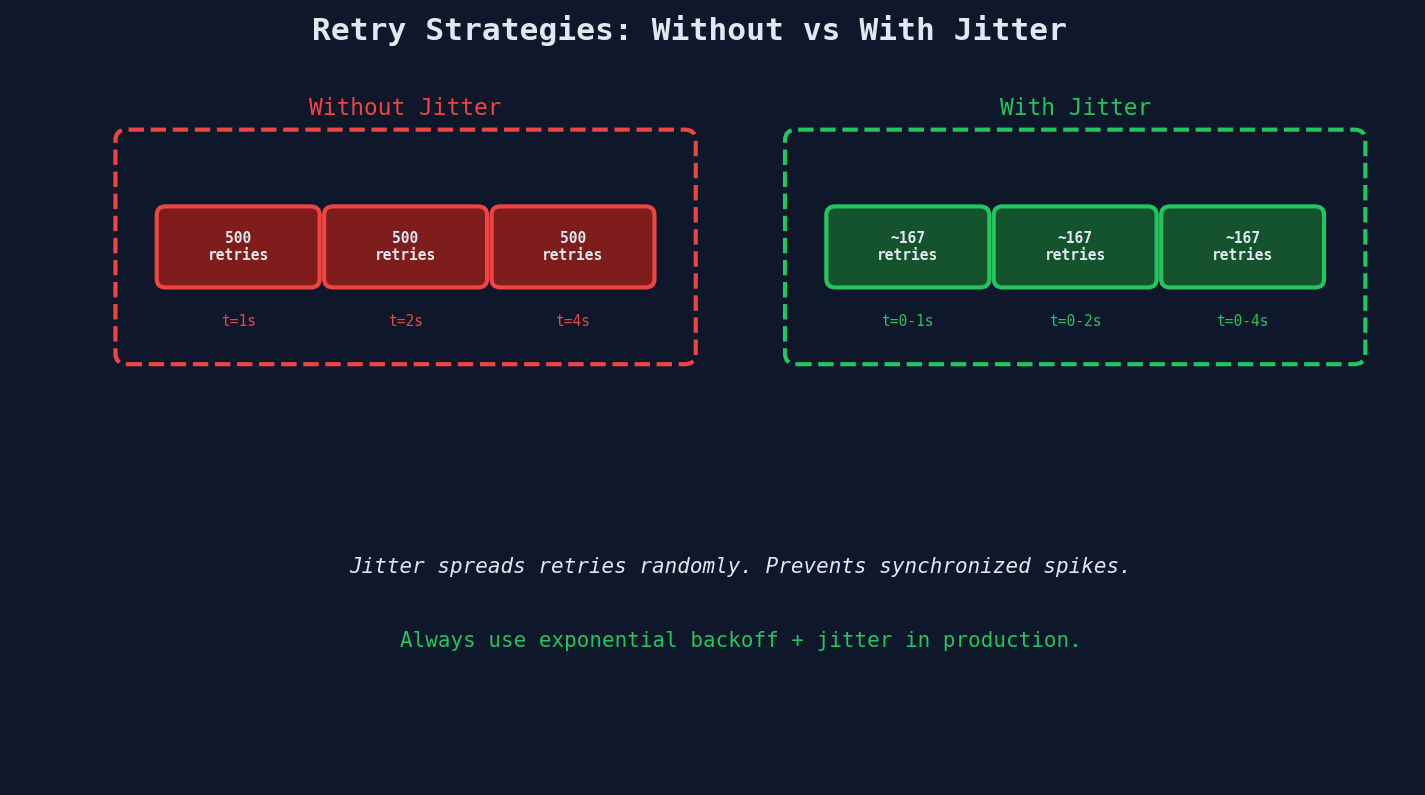
AWS's own engineering blog recommends full jitter over equal jitter or decorrelated jitter. The randomness is the feature, not a bug.
Strategy Summary
| Strategy | When to Use |
|---|---|
| Immediate | Never in production (maybe local dev) |
| Fixed delay | Simple tasks with independent failures |
| Exponential backoff | Standard choice for most systems |
| Exponential + jitter | Default for everything in production |
Dead Letter Queues: Where Failed Messages Go to Wait
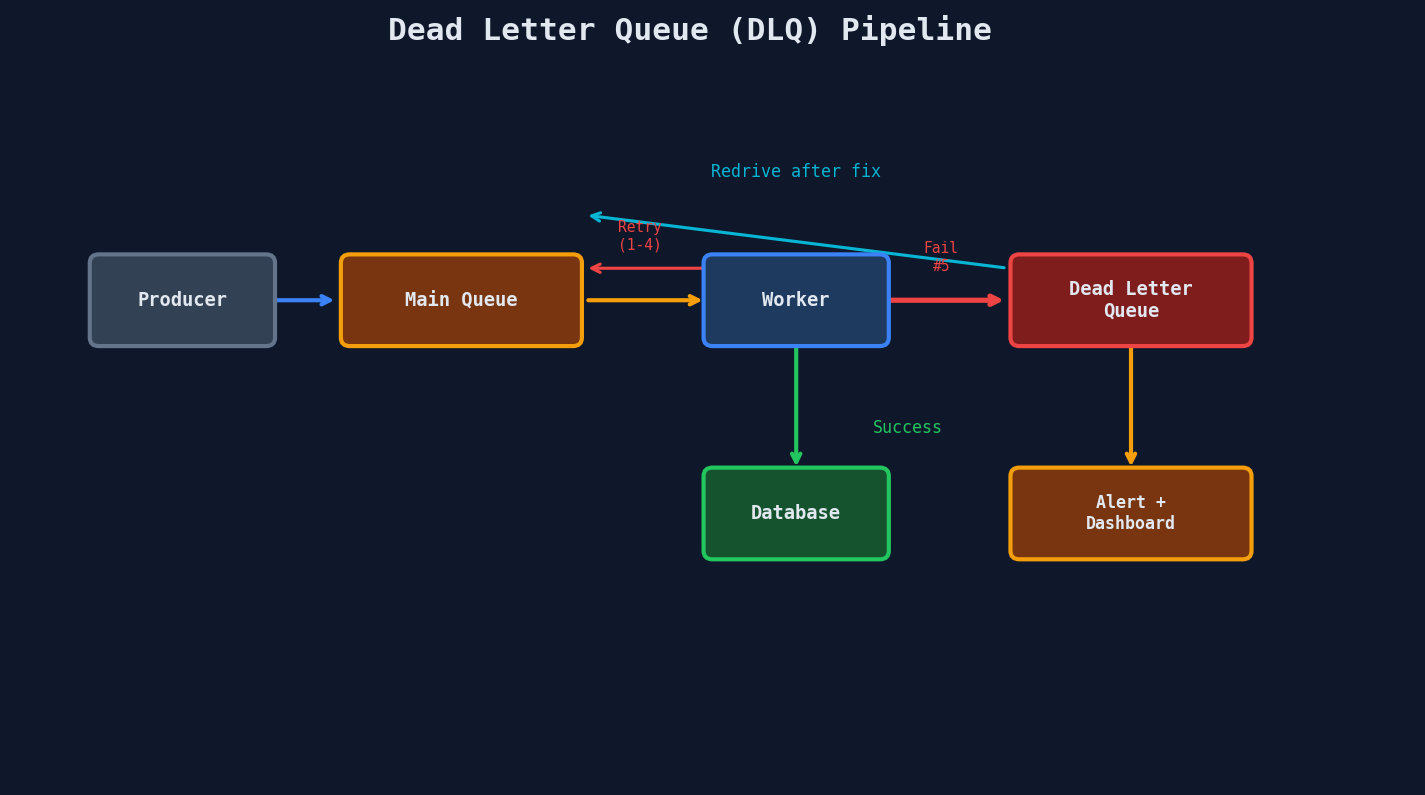
A dead letter queue (DLQ) catches messages that have exhausted all retry attempts. Without a DLQ, failed messages either disappear (data loss) or retry forever (resource waste).
SQS DLQ Configuration
{
  "QueueName": "report-jobs",
  "RedrivePolicy": {
    "deadLetterTargetArn": "arn:aws:sqs:us-east-1:123456789:report-jobs-dlq",
    "maxReceiveCount": 5
  }
}
After 5 receives without deletion, SQS automatically moves the message to the DLQ.
What to Do With DLQ Messages
A DLQ is not a graveyard -- it's a triage room.
def process_dlq():
    """Periodic job: inspect and redrive DLQ messages."""
    messages = sqs.receive_message(QueueUrl=DLQ_URL, MaxNumberOfMessages=10)

    for msg in messages.get("Messages", []):
        body = json.loads(msg["Body"])

        if is_invalid_format(body):
            # Bad data -- log, alert, delete
            log.error(f"Invalid message format: {body}")
            sqs.delete_message(QueueUrl=DLQ_URL, ReceiptHandle=msg["ReceiptHandle"])

        elif is_known_bug(body):
            # Bug has been fixed -- redrive to main queue
            sqs.send_message(QueueUrl=MAIN_QUEUE_URL, MessageBody=msg["Body"])
            sqs.delete_message(QueueUrl=DLQ_URL, ReceiptHandle=msg["ReceiptHandle"])

        else:
            # Unknown failure -- leave for manual investigation
            log.warning(f"Unknown DLQ message: {body}")
Set up alerts on DLQ depth
A growing DLQ means something is broken. Set a CloudWatch alarm for ApproximateNumberOfMessagesVisible > 0 on your DLQ. If it fires, you have messages that need attention.
Poison Messages: The Queue Blocker
A poison message is one that always crashes the consumer. Without safeguards, here's what happens:
Worker picks up message → crash → message returns to queue
Worker picks up message → crash → message returns to queue
Worker picks up message → crash → message returns to queue
... forever
The poison message blocks the entire queue because the worker crashes before it can process anything else. Meanwhile, legitimate messages pile up behind it.
How Poison Messages Happen
- Malformed data that triggers an unhandled exception
- A message referencing a deleted database record
- Payload size exceeding a downstream limit
- Character encoding issues (emoji in a field expecting ASCII)
- Integer overflow (quantity: 99999999999999)
Defenses Against Poison Messages
MAX_RETRIES = 5

def safe_process(message):
    """Worker wrapper that prevents poison messages from blocking the queue."""

    # Defense 1: Content validation before processing
    try:
        payload = json.loads(message.body)
        validate_schema(payload)  # throws if invalid
    except (json.JSONDecodeError, ValidationError) as e:
        log.error(f"Invalid message, sending to DLQ: {e}")
        send_to_dlq(message)
        acknowledge(message)
        return

    # Defense 2: Max retry tracking
    retry_count = int(message.attributes.get("ApproximateReceiveCount", 0))
    if retry_count > MAX_RETRIES:
        log.error(f"Message exceeded {MAX_RETRIES} retries, sending to DLQ")
        send_to_dlq(message)
        acknowledge(message)
        return

    # Defense 3: Timeout wrapper
    try:
        with timeout(seconds=300):
            process_job(payload)
        acknowledge(message)
    except TimeoutError:
        log.error("Job timed out, will be retried via visibility timeout")
    except Exception as e:
        log.error(f"Processing failed (attempt {retry_count}): {e}")
        # Don't acknowledge -- let visibility timeout return it to queue
Worker Isolation
For critical queues, run each message in an isolated process. If the message causes a segfault or memory leak, only the child process dies.
import multiprocessing

def isolated_worker(message):
    """Process each message in a child process."""
    process = multiprocessing.Process(target=process_job, args=(message,))
    process.start()
    process.join(timeout=300)

    if process.exitcode == 0:
        acknowledge(message)
    elif process.exitcode is None:
        # Timed out
        process.kill()
        log.error("Worker process timed out")
    else:
        # Crashed
        log.error(f"Worker crashed with exit code {process.exitcode}")
The Dual-Write Problem
This is the most subtle and most frequently asked failure mode in async systems. It comes up in virtually every system design interview that involves queues.
The Scenario
Your API needs to do two things atomically:
- Write a record to the database
- Publish a message to the queue
@app.route("/api/orders", methods=["POST"])
def create_order():
    # Step 1: Write to database
    order = db.orders.insert(request.json)  # succeeds

    # Step 2: Publish to queue
    queue.send_message({"order_id": order.id})  # FAILS -- network error

    return jsonify(order), 201
The order is in the database, but the queue message was never sent. The downstream service that ships orders never finds out about it. The customer waits forever.
The reverse is equally bad: queue message is sent, but the DB write fails. Now the shipping service tries to ship an order that doesn't exist.
This shows up in every interview
Interviewers love this because it tests whether you understand distributed systems fundamentals. You can't wrap a database write and a queue publish in a single transaction -- they're different systems.
Solution 1: The Transactional Outbox Pattern
Instead of writing to the queue directly, write to an outbox table in the same database transaction as your business data.
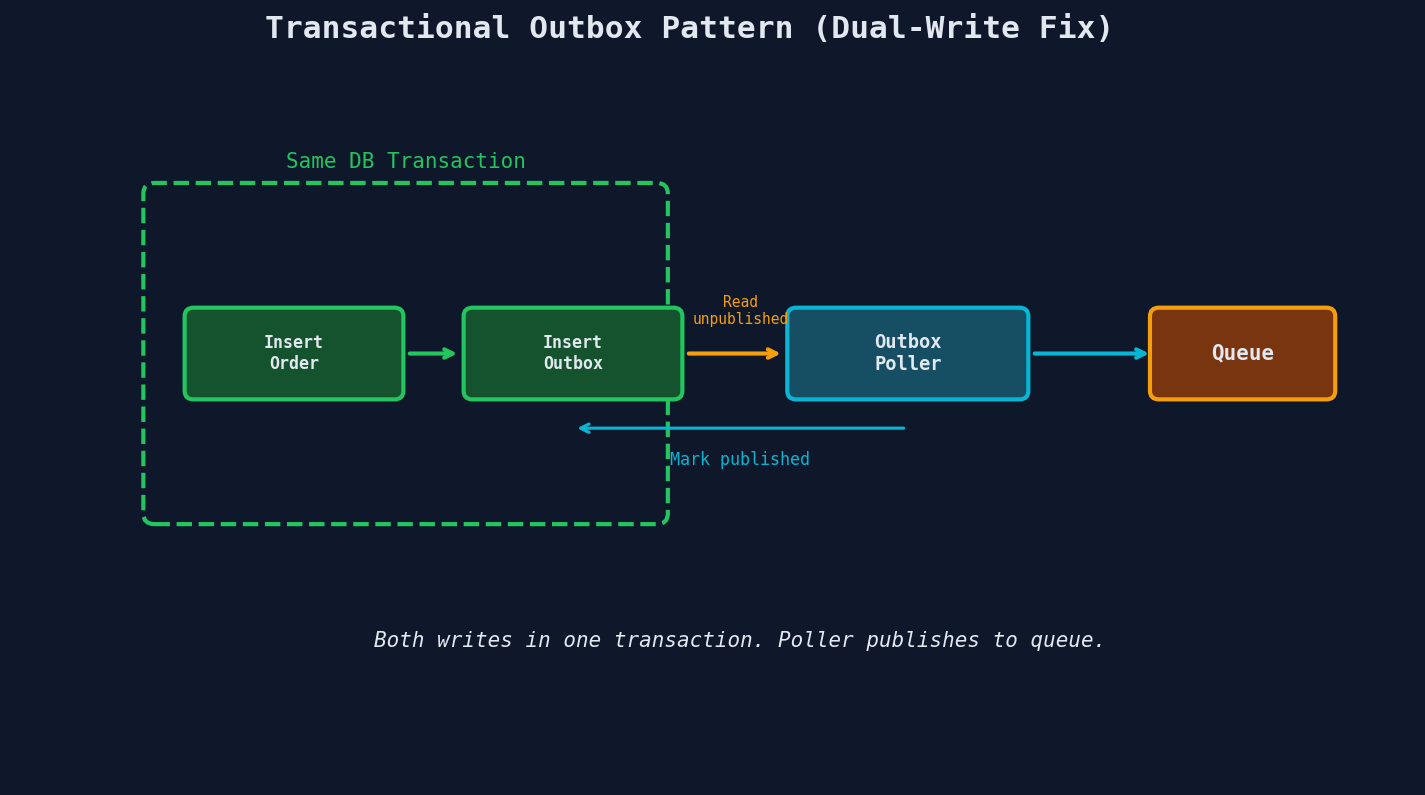
-- Single transaction: both succeed or both fail
BEGIN;

INSERT INTO orders (id, customer_id, total)
VALUES ('ord_123', 'cust_456', 99.99);

INSERT INTO outbox (id, aggregate_type, aggregate_id, event_type, payload, published)
VALUES ('evt_789', 'order', 'ord_123', 'order.created',
        '{"order_id": "ord_123", "total": 99.99}', FALSE);

COMMIT;
A separate poller process reads unpublished outbox events and sends them to the queue:
def outbox_poller():
    """Runs every few seconds. Reads unpublished events, sends to queue."""
    while True:
        events = db.query(
            "SELECT * FROM outbox WHERE published = FALSE ORDER BY created_at LIMIT 100"
        )

        for event in events:
            queue.send_message(event.payload)
            db.execute(
                "UPDATE outbox SET published = TRUE WHERE id = %s", (event.id,)
            )

        time.sleep(2)
Solution 2: Change Data Capture (CDC)
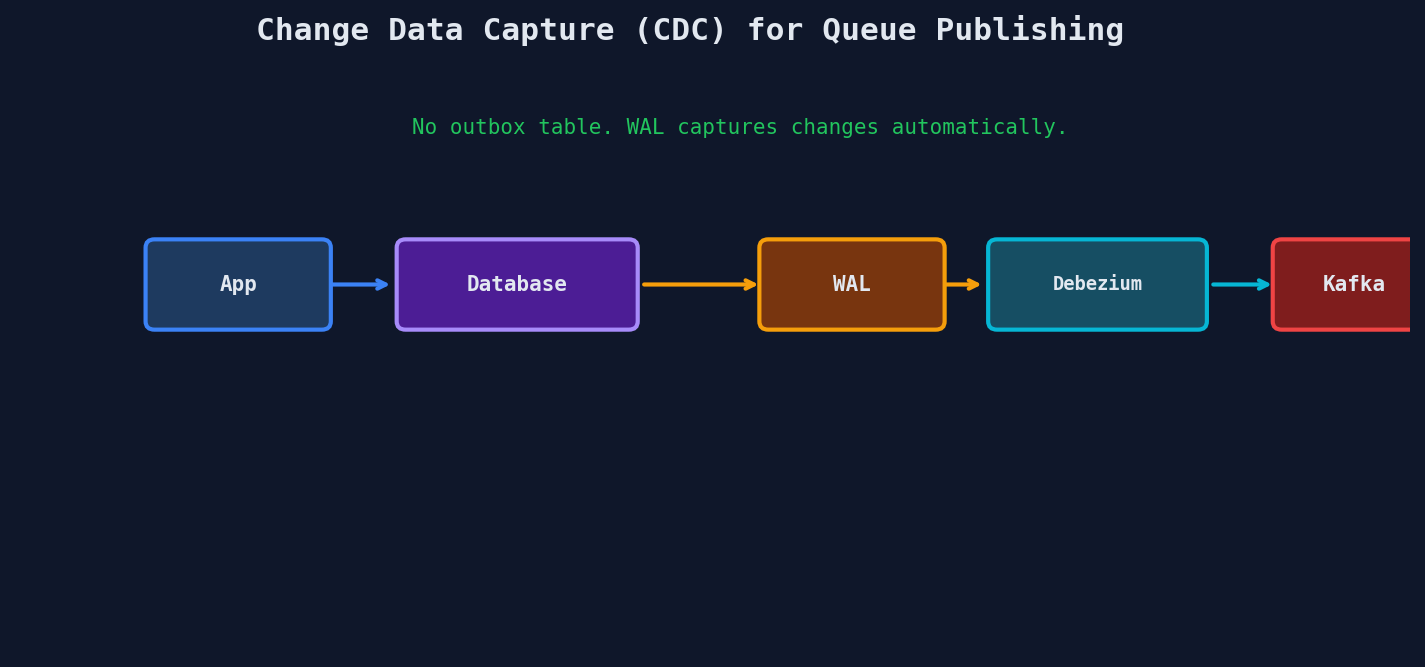
Instead of polling, use CDC to stream database changes directly to the queue. Tools like Debezium read the database's transaction log (WAL in Postgres, binlog in MySQL) and publish changes.
| Approach | Pros | Cons |
|---|---|---|
| Outbox + Poller | Simple, works with any queue, easy to debug | Polling latency (seconds), outbox table grows |
| Outbox + CDC | Near real-time, no polling overhead | More infrastructure (Debezium, Kafka Connect) |
| CDC on business tables | No application changes needed | Exposes internal schema, harder to evolve |
Putting It All Together
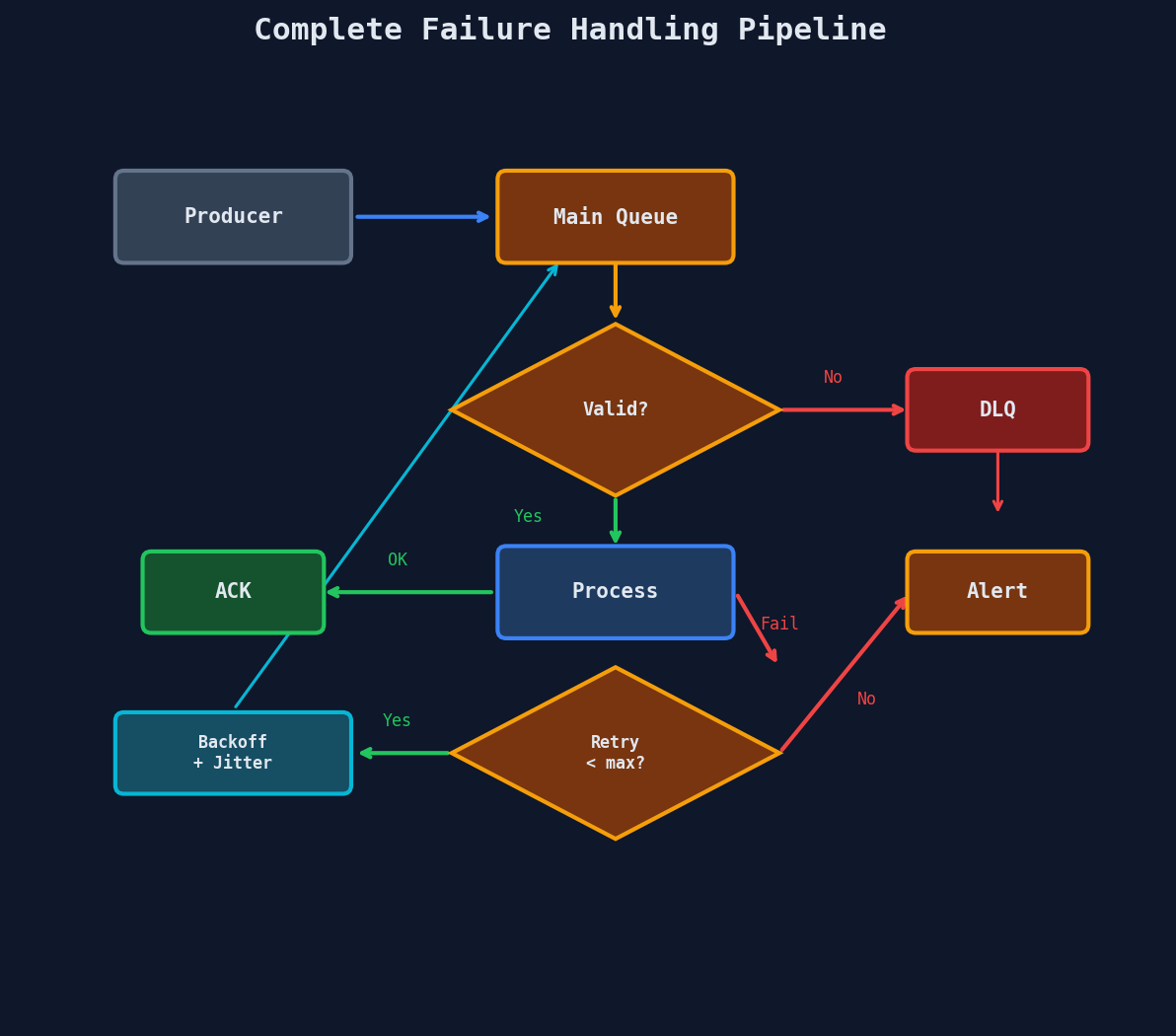
Here's the complete failure handling pipeline:
The Retry Budget Mental Model
Every system has a retry budget -- the total number of retries you can afford before things start cascading.
Original messages/sec:     1,000
Failure rate:                  5%
Retries per failure:           3
Retry traffic:          1,000 × 5% × 3 = 150 msg/s
Total traffic:          1,000 + 150 = 1,150 msg/s (15% increase)

With 50% failure rate and 5 retries:
Retry traffic:          1,000 × 50% × 5 = 2,500 msg/s
Total traffic:          1,000 + 2,500 = 3,500 msg/s (250% increase!)
When a downstream service is struggling, unlimited retries can turn a partial outage into a complete one. This is why max retry counts and circuit breakers exist.
Key Takeaways
| Concept | Details |
|---|---|
| Exponential + jitter | Default retry strategy for production systems |
| DLQ | Catches messages after max retries; triage, don't ignore |
| Poison messages | Validate early, track retry counts, isolate workers |
| Dual-write problem | DB + Queue can't share a transaction; use outbox pattern |
| Retry budget | High retry counts + high failure rate = cascading failure |