Presence and Connection Management
TL;DR
Knowing who's online sounds trivial until you do the math: 150M users heartbeating every 30 seconds is 5M heartbeats/sec. Presence systems use heartbeat-based detection with gossip protocols to propagate state across gateway servers. Collaborative editing (OT vs CRDTs) handles concurrent writes without locks. And at the infrastructure level, managing 50K-100K WebSocket connections per server with graceful deploys, backpressure, and connection migration is the unglamorous work that keeps push architectures alive.
Presence — Who's Online Right Now?
Every chat app, collaboration tool, and multiplayer game needs presence: that green dot next to someone's name. Simple concept. Hard infrastructure.
Heartbeat-Based Presence
The standard approach: every connected client sends a heartbeat at a fixed interval. Miss too many and you're marked offline.
# Client sends heartbeat every 30 seconds
HEARTBEAT_INTERVAL = 30   # seconds
OFFLINE_THRESHOLD = 2      # missed heartbeats before "offline"

class PresenceManager:
    def __init__(self, redis_client):
        self.redis = redis_client

    async def heartbeat(self, user_id, gateway_id):
        key = f"presence:{user_id}"
        await self.redis.setex(
            key,
            HEARTBEAT_INTERVAL * OFFLINE_THRESHOLD,  # 60s TTL
            json.dumps({
                'status': 'online',
                'gateway': gateway_id,
                'last_seen': time.time()
            })
        )

    async def is_online(self, user_id):
        return await self.redis.exists(f"presence:{user_id}")

    async def get_status(self, user_id):
        data = await self.redis.get(f"presence:{user_id}")
        if data:
            return json.loads(data)
        return {'status': 'offline', 'last_seen': None}
The Scale Problem
Let's do the math for a large messaging platform:
| Metric | Value |
|---|---|
| Connected users | 150,000,000 |
| Heartbeat interval | 30 seconds |
| Heartbeats per second | 5,000,000/s |
| Redis SET operations | 5M/s (one per heartbeat) |
| Presence queries (friend list loads, etc.) | ~10M/s |
That's 15M Redis operations per second just for presence. A single Redis instance handles ~100K ops/s. You need sharding, and you need it to be smart.
# Shard by user_id hash
def get_presence_shard(user_id, num_shards=128):
    return hash(user_id) % num_shards

# Each shard handles ~40K heartbeats/s and ~78K queries/s
# Well within a single Redis instance's capacity
Propagating Presence Across Gateway Servers
Your users are spread across dozens of gateway servers. When User A comes online, every gateway that holds a connection to one of A's friends needs to know.
Broadcasting every presence change to every gateway is wasteful. Instead, use a gossip protocol:
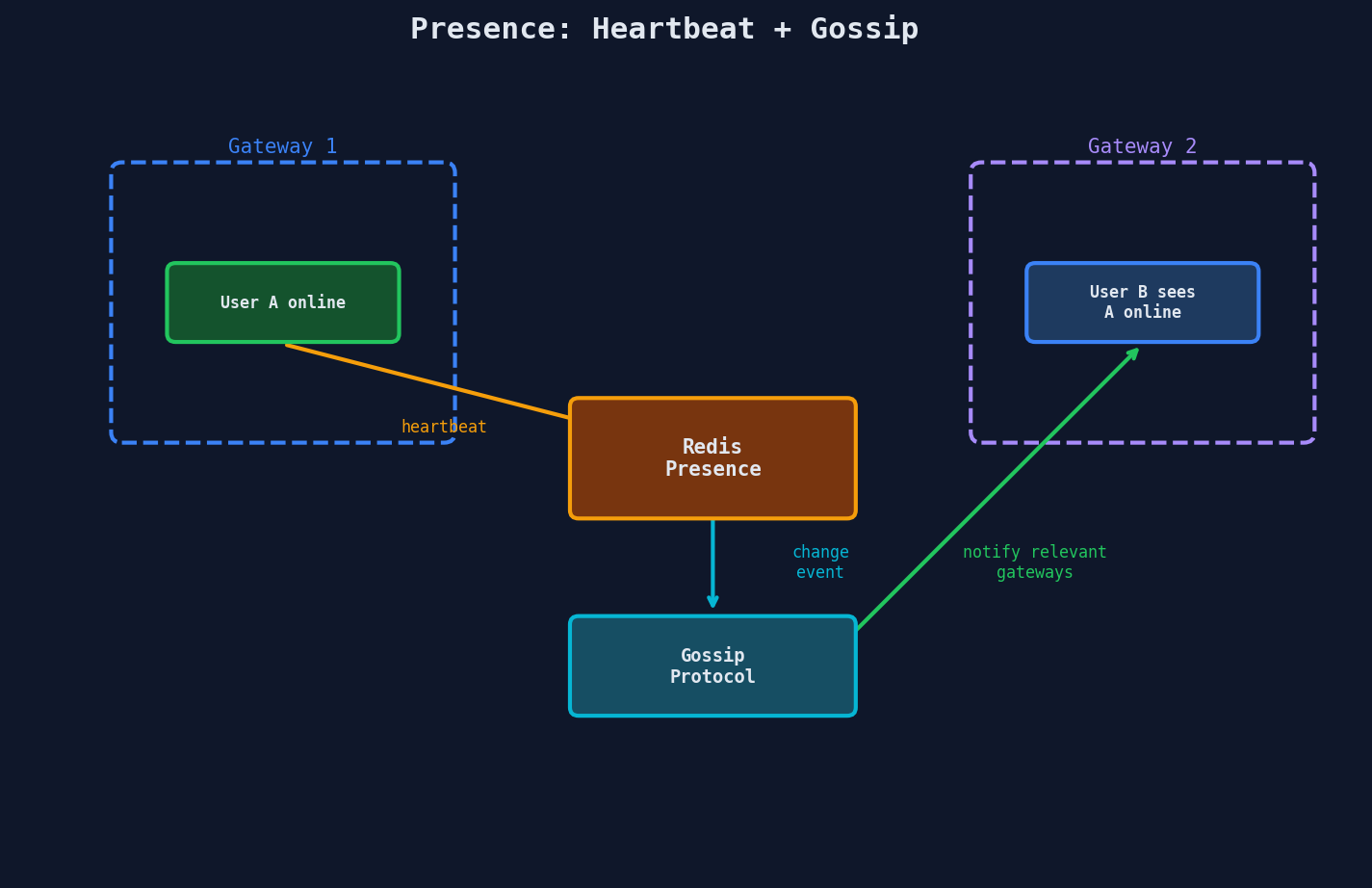
The key optimization: only notify gateways that care. Gateway 2 only needs to know about User A's status if one of A's friends is connected to Gateway 2.
async def on_presence_change(user_id, new_status):
    # 1. Update central presence store
    await presence_store.set(user_id, new_status)

    # 2. Find which gateways have this user's friends
    friends = await social_graph.get_friends(user_id)
    gateway_set = set()
    for friend_id in friends:
        gw = await presence_store.get_gateway(friend_id)
        if gw:
            gateway_set.add(gw)

    # 3. Notify only those gateways
    update = {'user_id': user_id, 'status': new_status}
    for gateway_id in gateway_set:
        await pubsub.publish(f'presence:{gateway_id}', update)
Interview Tip
When asked about presence, always mention the TTL-based approach first (heartbeat + expiry in Redis). Then discuss the fan-out problem: "We don't broadcast to all servers, we only notify gateways that hold connections to this user's contacts." This shows you understand both the mechanism and the scaling concern.
Collaborative Editing — Handling Concurrent Writes
When multiple users edit the same document simultaneously, you have a concurrency problem. Two dominant approaches:
Operational Transformation (OT)
The Google Docs approach. Every edit is an operation (insert, delete). A central server transforms conflicting operations so they converge.
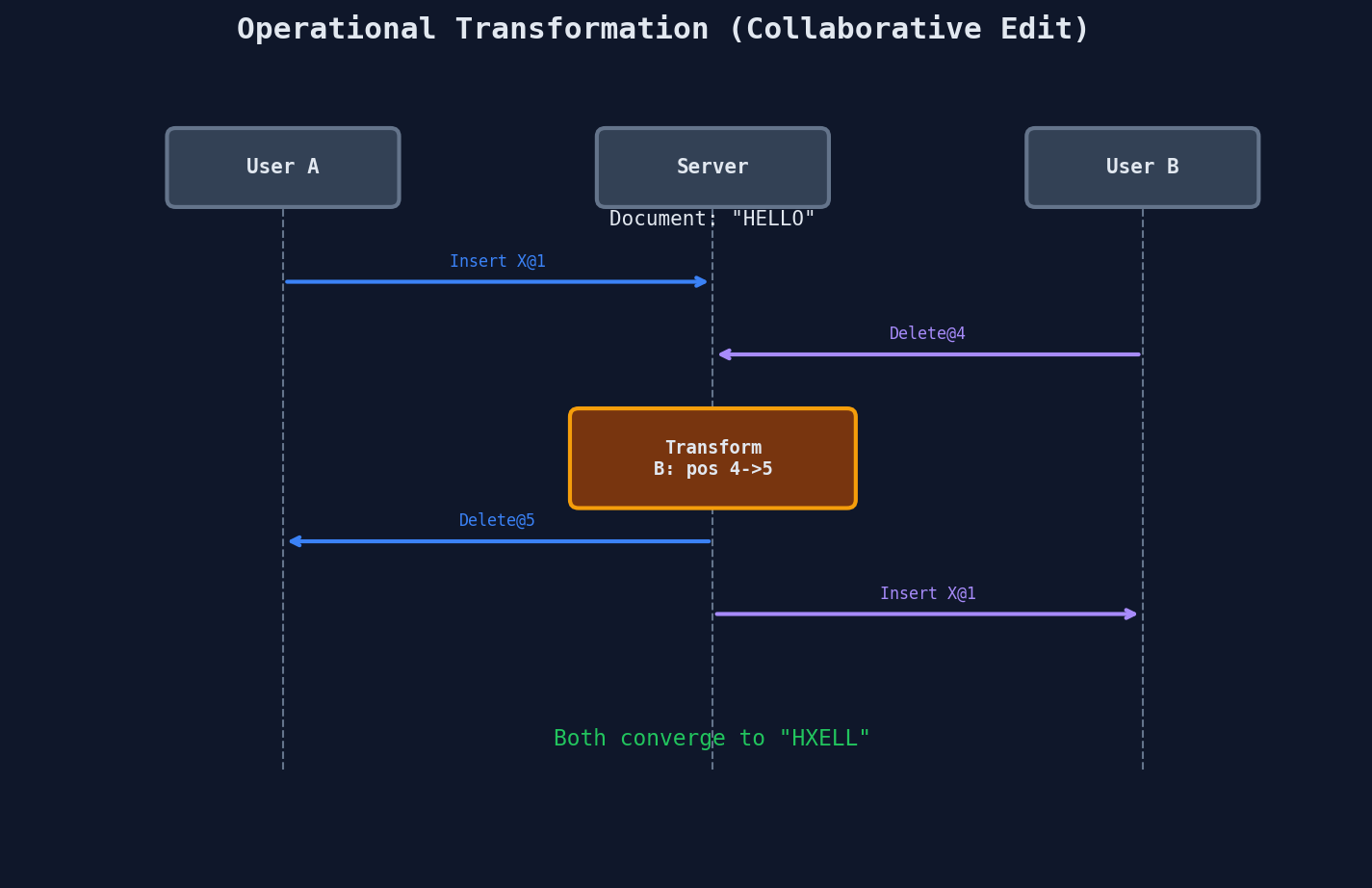
OT characteristics:
- Requires a central server to order and transform operations
- Transformation logic is complex (N operation types = N^2 transform functions)
- Battle-tested at massive scale (Google Docs has used OT since 2006)
CRDTs (Conflict-free Replicated Data Types)
The mathematical approach. Data structures are designed so that any merge order produces the same result — no central server needed.
# Simplified CRDT concept: Last-Writer-Wins Register
class LWWRegister:
    def __init__(self):
        self.value = None
        self.timestamp = 0

    def set(self, value, timestamp):
        if timestamp > self.timestamp:
            self.value = value
            self.timestamp = timestamp

    def merge(self, other):
        """Merge is commutative and idempotent"""
        if other.timestamp > self.timestamp:
            self.value = other.value
            self.timestamp = other.timestamp
CRDT characteristics:
- No central server required — peers can merge directly
- Math guarantees convergence (commutativity, associativity, idempotency)
- More complex data structures needed for text (e.g., RGA, YATA)
- Can work offline — merge when reconnected
OT vs CRDTs at a Glance
| Criteria | OT | CRDTs |
|---|---|---|
| Central server | Required | Not required |
| Offline support | Poor | Excellent |
| Implementation complexity | High (transform functions) | High (data structure design) |
| Memory overhead | Low | Higher (metadata per element) |
| Proven at scale | Google Docs | Figma, Apple Notes |
| Best for | Server-centric architectures | P2P, offline-first apps |
Figma chose CRDTs for their collaborative design tool because designers frequently work offline and need to merge changes when reconnecting. Google Docs uses OT because their architecture is centralized and they needed to minimize client-side memory overhead for large documents.
Scope Warning
Collaborative editing is a deep topic that could fill an entire course. For system design interviews, you need to know that OT and CRDTs exist, when to pick one over the other, and their high-level tradeoffs. You don't need to implement a text CRDT from scratch.
Connection Management at Scale
The unsexy but critical infrastructure: how do you manage tens of thousands of persistent WebSocket connections per server?
File Descriptor Limits
Every WebSocket connection is a TCP socket, which is a file descriptor. Operating systems have limits:
# Default Linux limit
$ ulimit -n
1024   # way too low

# Production setting
$ ulimit -n 1048576  # 1M file descriptors

# Practical WebSocket limit per server
# ~50K-100K connections (memory is the real bottleneck)
# Memory math per connection
# TCP buffer (send + receive): ~87KB default
# Application state: ~1-5KB
# TLS state (if terminating): ~50KB
# Total: ~100-140KB per connection

# 100K connections × 130KB = ~13GB RAM just for connections
| Resource | Per Connection | At 100K Connections |
|---|---|---|
| TCP buffers | ~87 KB | 8.7 GB |
| App state | ~2 KB | 200 MB |
| TLS state | ~50 KB | 5 GB |
| File descriptor | 1 | 100K |
| Total memory | ~140 KB | ~14 GB |
Discord runs approximately 100K concurrent WebSocket connections per gateway server using Elixir on the BEAM VM, which excels at managing millions of lightweight processes. WhatsApp famously achieved around 2 million connections per server using Erlang, thanks to the same BEAM VM and extremely lean per-connection state.
Graceful Shutdown and Deploys
You can't just kill a server with 100K active connections. Every deploy needs a graceful drain:
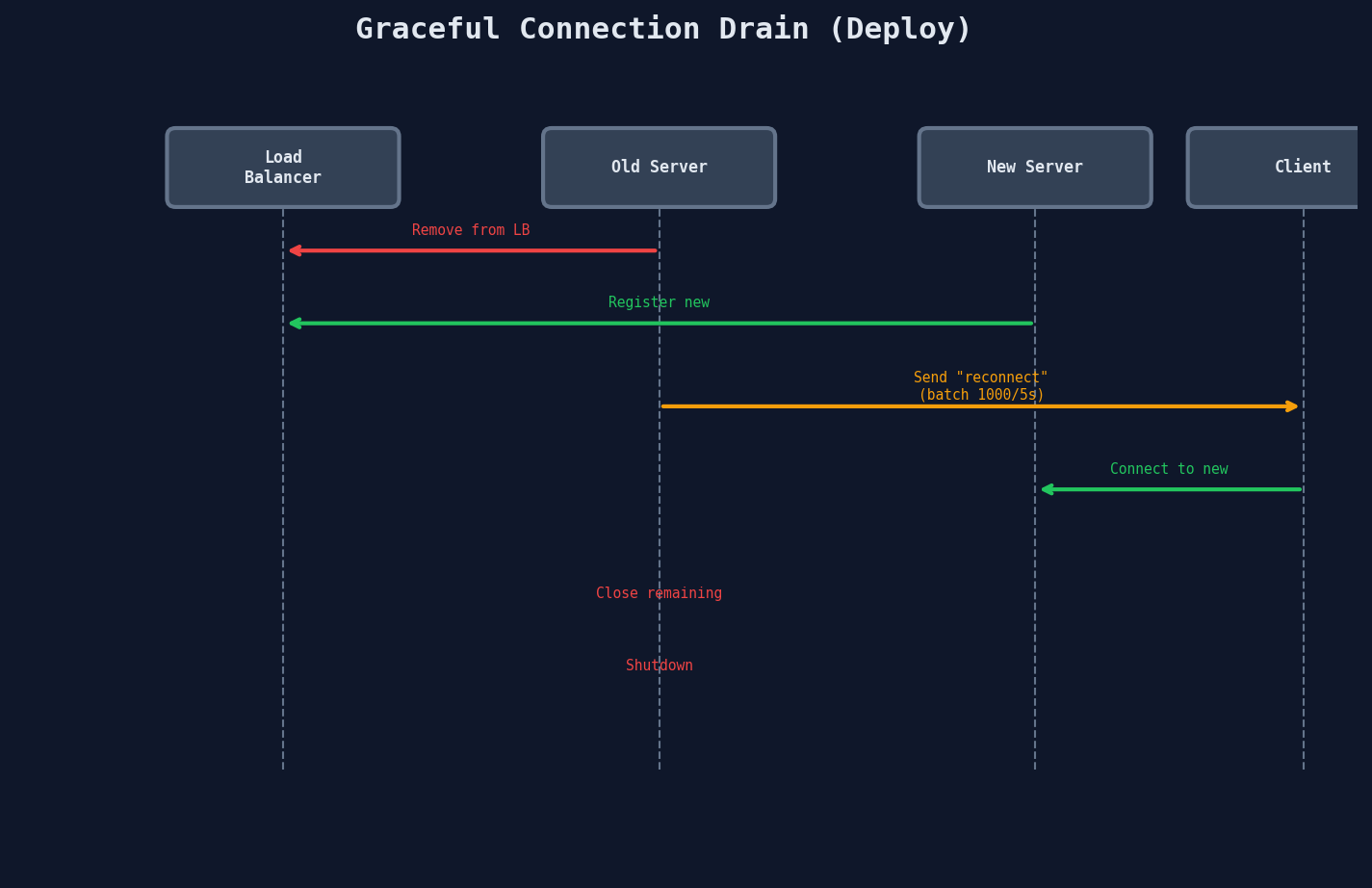
class GracefulShutdown:
    def __init__(self, connections, batch_size=1000, interval=5):
        self.connections = list(connections)
        self.batch_size = batch_size
        self.interval = interval

    async def drain(self, timeout=60):
        """Gracefully drain all connections."""
        start = time.time()

        # 1. Stop accepting new connections
        await self.deregister_from_load_balancer()

        # 2. Send reconnect frames in batches
        for i in range(0, len(self.connections), self.batch_size):
            if time.time() - start > timeout:
                break  # hard deadline

            batch = self.connections[i:i + self.batch_size]
            await asyncio.gather(*[
                self.send_reconnect(conn) for conn in batch
            ])
            await asyncio.sleep(self.interval)

        # 3. Force-close any remaining
        remaining = [c for c in self.connections if c.is_open]
        for conn in remaining:
            await conn.close(code=1001, reason='server shutdown')

    async def send_reconnect(self, conn):
        """Tell client to reconnect to a different server."""
        await conn.send(json.dumps({
            'type': 'system',
            'action': 'reconnect',
            'delay_ms': random.randint(0, 5000)  # jitter
        }))
Thundering Herd on Restart
If you close 100K connections simultaneously, 100K clients will reconnect at the same instant, overwhelming the remaining servers. Always drain in batches with random jitter. The delay_ms field tells clients to wait a random interval before reconnecting, spreading the load.
Backpressure — When Clients Can't Keep Up
Not all clients are equal. Mobile users on 3G, browser tabs in the background, clients with slow processing — some can't consume messages as fast as you produce them.
class ConnectionWithBackpressure:
    def __init__(self, ws, max_buffer=1000):
        self.ws = ws
        self.buffer = deque(maxlen=max_buffer)
        self.slow_client = False

    async def send(self, message):
        if self.ws.is_ready():
            try:
                await asyncio.wait_for(
                    self.ws.send(message),
                    timeout=5.0
                )
                self.slow_client = False
            except asyncio.TimeoutError:
                self.slow_client = True
                self.buffer.append(message)
        else:
            self.buffer.append(message)

        # If buffer is full, oldest messages are dropped (deque maxlen)
        if len(self.buffer) >= self.buffer.maxlen:
            logging.warning(
                f"Client {self.client_id}: buffer full, "
                f"dropping oldest messages"
            )

    async def flush_buffer(self):
        """Send buffered messages when client catches up."""
        while self.buffer and self.ws.is_ready():
            msg = self.buffer.popleft()
            await self.ws.send(msg)
Backpressure Strategy Decision
| Strategy | Behavior | Best For |
|---|---|---|
| Buffer + drop oldest | Keep last N messages, discard old | Live feeds, tickers (stale data is useless) |
| Buffer + drop newest | Keep first N, reject new until drained | Ordered event streams (preserve sequence) |
| Pause upstream | Signal publisher to slow down | Internal microservices (TCP backpressure) |
| Disconnect slow client | Close connection after buffer threshold | Gaming (slow = disconnected, period) |
| Degrade quality | Send summaries instead of full events | Dashboards (aggregate instead of individual) |
Connection State and Recovery
When a client reconnects (after a network blip, server deploy, or phone waking from sleep), it needs to catch up without re-fetching everything.
class ConnectionState:
    def __init__(self, user_id):
        self.user_id = user_id
        self.last_event_id = None
        self.subscriptions = set()
        self.created_at = time.time()

    def to_resume_token(self):
        """Encode state for client to send on reconnect."""
        return base64.b64encode(json.dumps({
            'user_id': self.user_id,
            'last_event_id': self.last_event_id,
            'subscriptions': list(self.subscriptions),
        }).encode()).decode()

    @classmethod
    def from_resume_token(cls, token):
        data = json.loads(base64.b64decode(token))
        state = cls(data['user_id'])
        state.last_event_id = data['last_event_id']
        state.subscriptions = set(data['subscriptions'])
        return state


# On reconnect
async def handle_reconnect(ws, resume_token):
    state = ConnectionState.from_resume_token(resume_token)

    # 1. Re-subscribe to all channels
    for channel in state.subscriptions:
        await pubsub.subscribe(channel, ws)

    # 2. Replay missed events
    missed = await event_store.get_after(state.last_event_id)
    for event in missed:
        await ws.send(json.dumps(event))

    # 3. Resume normal operation
    state.last_event_id = missed[-1]['id'] if missed else state.last_event_id
    return state
Interview Tip
Connection management is the "and then what?" follow-up that separates senior candidates. After describing your WebSocket architecture, proactively mention: "Each gateway server handles about 50-100K connections. We drain connections in batches during deploys, buffer for slow clients with a bounded queue that drops the oldest messages when full, and use resume tokens so clients can reconnect without missing events."
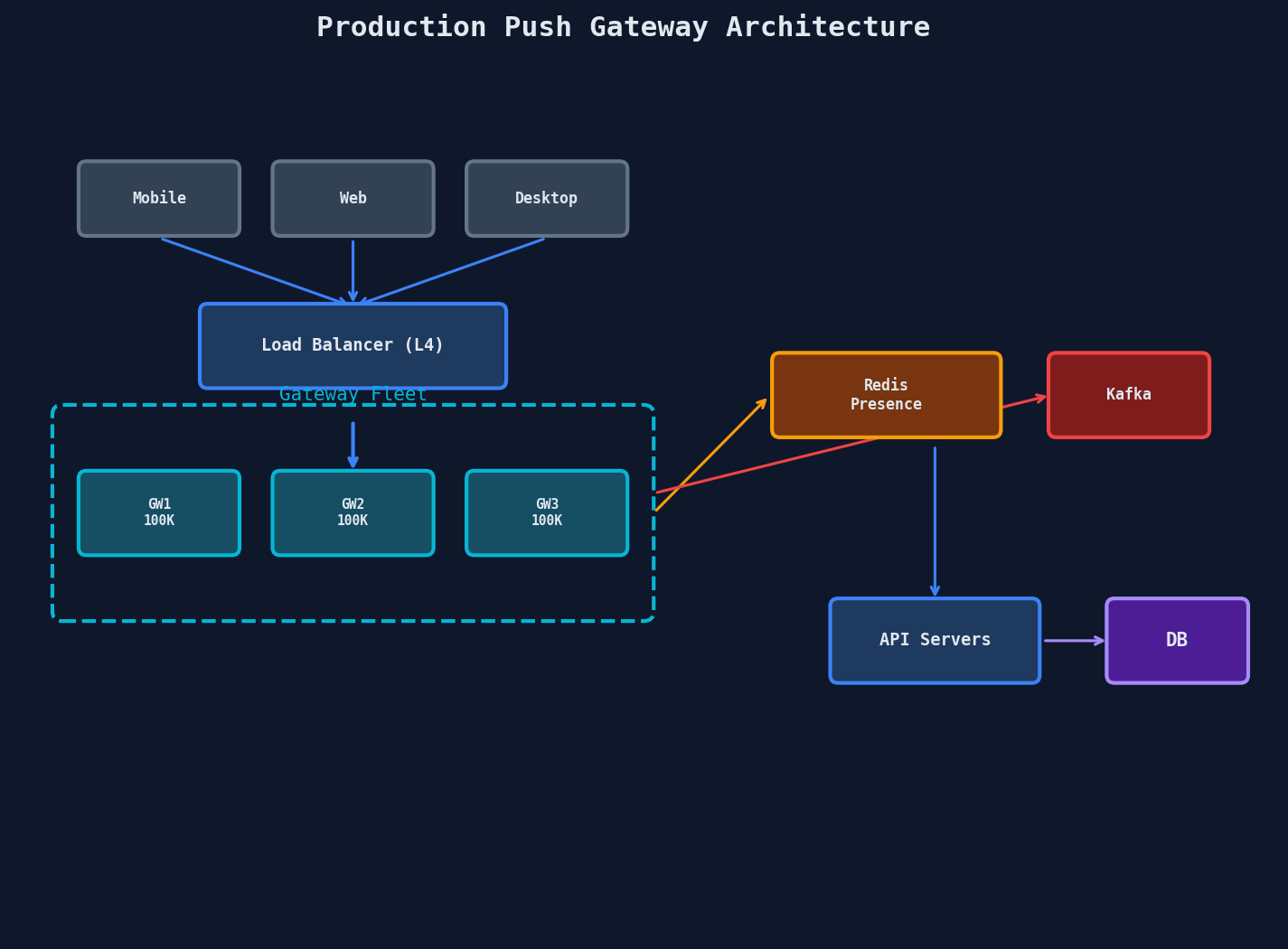
The Full Gateway Architecture
Putting it all together — here's what a production push gateway looks like:
Key Takeaways
| Component | Key Numbers | Critical Detail |
|---|---|---|
| Presence | 30s heartbeat, offline after 60s | Use Redis TTL, gossip only to relevant gateways |
| OT | N op types = N^2 transforms | Needs central server, proven at Google scale |
| CRDTs | Higher memory, math-guaranteed convergence | No central server, excellent offline support |
| Connections/server | 50K-100K WebSockets | ~140KB RAM per connection, tune file descriptors |
| Graceful deploys | Drain in batches + jitter | Never close all connections simultaneously |
| Backpressure | Bounded buffer, drop oldest | Slow clients must not block fast clients |
| Resume tokens | Client sends last_event_id on reconnect | Replay missed events, restore subscriptions |