WebRTC
TL;DR
WebRTC lets two browsers talk directly to each other — no server in the middle — which makes it perfect for video and voice calls. It's the only protocol we've covered that uses UDP and goes peer-to-peer. Amazing for calls, but overkill for almost everything else.
Cutting Out the Middleman
Everything we've talked about so far follows a client-server pattern. Your browser talks to a server, the server talks back. WebRTC breaks that pattern entirely.
Imagine two people having a conversation. In the client-server world, it's like they can only talk through an interpreter who stands between them — Person A says something to the interpreter, the interpreter repeats it to Person B, and vice versa. It works, but it's slow and the interpreter (server) has to handle every word.
WebRTC (Web Real-Time Communication) lets Person A and Person B talk directly to each other. No interpreter needed. One hop instead of two. Lower latency, less infrastructure cost.
Sounds simple, right? In practice... it's anything but.
The "I Can't Find Your House" Problem
Here's why peer-to-peer is harder than it sounds. Most devices on the internet hide behind a ~~NAT~~ (Network Address Translation) — that's your home router, your office firewall, your mobile carrier's network.
Think of NAT like living in an apartment building. The building has one address that the outside world can see, but your apartment number is only known internally. If someone on the street wants to reach you directly, they know the building but not which apartment you're in. And the building's security (the firewall) might not let them in at all.
Both people on a video call are usually behind NATs. Neither can directly reach the other. So WebRTC needs some clever tricks to make the connection work.
How WebRTC Actually Connects Two People
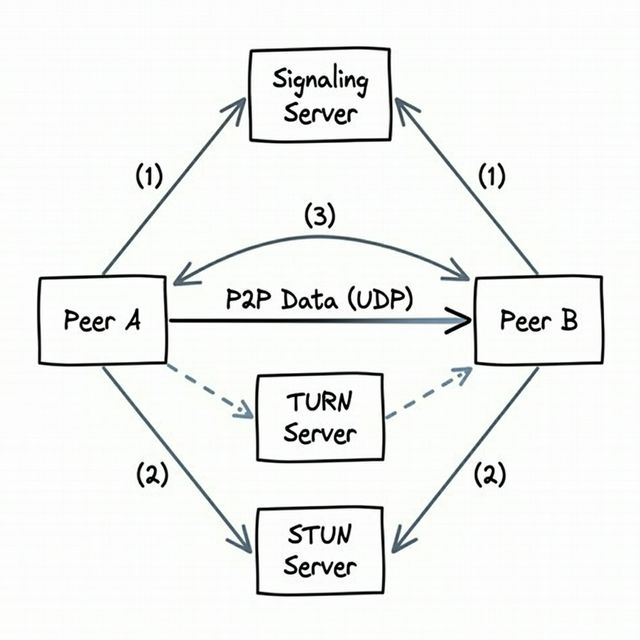
Setting up a WebRTC connection is like two people trying to meet in a city where neither knows the other's address. They need helpers.
Step 1: The Matchmaker (Signaling Server)
Both people connect to a signaling server — think of it as a mutual friend who can relay messages. This server doesn't carry any audio or video. It's just there to help the two sides exchange contact information.
"Hey, Alice wants to call Bob. Bob, here's how to reach Alice. Alice, here's how to reach Bob."
The signaling server can use any protocol — usually WebSockets or plain HTTP. WebRTC doesn't define how signaling works; it's up to you.
Step 2: Figuring Out Your Own Address (STUN)
Each person asks a STUN server (Session Traversal Utilities for NAT): "What does my address look like from the outside?" It's like stepping outside your apartment building and checking the building number.
STUN also uses a technique called "hole punching" to poke an opening through the NAT so the other person can reach you. Yes, it sounds hacky. It is. But it's standardized and it works most of the time.
Step 3: Exchanging Addresses
Through the signaling server, both sides share the addresses they discovered. Now each person knows how to find the other.
Step 4: Direct Connection!
The two browsers establish a direct connection and start streaming audio/video over UDP (because for video calls, speed beats reliability — a dropped frame is invisible, but a frozen video is infuriating).
The Backup Plan: TURN
Sometimes STUN isn't enough. Some corporate firewalls block everything, some NATs are too strict. When the direct connection fails, there's TURN (Traversal Using Relays around NAT) — a relay server that bounces traffic between the two people.
TURN defeats the purpose of peer-to-peer (data goes through a server again), but it's the fallback when nothing else works. Think of it as the mutual friend saying "You two can't meet directly? Fine, tell me what to say and I'll relay everything." In practice, a significant chunk of WebRTC connections end up needing TURN.
Where to Use WebRTC
Keep it simple: WebRTC is for audio and video calls. That's its sweet spot.
- Video conferencing (Zoom, Google Meet)
- Voice calls (browser-based phone calls)
- Screen sharing
You could technically use it for other things like collaborative editing, but in practice, most problems don't actually need peer-to-peer connections. Chat? Use WebSockets. Notifications? Use SSE. Collaborative editing? WebSockets with a central server handle persistence better.
Don't Reach for WebRTC Unless You Need It
Here's a word of caution — and this applies to interviews especially. WebRTC is fascinating technology, but it's a rabbit hole. The setup is complex (signaling servers, STUN, TURN, ICE candidates, SDP negotiation), and if you go down that path in a design interview, you might spend all your time on connection plumbing instead of solving the actual problem.
If the problem is "design a video calling app" — yes, mention WebRTC. For virtually everything else, stick with SSE or WebSockets.
Quick Reference: Which Real-Time Protocol Should I Use?
| What you need | Use this | Why |
|---|---|---|
| Server pushes updates to the client | SSE | Simple, HTTP-based, auto-reconnect, zero setup |
| Client and server chat back and forth | WebSockets | Bidirectional, persistent, works everywhere |
| Browser-to-browser audio/video | WebRTC | Peer-to-peer, UDP, lowest latency for calls |
| Server-to-server streaming | gRPC streaming | Binary, efficient, strongly typed |
Interview Tip
The safest approach is: "SSE by default, WebSockets if I need bidirectional, WebRTC only for voice/video." This shows you understand the trade-offs and won't over-engineer. If an interviewer asks about WebRTC for a chat app, politely explain why WebSockets are a better fit — it demonstrates practical judgment over theoretical knowledge.