Authorization and RBAC
TL;DR
Authorization decides what an authenticated user can do. Use RBAC (Role-Based Access Control) to map roles to permissions. User identity MUST come from the verified JWT, never from the request body — anything in the body is spoofable. In multi-tenant systems, tenant ID MUST be in the JWT, not in URL path parameters. Getting multi-tenancy wrong is an "immediately disqualify" level mistake in interviews.
Authentication Is the Door. Authorization Is the Floor Plan.
In the previous lesson, we covered authentication — proving who someone is. But knowing who someone is doesn't mean they can do anything they want.
Think of a hotel. When you check in, the front desk verifies your identity (authentication) and gives you a keycard. But your keycard doesn't open every room. It opens your room, the gym, and the pool. The penthouse suite? The staff-only maintenance room? Your keycard doesn't work there.
That's authorization — determining which resources and actions a verified user is allowed to access.
In API design, every endpoint needs both:
- Is this user authenticated? (Is the JWT valid?)
- Is this user authorized? (Does their role/permission allow this action on this resource?)
RBAC — Role-Based Access Control
RBAC is the most common authorization model in production systems. The idea is simple: instead of assigning permissions to individual users, you assign permissions to roles, then assign roles to users.
The Ticketmaster Example
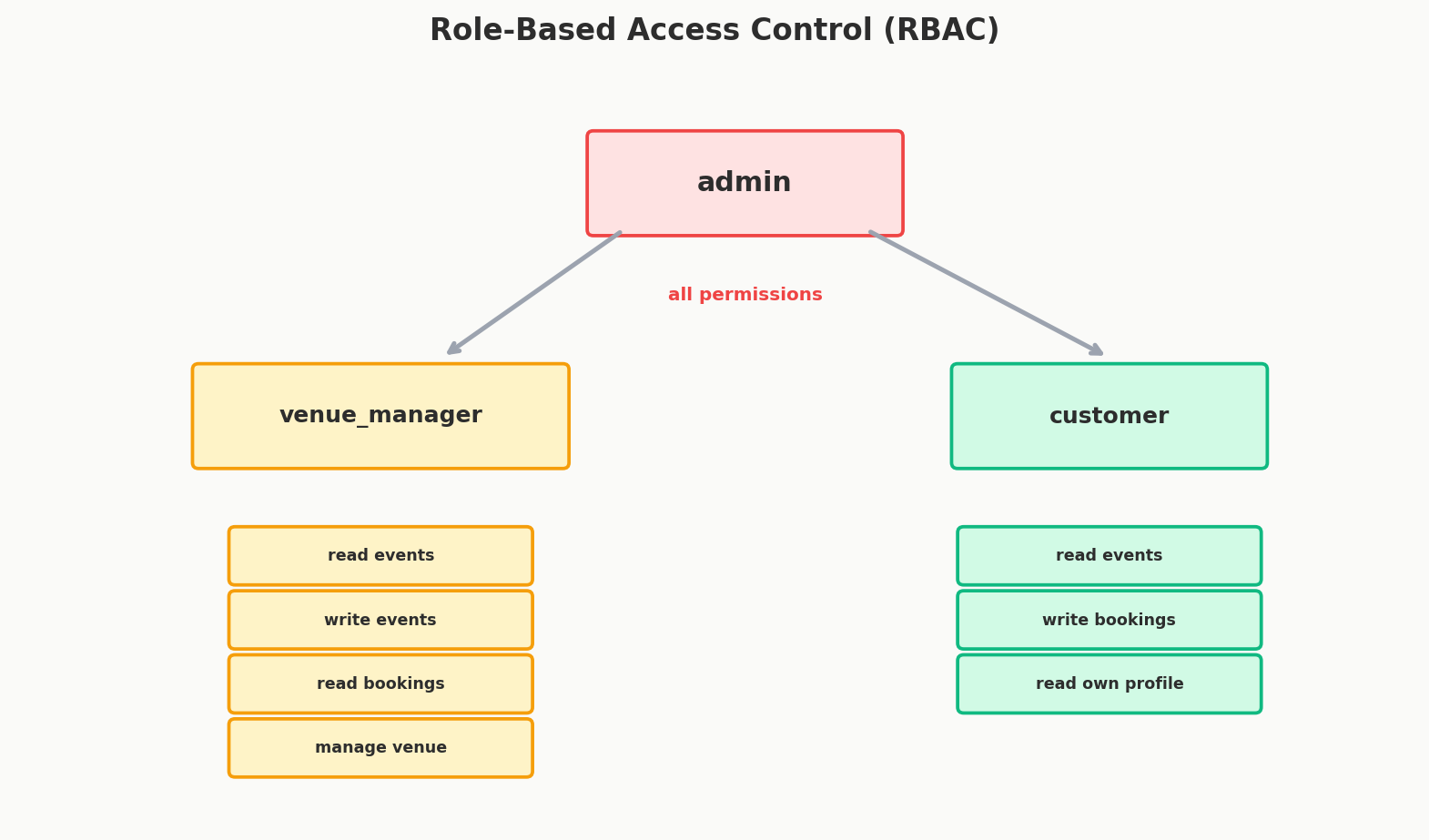
Imagine you're designing the API for a ticketing platform like Ticketmaster. You have three types of users:
| Role | Who They Are | What They Can Do |
|---|---|---|
| customer | End users buying tickets | Browse events, purchase tickets, view their own bookings |
| venue_manager | People who run venues | Everything a customer can do, PLUS create/edit events at their venue, view sales reports |
| admin | Platform operators | Everything, including managing users, approving venues, viewing all data |
How RBAC Works in Practice
You define a permission matrix — which roles can access which endpoints:
| Endpoint | customer | venue_manager | admin |
|---|---|---|---|
GET /events |
Yes | Yes | Yes |
POST /events |
No | Yes (own venue only) | Yes |
GET /bookings/:id |
Own only | Own venue's bookings | All |
DELETE /events/:id |
No | Own events only | Yes |
GET /admin/users |
No | No | Yes |
POST /admin/venues/approve |
No | No | Yes |
Implementation Pattern
In your backend, authorization typically happens in middleware that runs after authentication:
# Pseudocode — the pattern, not a specific framework

@app.route("/events", methods=["POST"])
@require_auth                    # Step 1: Verify JWT, extract user
@require_role("venue_manager", "admin")  # Step 2: Check role
def create_event():
    user = get_current_user()    # User info comes from the JWT
    # ... create the event
The key pattern is:
- Authenticate — verify the JWT, extract the user's identity and role.
- Authorize — check if the user's role has permission for this action.
- Scope — even if authorized, scope the action appropriately (venue managers can only create events at their venue).
Ownership Checks: Beyond Simple Roles
RBAC gets you most of the way, but many endpoints also need ownership checks. A customer can view their own bookings but not someone else's.
@app.route("/bookings/<booking_id>", methods=["GET"])
@require_auth
def get_booking(booking_id):
    user = get_current_user()  # From JWT
    booking = db.get_booking(booking_id)

    if user.role == "admin":
        return booking           # Admins can see everything

    if user.role == "venue_manager" and booking.venue_id == user.venue_id:
        return booking           # Venue managers see their venue's bookings

    if booking.user_id == user.id:
        return booking           # Customers see their own bookings

    return {"error": "Forbidden"}, 403
The authorization logic checks: Is the user authenticated? Does their role allow this? Do they own this resource?
Interview Tip
When designing API endpoints, explicitly state which roles can access each one. Saying "this endpoint requires the admin role" or "users can only access their own bookings" shows the interviewer you think about security and access control — not just happy-path functionality.
CRITICAL: User Identity Comes from the JWT, NEVER from the Request Body
This is one of the most common and most dangerous mistakes in API design. It's worth an entire section because getting it wrong is a security vulnerability, and in an interview, it's a red flag.
The Attack
Imagine an endpoint to cancel a booking:
The server receives this and thinks: "User 42 wants to cancel booking 789. Let me check if user 42 owns booking 789... yes they do. Cancelled."
The problem: What stops an attacker from sending this?
POST /bookings/cancel
{
    "user_id": 42,    ← This is a lie. The attacker is user 99.
    "booking_id": 789
}
Absolutely nothing. The user_id in the request body is just a number anyone can type. It's no more trustworthy than someone writing "I am the President" on a sticky note.
The Fix
The server must extract the user's identity from the verified JWT, never from the request body:
# WRONG — user_id from request body (spoofable)
@app.route("/bookings/cancel", methods=["POST"])
def cancel_booking():
    user_id = request.json["user_id"]    # ANYONE can set this
    booking_id = request.json["booking_id"]
    booking = db.get_booking(booking_id)
    if booking.user_id == user_id:
        db.cancel_booking(booking_id)
        return {"status": "cancelled"}
# RIGHT — user_id from JWT (cryptographically verified)
@app.route("/bookings/cancel", methods=["POST"])
@require_auth
def cancel_booking():
    user = get_current_user()            # Extracted from verified JWT
    booking_id = request.json["booking_id"]
    booking = db.get_booking(booking_id)
    if booking.user_id == user.id:       # Compare against JWT identity
        db.cancel_booking(booking_id)
        return {"status": "cancelled"}
    return {"error": "Forbidden"}, 403
The JWT is cryptographically signed. If someone tampers with it, the signature verification fails. The request body has no such protection.
The Rule
Even if you include user_id in the request body, never rely on it server-side. The server should always derive the user's identity from the authentication token. The body user_id might be useful for logging or debugging, but it must never be the source of truth for authorization decisions.
This principle applies to any identity field: user_id, email, account_id, tenant_id. If it's used for authorization, it must come from the JWT.
Multi-Tenancy: The "Immediately Disqualify" Mistake
Multi-tenancy means multiple organizations (tenants) share the same system. Think Slack — thousands of companies use the same Slack infrastructure, but Company A must never see Company B's messages.
The Wrong Way: Tenant ID in the URL
Some developers design APIs like this:
The tenant ID is in the path parameter. What could go wrong?
Everything.
The Attack
An authenticated user from Tenant 123 sends:
If the server trusts the path parameter for tenant context, this user just accessed Tenant 456's data. This isn't a theoretical risk — this is a real-world data breach pattern that has caused compliance violations and lawsuits.
Even if you add server-side checks ("does this user belong to tenant 456?"), you're relying on every single endpoint implementing that check correctly. One missed check, one junior developer who forgets, and you have a cross-tenant data leak.
The Right Way: Tenant ID in the JWT
The tenant ID should be embedded in the JWT when the token is created:
{
  "user_id": 42,
  "email": "alice@company-a.com",
  "role": "venue_manager",
  "tenant_id": 123,
  "exp": 1717024000
}
Now the server extracts the tenant ID from the cryptographically verified JWT:
@app.route("/events", methods=["GET"])
@require_auth
def get_events():
    user = get_current_user()           # From JWT
    tenant_id = user.tenant_id          # From JWT — tamper-proof
    events = db.get_events(tenant_id=tenant_id)  # Scoped to tenant
    return events
No path parameter. No way for a user to accidentally or maliciously access another tenant's data. The tenant context is baked into the token and cryptographically secured.
Why This Is an Interview Dealbreaker
In senior system design interviews, multi-tenancy security is a signal of production experience. Putting the tenant ID in the URL path or request body shows a fundamental misunderstanding of how data isolation works in shared systems.
The consequences of getting this wrong aren't just bugs — they're compliance violations (GDPR, SOC 2, HIPAA), data breaches, and lost customer trust. In regulated industries (healthcare, finance), cross-tenant data access can result in legal action.
If you're designing a multi-tenant system in an interview, always say: "The tenant ID is embedded in the JWT. Every database query is scoped by the tenant ID extracted from the token. There's no path parameter or request body field for tenant ID."
Interview Tip
If your design involves multiple organizations or companies sharing one system, proactively mention tenant isolation. "The tenant ID is in the JWT, and every data access is scoped to that tenant" is a line that immediately signals seniority.
ABAC — Attribute-Based Access Control
RBAC is great for most systems, but sometimes roles aren't granular enough. What if the authorization rule is:
"Users can edit documents they created AND the document is still in draft status AND it was created less than 7 days ago."
That's three conditions — and they're based on attributes of the user and the resource, not just the user's role. This is ABAC (Attribute-Based Access Control).
RBAC vs. ABAC
| RBAC | ABAC | |
|---|---|---|
| Authorization based on | User's role | User attributes + resource attributes + environment conditions |
| Example rule | "Admins can delete events" | "Users can edit documents they own, if the document is in draft status, during business hours" |
| Complexity | Low-Medium | High |
| Flexibility | Limited — adding new conditions often means new roles | Very flexible — any attribute can be a condition |
| Best for | Most applications | Systems with complex, fine-grained access rules (healthcare, finance, government) |
ABAC in Practice
An ABAC policy engine evaluates rules like:
ALLOW action: "edit"
  IF subject.id == resource.owner_id       # User owns the resource
  AND resource.status == "draft"            # Resource is in draft
  AND environment.time.hour >= 9            # During business hours
  AND environment.time.hour <= 17
AWS IAM policies are a real-world example of ABAC. Each policy specifies conditions based on attributes:
{
  "Effect": "Allow",
  "Action": "s3:GetObject",
  "Resource": "arn:aws:s3:::my-bucket/*",
  "Condition": {
    "StringEquals": {
      "aws:PrincipalOrgID": "o-123456"
    },
    "IpAddress": {
      "aws:SourceIp": "10.0.0.0/24"
    }
  }
}
When to Mention ABAC in Interviews
For most system design interviews, RBAC is sufficient. Mention ABAC if:
- The system has complex authorization rules that don't map cleanly to roles.
- You're designing something in healthcare, finance, or government where fine-grained access control is a regulatory requirement.
- The interviewer specifically asks about granular permissions.
Don't over-engineer. If "admins can do X, users can do Y" covers your requirements, RBAC is the right choice.
Field-Level Authorization
Sometimes authorization isn't about entire endpoints — it's about specific fields within a response. This is especially relevant for GraphQL APIs, where clients choose which fields to query.
Consider a user profile:
{
  "id": 42,
  "name": "Alice Smith",
  "email": "alice@example.com",
  "salary": 95000,
  "ssn": "123-45-6789",
  "department": "Engineering"
}
Different users should see different fields:
| Field | Self | Manager | HR Admin |
|---|---|---|---|
name |
Yes | Yes | Yes |
email |
Yes | Yes | Yes |
salary |
Yes | Yes | Yes |
ssn |
Yes | No | Yes |
department |
Yes | Yes | Yes |
In REST, you might handle this with different endpoints or response serializers per role. In GraphQL, you need field-level resolvers that check permissions:
type User {
  name: String!
  email: String!
  salary: Int! @auth(requires: [SELF, MANAGER, HR_ADMIN])
  ssn: String @auth(requires: [SELF, HR_ADMIN])
}
Interview Tip
If your design returns user data with sensitive fields, briefly mention "I'd filter sensitive fields based on the requester's role" — it shows awareness of data exposure risks.
Policy Enforcement: Where to Put Authorization Logic
You have three main options for where authorization checks live:
| Approach | How It Works | Pros | Cons |
|---|---|---|---|
| Per-endpoint | Each route handler checks permissions | Simple, explicit | Easy to forget on new endpoints, scattered logic |
| Middleware | Authorization middleware runs before handlers | Centralized, consistent | Can be too coarse-grained for complex rules |
| API Gateway | Gateway (Kong, AWS API Gateway) enforces policies | Offloads from application code | Limited to simple rules (role checks), can't do ownership checks |
In practice, most systems use a combination: the API gateway handles simple checks (is the token valid? is the user an admin?), and the application handles fine-grained checks (does the user own this resource?).
Putting It All Together: An Authorization Flow
Here's what a complete authorization flow looks like for a request to DELETE /events/456:
Client sends: DELETE /events/456
               Authorization: Bearer eyJ...

API Gateway:
  1. Is the JWT valid? → Yes (signature checks out, not expired)
  2. Extract: user_id=42, role=venue_manager, tenant_id=123
  3. Does this endpoint require a specific role? → Yes, venue_manager or admin
  4. Is venue_manager allowed? → Yes → forward to application

Application:
  5. Get event 456 from database
  6. Is event 456 in tenant 123? → Yes (tenant isolation check)
  7. Does user 42 own event 456? → Yes (ownership check)
  8. Delete event 456 → return 204 No Content
Every layer adds a check. The JWT provides the identity (tamper-proof). The gateway handles coarse checks. The application handles fine-grained logic. No step trusts user input for identity or tenant context.
Quick Recap
- Authorization checks what an authenticated user is allowed to do. It happens after authentication.
- RBAC maps roles to permissions. Define roles (customer, manager, admin), assign permissions to roles, assign roles to users.
- User identity must come from the JWT, never from the request body. The body is spoofable; the JWT is cryptographically signed.
- Tenant ID must be in the JWT for multi-tenant systems. Path-based tenant IDs are a data breach waiting to happen.
- ABAC provides finer-grained control based on attributes. Use it when RBAC isn't granular enough. Most systems don't need it.
- Field-level authorization filters sensitive fields based on the requester's role. Especially important for GraphQL.
- Layer your checks: API gateway for coarse rules, application middleware for fine-grained ownership and scope checks.
Interview Expectations: Junior vs. Senior
- Junior/Mid-level: Can explain basic Role-Based Access Control (RBAC) like checking if a user is an "admin" or "user".
- Senior/Staff: Designs authorization as middleware/interceptors, not scattered throughout business logic. Discusses when RBAC is too limited and introduces Attribute-Based Access Control (ABAC) or ACLs for fine-grained resource ownership (e.g., "User A can edit Doc B but only view Doc C").