Why Large Files Break
TL;DR
Routing file bytes through your API server turns it into a dumb, expensive pipe. A 2GB upload ties up a server thread, burns bandwidth you pay for twice, and adds latency for zero value. The fix: your server hands out a permission slip (presigned URL), and the client uploads directly to object storage. Server never touches the bytes. This chapter teaches the patterns that make it work.
Your API Server Is Not a Pipe
Here's what happens when someone uploads a profile picture through your REST API in the "obvious" way:
# The naive approach -- every byte flows through your server
@app.route("/api/upload", methods=["POST"])
def upload_file():
    file = request.files["document"]
    # Your server receives every byte...
    data = file.read()
    # ...then re-uploads every byte to S3
    s3.put_object(Bucket="my-bucket", Key=f"docs/{file.filename}", Body=data)
    return jsonify({"status": "uploaded"}), 200
For a 5KB avatar, nobody notices. For a 2GB video, your server becomes a relay station doing zero useful work while holding a thread hostage.
The Proxy Problem Visualized
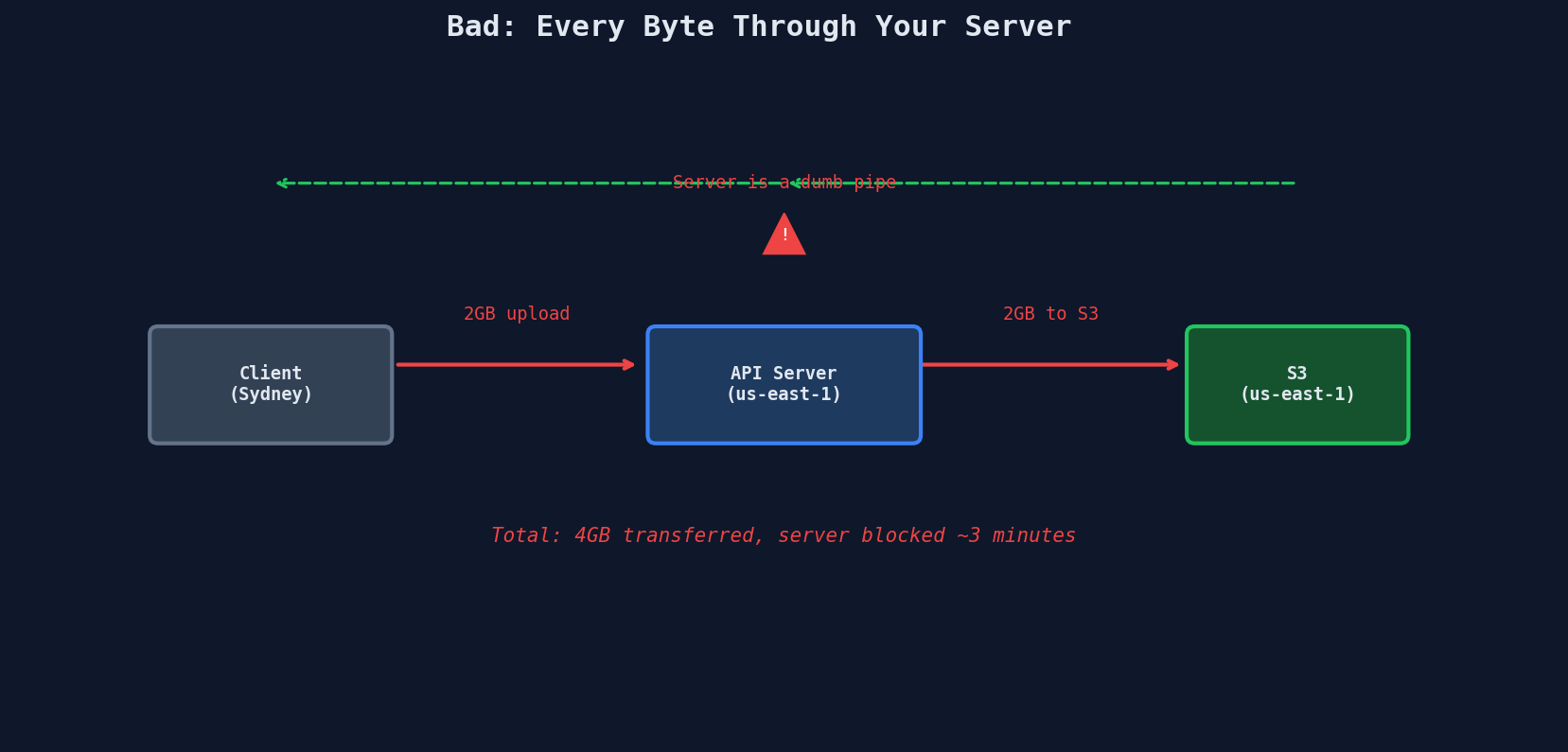
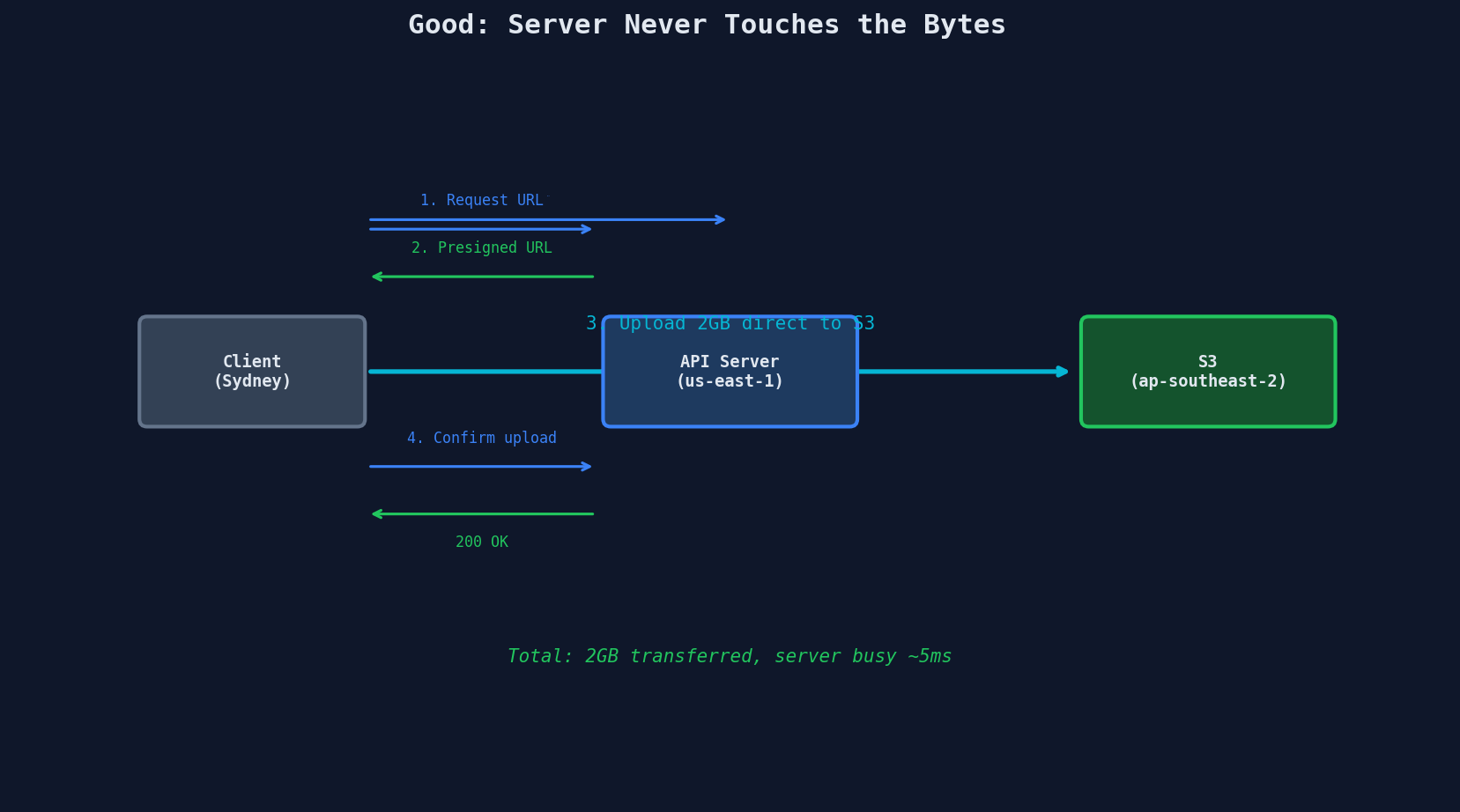
The server goes from processing 2GB of traffic to processing two tiny JSON requests. That's the entire lesson of this chapter in one diagram.
The Three Costs of Proxying
| Cost | Proxied Upload (2GB) | Direct Upload (2GB) |
|---|---|---|
| Server thread time | ~3 minutes blocked | ~5ms (two JSON calls) |
| Bandwidth bill | 2GB in + 2GB to S3 = 4GB | 0 (client talks to S3) |
| User latency | Double hop: user→server→S3 | Single hop: user→S3 |
| Concurrent uploads supported | Handful before thread pool exhaustion | Thousands (server does no heavy lifting) |
The bandwidth cost is particularly brutal. You pay for data transfer into your server, then pay again to transfer it to S3. Direct upload costs you nothing on the server side.
Object Storage vs. Your Database
Not all data belongs in the same place. The decision is straightforward:
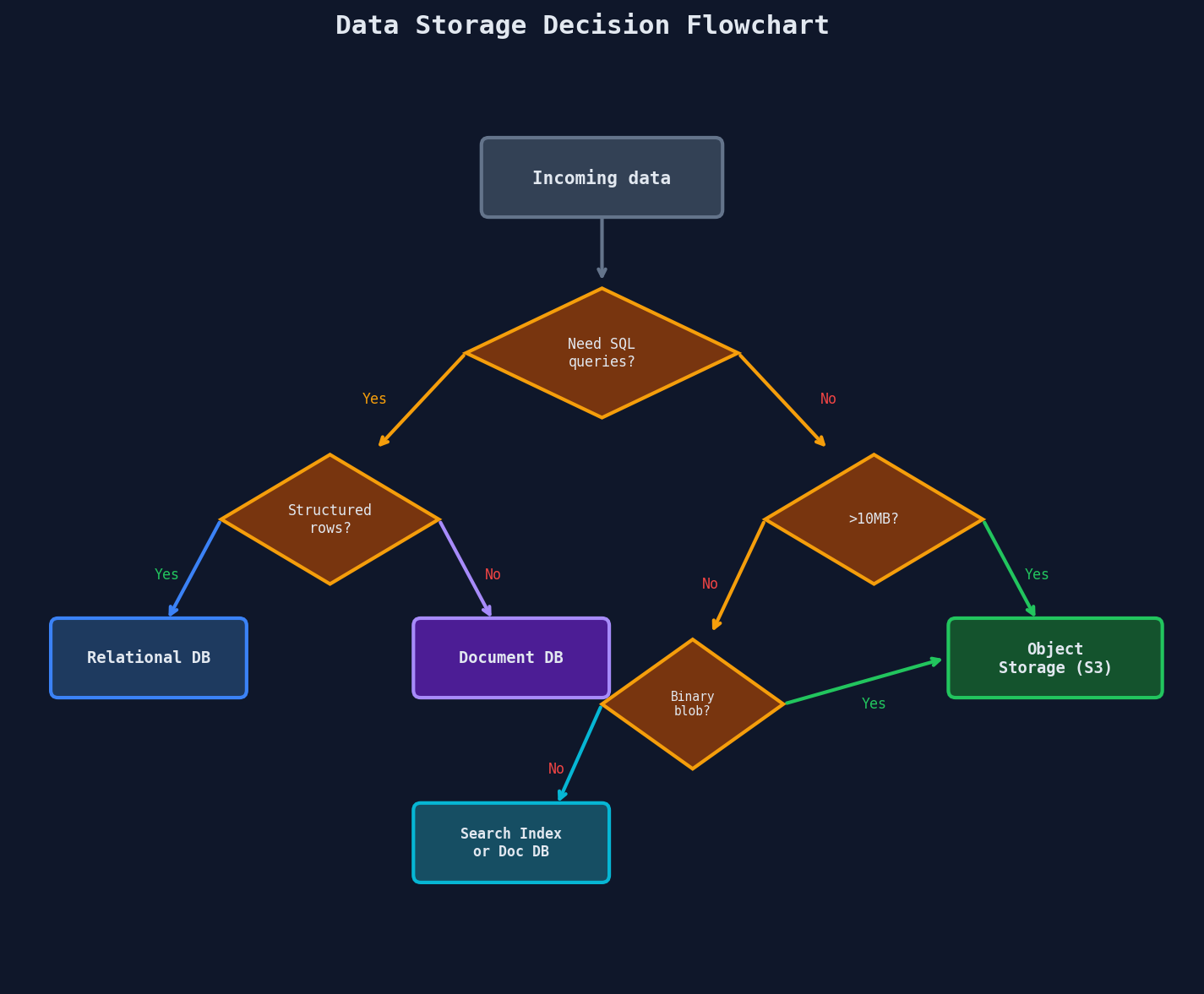
Object storage (S3, GCS, Azure Blob) is purpose-built for large binary data:
| Property | Object Storage (S3) | Relational DB (Postgres) |
|---|---|---|
| Max object size | 5TB | ~1GB (BYTEA), painful above 100MB |
| Durability | 99.999999999% (11 nines) | Depends on your backup strategy |
| Cost per GB/month | $0.023 | $0.10 - $0.30 (EBS storage) |
| Designed for | Write once, read many | Frequent updates, joins, queries |
| Access pattern | GET by key | SQL queries across rows |
| Concurrent access | Millions of reads | Connection pool limits |
The 11 nines number
S3's durability of 99.999999999% means if you store 10 million objects, you'd statistically lose one every 10,000 years. That's not a marketing number -- it's replicated across multiple facilities within a region by default.
The Rule of Thumb
If the data is larger than 10MB and you'll never run SQL queries on it -- it goes in object storage. Store a pointer (the S3 key) in your database.
# Your database row -- small, queryable metadata
{
    "id": "doc_8f3a",
    "user_id": "user_42",
    "filename": "quarterly-report.pdf",
    "content_type": "application/pdf",
    "size_bytes": 48_291_837,
    "s3_key": "documents/user_42/doc_8f3a/quarterly-report.pdf",
    "uploaded_at": "2025-03-15T10:30:00Z",
    "status": "processed"
}

# The actual file -- large, binary, stored in S3
# s3://my-bucket/documents/user_42/doc_8f3a/quarterly-report.pdf
This is the metadata-in-DB, bytes-in-storage pattern. You'll see it everywhere: profile photos, videos, documents, backups, ML model artifacts.
Why Direct Upload Matters for Global Users
When your API server is in us-east-1 and your user is in Sydney, proxying the upload means every byte crosses the Pacific Ocean twice -- once to your server, once from your server to S3.
With direct upload to a regional S3 bucket (or S3 Transfer Acceleration), the Sydney user uploads to an endpoint that routes to the nearest AWS edge location. The bytes never touch your application server.
| Upload Path | Sydney User Latency (2GB) |
|---|---|
| Sydney → us-east-1 API → us-east-1 S3 | ~4 minutes |
| Sydney → ap-southeast-2 S3 (direct) | ~90 seconds |
| Sydney → nearest edge (Transfer Acceleration) | ~60 seconds |
Dropbox uses direct-to-storage uploads for all file syncs, routing clients to the nearest data center rather than proxying through a central API.
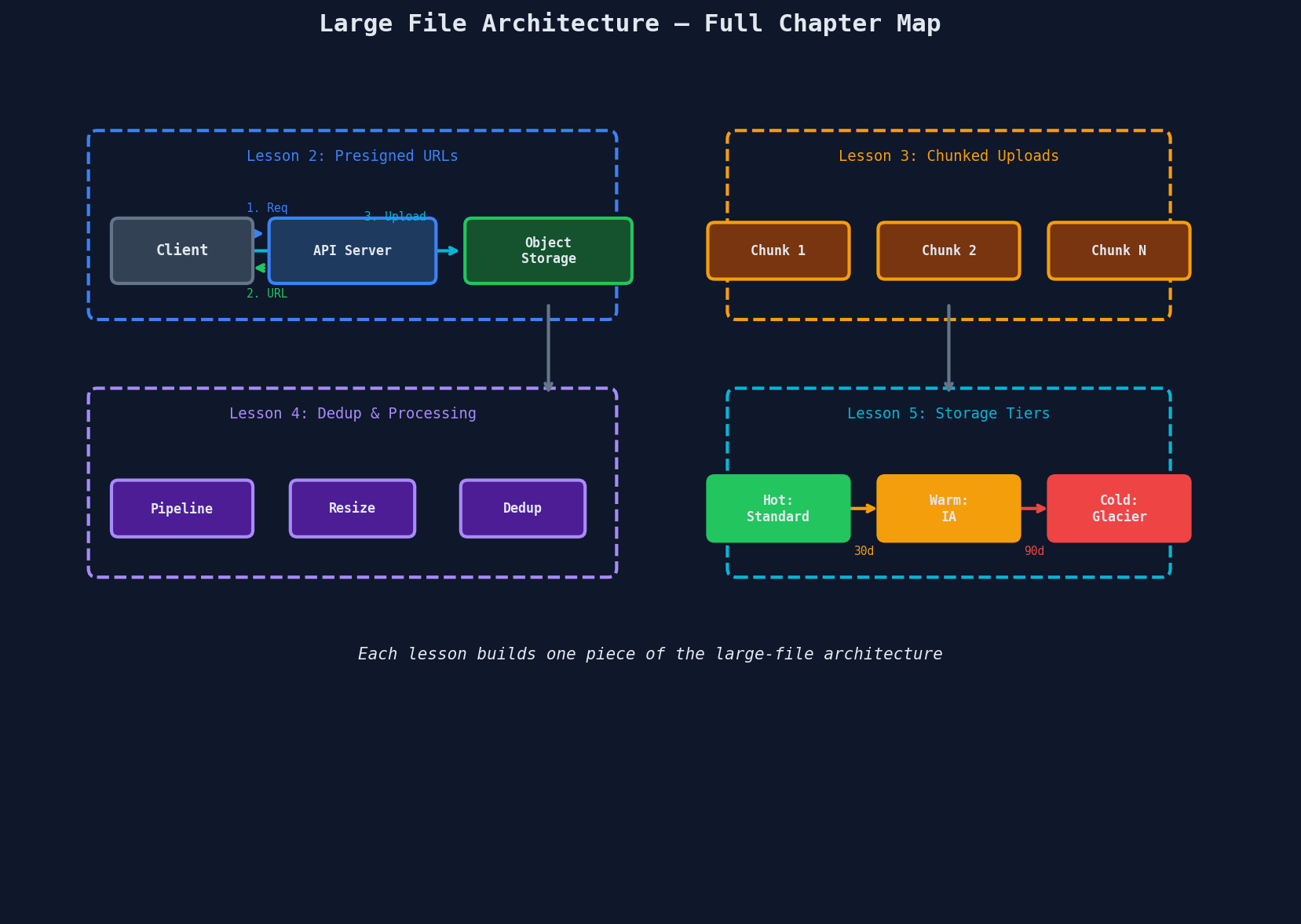
The Architecture You're Building This Chapter
Here's the complete picture. Each of the next four lessons tackles one piece:
What Goes Wrong When You Skip This
The failure modes of proxied uploads stack up fast:
Production horror stories
- Thread pool exhaustion: 20 concurrent 1GB uploads pin all Gunicorn workers. Health checks fail. Load balancer marks the server unhealthy. All traffic reroutes. Cascading failure.
- Memory pressure:
request.files["video"].read()loads the entire file into memory. 8 concurrent 2GB uploads = 16GB RAM. OOMKilled. - Timeout cascade: Nginx's
proxy_read_timeoutkills the connection at 60s. The client retries. Now you have duplicate partial uploads and orphaned S3 objects. - Cost surprise: A file-sharing app proxying 10TB/day through c5.xlarge instances. The bandwidth bill alone was $900/month -- for acting as a relay.
Where This Pattern Shows Up in Interviews
Any system design question involving user-generated content will test these concepts:
| Question | Large File Pattern Needed |
|---|---|
| Design a file sharing service | Presigned URLs, chunked uploads, dedup |
| Design a video streaming platform | Chunked uploads, processing pipeline, CDN |
| Design an image hosting service | Presigned URLs, processing pipeline, storage tiers |
| Design a collaborative document editor | Direct upload, delta sync, block-level dedup |
| Design a backup system | Chunked uploads, dedup, cold storage |
The interviewer isn't testing whether you know S3 API calls. They're testing whether you understand why the server shouldn't touch the bytes and what patterns enable that.
Key Takeaways
| Concept | Details |
|---|---|
| Proxy problem | Routing files through your server wastes bandwidth, threads, and money |
| Direct upload | Client uploads straight to object storage; server only handles metadata |
| Object storage rule | >10MB + no SQL queries = blob storage, not database |
| 11 nines | S3 durability: 99.999999999% -- lose 1 object per 10M every 10,000 years |
| Metadata pattern | Store the S3 key in your DB, the bytes in S3 |
| Global latency | Direct upload eliminates the double-hop for geographically distant users |