Queue Architectures
TL;DR
Four queue technologies dominate system design: SQS (managed, nearly infinite scale, zero ops), RabbitMQ (rich routing with exchanges, priority queues, ACK-based delivery), Redis/BullMQ (fast and simple with a built-in dashboard, but memory-limited), and Kafka (500K+ msg/s, persistent log you can replay, but no per-message ACK, no priority queues, no delayed delivery). Pick based on your actual constraints, not hype.
The Core Pattern
Every queue-based system follows the same skeleton. The technology choice changes the capabilities, not the shape.
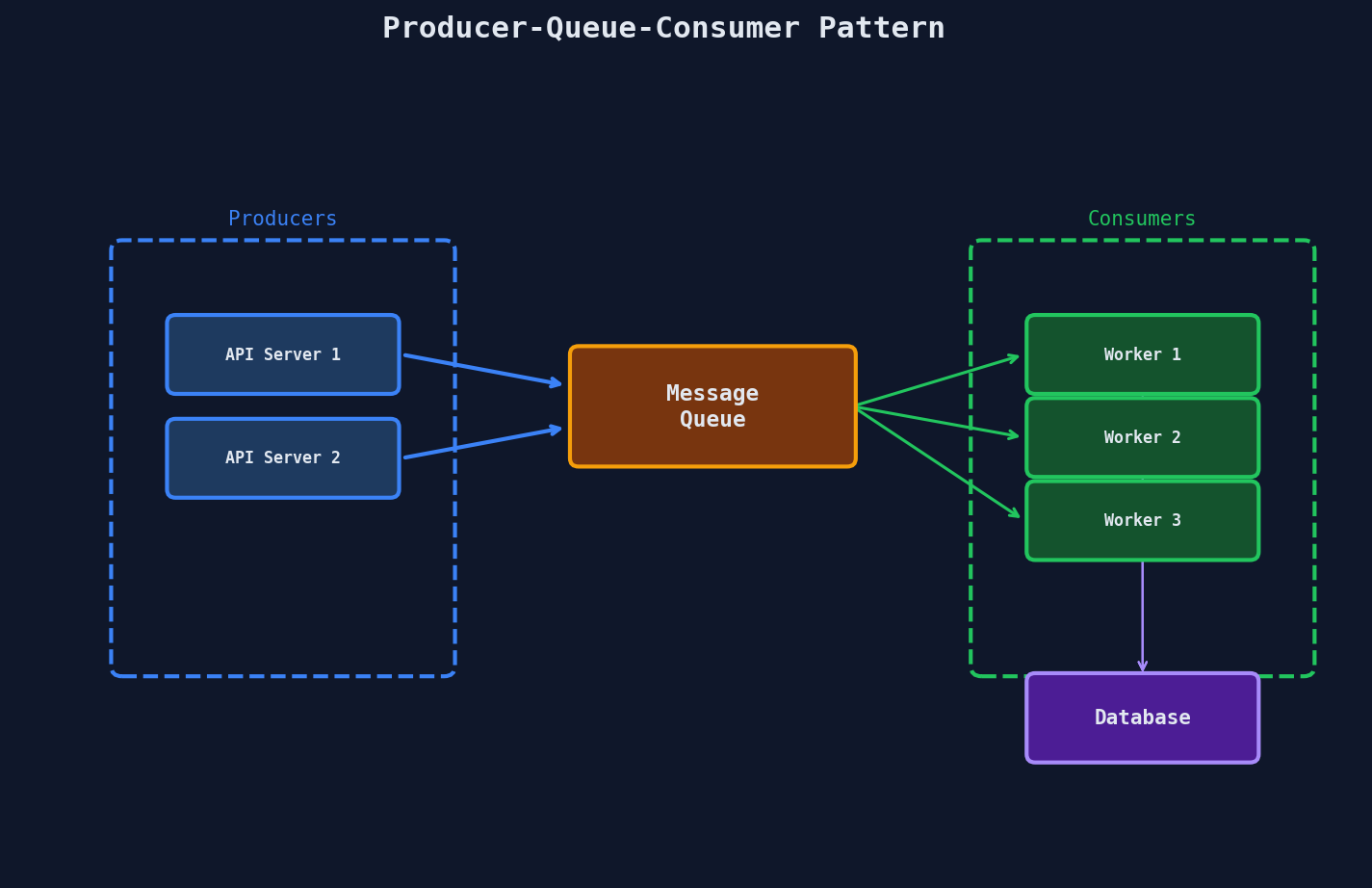
Producer sends a message. Queue stores it durably. Consumer picks it up, processes it, and acknowledges completion. If the consumer crashes before acknowledging, the message goes back to the queue.
That's the contract. Everything else is implementation detail.
The Big Four: Head-to-Head
| Feature | SQS | RabbitMQ | Redis / BullMQ | Kafka |
|---|---|---|---|---|
| Type | Managed service | Self-hosted broker | In-memory store + lib | Distributed log |
| Throughput | ~120K msg/s | ~20-50K msg/s | ~100K+ msg/s | 500K+ msg/s |
| Delivery guarantee | At-least-once | At-least-once (ACK) | At-least-once | At-least-once |
| Ordering | FIFO queues only | Per-queue | Per-queue | Per-partition |
| Priority queues | No | Yes (0-255 levels) | Yes (via BullMQ) | No |
| Delayed delivery | Yes (up to 15 min) | Yes (via plugin/TTL) | Yes (native in BullMQ) | No |
| Dead letter queue | Yes (native) | Yes (native) | Yes (via BullMQ) | Manual (topic redirect) |
| Message replay | No (deleted on ACK) | No (deleted on ACK) | No (deleted on ACK) | Yes (retained by offset) |
| Per-message ACK | Yes | Yes | Yes | No (offset-based) |
| Ops burden | Zero (AWS managed) | Medium (clustering) | Low-Medium | High (ZooKeeper/KRaft) |
| Best for | General job queues | Complex routing | Fast jobs + dashboard | Event streaming |
SQS: The "Just Works" Queue
Amazon SQS is the default choice when you're on AWS and need a job queue with zero operational overhead.
How It Works
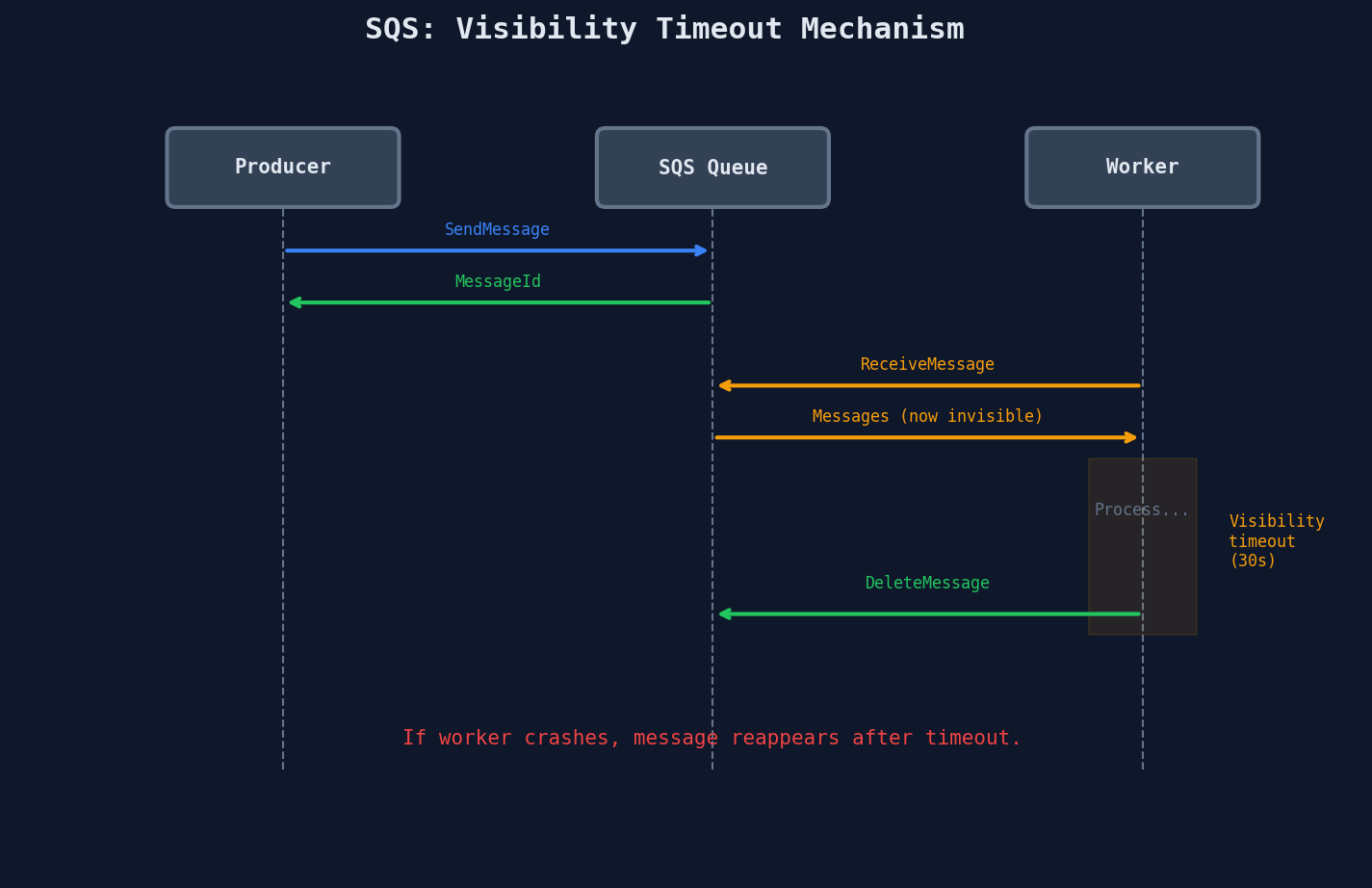
Visibility Timeout: The Key Concept
When a worker receives a message, SQS doesn't delete it -- it hides it for a configurable duration (the visibility timeout). If the worker finishes and deletes the message, great. If the worker crashes, the timeout expires and the message reappears for another worker.
import boto3

sqs = boto3.client("sqs")
queue_url = "https://sqs.us-east-1.amazonaws.com/123456789/reports"

# Send a message
sqs.send_message(
    QueueUrl=queue_url,
    MessageBody='{"job_id": "abc123", "type": "report"}',
    DelaySeconds=0  # up to 900 seconds (15 minutes)
)

# Receive and process
response = sqs.receive_message(
    QueueUrl=queue_url,
    MaxNumberOfMessages=10,
    VisibilityTimeout=300,  # 5 minutes to process
    WaitTimeSeconds=20      # long polling -- reduces empty responses
)

for msg in response.get("Messages", []):
    process(msg["Body"])
    sqs.delete_message(
        QueueUrl=queue_url,
        ReceiptHandle=msg["ReceiptHandle"]
    )
Long polling saves money
WaitTimeSeconds=20 means "wait up to 20 seconds for a message before returning empty." Without it, workers spam ReceiveMessage every 100ms and you pay per request.
SQS FIFO Queues
Standard SQS doesn't guarantee ordering. FIFO queues do, but with trade-offs:
- Throughput cap: 300 msg/s (3,000 with batching) vs. nearly unlimited for standard
- Exactly-once processing: Deduplication via
MessageDeduplicationId - Message groups: Order is guaranteed within a group, parallelism across groups
Use FIFO when order matters (financial transactions). Use Standard when it doesn't (report generation, image processing).
RabbitMQ: The Routing Powerhouse
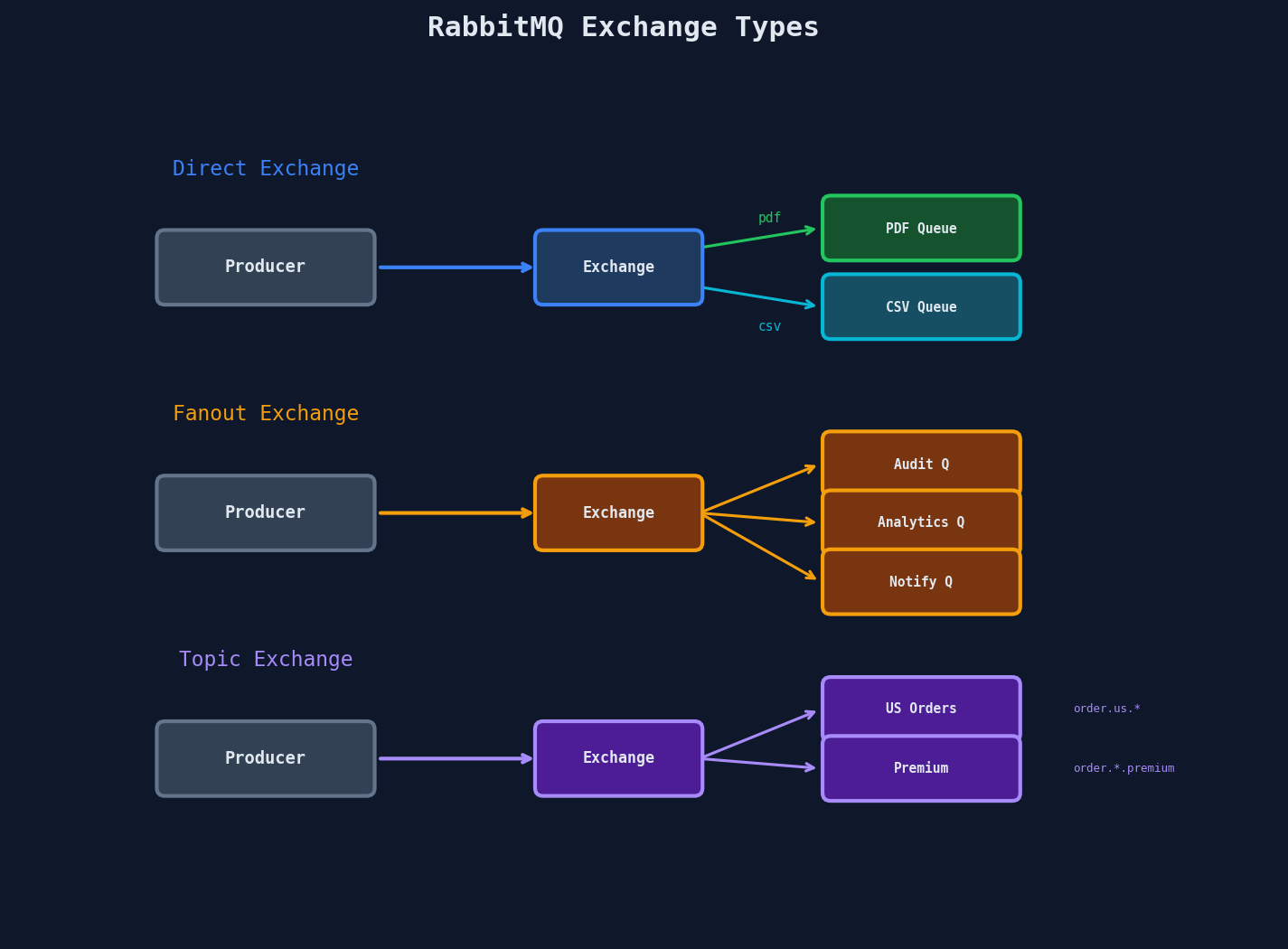
RabbitMQ shines when you need flexible message routing. Its exchange system lets you build patterns that SQS can't touch.
Exchange Types
| Exchange Type | Routing Logic | Use Case |
|---|---|---|
| Direct | Exact match on routing key | Job type routing (pdf, csv, email) |
| Fanout | Broadcast to all bound queues | Event notifications, audit logging |
| Topic | Pattern match with * and # |
Region/tier-based routing |
| Headers | Match on message headers | Complex multi-attribute routing |
Prefetch Count: Flow Control
Prefetch controls how many unacknowledged messages a worker can hold. This is critical for balancing throughput and fairness.
import pika

connection = pika.BlockingConnection(pika.ConnectionParameters("localhost"))
channel = connection.channel()

# Each worker gets at most 5 messages at a time
channel.basic_qos(prefetch_count=5)

def callback(ch, method, properties, body):
    result = process_job(body)
    # Only ACK after successful processing
    ch.basic_ack(delivery_tag=method.delivery_tag)

channel.basic_consume(queue="reports", on_message_callback=callback)
channel.start_consuming()
| Prefetch Count | Behavior |
|---|---|
1 |
Strict round-robin, but low throughput |
5-20 |
Good balance for most workloads |
100+ |
High throughput, but one slow consumer hoards messages |
0 (unlimited) |
Consumer grabs everything -- defeats load balancing |
Priority Queues
RabbitMQ supports up to 255 priority levels. Higher priority messages get delivered first.
# Declare queue with max priority
channel.queue_declare(
    queue="jobs",
    arguments={"x-max-priority": 10}
)

# Publish with priority
channel.basic_publish(
    exchange="",
    routing_key="jobs",
    body='{"type": "payment_refund"}',
    properties=pika.BasicProperties(priority=9)  # urgent
)
Redis / BullMQ: The Developer's Favorite
Redis-backed job queues (BullMQ for Node.js, RQ for Python, Sidekiq for Ruby) offer the best developer experience: simple API, built-in dashboard, and Redis speeds.
import { Queue, Worker } from "bullmq";
import Redis from "ioredis";

const connection = new Redis({ host: "localhost", port: 6379 });

// Create a queue
const reportQueue = new Queue("reports", { connection });

// Add a job with options
await reportQueue.add(
  "generate-pdf",
  { userId: "u_123", reportType: "annual" },
  {
    priority: 1,           // lower number = higher priority
    delay: 5000,           // wait 5s before processing
    attempts: 3,           // retry up to 3 times
    backoff: {
      type: "exponential",
      delay: 1000           // 1s, 2s, 4s
    },
    removeOnComplete: 1000, // keep last 1000 completed jobs
    removeOnFail: 5000      // keep last 5000 failed jobs
  }
);

// Process jobs
const worker = new Worker("reports", async (job) => {
  const pdf = await generateReport(job.data);
  await uploadToS3(pdf);
  return { url: pdf.url };
}, { connection, concurrency: 5 });
BullMQ Dashboard
Bull Board gives you a real-time UI showing active, waiting, completed, and failed jobs. During incidents, this visibility is worth its weight in gold compared to staring at SQS metrics in CloudWatch.
The Memory Ceiling
Redis stores everything in RAM. A million messages at 1KB each = 1GB of memory. For most job queues this is fine, but if your queue can grow unbounded during an outage, you need to plan for it.
Never use allkeys-lru with job queues
If Redis runs out of memory with an LRU eviction policy, it will silently drop your job messages. Always use noeviction and set up memory alerts.
Kafka: The Distributed Log
Kafka is fundamentally different from the others. It's not a job queue -- it's a persistent, ordered, replayable event log. People use it as a job queue, but they should understand what they're giving up.
How Kafka Actually Works
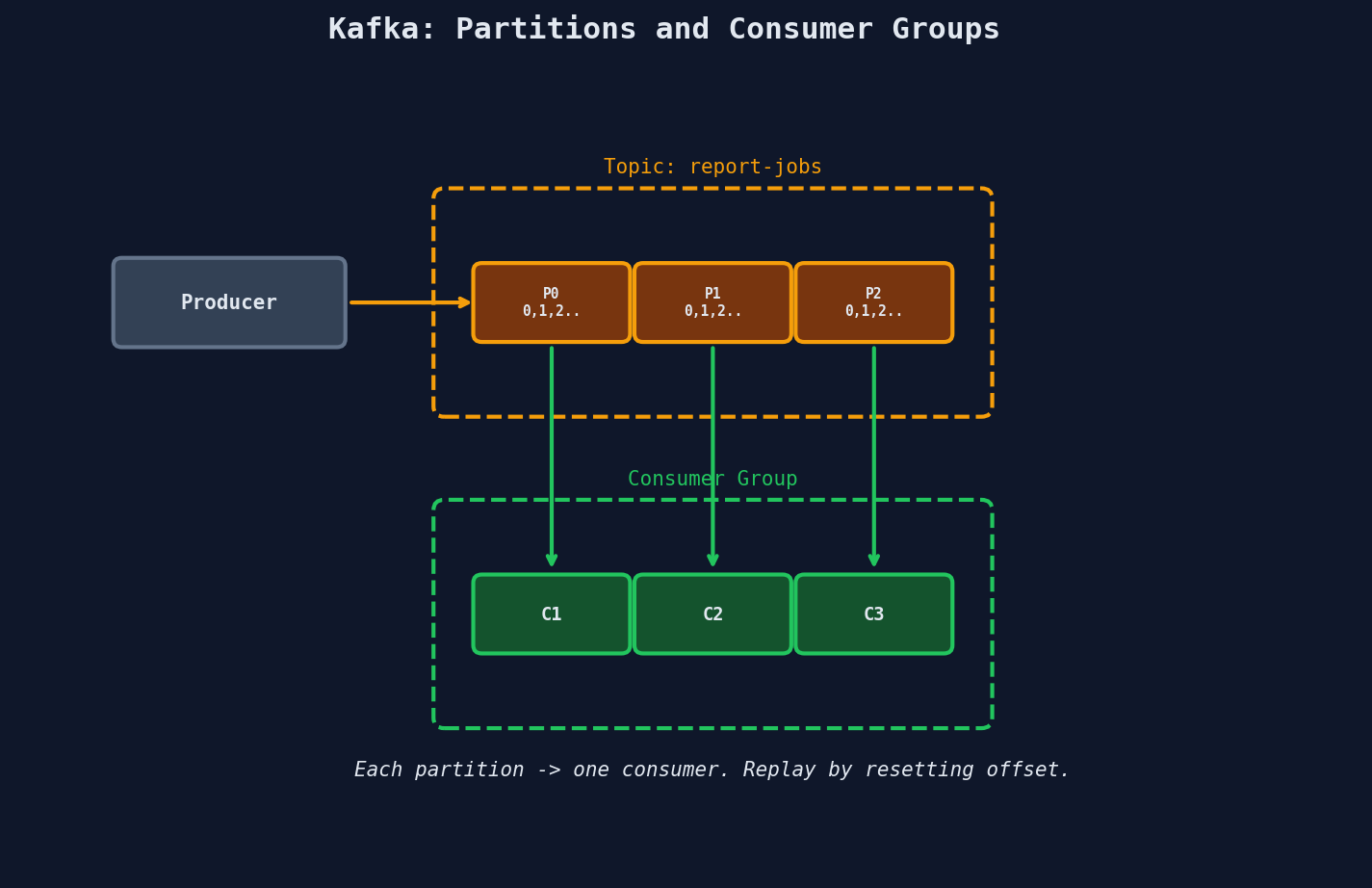
Key concepts:
- Topics are split into partitions
- Each partition is an ordered, append-only log
- Consumer groups divide partitions among consumers -- each partition goes to exactly one consumer in the group
- Consumers track their offset (position in the log) -- they can rewind and replay
What Kafka Gives You That Others Don't
Replay: A consumer can rewind to any offset and reprocess. Deployed a bug that corrupted results? Fix the bug, reset the offset, reprocess everything. SQS and RabbitMQ delete messages on acknowledgment -- there's no going back.
Throughput: LinkedIn processes 7+ trillion messages per day through Kafka. The append-only log design is fundamentally faster than random-access broker queues.
What Kafka Takes Away
| Missing Feature | Impact on Job Queues |
|---|---|
| No per-message ACK | Can't selectively retry message #47. You commit an offset, meaning "everything up to here is done." |
| No priority queues | Can't rush a payment refund ahead of analytics jobs |
| No delayed delivery | Can't say "process this in 5 minutes" |
| No automatic redelivery | If a consumer crashes, it replays from last committed offset -- possibly reprocessing already-done work |
| Partition = parallelism | Want 20 consumers? Need at least 20 partitions. Can't dynamically scale consumers beyond partition count. |
from confluent_kafka import Consumer, Producer

# Producer
producer = Producer({"bootstrap.servers": "kafka:9092"})
producer.produce(
    topic="report-jobs",
    key="user_123",     # determines partition (same key = same partition = ordering)
    value='{"job_id": "abc", "type": "report"}'
)
producer.flush()

# Consumer
consumer = Consumer({
    "bootstrap.servers": "kafka:9092",
    "group.id": "report-workers",
    "auto.offset.reset": "earliest",
    "enable.auto.commit": False  # manual commit for control
})
consumer.subscribe(["report-jobs"])

while True:
    msg = consumer.poll(timeout=1.0)
    if msg is None:
        continue
    process(msg.value())
    consumer.commit(message=msg)  # "everything up to here is done"
Don't use Kafka as a job queue unless you understand the trade-offs
Kafka is brilliant for event streaming, CDC, and log aggregation. But as a job queue, the lack of per-message ACK, priority, and delayed delivery means you'll end up building those features yourself on top of Kafka. At that point you've built a worse version of RabbitMQ.
Decision Framework
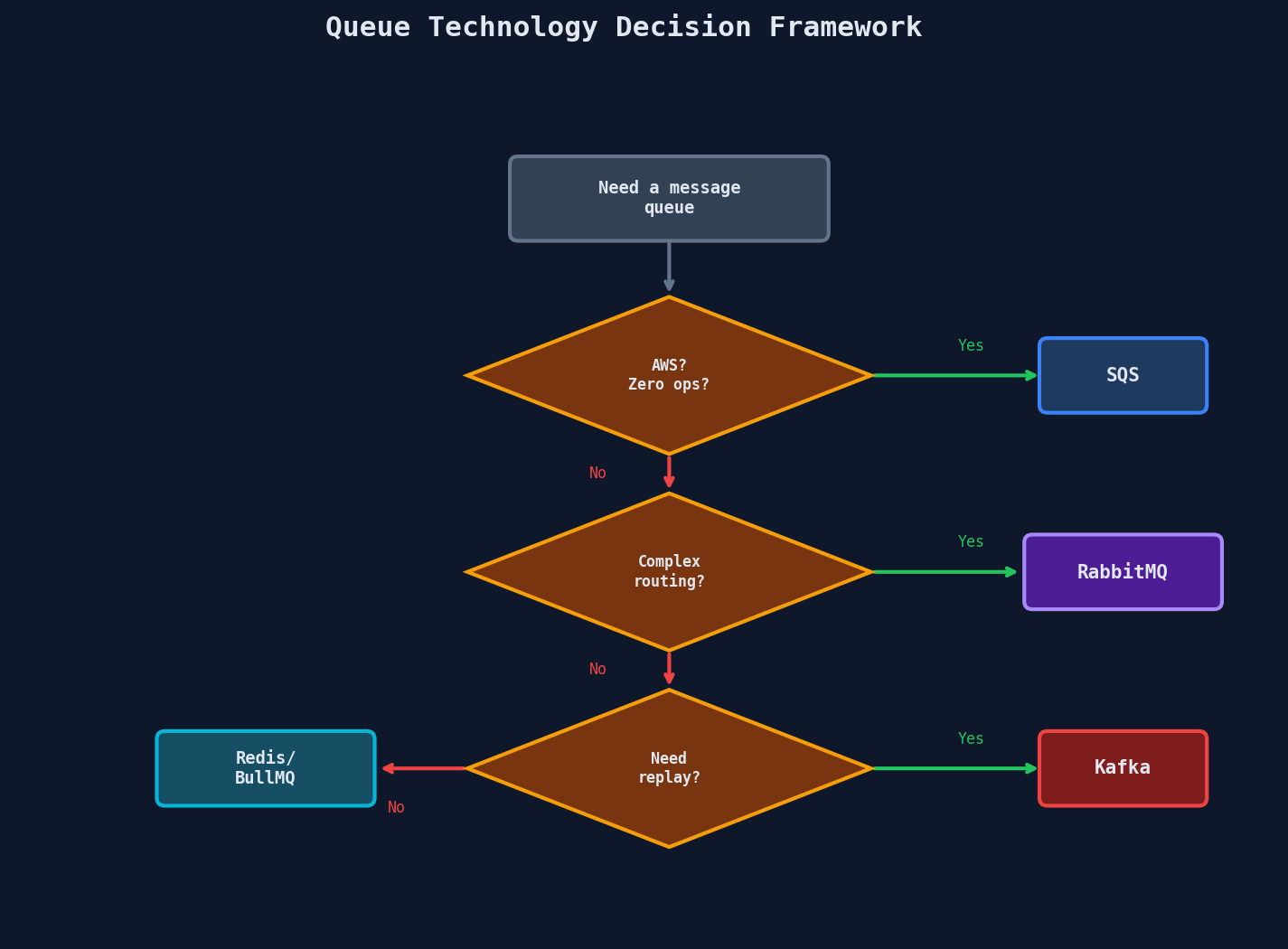
Quick Reference
| Scenario | Best Choice | Why |
|---|---|---|
| Standard job queue on AWS | SQS | Zero ops, scales automatically, DLQ built in |
| Multi-tenant with priority | RabbitMQ | Priority queues + exchange routing |
| Startup, Node.js stack | BullMQ | Best DX, great dashboard, fast iteration |
| Event sourcing / CDC | Kafka | Replay, retention, ordering guarantees |
| Analytics pipeline | Kafka | High throughput, consumer groups, reprocessing |
| Hybrid (jobs + events) | SQS + Kafka | SQS for jobs, Kafka for event streaming |
Combining Technologies
In practice, mature systems use multiple queue technologies for different workloads.
Uber uses Kafka for real-time trip event streaming (millions of events/sec), but uses Cherami (their custom queue, later open-sourced) for task-oriented work like driver notifications and payment processing where per-message delivery guarantees matter.
Stripe routes payment events through Kafka for downstream consumers, but uses a custom Redis-based job queue for webhook delivery where retry schedules and per-message control are essential.
Key Takeaways
| Concept | Details |
|---|---|
| SQS | Managed, ~120K msg/s, visibility timeout, FIFO optional |
| RabbitMQ | Exchange routing, prefetch control, priority 0-255 |
| Redis/BullMQ | In-memory speed, dashboard, noeviction policy required |
| Kafka | Append-only log, offset tracking, replay, no per-message ACK |
| Key question | "Do I need a job queue or an event stream?" |