Read Replicas
TL;DR
Read replicas let you scale reads by creating copies of your database that handle read queries. The primary handles all writes and streams changes to replicas. The trick is handling the gap between when data is written and when replicas catch up — the replication lag.
One Writer, Many Readers
Here's the simplest analogy: a teacher writes on the whiteboard, and thirty students copy it down. The teacher writes once. Thirty people can read it. That's read replicas.
Your primary database is the single source of truth — it handles every INSERT, UPDATE, and DELETE. But reads? Those can go to any copy of the data. And since most applications are read-heavy (often 90%+ reads), this is a massive win.
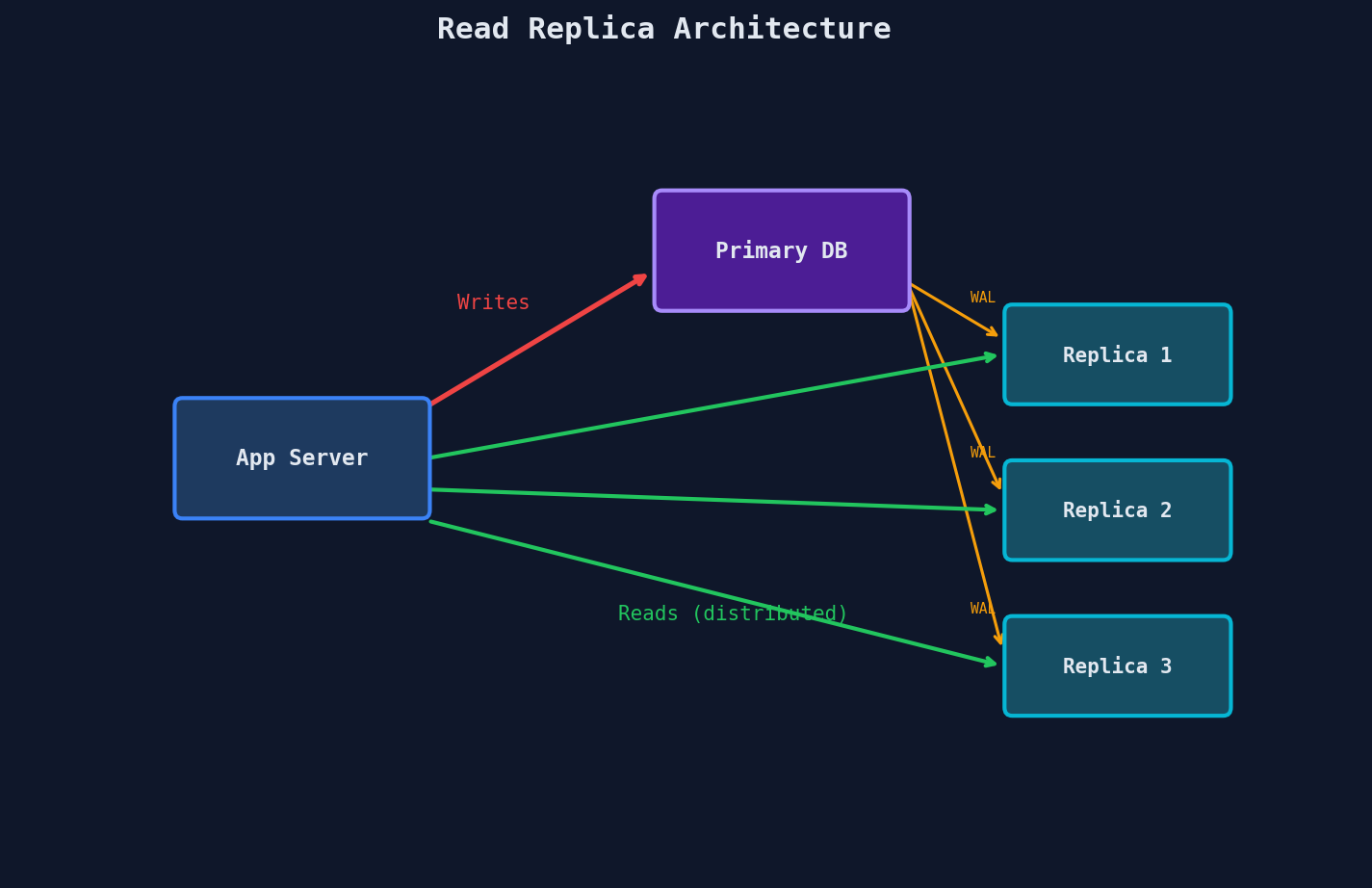
The key detail: your application code decides where to route each query. A write goes to the primary. A read goes to a replica. This isn't magic — it's application-level routing that you have to build (or your ORM/driver handles for you).
# Simplified connection setup
primary = connect("primary.db.internal:5432")
replicas = [
    connect("replica-1.db.internal:5432"),
    connect("replica-2.db.internal:5432"),
    connect("replica-3.db.internal:5432"),
]

def execute_query(sql: str):
    if sql.strip().upper().startswith("SELECT"):
        replica = random.choice(replicas)
        return replica.execute(sql)
    else:
        return primary.execute(sql)
This is naive (we'll fix the problems with it shortly), but it captures the core idea. Reads fan out across replicas. Writes go to one place.
How Replication Actually Works
Under the hood, replication piggybacks on the Write-Ahead Log (WAL) — the same append-only log the database already uses for crash recovery. (If you've been through the Data Modelling course, you've seen WAL in the storage engine chapter. We won't re-teach it here.)
The flow looks like this:
The primary writes to its WAL, confirms the write to the client, and then streams those WAL bytes to every replica. Each replica replays the log to reconstruct the same state.
This is why replicas are sometimes called streaming replicas — they're consuming a continuous stream of WAL data, not periodically copying the whole database.
A few important details:
- Replicas are read-only. You cannot write to a replica. If you try, the database rejects the query.
- Replicas apply changes in order. The WAL is sequential, so replicas replay operations in the exact same order as the primary. This guarantees they converge to the same state.
- Replicas can fall behind. If the replica is slower than the primary (disk I/O, CPU, network), unprocessed WAL records queue up. This gap is called replication lag.
PostgreSQL specifics
In PostgreSQL, this is called streaming replication and uses the pg_wal directory. The replica connects to the primary via a replication slot and continuously pulls WAL segments. MySQL uses a similar concept called the binary log (binlog).
Sync vs Async Replication
Here's where things get interesting. When the primary writes to the WAL and streams it to replicas, does it wait for replicas to confirm they received it? That single decision changes everything.
Synchronous Replication
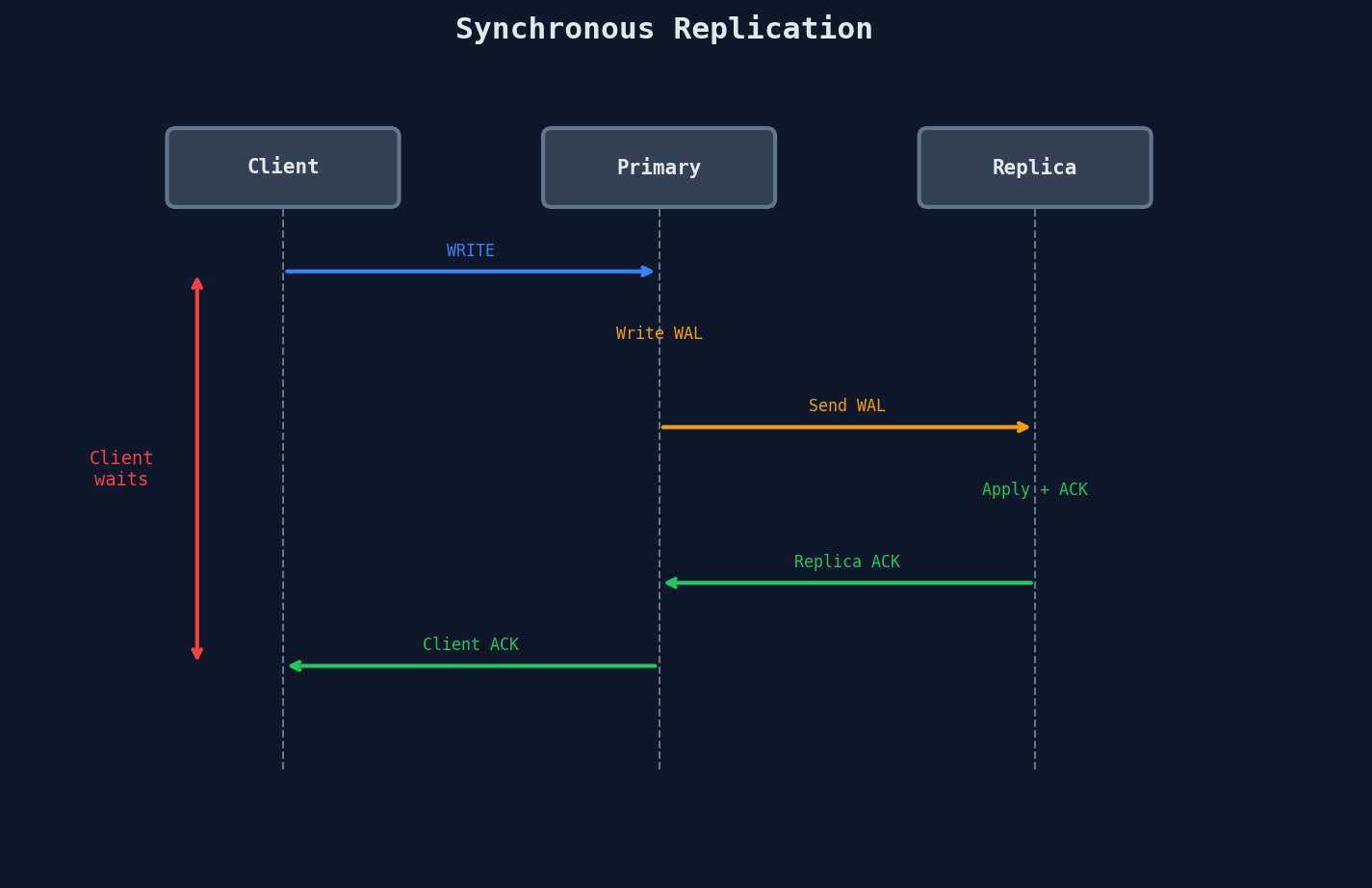
The primary writes to its WAL, sends the record to at least one replica, and waits for an acknowledgment before telling the client "write successful."
Pros: If the primary bursts into flames one second after confirming, the replica has the data. Zero data loss.
Cons: Every write now includes a network round-trip to a replica. If that replica is slow or down, your writes are blocked.
Asynchronous Replication
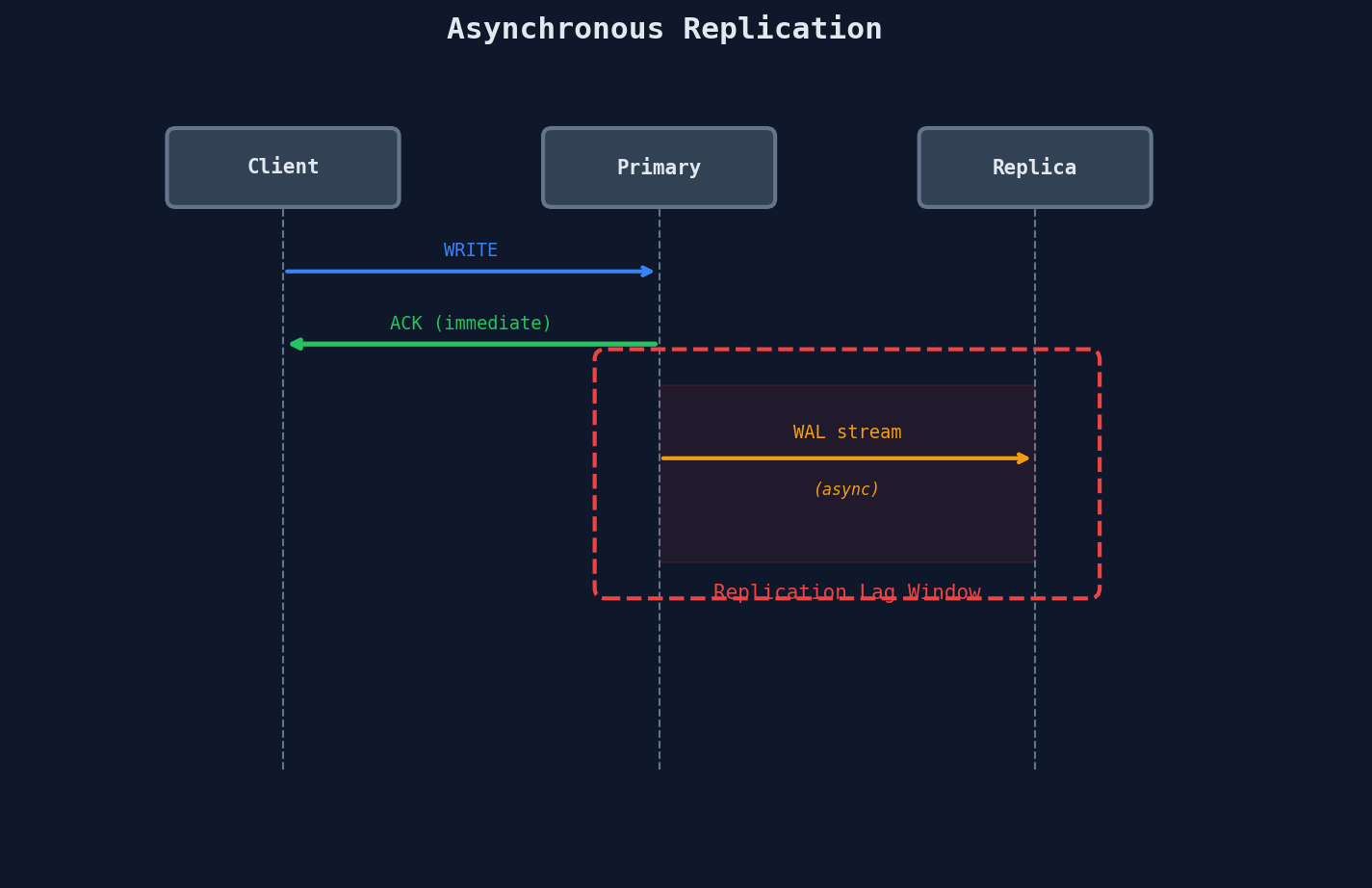
The primary writes to its local WAL and immediately tells the client "done." Replicas get the data... eventually.
Pros: Writes are fast — no waiting on replicas. If a replica goes down, the primary doesn't care.
Cons: If the primary crashes before the replica gets the data, that data is gone. And reads from replicas might return stale results.
Semi-Synchronous Replication
The compromise: wait for at least 1 out of N replicas to ACK. In PostgreSQL, this is synchronous_commit = on with a synchronous_standby_names setting. You get durability (at least one replica has the data) without being hostage to the slowest replica.
PostgreSQL semi-sync config
-- Primary: wait for ANY 1 of these replicas
ALTER SYSTEM SET synchronous_standby_names = 'ANY 1 (replica1, replica2, replica3)';
replica1 is slow, replica2 or replica3 can ACK instead. You're never blocked by one bad node.
The Comparison
| Mode | Write Latency | Data Loss Risk | Read Staleness | Use When |
|---|---|---|---|---|
| Synchronous | High (network RTT added) | None | None on ACK'd replica | Financial transactions, billing |
| Asynchronous | Low (local WAL only) | Possible (unshipped WAL) | Milliseconds to seconds | Analytics dashboards, social feeds |
| Semi-synchronous | Medium (1 fastest replica) | Minimal (1 replica guaranteed) | Low on ACK'd replica | Most production systems |
Most production PostgreSQL and MySQL deployments use semi-synchronous or async replication. Fully synchronous across all replicas is rare outside of financial systems.
The Stale Read Problem
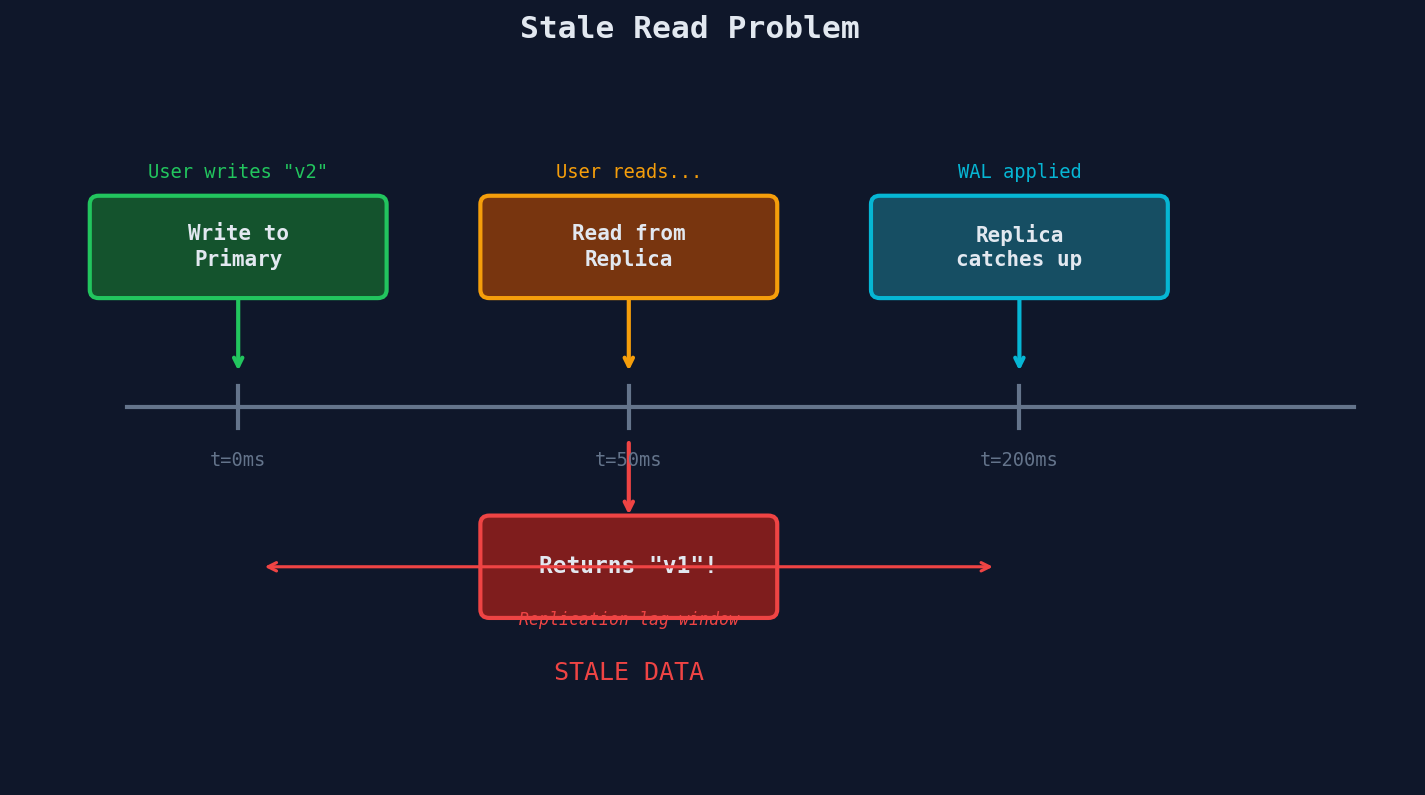
Here's the scenario that will bite you if you ignore it:
- A user posts a comment.
- The write goes to the primary and succeeds.
- The user refreshes the page.
- The read goes to a replica that hasn't received the write yet.
- The user sees... no comment. It's gone. They post it again. Now there are two.
This is the stale read problem, and it's the single most important thing to understand about read replicas.
How bad is the lag?
Replication lag in async mode is typically 10ms to 1 second under normal load. But under heavy write traffic, network congestion, or when a replica is catching up after a restart, it can spike to seconds or even minutes.
You can monitor it. In PostgreSQL:
-- On the replica: how far behind is it?
SELECT now() - pg_last_xact_replay_timestamp() AS replication_lag;

-- On the primary: check all replicas at once
SELECT client_addr, state, sent_lsn, replay_lsn,
       sent_lsn - replay_lsn AS byte_lag
FROM pg_stat_replication;
If byte_lag is growing over time, your replica is falling behind and you have a problem.
Lag is variable, not constant
Don't assume replication lag is a fixed number. It fluctuates with write load, network conditions, and replica health. A system that "usually" has 50ms lag can spike to 5 seconds during a traffic burst.
Read-After-Write Consistency
The stale read problem has well-known solutions. Each trades off complexity for consistency.
Solution 1: Route "Own Writes" to Primary
The simplest approach: after a user writes something, route their reads to the primary for the next N seconds.
WRITE_WINDOW = 5  # seconds

def user_wrote_recently(user_id: str) -> bool:
    last_write = cache.get(f"last_write:{user_id}")
    if last_write is None:
        return False
    return (time.time() - last_write) < WRITE_WINDOW

def on_write(user_id: str):
    cache.set(f"last_write:{user_id}", time.time(), ttl=WRITE_WINDOW)

def route_query(user_id: str, sql: str):
    if sql.strip().upper().startswith("SELECT") and not user_wrote_recently(user_id):
        return random.choice(replicas).execute(sql)
    else:
        return primary.execute(sql)
Simple. Works. But it's time-based guessing. If replication is faster than 5 seconds, you're unnecessarily hitting the primary. If it's slower, you still get stale reads.
Solution 2: LSN-Based Routing
A more precise approach: track the Log Sequence Number (LSN) of the last write, and only read from a replica if its replay position is past that LSN.
def on_write(user_id: str):
    # Get the WAL position after the write
    lsn = primary.execute("SELECT pg_current_wal_lsn()").scalar()
    cache.set(f"last_lsn:{user_id}", lsn, ttl=30)

def route_read(user_id: str, sql: str):
    required_lsn = cache.get(f"last_lsn:{user_id}")
    if required_lsn is None:
        return random.choice(replicas).execute(sql)

    # Find a replica that's caught up
    for replica in replicas:
        replica_lsn = replica.execute("SELECT pg_last_wal_replay_lsn()").scalar()
        if replica_lsn >= required_lsn:
            return replica.execute(sql)

    # No replica caught up yet — fall back to primary
    return primary.execute(sql)
This is exact — you never read stale data, and you never unnecessarily hit the primary. The cost is an extra query to check each replica's position.
Solution 3: Causal Consistency Tokens
MongoDB takes a different approach. The server returns a cluster time token with every write response. The client passes that token back on the next read. The replica receiving the read waits until it has caught up to that token before responding.
// MongoDB example
const session = client.startSession({ causalConsistency: true });
const db = session.getDatabase("myapp");

// Write — MongoDB returns an operationTime
db.comments.insertOne({ text: "Great article!" });

// Read — MongoDB ensures the replica has caught up
// to the operationTime from the write above
const comments = db.comments.find({ postId: 42 });
The client doesn't need to know about replicas at all. The database handles it internally.
This is a database-level feature
Causal consistency tokens only work if your database supports them natively. MongoDB does. PostgreSQL and MySQL do not — you'd need to implement LSN-based or time-window routing at the application level.
Comparing the Approaches
| Approach | Complexity | Consistency Guarantee | Performance Impact |
|---|---|---|---|
| Time-window routing | Low — just a cache TTL | Approximate — guesses replication speed | Some unnecessary primary reads |
| LSN-based routing | Medium — track LSNs, check replicas | Exact — reads only from caught-up replicas | Extra LSN check per read |
| Causal tokens | Low (client) — database handles it | Exact — replica waits until caught up | Read latency increases if replica is behind |
Which should you pick?
For interviews, time-window routing is the easiest to explain and usually sufficient. Mention LSN-based routing if the interviewer pushes on precision. Causal tokens are worth mentioning if the question involves MongoDB specifically.
When Replicas Aren't Enough
Read replicas are powerful, but they have hard limits:
Each replica is a full copy of the database (with physical replication). Three replicas means three times the storage cost. PostgreSQL's logical replication allows replicating specific tables rather than the entire database, reducing storage costs. Physical replication (WAL streaming) replicates everything. Most production setups use physical replication for simplicity, so in practice, each replica is usually a full copy.
Replication lag increases under heavy write load. The more writes per second, the more WAL data replicas need to process. If writes outpace replay, lag grows unboundedly.
Replicas don't help with write scaling at all. Every write still goes to the single primary. If your bottleneck is write throughput, adding 100 replicas does nothing.
Connection overhead. Each replica maintains its own connection pool. At some point, you're managing dozens of database connections per application server.
Operational complexity scales linearly. Every replica needs monitoring, alerting, failover configuration, and software upgrades. Ten replicas means ten sets of operational burden.
| Scaling Dimension | Read Replicas Help? | What to Use Instead |
|---|---|---|
| Read throughput | Yes — distribute across replicas | Caching (next lesson) |
| Write throughput | No — single primary bottleneck | Sharding, partitioning |
| Storage capacity | No — each replica is a full copy | Sharding, archival |
| Hot key reads | Marginally — replicas share the same data layout | Caching with TTL |
The typical evolution looks like this:
- Single database — works until read traffic saturates it
- Add read replicas — handles 3-10x read traffic
- Add caching — handles 100x+ read traffic by avoiding the database entirely
- Shard the primary — when write traffic is the bottleneck
When read replicas can't keep up with your read traffic, the next tool in the box is caching — putting a fast in-memory layer (like Redis or Memcached) in front of your database so most reads never hit a replica at all. That's the next lesson.
Interview Tip
Read replicas are the first horizontal scaling answer in most system design interviews. When the interviewer says "how would you handle 10x read traffic?", mention replicas early. But immediately acknowledge the stale read problem and explain your solution (time-window routing is the easiest to whiteboard). That shows you understand the tradeoff, not just the buzzword.
Proof Point
GitHub routes all non-write queries to read replicas — the primary handles writes only. At their scale, this means the vast majority of page loads (viewing repos, reading code, browsing issues) never touch the primary database. The primary is reserved exclusively for pushes, comments, and other mutations.