How Data Lives on Disk
TL;DR
Databases store data in fixed-size pages on disk. Without an index, finding one row means scanning every page. Indexes are like a book's table of contents — they tell the database exactly where to look, turning millions of page reads into a handful.
Why This Matters
Every time someone asks "should I add an index?" or "why is this query slow?" — the answer comes back to how data physically lives on disk. If you understand pages and I/O, you understand why indexes work, why joins can be expensive, and why denormalization sometimes makes sense.
This isn't abstract theory. It's the foundation for every performance decision you'll make.
The Heap File — Where Your Data Actually Lives
When you insert a row into a table, the database doesn't keep it in memory forever. It writes it to a heap file on disk — essentially a big, unordered collection of rows.
Think of it like a warehouse full of boxes. Each box has a label (the row data), but the boxes aren't organized in any particular order. They're just stacked wherever there's space.
The heap file is divided into pages — fixed-size blocks, typically 8 KB in PostgreSQL. Each page holds as many rows as will fit.
Heap File (users table)
┌─────────────────┐
│ Page 0           │  ← rows 1-50
│ [alice, bob, ...]│
├─────────────────┤
│ Page 1           │  ← rows 51-100
│ [dave, eve, ...] │
├─────────────────┤
│ Page 2           │  ← rows 101-150
│ [grace, hank, ..]│
├─────────────────┤
│ ...              │
│ Page 9999        │  ← rows 499,951-500,000
└─────────────────┘
A table with 500,000 users might span 10,000 pages. Each page is one trip to disk.
The Sequential Scan — Brute Force
What happens when you run this query?
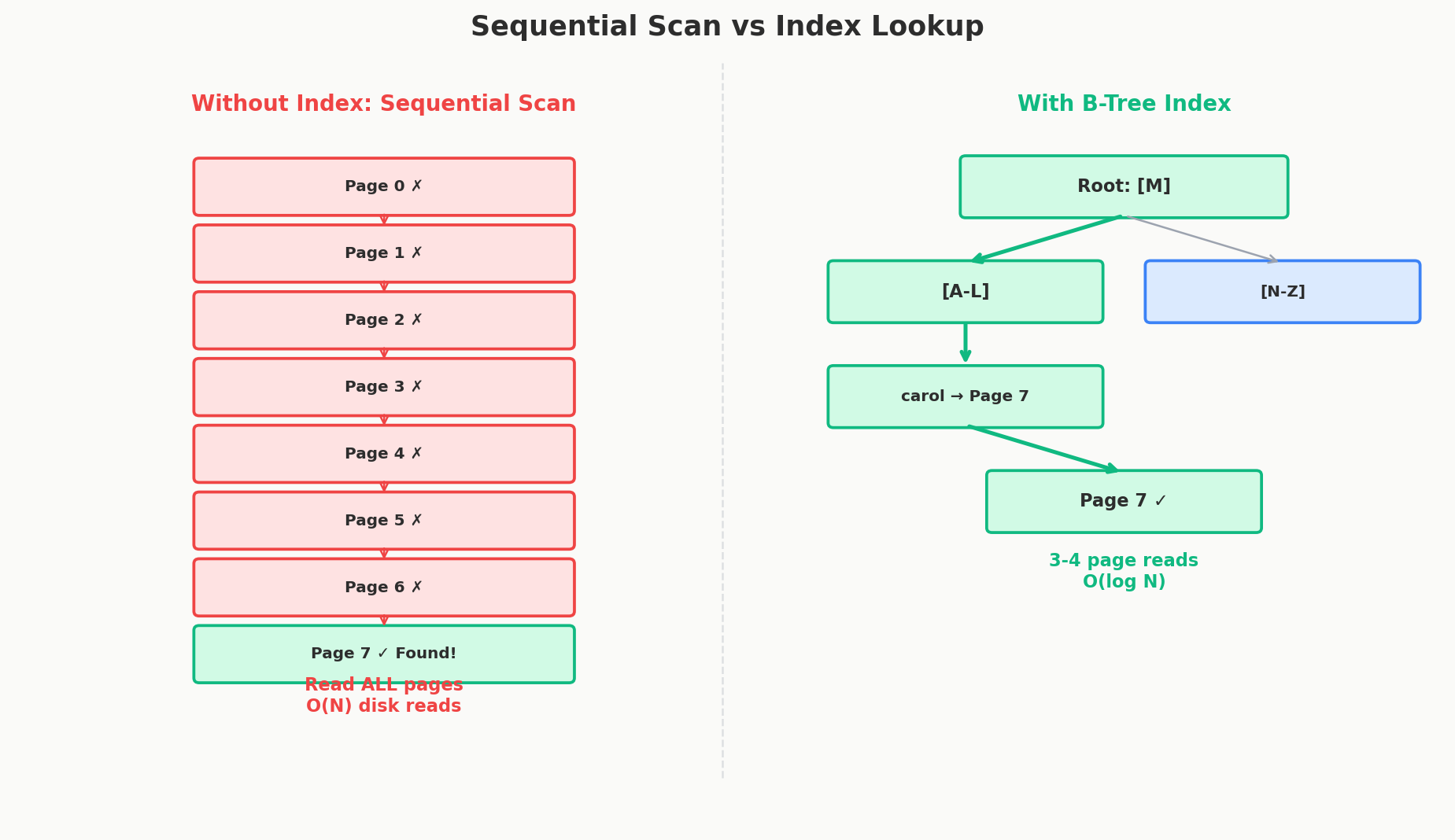
Without an index, the database has no idea which page contains Carol's row. So it does the only thing it can: read every single page, checking each row for a matching email.
This is called a sequential scan (or full table scan). For our 500,000-user table:
- 10,000 pages to read from disk
- Each page requires a disk I/O operation
- Even with modern SSDs (~0.1ms per read), that's ~1 second of pure I/O
One second to find one email. Now imagine 1,000 users searching simultaneously. That's the problem.
Why Disk I/O Is the Bottleneck
Your CPU can process billions of operations per second. RAM can deliver data in nanoseconds. But disk — even fast SSDs — operates in microseconds to milliseconds. The speed gap is enormous:
| Operation | Latency | Relative Speed |
|---|---|---|
| CPU register access | ~1 ns | 1x |
| L1 cache | ~1 ns | 1x |
| RAM | ~100 ns | 100x slower than CPU |
| SSD random read | ~100,000 ns (0.1 ms) | 100,000x slower than CPU |
| HDD random read | ~10,000,000 ns (10 ms) | 10,000,000x slower |
The takeaway: database performance is almost entirely about minimizing disk reads. Every optimization technique you'll learn in this course — indexes, denormalization, caching, partitioning — exists to reduce the number of pages the database needs to read from disk.
Indexes — The Table of Contents
Open a 500-page textbook. If you want to find information about "TCP handshakes," you don't read all 500 pages. You check the index at the back, find "TCP handshakes: page 247," and go straight there.
A database index works the same way. It's a separate data structure that maps column values to the pages where those rows live.
When you create an index:
The database builds a sorted lookup structure (typically a B-tree, which we'll cover in depth in Chapter 4). Now when you search for Carol's email:
- Consult the index → "carol@example.com is on page 847, row 3"
- Read page 847
- Done
Two page reads instead of 10,000. That's the difference between 0.2ms and 1 second.
Without index:           With index:
Read page 0  ✗          Check B-tree (2-3 page reads)
Read page 1  ✗              ↓
Read page 2  ✗          Go directly to page 847 ✓
Read page 3  ✗
...
Read page 847 ✓ Found!
...
Read page 9999 (still scanning)
The B-Tree — A Quick Preview
The most common index type is the B-tree (balanced tree). We'll do a deep dive in Chapter 4, but here's the intuition.
A B-tree is like a multi-level table of contents. Imagine a phonebook:
- Level 1 (root): "A-M is in the left half, N-Z is in the right half"
- Level 2: "A-F is in section 1, G-M is in section 2"
- Level 3 (leaf): "Carol is on page 847"
Each "level" is one page read. A B-tree with 500,000 entries typically has only 3-4 levels. That means finding any row takes 3-4 page reads — regardless of table size. A table with 500,000 rows and a table with 50,000,000 rows both take about 3-4 reads through the index. That's the magic of logarithmic lookup.
         [M]              ← Level 1 (root): 1 page read
        /   \
     [F]     [S]          ← Level 2: 1 page read
    / | \   / | \
  [A-E][G-L][N-R][T-Z]   ← Level 3 (leaf): 1 page read → points to heap page
The Primary Key Index — You Already Have One
When you define a primary key, the database automatically creates an index on it. That's why SELECT * FROM users WHERE id = 42 is always fast — there's already a B-tree index on the id column.
In PostgreSQL, this is a regular B-tree index pointing to heap file pages. In MySQL (InnoDB), the primary key index is the table — rows are stored sorted by primary key in a structure called a clustered index. This makes primary key lookups extremely fast in MySQL, but it also means choosing a good primary key matters even more.
When Indexes Hurt
Indexes aren't free. Every index you add has a cost:
Write overhead: When you insert, update, or delete a row, every index on that table must also be updated. Five indexes on a table means every write does roughly 6x the work (one for the row, one for each index).
Storage: An index is a separate data structure on disk. On a large table, indexes can consume as much space as the data itself.
Not always used: The database's query planner decides whether to use an index. For very small tables, a sequential scan is actually faster (reading 5 pages is quicker than traversing a B-tree). The planner knows this.
We'll cover when NOT to index in Chapter 4. The key intuition: indexes trade write speed and storage for read speed. On a read-heavy table, that's a great deal. On a write-heavy logging table, it can make things worse.
Buffer Pool — The Cache You Didn't Know About
Databases don't actually read from disk on every query. They keep frequently-accessed pages in memory in a structure called the buffer pool (or shared buffers in PostgreSQL).
When you request a page: 1. Is it in the buffer pool? → Return it instantly (memory speed) 2. Not in the buffer pool? → Read from disk, put it in the buffer pool, return it
The buffer pool acts as an automatic LRU (Least Recently Used) cache. Hot pages stay in memory. Cold pages get evicted to make room. On a well-tuned database, 90-99% of reads hit the buffer pool and never touch disk.
This is why adding RAM to a database server often helps more than upgrading to faster disks — more RAM means a bigger buffer pool, which means more data stays in memory.
Quick Recap
| Concept | What It Is | Why It Matters |
|---|---|---|
| Heap file | Unordered collection of rows on disk | Where your data actually lives |
| Page | Fixed-size block (8KB) | Unit of disk I/O — one trip per page |
| Sequential scan | Read every page to find a row | Slow — O(N) pages |
| Index | Sorted lookup structure (B-tree) | Fast — O(log N) pages |
| Primary key index | Automatic index on the PK | Why WHERE id = X is always fast |
| Buffer pool | In-memory page cache | Why repeated queries are fast |
| Write overhead | Indexes slow down inserts/updates | Why you don't index everything |
Interview Tip
When you propose adding a table in a system design interview, immediately think about which columns will be queried most. Those are your index candidates. Say something like "I'll add an index on (user_id, created_at) since the primary query is fetching a user's recent posts." That shows you understand why indexes exist, not just that they exist.