Vertical Optimization
Vertical Optimization — Before You Go Horizontal
TL;DR
Before sharding, queuing, or adding infrastructure, make sure you've exhausted what a single server can do. The right database choice, proper tuning, and modern hardware can often handle 10x more writes than a naive setup. Interviewers respect candidates who optimize before they complicate.
Every candidate in a system design interview reaches for sharding at the first sign of write pressure. The interviewer asks "how do you handle 50K writes per second?" and within 30 seconds, there's a consistent hashing ring on the whiteboard. But here's the thing — most write bottlenecks aren't infrastructure problems. They're configuration problems, hardware problems, or wrong-database problems. Fix those first.
Your Hardware Is Probably from 2010 (In Your Head)
Most candidates mentally model servers as having 4-8 cores, 16 GB of RAM, and spinning hard drives. That was reasonable in 2012. Today's cloud instances look nothing like that.
| Resource | "Mental Model" (2010) | Modern Cloud Instance (2024) | Difference |
|---|---|---|---|
| CPU Cores | 4-8 | 96-192 vCPUs | 12-24x |
| RAM | 16 GB | 256-1024 GB | 16-64x |
| Disk I/O (random) | 100-200 IOPS (HDD) | 100,000+ IOPS (NVMe SSD) | 500-1000x |
| Disk I/O (sequential) | 100 MB/s (HDD) | 3-7 GB/s (NVMe SSD) | 30-70x |
| Network | 1 Gbps | 10-100 Gbps | 10-100x |
The single biggest hardware upgrade for write-heavy systems is swapping HDD for NVMe SSD. Random I/O — the kind databases do constantly when updating B-tree pages and flushing WAL segments — gets 500-1000x faster. That alone can turn a "we need to shard" problem into a "we're fine on one box" solution.
Adding RAM helps too: the more of the write buffer (memtable, WAL buffer, InnoDB buffer pool) that fits in memory, the fewer disk flushes you need. Disk flushes are where writes go to die.
Interview Move
Mention vertical scaling briefly. It shows you don't prematurely add complexity. Something like: "Before distributing writes, I'd make sure we're on appropriate hardware — NVMe SSDs and sufficient RAM for write buffers. That alone can handle 10x more writes." But don't fight the interviewer if they push for distributed solutions. They have a rubric, and it probably includes sharding.
The Storage Engine Matters More Than You Think
Not all databases write data the same way. The storage engine architecture determines your write ceiling. Pick the wrong one and no amount of tuning will save you.
B-tree Databases (PostgreSQL, MySQL/InnoDB)
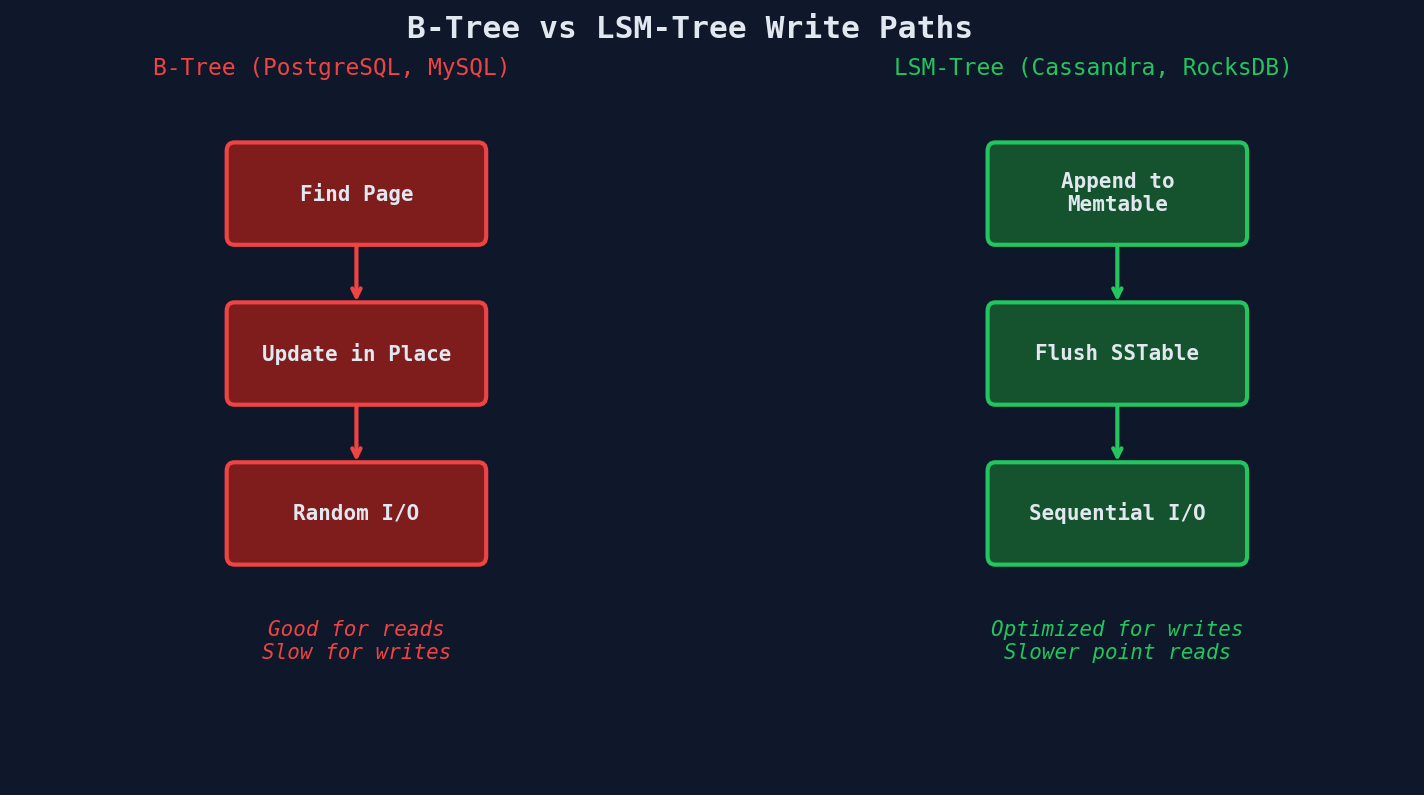
B-tree databases update data in place. When you INSERT or UPDATE a row, the database:
- Finds the correct B-tree page on disk (random I/O)
- Modifies the page in the buffer pool
- Writes ahead to the WAL (sequential I/O)
- Updates every affected index (more random I/O)
- Eventually flushes dirty pages back to disk
This is fundamentally read-optimized. Data is sorted on disk, so reads are fast. But every write touches multiple locations on disk — the table page, the WAL, and every index.
-- A single INSERT into a table with 3 indexes triggers:
-- 1. WAL write (sequential)
-- 2. Heap page modification (random I/O)
-- 3. Primary key index update (random I/O)
-- 4. Index on created_at update (random I/O)
-- 5. Index on user_id update (random I/O)
-- That's 4 random I/O operations per write.

INSERT INTO events (user_id, event_type, created_at, payload)
VALUES (42, 'page_view', NOW(), '{"page": "/home"}');
LSM-tree Databases (Cassandra, RocksDB, ScyllaDB)
LSM-tree databases take the opposite approach: never update in place. Every write is an append.
- Write to an in-memory sorted buffer (memtable) — microseconds
- When the memtable is full, flush it as an immutable SSTable to disk — sequential I/O
- Background compaction merges SSTables later — also sequential I/O
The critical insight: all disk I/O is sequential. No random seeks. Sequential writes on an SSD are 10-100x faster than random writes. On an HDD, the difference is even larger.
# Conceptual LSM-tree write path (simplified)
class LSMTree:
    def __init__(self):
        self.memtable = SortedDict()      # in-memory, fast
        self.sstables = []                  # on-disk, immutable
        self.wal = WriteAheadLog()          # durability

    def write(self, key, value):
        self.wal.append(key, value)         # sequential write
        self.memtable[key] = value          # memory write

        if self.memtable.size() > THRESHOLD:
            self._flush_to_disk()           # sequential write

    def _flush_to_disk(self):
        # Write entire memtable as one sorted file
        sstable = SSTable.from_sorted(self.memtable)
        self.sstables.append(sstable)
        self.memtable = SortedDict()

    def read(self, key):
        # Check memtable first
        if key in self.memtable:
            return self.memtable[key]
        # Then check each SSTable (newest first)
        # This is why reads are slower — multiple files to check
        for sstable in reversed(self.sstables):
            if sstable.bloom_filter.might_contain(key):
                result = sstable.get(key)
                if result:
                    return result
        return None
The trade-off is real: reads must check the memtable plus potentially multiple SSTables. Bloom filters help skip SSTables that definitely don't contain the key, but reads are still slower than B-tree lookups.
Write Path Comparison
Other Write-Optimized Options
| Database Type | Examples | Write Pattern | Best For |
|---|---|---|---|
| B-tree (OLTP) | PostgreSQL, MySQL | Update in place, random I/O | General purpose, read-heavy workloads |
| LSM-tree | Cassandra, RocksDB, ScyllaDB | Append-only, sequential I/O | High-volume writes, time-series-like data |
| Time-series | InfluxDB, TimescaleDB | Sequential timestamps, delta encoding | Metrics, IoT, monitoring (ordered writes) |
| Column store | ClickHouse, DuckDB | Batch columnar writes | Analytics, aggregation-heavy workloads |
| Append-only log | Kafka, Redpanda | Pure sequential append | Event streaming, audit logs |
Choosing the Right Engine
The decision isn't "which is best" — it's "what does my workload look like?" If you need strong consistency, complex queries, and moderate write volume, PostgreSQL is fine. If you need to absorb 100K+ writes/second and can tolerate eventual consistency and simpler query patterns, an LSM-tree database is the right tool. If your data is time-stamped metrics, a time-series database will outperform both.
Squeezing More Writes From What You Have
Already on the right database? Good. Now tune it. There's usually a 2-5x improvement hiding in default configurations that nobody changed.
Kill Unused Indexes
Every index on a table adds overhead to every INSERT, UPDATE, and DELETE. If an index isn't being used for reads, it's just dead weight slowing down your writes.
-- PostgreSQL: find indexes that have NEVER been used for a scan
SELECT
    schemaname,
    relname AS table_name,
    indexrelname AS index_name,
    idx_scan AS times_used,
    pg_size_pretty(pg_relation_size(indexrelid)) AS index_size
FROM pg_stat_user_indexes
WHERE idx_scan = 0
ORDER BY pg_relation_size(indexrelid) DESC;

-- Example output:
-- table_name | index_name              | times_used | index_size
-- -----------+-------------------------+------------+-----------
-- events     | idx_events_legacy_type  | 0          | 2.1 GB
-- orders     | idx_orders_old_status   | 0          | 890 MB
-- users      | idx_users_created_year  | 0          | 340 MB

-- That's 3.3 GB of indexes slowing down every write for zero benefit.
-- DROP INDEX idx_events_legacy_type;
A table with 8 indexes processes writes roughly 3-4x slower than the same table with 2 indexes. In a write-heavy system, audit your indexes aggressively.
Tune WAL and Commit Behavior
By default, PostgreSQL calls fsync after every single transaction to guarantee durability. That's the safest option — and the slowest.
-- PostgreSQL tuning for write-heavy workloads

-- 1. Batch WAL flushes (risky: can lose last few ms of transactions on crash)
SET synchronous_commit = off;

-- 2. Increase WAL buffer size (default is only 16 MB)
-- In postgresql.conf:
-- wal_buffers = 256MB

-- 3. Delay commits slightly to batch them together
-- commit_delay = 100        -- wait 100 microseconds
-- commit_siblings = 5       -- only delay if 5+ concurrent transactions

-- 4. Increase checkpoint distance (fewer full-page writes)
-- max_wal_size = 4GB        -- default is 1GB
-- checkpoint_completion_target = 0.9
The synchronous_commit Trade-off
Setting synchronous_commit = off means the database acknowledges the write before it's on disk. If the server crashes in the next few milliseconds, those transactions are lost. For a payment system, this is unacceptable. For a metrics pipeline or activity feed, losing a handful of events in a rare crash is a reasonable trade-off for 2-3x more write throughput.
Bulk Load Optimization
When you're doing large data migrations or batch imports, temporarily dropping constraints can speed things up dramatically:
-- Bulk load strategy for PostgreSQL
BEGIN;

-- 1. Drop indexes (rebuild them after)
DROP INDEX idx_events_user_id;
DROP INDEX idx_events_created_at;

-- 2. Disable triggers
ALTER TABLE events DISABLE TRIGGER ALL;

-- 3. Use COPY instead of INSERT (10-100x faster)
COPY events (user_id, event_type, created_at, payload)
FROM '/tmp/events_batch.csv'
WITH (FORMAT csv, HEADER true);

-- 4. Re-enable triggers
ALTER TABLE events ENABLE TRIGGER ALL;

-- 5. Rebuild indexes (faster than maintaining them during insert)
CREATE INDEX idx_events_user_id ON events (user_id);
CREATE INDEX idx_events_created_at ON events (created_at);

COMMIT;
Connection Pooling
PostgreSQL forks a new process for every connection. Each process consumes ~10 MB of RAM. At 500 connections, that's 5 GB of RAM just for connection overhead. PgBouncer sits between your application and PostgreSQL, multiplexing thousands of application connections into a smaller pool.
# pgbouncer.ini
[databases]
mydb = host=localhost port=5432 dbname=mydb

[pgbouncer]
listen_port = 6432
pool_mode = transaction        # release connection after each transaction
default_pool_size = 20         # only 20 real PostgreSQL connections
max_client_conn = 5000         # but accept 5000 app connections
Without pooling: 5,000 app servers each hold a connection = 5,000 PostgreSQL processes = server falls over.
With PgBouncer: 5,000 app connections are multiplexed into 20 real connections. PostgreSQL is happy.
When Vertical Isn't Enough
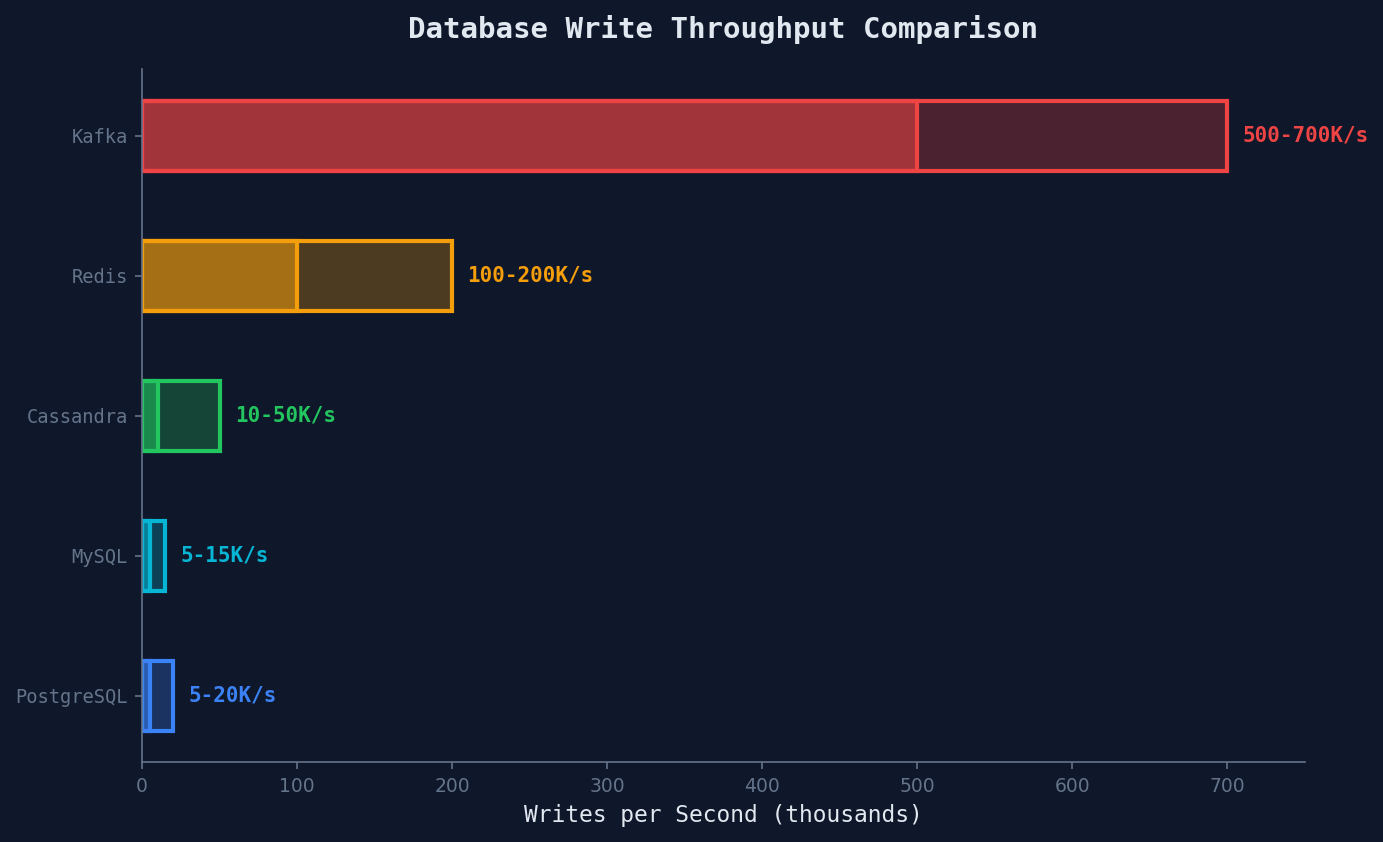
You've upgraded hardware, picked the right storage engine, tuned your database, and pooled your connections. If you're still hitting write limits, it's time to go horizontal. Here's the decision framework:
Interviewers Will Push You Horizontal
Many interviewers have an assessment built around horizontal scaling. They'll move the goalposts until you're forced to shard — "what if it's 500K writes/second?" Make the vertical case, show that you think about cost and complexity, but don't fight it. When they push, pivot gracefully: "At this scale, a single node won't cut it. Let's talk about sharding strategies."
Proof Point: The Numbers Don't Lie
Cassandra, built on an LSM-tree architecture, achieves 10K-50K writes/second on modest hardware (8 cores, 32 GB RAM, SSDs). PostgreSQL on the same hardware typically maxes out at 2K-8K writes/second for indexed tables with durability guarantees.
That's a 5-10x difference — not from adding servers, not from sharding, not from queuing. Just from choosing a storage engine designed for the workload.
| Metric | PostgreSQL (B-tree) | Cassandra (LSM-tree) |
|---|---|---|
| Writes/sec (single node) | 2K-8K | 10K-50K |
| Write latency (p99) | 5-20 ms | 1-5 ms |
| Read latency (p99) | 1-5 ms | 5-20 ms |
| Disk I/O pattern | Random | Sequential |
| Consistency | Strong (ACID) | Tunable (eventual default) |
| Query flexibility | Full SQL, JOINs, aggregates | Limited (partition key lookups) |
The lesson: every database makes a trade-off. B-tree databases trade write speed for read speed and query flexibility. LSM-tree databases trade read speed for write speed. Neither is "better" — the right choice depends on your access pattern.
Key Takeaways
- Upgrade hardware first. NVMe SSDs and more RAM are the cheapest write optimization. Mention this early in interviews.
- Storage engine > tuning. Switching from B-tree to LSM-tree can yield 5-10x write improvement. No amount of PostgreSQL tuning matches that.
- Tune what you have. Kill unused indexes, batch WAL flushes, use connection pooling. These are free performance.
- Know when to stop. Vertical optimization has a ceiling. When you hit it, go horizontal — but not before.