WebSockets
TL;DR
WebSockets are like a phone call — once connected, both sides can talk freely at any time. Unlike HTTP's "ask a question, get an answer" pattern, WebSockets keep the line open for continuous two-way conversation. Great for chat apps, multiplayer games, and collaborative editing.
The Phone Call vs. The Post Office
With HTTP, every interaction is like sending a letter. You write it, mail it, wait for a reply, read it. If you want to say something else, you write another letter. Each exchange is independent.
WebSockets are like picking up the phone. You dial once (the connection handshake), and then you can talk back and forth freely — no re-dialing, no waiting for envelopes, no overhead. The connection stays open until someone hangs up.
This makes WebSockets perfect for situations where both sides need to talk rapidly and unpredictably — like a group chat where anyone can send a message at any moment.
How the Connection Gets Started
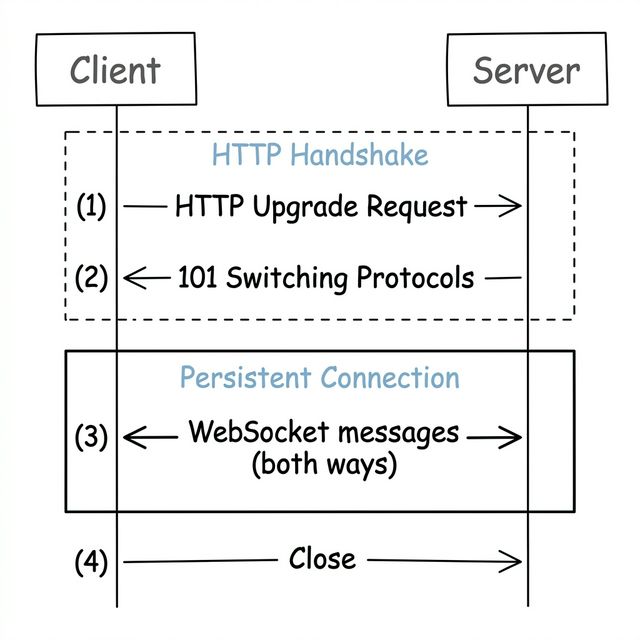
Here's the clever part about WebSockets — they start as regular HTTP and then upgrade:
- Client sends a normal HTTP request with an
Upgrade: websocketheader — "Hey, can we switch to WebSockets?" - Server agrees — "Sure, let's upgrade"
- The connection transforms — Same TCP connection, but now it speaks WebSocket instead of HTTP
- Both sides talk freely — Either side can send a message at any time
- Connection stays open — Until someone explicitly closes it
The upgrade trick is smart because it means authentication works the same way — cookies and tokens that work with HTTP still work during the handshake. You don't need a separate auth system.
You Have to Build Your Own "Language"
Here's something that surprises beginners: WebSockets don't tell you how to structure your messages. You just get a pipe that sends bytes back and forth. It's like getting a phone line with no agreed-upon language.
So you need to define your own message format. Most apps use JSON:
// Client → Server: "I'm sending a chat message"
{"type": "send_message", "room": "general", "text": "Hello!"}

// Server → Client: "Someone sent a message"
{"type": "new_message", "from": "ada", "room": "general", "text": "Hi there!"}

// Server → Client: "Someone joined the room"
{"type": "user_joined", "user": "bob", "room": "general"}
Think of the type field like a subject line — it tells the receiver what kind of message this is and how to handle it.
The Hidden Cost: Infrastructure Headaches
WebSockets sound great, but they come with real costs that you need to understand. This is the stuff that separates "I've read about WebSockets" from "I've actually used them."
Every Connection Eats Memory
With regular HTTP, a server handles a request and immediately forgets the client. With WebSockets, the server has to remember every connected client. A server with 10,000 users chatting has 10,000 open connections sitting in memory.
Think of it like a restaurant. HTTP is a food truck — serve the customer, they walk away. WebSockets are a sit-down restaurant — every customer takes up a table for the entire meal.
Load Balancing Gets Messy
With stateless HTTP, any server can handle any request — that's easy to load balance. But with WebSockets, each client is connected to one specific server. You can't just move them mid-conversation.
This means: - If that server goes down, all its connected clients disconnect - You need to think about how to distribute connections evenly - Scaling up (adding servers) doesn't help existing connections — only new ones
Not Everything in the Network Plays Nice
Firewalls, proxies, and corporate networks don't always understand WebSocket connections. You might find WebSockets working perfectly in development but failing for some users in production because their company's proxy blocks the upgrade.
When WebSockets Are Worth the Complexity
WebSockets make sense when you genuinely need fast, frequent, two-way communication:
- Chat applications (Slack, WhatsApp Web) — Messages fly in both directions constantly
- Multiplayer games — Player positions, actions, and game state sync in real-time
- Collaborative editing (Google Docs) — Multiple people typing simultaneously need instant updates
- Live trading platforms — Orders go out, price updates come in, all in milliseconds
"Doesn't HTTP/2 Make WebSockets Redundant?"
This is a common interview question — and the answer is no.
HTTP/2 introduced multiplexing — multiple requests can share one TCP connection simultaneously. That sounds like it solves the same problem as WebSockets. But there's a fundamental difference:
- HTTP/2 is still request-response. The client sends a request, the server sends a response. The server cannot spontaneously push a message to the client without the client asking first. (HTTP/2 Server Push existed but was limited to pre-loading resources like CSS files, and Chrome actually removed support for it.)
- WebSockets are full-duplex. Either side can send a message at any time without the other side asking. The server can push a chat message to the client the instant it arrives — no request needed.
HTTP/2 multiplexing makes multiple concurrent API calls efficient (great for loading a webpage with many resources). WebSockets make continuous bidirectional communication possible (great for chat, games, live collaboration).
Interview Tip
If asked "does HTTP/2 replace WebSockets?", the answer is: "No — HTTP/2 multiplexing optimizes concurrent request-response patterns, but it's still fundamentally client-initiated. WebSockets provide true server-initiated push and full-duplex communication. They solve different problems." Bonus points: mention that HTTP/3 (built on QUIC/UDP) improves HTTP/2 further by eliminating head-of-line blocking, but it's still request-response — it doesn't replace WebSockets either.
When to Reach for Something Simpler
Here's the most important thing: don't use WebSockets unless you really need them.
Ask yourself these questions: - Does the client need to send data to the server in real-time? If it's just receiving updates, SSE is simpler. - Are messages infrequent? If the client only sends something every few seconds, a regular HTTP POST works fine alongside an SSE stream. - Do you want to avoid the infrastructure headaches? Polling or SSE keeps your architecture stateless and simple.
WebSockets are powerful but expensive. Using them when you don't need to is like renting a moving truck to go grocery shopping — it works, but a car would've been fine.
Interview Tip
Jumping straight to WebSockets without justification is a common mistake. Interviewers know that WebSocket infrastructure is expensive, and they want to see that you know it too. Always ask yourself "does the client actually need to push real-time data back?" If the answer is no, say "SSE is enough here" — it shows mature engineering judgment.