Why GraphQL Exists
TL;DR
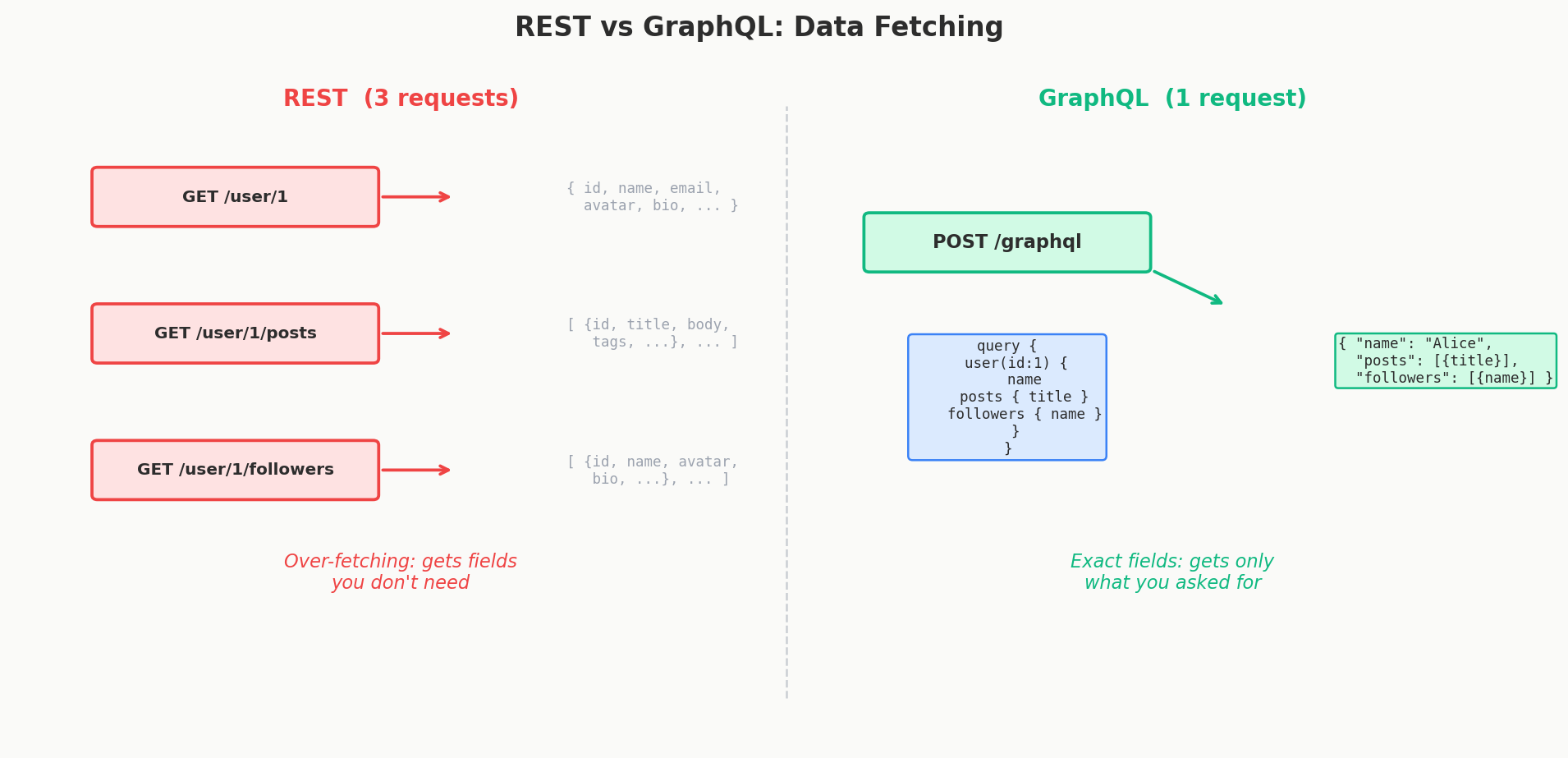
REST forces every client to get the same data from the same endpoint, which means mobile apps download fields they never use (over-fetching) and need multiple round trips to compose one screen (under-fetching). GraphQL solves this by letting the client ask for exactly the fields it needs in a single request.
The Buffet vs. The Fixed Menu
Imagine you're at a restaurant with a fixed menu. You order the dinner special and it comes with soup, salad, steak, two sides, and dessert. You only wanted the steak. Too bad — you're paying for the whole plate, and the kitchen spent time making all of it.
Now imagine a buffet. You walk up, grab exactly the steak and one side, and sit down. You got precisely what you wanted. Nothing wasted.
REST is the fixed menu. Every endpoint returns a pre-defined shape of data, whether you need all of it or not. GraphQL is the buffet. The client walks up to a single endpoint and picks exactly what it wants.
This isn't just a cute analogy — it's the exact problem that created GraphQL.
Facebook's 2012 Problem
In 2012, Facebook had a serious problem. Their mobile app was slow and buggy. Not because the engineers were bad, but because they were fighting their own API design.
Here's what was happening. Facebook had REST APIs designed for the web app — a full desktop experience with tons of screen real estate. The web dashboard needed comprehensive user data: profile info, friend lists, recent posts, photo albums, notification counts, all of it.
Then the mobile app came along. A phone screen is tiny. The News Feed screen only needed a user's name, profile picture, and their latest post. But the REST endpoint returned everything — full profile, friend count, all recent posts with comments, photo URLs in multiple resolutions.
The mobile app was downloading megabytes of data it never used. On a 2012 phone with a 3G connection, this was brutal.
Interview Tip
When explaining GraphQL's origin, always connect it to the mobile vs. web problem. Interviewers love hearing a concrete reason for why a technology exists, not just what it does.
Over-Fetching and Under-Fetching
Facebook's problem has two names, and you'll hear them constantly in system design discussions.
Over-Fetching: Getting Too Much
Over-fetching means an endpoint returns more data than the client needs.
Say you have a GET /users/42 endpoint. It returns:
{
  "id": 42,
  "name": "Alice Chen",
  "email": "alice@example.com",
  "bio": "Software engineer at...",
  "avatarUrl": "https://cdn.example.com/alice.jpg",
  "friendCount": 847,
  "posts": [...],         // 50 recent posts with full content
  "photos": [...],        // 200 photo URLs
  "notificationCount": 12,
  "settings": {...}       // privacy settings, preferences
}
The mobile app only needs name and avatarUrl to render a friend list item. But it just downloaded a user's entire digital life. Multiply that by 20 friends in a list and you're transferring megabytes of useless data.
Under-Fetching: Not Getting Enough
Under-fetching is the opposite problem — an endpoint doesn't return everything you need, forcing you to make additional requests.
Say you want to show a user's profile page with their latest 3 posts and the number of comments on each post. With REST, that might look like:
Request 1: GET /users/42           → user profile
Request 2: GET /users/42/posts     → list of posts
Request 3: GET /posts/101/comments → comments for post 1
Request 4: GET /posts/102/comments → comments for post 2
Request 5: GET /posts/103/comments → comments for post 3
Five sequential HTTP requests to render one screen. Each request adds network latency. On a slow mobile connection, the user stares at a loading spinner for seconds.
The REST Workarounds (and Why They're Ugly)
When teams hit these problems, they typically try one of two things — both of which create new headaches.
Workaround 1: Endpoint Proliferation
Just make more endpoints! One for mobile, one for web, one for the admin dashboard:
GET /users/42                  → full user (for web)
GET /users/42/minimal          → name + avatar (for mobile list)
GET /users/42/detailed         → user + posts + comments (for profile page)
GET /users/42/admin            → user + settings + logs (for admin)
This "works," but now you have four endpoints that all do roughly the same thing with different data shapes. Every time the mobile team wants a new field, a backend engineer has to create or modify an endpoint. Multiply this across your entire API surface and you have hundreds of snowflake endpoints that are impossible to maintain.
Workaround 2: The BFF Pattern
The Backend for Frontend (BFF) pattern puts a dedicated API layer in front of your microservices, one per client type:
| Client | BFF Layer | Backend Services |
|---|---|---|
| iOS app | Mobile BFF | User Service, Post Service, etc. |
| Web app | Web BFF | User Service, Post Service, etc. |
| Admin panel | Admin BFF | User Service, Post Service, etc. |
Each BFF aggregates data from multiple backend services and returns exactly what its client needs. This is actually a legitimate pattern that companies like Netflix use. But it means you're maintaining multiple backend services just to reshape data. That's a lot of code that doesn't add business logic — it just translates between what your services return and what your clients want.
Interview Tip
If an interviewer asks "how would you handle different clients needing different data from the same API?", mention both the BFF pattern and GraphQL. Then explain when you'd pick each one. BFF when you have separate backend teams per client platform; GraphQL when you want one flexible API for all clients.
GraphQL: One Endpoint, You Pick the Shape
In 2012, Facebook engineers Lee Byron, Dan Schafer, and Nick Schrock built an internal tool called GraphQL. The idea was simple but powerful: instead of the server deciding what data to return, the client sends a query describing exactly what it wants.
GraphQL uses a single endpoint (typically POST /graphql). The client sends a query in the request body, and the server returns exactly that shape of data — nothing more, nothing less.
The Ticketmaster Example
Let's make this concrete. Imagine you're building an event ticketing platform like Ticketmaster. You want to display an event page showing the event details, its venue, and available tickets.
With REST, you'd need multiple requests:
Request 1: GET /events/501
Response: { "id": 501, "name": "Taylor Swift Eras Tour", "date": "2026-06-15", "venueId": 88, ... }

Request 2: GET /venues/88
Response: { "id": 88, "name": "SoFi Stadium", "city": "Los Angeles", "capacity": 70000, ... }

Request 3: GET /events/501/tickets?available=true
Response: [{ "id": 1, "section": "Floor", "price": 450 }, { "id": 2, "section": "Lower Bowl", "price": 250 }, ...]
Three round trips. And each response probably includes fields you don't need.
With GraphQL, it's one request:
Response:
{
  "data": {
    "event": {
      "name": "Taylor Swift Eras Tour",
      "date": "2026-06-15",
      "venue": {
        "name": "SoFi Stadium",
        "city": "Los Angeles"
      },
      "availableTickets": [
        { "section": "Floor", "price": 450 },
        { "section": "Lower Bowl", "price": 250 }
      ]
    }
  }
}
One request. Exactly the fields you asked for. No wasted bytes. No extra round trips.
REST vs. GraphQL: Side by Side
| Aspect | REST | GraphQL |
|---|---|---|
| Endpoints | Multiple (/users, /posts, /comments) |
Single (/graphql) |
| Data shape | Server decides what to return | Client decides what to receive |
| Over-fetching | Common — endpoints return fixed shapes | Eliminated — you ask for exactly what you need |
| Under-fetching | Common — requires multiple requests | Eliminated — nested queries in one request |
| Versioning | /api/v1/, /api/v2/ |
No versioning needed — add fields, deprecate old ones |
| Caching | Simple — HTTP caching works naturally | Complex — single POST endpoint breaks HTTP caching |
| Learning curve | Low — most developers know REST | Higher — schema, resolvers, query language |
Who Uses GraphQL in Production?
GraphQL isn't a niche experiment. Some of the largest companies in the world rely on it:
- GitHub — Their API v4 is entirely GraphQL. They switched from REST because integrators needed wildly different subsets of data (some wanted just repo names, others wanted full commit histories with CI status).
- Shopify — Their Storefront API uses GraphQL so merchants can build custom storefronts that fetch only the product data they display.
- Airbnb — Uses GraphQL to serve their web, iOS, and Android apps from a single API layer.
- Facebook/Meta — Still powers the Facebook and Instagram apps, where it all started.
- Twitter/X — Adopted GraphQL for their API platform.
The Mental Model
Here's the simplest way to think about when GraphQL matters:
- If you have one client that always needs the same data, REST is simpler and works fine.
- If you have multiple clients (mobile, web, third-party integrators) that all need different slices of the same data, GraphQL starts to shine.
GraphQL doesn't replace REST. It solves a specific set of problems that REST handles poorly — namely, giving diverse clients the flexibility to ask for exactly the data they need without burdening the backend team with endless custom endpoints.
In the next lesson, we'll dig into how you actually build a GraphQL API — types, schemas, queries, mutations, and the Ticketmaster example in full detail.
Quick Recap
| Problem | REST's Answer | GraphQL's Answer |
|---|---|---|
| Mobile needs less data than web | Make separate endpoints or a BFF | Client queries only the fields it needs |
| One screen needs data from 3 services | 3 sequential HTTP requests | 1 nested GraphQL query |
| New client needs a different shape | Backend builds another endpoint | Client writes a new query — no backend changes |
| API versioning | /v1/, /v2/, /v3/... |
Add fields freely, deprecate old ones with @deprecated |
Interview Expectations: Junior vs. Senior
- Junior/Mid-level: Can explain that GraphQL solves over-fetching and under-fetching. Knows there is a single
/graphqlendpoint. - Senior/Staff: Explains the organizational benefits of GraphQL (a single unified graph for frontend teams to query). Understands that GraphQL pushes complexity from the network/client layer into the backend (resolvers, authorization, rate limiting).