Storage Tiers and Cost
TL;DR
Not all data is accessed equally. S3 offers storage classes ranging from $0.023/GB (Standard) down to $0.00099/GB (Deep Archive) -- a 23x cost reduction for data you rarely touch. Lifecycle policies auto-transition objects by age. For downloads, CDNs with adaptive bitrate streaming serve video at edge locations using byte-range requests and signed cookies. Know the key numbers: S3 throughput per prefix, max object size, multipart limits, and CDN edge latency.
The Storage Cost Spectrum
S3 storage classes exist because access patterns vary wildly. A profile photo uploaded today gets viewed 500 times this week. A compliance audit log from 2019 might never be read again -- but you're legally required to keep it for 7 years.
| Storage Class | Cost/GB/mo | Retrieval Cost | Access Time | Best For |
|---|---|---|---|---|
| S3 Standard | $0.023 | None | Milliseconds | Frequently accessed files, active uploads |
| S3 Intelligent-Tiering | $0.023 → auto | None | Milliseconds | Unpredictable access patterns |
| S3 Standard-IA | $0.0125 | $0.01/GB | Milliseconds | Files accessed < 1x/month |
| S3 One Zone-IA | $0.01 | $0.01/GB | Milliseconds | Reproducible data (thumbnails, transcoded video) |
| S3 Glacier Instant | $0.004 | $0.03/GB | Milliseconds | Quarterly access (reports, archives) |
| S3 Glacier Flexible | $0.0036 | $0.03/GB | 1-12 hours | Annual access (compliance, audit logs) |
| S3 Glacier Deep Archive | $0.00099 | $0.02/GB | 12-48 hours | Legal/regulatory retention, disaster recovery |
The economics at scale
100TB of old video content sitting in Standard costs $2,300/month. Move it to Glacier Deep Archive: $99/month. That's $26,400/year saved -- enough to justify the engineering time to set up lifecycle policies in an afternoon.
Proof Point: Dropbox Magic Pocket
Dropbox migrated from S3 to their own storage system (Magic Pocket) in 2016, achieving exabyte-scale storage with 12 nines of durability. For most companies, S3 is the right choice — building your own object storage only makes sense at Dropbox's scale where the cost savings justify the engineering investment.
Lifecycle Policies: Set It and Forget It
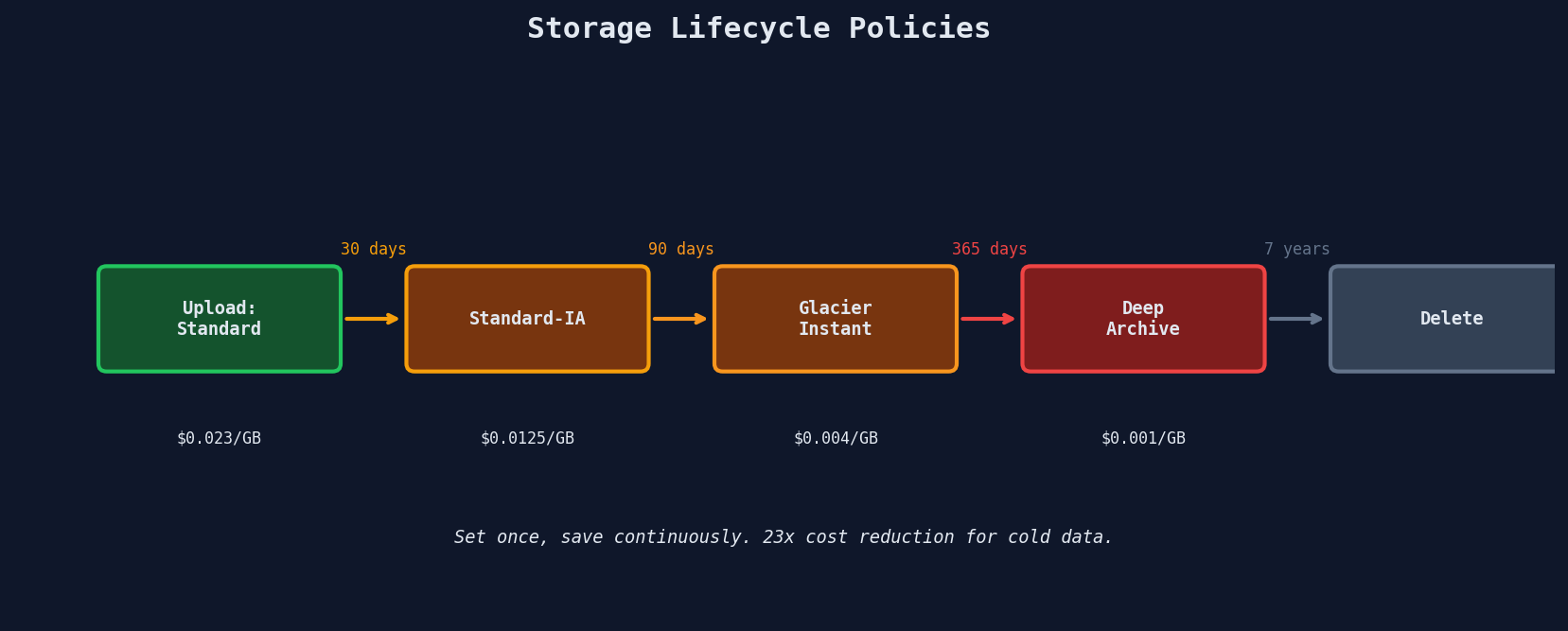
Instead of manually moving objects between tiers, lifecycle policies automate transitions based on object age:
{
    "Rules": [
        {
            "ID": "archive-old-uploads",
            "Status": "Enabled",
            "Filter": {"Prefix": "uploads/"},
            "Transitions": [
                {"Days": 30, "StorageClass": "STANDARD_IA"},
                {"Days": 90, "StorageClass": "GLACIER_IR"},
                {"Days": 365, "StorageClass": "DEEP_ARCHIVE"}
            ],
            "Expiration": {"Days": 2555}
        }
    ]
}
Choosing Transition Thresholds
The transition decision depends on access frequency and retrieval costs:
| Transition | Rule of Thumb |
|---|---|
| Standard → Standard-IA | When accessed less than once per month (30-day minimum) |
| Standard-IA → Glacier Instant | When accessed less than once per quarter |
| Glacier Instant → Glacier Flexible | When access delay of 1-12 hours is acceptable |
| Glacier Flexible → Deep Archive | When access delay of 12-48 hours is acceptable |
Minimum storage duration charges
S3-IA charges a minimum of 30 days even if you delete earlier. Glacier Instant: 90 days. Glacier Flexible: 90 days. Deep Archive: 180 days. Transitioning a file to Glacier then deleting it 10 days later still costs you for 90 days.
Intelligent-Tiering: When You Can't Predict Access
For objects with unpredictable access patterns, S3 Intelligent-Tiering monitors access and moves objects automatically:
Frequent Access tier (default)
  ↓ 30 days no access
Infrequent Access tier (40% savings)
  ↓ 90 days no access
Archive Instant Access tier (68% savings)
  ↓ Optional: 90 days no access
Archive Access tier (configurable)
  ↓ Optional: 180 days no access
Deep Archive Access tier (configurable)
No retrieval charges. Small monthly monitoring fee per object ($0.0025 per 1,000 objects). Worth it for data stores where you genuinely don't know the access pattern -- user file storage is a common fit.
CDN for High-Traffic Downloads
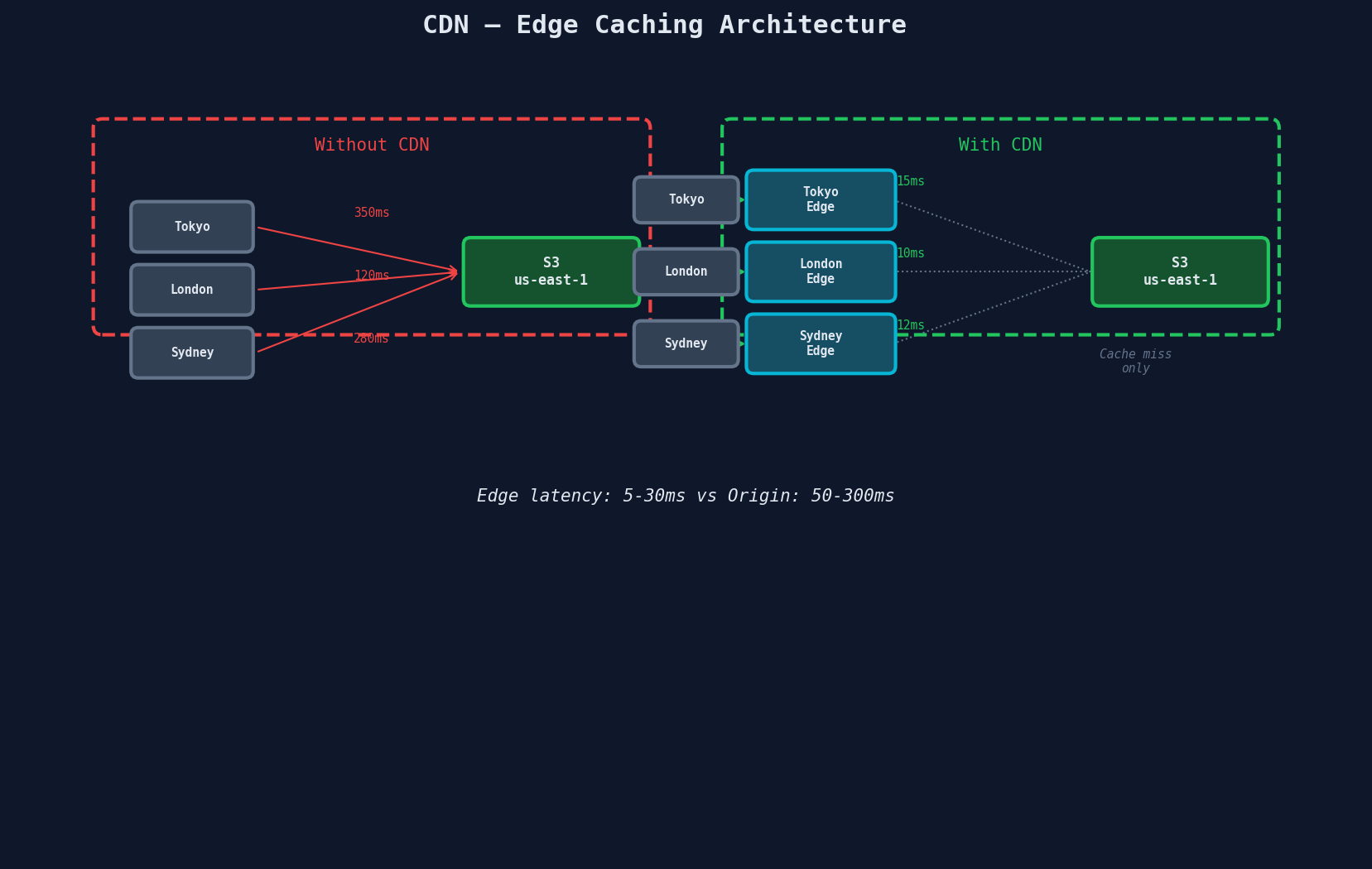
When thousands of users download the same file, hitting S3 directly for each request is wasteful. A CDN caches content at edge locations worldwide.
Adaptive Bitrate Streaming (ABR)
Video streaming doesn't serve a single file. It serves multiple quality renditions, each split into small segments:
/videos/abc123/
    master.m3u8              ← Master manifest (lists all qualities)
    1080p/
        playlist.m3u8        ← Quality-specific manifest
        segment_001.ts       ← 4-second video chunk
        segment_002.ts
        ...
    720p/
        playlist.m3u8
        segment_001.ts
        ...
    480p/
        ...
    360p/
        ...
The player requests the master manifest, evaluates available bandwidth, and picks the appropriate quality. If bandwidth drops mid-stream, it switches to a lower quality on the next segment -- no buffering, no interruption.
| Protocol | Full Name | Segment Format | Adopted By |
|---|---|---|---|
| HLS | HTTP Live Streaming | .ts or .fmp4 |
Apple ecosystem, most browsers |
| DASH | Dynamic Adaptive Streaming over HTTP | .m4s |
Android, smart TVs, web |
Netflix encodes each title in approximately 1,200 streams -- combinations of resolution, bitrate, codec, and audio language.
Byte-Range Requests: Seeking Without Downloading
When a user scrubs to the 45-minute mark in a 2-hour video, the player doesn't download the first 45 minutes. It uses HTTP byte-range requests:
GET /videos/abc123/segment_045.ts HTTP/1.1
Range: bytes=0-1048575

HTTP/1.1 206 Partial Content
Content-Range: bytes 0-1048575/4194304
Content-Length: 1048576
S3 and CDNs natively support Range headers. The client requests exactly the bytes it needs. This is also how PDF viewers load specific pages and how download managers implement parallel downloads.
Signed Cookies for Streaming
From Lesson 2: signed cookies beat signed URLs for streaming because one cookie covers all segment requests.
# Set once when the user starts watching
def start_stream(video_id, user):
    # Verify premium access
    if not check_premium_access(user.email):
        return jsonify({"error": "Premium required"}), 403

    # Cookie covers all segments for this video
    policy = {
        "Statement": [{
            "Resource": f"https://cdn.example.com/videos/{video_id}/*",
            "Condition": {
                "DateLessThan": {"AWS:EpochTime": int(time.time()) + 7200}
            }
        }]
    }

    signed_cookie = sign_cloudfront_policy(policy)

    response = jsonify({"manifest": f"https://cdn.example.com/videos/{video_id}/master.m3u8"})
    response.set_cookie("CloudFront-Policy", signed_cookie["policy"],
                        domain=".cdn.example.com", secure=True, httponly=True)
    response.set_cookie("CloudFront-Signature", signed_cookie["signature"],
                        domain=".cdn.example.com", secure=True, httponly=True)
    response.set_cookie("CloudFront-Key-Pair-Id", signed_cookie["key_pair_id"],
                        domain=".cdn.example.com", secure=True, httponly=True)
    return response
The video player makes hundreds of requests for .ts segments. The browser automatically sends the cookie with each one. No per-segment authentication needed.
Numbers to Know
These limits and latencies show up in back-of-the-envelope calculations:
S3 Performance Limits
| Metric | Value |
|---|---|
| PUT/COPY/POST/DELETE | 3,500 requests/second per prefix |
| GET/HEAD | 5,500 requests/second per prefix |
| Max object size (single PUT) | 5GB |
| Max object size (multipart) | 5TB |
| Max parts per multipart upload | 10,000 |
| Min part size | 5MB (last part can be smaller) |
| Max part size | 5GB |
| Durability | 99.999999999% (11 nines) |
| Availability (Standard) | 99.99% |
CDN Performance
| Metric | Value |
|---|---|
| Edge location count (CloudFront) | 600+ globally |
| Edge-to-user latency | 5-30ms typical |
| Origin fetch latency | 50-300ms (cache miss) |
| Max cacheable object | 30GB (CloudFront) |
| Time-to-first-byte (cache hit) | < 10ms |
Upload/Download Speeds
| Metric | Value |
|---|---|
| Presigned URL generation | ~0.1ms (local HMAC, no network call) |
| S3 Transfer Acceleration | 25-300% improvement for distant uploads |
| Multipart upload throughput | Limited by client bandwidth, not S3 |
| S3 single-stream throughput | ~100 MB/s per connection |
Cost Optimization Cheat Sheet
| Strategy | Savings | Effort |
|---|---|---|
| Lifecycle policies | 40-95% on old data | Low -- configure once |
| One Zone-IA for derived data | 20% vs Standard-IA | Low -- different storage class |
| Block-level dedup (Lesson 4) | ~70% on redundant data | Medium -- client-side chunking |
| CDN caching | 50-80% reduction in S3 GETs | Low -- put CloudFront in front |
| Intelligent-Tiering | Up to 68% automatic | Low -- per-bucket setting |
| Abort incomplete multipart | Stops silent cost leak | Low -- lifecycle rule |
| Delete processing artifacts | Varies | Low -- cleanup job |
The hidden costs
S3 charges aren't just storage. Watch for: request costs (PUT: $0.005/1000, GET: $0.0004/1000), data transfer out ($0.09/GB after first 100GB/month), and early deletion fees for Glacier classes. A system doing millions of small PUTs per day can spend more on requests than storage.
Putting It All Together
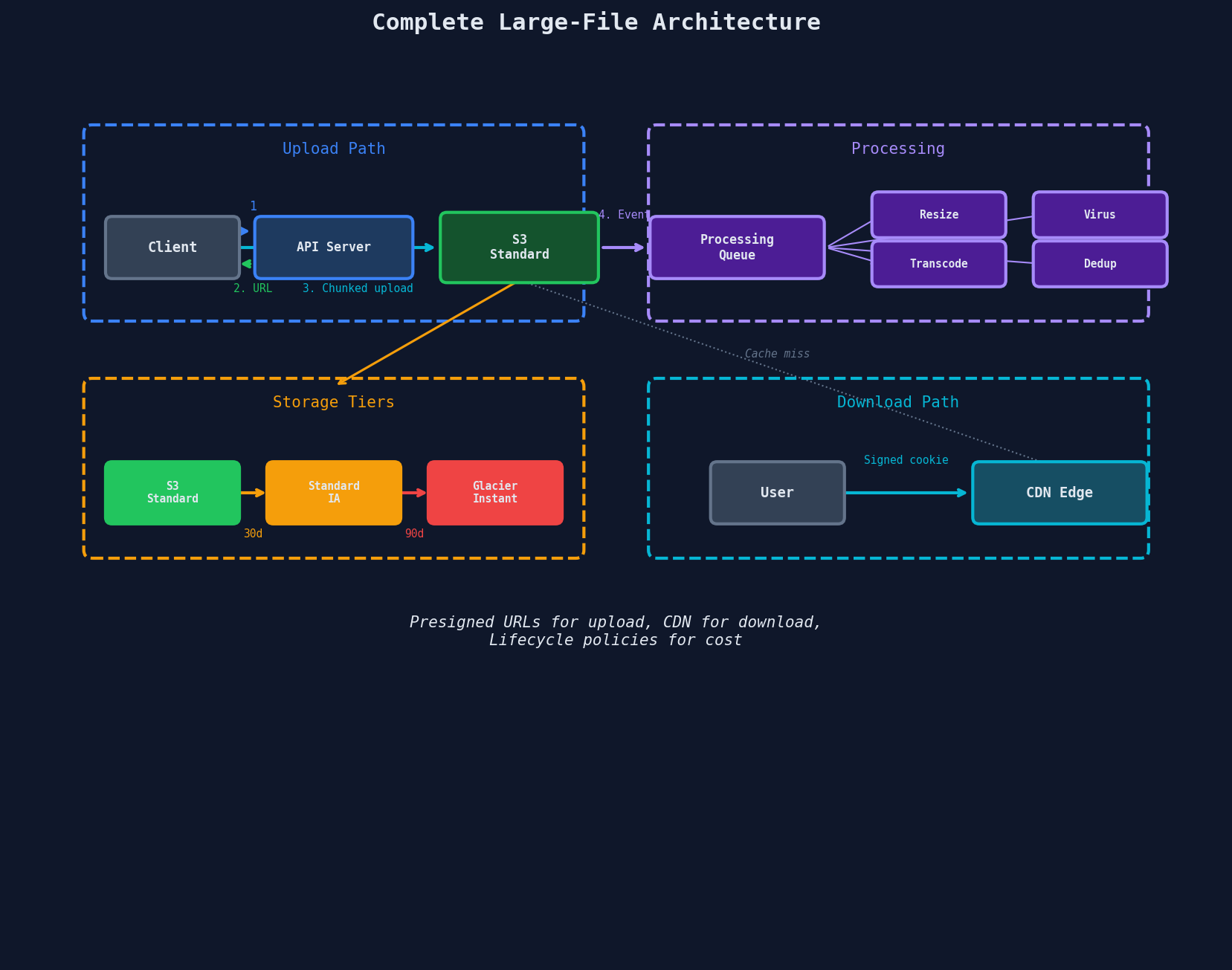
Here's the complete architecture for a file-heavy system, combining every pattern from this chapter:
Interview Tip
The cost-aware answer
Most candidates design for functionality and performance. Few mention cost. When you bring up storage tiers and lifecycle policies unprompted, you signal production experience. The one-liner: "For cold data, we'd set lifecycle policies to transition from Standard to Glacier after 90 days -- that's a 5-6x cost reduction with no code changes, just S3 configuration." Then mention CDN caching for hot data: "Popular files are served from CDN edge locations, which cuts both latency and S3 request costs."
Key Takeaways
| Concept | Details |
|---|---|
| Storage classes | Standard ($0.023/GB) → Deep Archive ($0.00099/GB), 23x savings |
| Lifecycle policies | Auto-transition by age; set once, saves continuously |
| Intelligent-Tiering | Auto-moves based on access; good for unpredictable patterns |
| ABR streaming | Multiple quality renditions, 4s segments, player switches dynamically |
| Byte-range requests | HTTP Range header for seeking; CDN/S3 native support |
| Signed cookies | One cookie covers all streaming segments; better than per-URL signing |
| S3 throughput | 3,500 PUT/s and 5,500 GET/s per prefix |
| CDN edge latency | 5-30ms to user vs 50-300ms from origin |