Workflow Orchestration
TL;DR
Durable execution frameworks let you write workflows as normal sequential code while the framework invisibly handles crashes, retries, and persistence. Temporal (born from Uber's Cadence) replays deterministic workflow functions from event history on restart, so your code "thinks" it never crashed. AWS Step Functions define workflows as JSON state machines with native AWS integrations. Netflix Conductor uses JSON workflow definitions with task queues and worker polling. Choose Temporal for complex, long-running, code-level control; Step Functions for AWS-native serverless workloads; and Airflow only for batch data pipelines — never for user-triggered workflows.
The Big Idea: Durable Execution
Every framework in this lesson does the same fundamental thing:
┌──────────────────────────────────────────────────────┐
│                                                      │
│   You write:     Business logic as normal code       │
│   Framework does: Crash recovery, retries,           │
│                   persistence, timeouts, scaling     │
│                                                      │
│   Your code "thinks" it never crashes.               │
│                                                      │
└──────────────────────────────────────────────────────┘
The framework intercepts every side effect (API call, DB write, timer), records it in a durable event history, and replays that history on restart so the workflow resumes exactly where it left off. From your code's perspective, execution is continuous — even if the underlying server crashed five times.
This is durable execution. It's the Gen 1 simplicity from the last lesson with Gen 2/3 reliability baked into the runtime.
Temporal — The Power Tool
Temporal was born from Uber's Cadence project. It's the most capable (and most complex) option. Stripe, Airbnb, Snap, Netflix, and DoorDash all use it in production.
Two Types of Functions
Temporal splits your code into two categories:
| Type | Rules | Purpose |
|---|---|---|
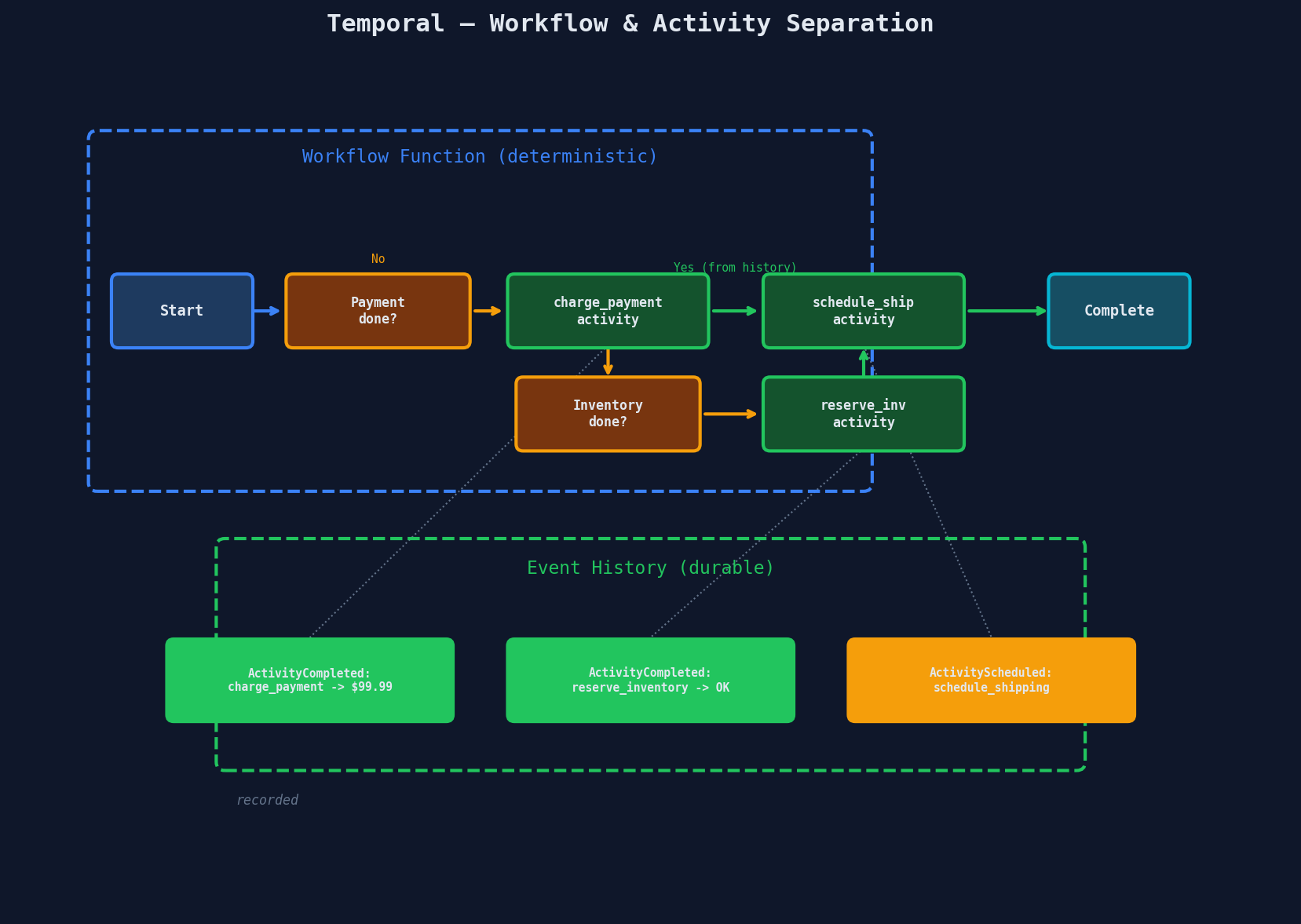
| Workflow function | Must be deterministic — no random numbers, no current time, no direct API calls | Defines the orchestration logic, control flow, and decision-making |
| Activity function | Can do anything — API calls, DB writes, file I/O | Performs the actual non-deterministic work |
Why the split? Because workflow functions get replayed. When a server crashes and restarts, Temporal re-executes the workflow function from the beginning, but skips activities that already completed by returning their recorded results from the event history.
Pseudocode: Order Processing Workflow
# ── Workflow (deterministic, replayed on crash) ──────────

@workflow.defn
class OrderWorkflow:

    @workflow.run
    async def run(self, order: Order) -> OrderResult:
        # Step 1: Charge payment
        payment = await workflow.execute_activity(
            charge_payment,
            order,
            start_to_close_timeout=timedelta(seconds=30),
            retry_policy=RetryPolicy(max_attempts=3),
        )

        # Step 2: Reserve inventory
        try:
            await workflow.execute_activity(
                reserve_inventory,
                order,
                start_to_close_timeout=timedelta(seconds=10),
            )
        except ActivityError:
            # Compensate: refund payment
            await workflow.execute_activity(
                refund_payment, payment.id
            )
            return OrderResult(status="cancelled", reason="out_of_stock")

        # Step 3: Wait for warehouse pick (could take hours)
        pick_signal = await workflow.wait_condition(
            lambda: self.warehouse_picked,
            timeout=timedelta(hours=24),
        )
        if not pick_signal:
            # 24h timeout — escalate to human
            await workflow.execute_activity(alert_ops, order.id)

        # Step 4: Schedule shipping
        tracking = await workflow.execute_activity(
            schedule_shipping, order
        )

        # Step 5: Send confirmation
        await workflow.execute_activity(
            send_confirmation, order, tracking
        )

        return OrderResult(status="completed", tracking=tracking.id)

    @workflow.signal
    def on_warehouse_pick(self):
        self.warehouse_picked = True
# ── Activity (non-deterministic, auto-retried) ──────────

@activity.defn
async def charge_payment(order: Order) -> PaymentResult:
    # This is a normal function — call Stripe, hit a DB, whatever
    result = await stripe.charges.create(
        amount=order.total_cents,
        currency="usd",
        idempotency_key=f"order-{order.id}",
    )
    return PaymentResult(id=result.id, amount=order.total_cents)
Look at that workflow code. It reads like a normal function: charge, reserve, wait, ship, email. No checkpointing. No state machine. No event subscriptions. The infrastructure is invisible.
Key Temporal Concepts
Signals are external events sent to a running workflow. The warehouse worker scans a barcode, and the system sends a signal to the waiting order workflow. The workflow wakes up and continues.
Durable timers survive server restarts. workflow.sleep(timedelta(days=7)) doesn't hold a thread — the framework persists the timer and wakes the workflow in seven days, even if every server in the cluster was replaced in the meantime.
Airbnb uses durable timers for their host acceptance flow — hosts get 24 hours to accept a booking request, and the timer runs reliably across infrastructure changes.
Continue-as-new solves the history growth problem. Temporal's event history grows with every activity and signal. A long-running workflow (months, years) can accumulate millions of events, making replays slow. continue_as_new() squashes the history and starts a fresh execution with carry-over state — like a garbage collection for workflow history.
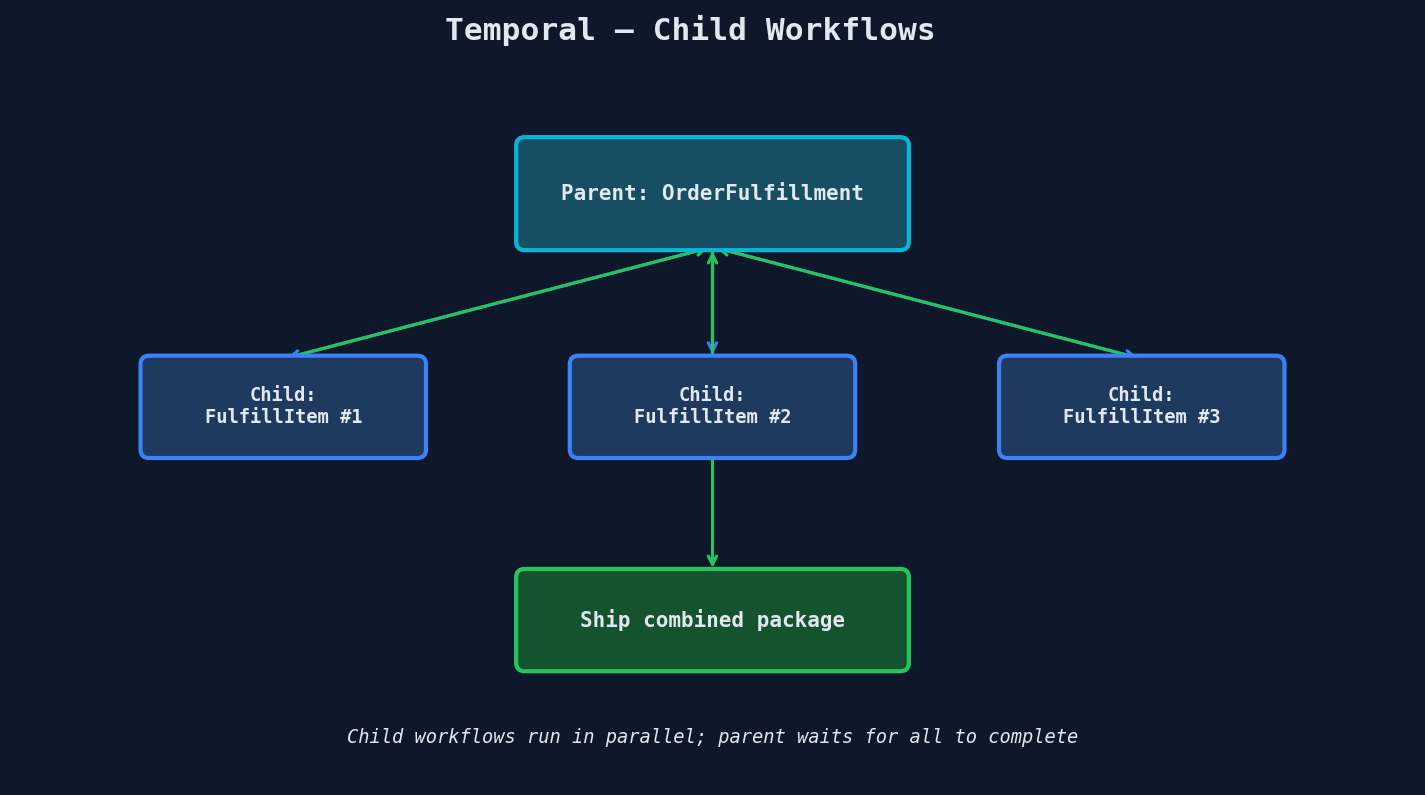
Child workflows let you compose complex workflows from simpler ones. An order fulfillment workflow can spawn child workflows for each item in a multi-item order, running them in parallel.
AWS Step Functions — The Serverless Option
Step Functions define workflows as JSON (or YAML) state machines. No application servers needed — everything runs on AWS infrastructure.
Two Flavors
| Feature | Standard | Express |
|---|---|---|
| Max duration | 1 year | 5 minutes |
| Pricing | ~$25 per million transitions | ~$1 per million transitions |
| Execution model | Exactly-once | At-least-once |
| History | 25,000 events max | No persistent history |
| Best for | Long-running, human-in-the-loop | High-volume, short-lived |
State Machine Definition
{
  "Comment": "Order Processing Workflow",
  "StartAt": "ChargePayment",
  "States": {
    "ChargePayment": {
      "Type": "Task",
      "Resource": "arn:aws:lambda:us-east-1:123:function:charge",
      "Next": "ReserveInventory",
      "Retry": [
        {
          "ErrorEquals": ["States.Timeout"],
          "IntervalSeconds": 2,
          "MaxAttempts": 3,
          "BackoffRate": 2.0
        }
      ],
      "Catch": [
        {
          "ErrorEquals": ["PaymentDeclined"],
          "Next": "OrderCancelled"
        }
      ]
    },
    "ReserveInventory": {
      "Type": "Task",
      "Resource": "arn:aws:lambda:us-east-1:123:function:reserve",
      "Next": "WaitForPick",
      "Catch": [
        {
          "ErrorEquals": ["OutOfStock"],
          "Next": "RefundPayment"
        }
      ]
    },
    "WaitForPick": {
      "Type": "Task",
      "Resource": "arn:aws:states:::sqs:sendMessage.waitForTaskToken",
      "TimeoutSeconds": 86400,
      "Next": "ScheduleShipping"
    },
    "ScheduleShipping": {
      "Type": "Task",
      "Resource": "arn:aws:lambda:us-east-1:123:function:ship",
      "Next": "SendConfirmation"
    },
    "SendConfirmation": {
      "Type": "Task",
      "Resource": "arn:aws:lambda:us-east-1:123:function:email",
      "End": true
    },
    "RefundPayment": {
      "Type": "Task",
      "Resource": "arn:aws:lambda:us-east-1:123:function:refund",
      "Next": "OrderCancelled"
    },
    "OrderCancelled": {
      "Type": "Fail",
      "Error": "OrderCancelled",
      "Cause": "Payment declined or out of stock"
    }
  }
}
Pros: Zero infrastructure to manage. 200+ native AWS integrations (invoke Lambda, write to DynamoDB, send SNS, start ECS tasks) without custom code. Built-in visual debugger shows exactly which state each execution is in.
Cons: Vendor lock-in. JSON state machines are hard to read for complex logic. 25,000 event history limit means very long-running workflows need careful design. No code-level abstractions — conditionals, loops, and error handling are all JSON config.
Step Functions History Limit
Standard Step Functions have a hard limit of 25,000 events in the execution history. Each state transition, retry, and wait counts as events. For workflows that run for months with frequent state changes, you'll hit this ceiling. The workaround is to break long workflows into child executions — similar to Temporal's continue-as-new.
Netflix Conductor — The Middle Ground
Conductor (now part of the Orkes ecosystem) uses JSON workflow definitions with a task queue model. Workers poll for tasks, execute them, and report results back.
┌────────────────────┐     ┌──────────────────┐
│  Conductor Server  │────►│  Task Queue:     │
│  (workflow engine)  │     │  charge_payment  │
└────────────────────┘     └──────────────────┘
         │                         │
         │                    ┌────┴────┐
         │                    │ Worker  │
         │                    │ (polls) │
         │                    └─────────┘
         │
         │                 ┌──────────────────┐
         ├────────────────►│  Task Queue:     │
         │                 │  reserve_inv     │
         │                 └──────────────────┘
         │                         │
         │                    ┌────┴────┐
         │                    │ Worker  │
         │                    │ (polls) │
         │                    └─────────┘
Key difference from Temporal: Conductor workers are language-agnostic. Any HTTP client can poll for tasks and submit results. This makes it easier to integrate with legacy systems. The trade-off is less power — you don't get Temporal's replay-based deterministic execution or its rich SDK abstractions.
The Decision Framework
| Factor | Temporal | Step Functions | Conductor | Airflow |
|---|---|---|---|---|
| Complexity | High (most capable) | Medium | Medium | High (data-focused) |
| Duration | Unlimited | 1 year (Standard) | Unlimited | DAG-based |
| Programming model | Code (Python, Go, Java, TS) | JSON state machine | JSON + workers | Python DAGs |
| Cloud lock-in | None (self-host or Temporal Cloud) | AWS only | None (self-host or Orkes) | None |
| Best for | Complex, long-running, code-level control | AWS-native, moderate complexity, serverless | Polyglot teams, legacy integration | Batch data pipelines |
| Not for | Simple 2-3 step workflows | Non-AWS environments | Workflows needing replay semantics | User-triggered, real-time workflows |
Airflow Is Not a Workflow Orchestrator
Airflow is designed for scheduled batch data pipelines — DAGs that run on a cron schedule to process data. It is NOT designed for user-triggered, real-time workflows like order processing. Airflow DAGs are not instantiated per-request; they run on a schedule. If an interviewer describes a user-triggered workflow and you suggest Airflow, it signals a misunderstanding of the tool's purpose.
When to Mention These in Interviews
For senior-level interviews, demonstrate you understand the underlying pattern: "This workflow spans multiple services, so we need durable execution — the ability to persist workflow state across crashes and retries. Conceptually, the framework replays the workflow from a durable event history, so our code doesn't need to handle checkpointing manually."
For staff+ interviews, name the tools: "For this, I'd use Temporal. It gives us deterministic replay, durable timers for the 24-hour host acceptance window, and signals to handle the asynchronous warehouse pick event. We'd define the workflow as a function with activities for each service call."
Stripe uses Temporal to orchestrate their payment processing pipelines. Snap runs workflow orchestration for their ad delivery system on Temporal. These aren't toy deployments — they're mission-critical, high-volume production systems.
Interview Tip
Don't just name-drop Temporal or Step Functions. Explain the problem first (partial failures, crash recovery, long-running steps), then present the pattern (durable execution), then mention the tool as an implementation of that pattern. This shows you understand fundamentals rather than just memorizing tool names. An interviewer would much rather hear "we need durable execution because of X, Y, Z — Temporal is one way to achieve that" than "let's use Temporal" with no justification.
Temporal's Replay Mechanism — How the Magic Works
This is worth understanding because it's the most common follow-up question. When a Temporal worker crashes and restarts:
- The worker picks up the workflow execution from the Temporal server
- It re-executes the workflow function from the beginning
- For each
execute_activitycall, it checks the event history - If the activity already completed, it returns the recorded result instead of re-executing
- If the activity has NOT completed, it executes it for real
Replay example (crash after step 2):
═══════════════════════════════════════════════════════
Event History:
  [1] WorkflowStarted
  [2] ActivityScheduled: charge_payment
  [3] ActivityCompleted: charge_payment → {id: "pay_123"}
  [4] ActivityScheduled: reserve_inventory
  [5] ActivityCompleted: reserve_inventory → OK
  [6] ActivityScheduled: schedule_shipping
  [CRASH]

Replay execution:
  charge_payment(order)     → returns {id: "pay_123"} FROM HISTORY
  reserve_inventory(order)  → returns OK FROM HISTORY
  schedule_shipping(order)  → EXECUTES FOR REAL (no result in history)
═══════════════════════════════════════════════════════
This is why workflow functions must be deterministic. If the replay takes a different code path than the original execution (because of a random number or a clock check), the history won't match and Temporal throws a non-deterministic error.
# ❌ BAD — non-deterministic
@workflow.defn
class BadWorkflow:
    @workflow.run
    async def run(self):
        if random.random() > 0.5:      # different on replay!
            await do_thing_a()
        else:
            await do_thing_b()

# ✓ GOOD — deterministic
@workflow.defn
class GoodWorkflow:
    @workflow.run
    async def run(self):
        # Use workflow.random() for deterministic randomness
        if workflow.random().random() > 0.5:
            await do_thing_a()
        else:
            await do_thing_b()
Quick Recap
| Concept | Key Takeaway |
|---|---|
| Durable execution | Framework persists workflow state; your code "never crashes" |
| Temporal workflows | Deterministic functions replayed from event history |
| Temporal activities | Non-deterministic work (API calls, DB writes), auto-retried |
| Signals + timers | External events and durable waits that survive restarts |
| Continue-as-new | Squash history to prevent unbounded growth |
| Step Functions | JSON state machines, serverless, 200+ AWS integrations |
| Conductor | JSON definitions + language-agnostic task polling workers |
| Airflow | Batch data pipelines only — NOT for user-triggered workflows |
Interview Tip
If the interviewer asks about a workflow that involves a human step (approval, review, physical warehouse pick), immediately mention durable timers and signals. "The workflow starts a 24-hour durable timer. When the human completes their action, the system sends a signal to the workflow, which wakes up and continues. If the timer expires first, we escalate." This is the killer feature that separates durable execution from simple retry logic.