L4 vs L7 Load Balancers
TL;DR
L4 load balancers are like mail sorters — they look at the address on the envelope and route it without opening it. L7 load balancers are like executive assistants — they read the letter inside and decide where it should go based on the contents. L4 is faster; L7 is smarter. Most of the time, you want L7.
Two Flavors of Load Balancer
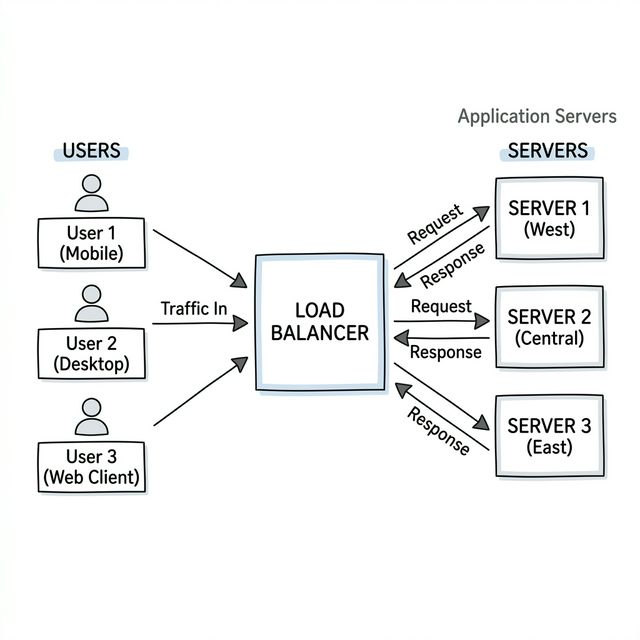
When you put a dedicated load balancer between clients and servers, it needs to decide where to send each request. How it makes that decision depends on how deeply it inspects the traffic — and that gives us two very different types.
Layer 4: The Speed Demon
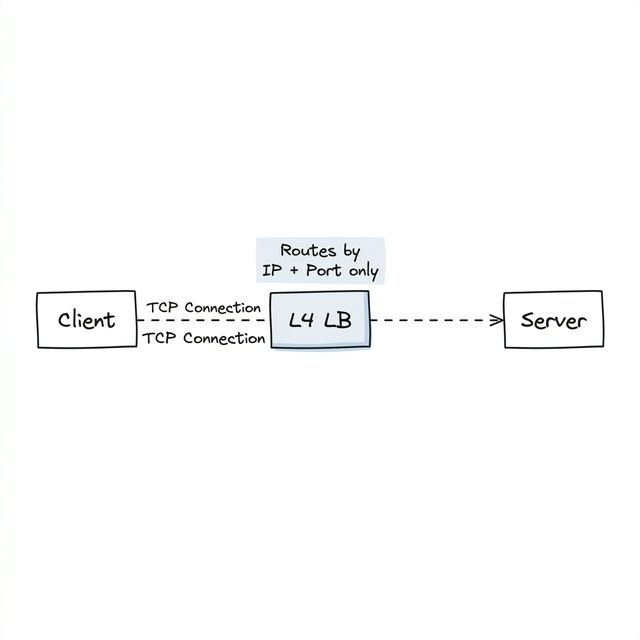
An L4 load balancer works at the transport layer (TCP/UDP). It looks at the outside of the envelope — IP addresses and port numbers — and routes based on that. It never opens the envelope to read what's inside.
Think of a highway toll booth. It sees your car (the connection), picks a lane for you, and you drive straight through to your destination. The toll booth doesn't care what's in your trunk.
What makes L4 special:
- Pass-through connections — The client's TCP connection goes all the way to the backend server. The LB just forwards packets along. It's like the toll booth opened a direct lane for you.
- Very fast — Since it's not reading contents, there's minimal overhead
- Can't make smart decisions — It has no idea what URL you're requesting, what cookies you have, or what headers you sent. It only sees addresses and ports.
- Natural fit for persistent connections — WebSocket connections pass through directly, as if the load balancer isn't even there
When to use L4:
- WebSocket connections — The persistent TCP connection passes through cleanly
- Raw performance — When you need maximum throughput and don't need content-based routing
- Non-HTTP protocols — When the traffic isn't HTTP and the LB doesn't need to understand it
Layer 7: The Smart One
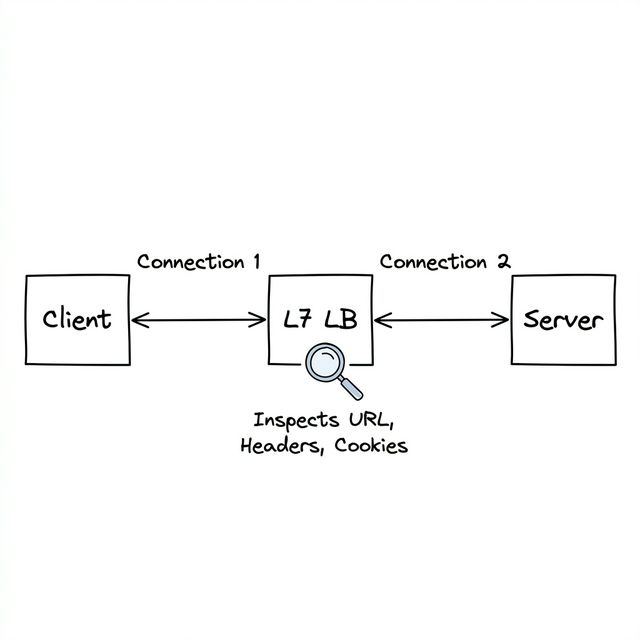
An L7 load balancer operates at the application layer. It opens the envelope, reads the HTTP request inside, and makes routing decisions based on what it finds.
Think of a receptionist at a large office building. When you walk in, they ask "who are you here to see?" and direct you to the right floor. They don't just point you at a random office — they understand your intent and route you accordingly.
What makes L7 special:
- Content-aware — Can read URLs, headers, cookies, and even request bodies
- Terminates connections — The client's connection ends at the LB. The LB opens a new connection to the backend. Two separate connections.
- More processing overhead — Reading and understanding request content takes CPU time
- Very flexible — Can do things L4 simply can't
What L7 can do that L4 can't:
- Route
/api/*requests to your API servers and/images/*to your static file servers - Use cookies for sticky sessions — "All requests from this user go to Server 3"
- Handle SSL termination — Decrypt HTTPS at the load balancer, send plain HTTP to your backend servers (so they don't each need SSL certificates)
- Act as a simple API gateway — Inspect and modify requests before passing them along
The WebSocket Debate
"I heard you should always use L4 for WebSockets." — That's the common advice, and it's mostly right.
L4 is the natural fit because WebSocket connections pass through directly. But many L7 load balancers (AWS ALB, Nginx, etc.) actually support WebSockets just fine. They maintain two connections — one from client to LB, another from LB to backend — which adds some overhead but works.
The real trade-off: L4 handles more concurrent persistent connections with less overhead. L7 gives you the ability to inspect the HTTP upgrade request (useful if you want to route different WebSocket paths to different servers).
For interviews: "L4 for WebSockets, L7 for HTTP" is a safe and correct answer. If pressed, mention that L7 can handle WebSockets too, but L4 is better for high-concurrency persistent connections.
Advanced Deep Dive: The Full L4 vs L7 WebSocket Trade-off
The trade-off is more nuanced than "L4 is better for WebSockets." Here's what you're actually choosing between:
L4 (TCP pass-through): - The client's TCP connection goes directly to the backend — the LB just forwards packets. This means one TCP connection per client, minimal memory overhead, and excellent concurrency (100K+ connections per node is common). - The catch: the LB never "opens the envelope." It can't do SSL termination (each backend must handle its own TLS), can't inspect cookies for auth, and can't route by URL path. You trade intelligence for raw throughput.
L7 (connection termination): - The LB terminates the client's TCP connection and opens a second TCP connection to the backend. That means two TCP connections per client — double the memory, double the socket overhead. - The win: the LB can do SSL termination (handle TLS once at the edge instead of on every backend), inspect the HTTP Upgrade request (route
/ws/chatto chat servers and/ws/notificationsto notification servers), and enforce auth/rate-limiting before the connection reaches your backends.The decision framework: If you have thousands of simple WebSocket connections and backends handle their own auth, use L4. If you need SSL termination, path-based routing, or auth at the edge, use L7 and accept the overhead. Most production systems use L7 (via Nginx or ALB) because the operational convenience of centralized SSL and routing outweighs the memory cost.
Quick Comparison
| L4 Load Balancer | L7 Load Balancer | |
|---|---|---|
| Analogy | Mail sorter (reads the envelope) | Executive assistant (reads the letter) |
| Operates at | Transport layer (TCP/UDP) | Application layer (HTTP) |
| Routes based on | IP address, Port number | URL, Headers, Cookies, Body |
| TCP connections | Passes through to backend | Terminates and creates new |
| Speed | Very fast (minimal inspection) | Slower (reads content) |
| WebSockets | Natural fit | Supported, but more overhead |
| SSL termination | No | Yes |
| Best for | WebSockets, raw performance | Everything else (the default) |
Interview Tip
"L4 vs L7" is one of the most common follow-up questions after you mention a load balancer. The key phrase is: "L4 routes by address, L7 routes by content." If you can explain the WebSocket trade-off on top of that, you're in great shape. Default to L7 for HTTP traffic and mention L4 specifically for WebSocket or persistent connection scenarios.