The Reservation Pattern
TL;DR
Hard locks (SELECT FOR UPDATE) block other users while one person holds the lock. For user-facing systems like ticket booking, that's terrible UX — you can't lock a database row while someone takes 5 minutes to enter their credit card. The reservation pattern uses soft locks with time limits: reserve the resource for N minutes, convert to a purchase if payment succeeds, auto-release if the timer expires. It separates the "claim" from the "commit" and puts a countdown between them.
Your Database Lock Is Holding 10,000 People Hostage
You learned SELECT FOR UPDATE in the last lesson. It solves the race condition — only one transaction can modify the locked row at a time. But here's the problem nobody mentions in textbook examples:
What happens between "User clicks Buy" and "User finishes entering their credit card"?
Timeline of a real purchase flow:

User clicks "Buy Seat A15"     → SELECT FOR UPDATE on seat A15
User stares at payment form    → ... lock held ...
User searches for credit card  → ... lock held ...
User types card number wrong   → ... lock held ...
User re-types card number      → ... lock held ...
User clicks "Pay"              → UPDATE seat, COMMIT, lock released

Total lock duration: 3-10 minutes
During those 3-10 minutes, every other user trying to buy seat A15 — or any seat in the same row range — is blocked. Their queries are waiting on your lock. Their HTTP connections are hanging. Your connection pool is filling up.
| What Goes Wrong | Why It Hurts |
|---|---|
| Lock held for minutes instead of milliseconds | Other transactions queue up waiting |
| User abandons the page (closes tab) | Lock held until DB timeout (30-60 seconds), not until the user leaves |
| 100 users trying to buy the same seat | 99 connections blocked, connection pool exhausted |
| Connection pool exhausted | Entire application stops responding — not just ticket purchases |
The Cascade Failure
One user holding a database lock for 5 minutes doesn't just affect people buying that seat. If your connection pool has 20 connections and 20 users are all holding locks on different seats while entering credit card info, no new database connections are available. Your homepage stops loading. Your search stops working. Your entire site goes down because 20 people are slowly typing their credit card numbers.
Hard locks are built for millisecond-duration operations — decrement a counter, transfer money between accounts, update a balance. They were never designed for minute-duration user flows where a human is in the loop.
The Two-Phase Fix: Reserve Now, Pay Later
The reservation pattern splits the purchase into two distinct phases, with a countdown timer between them.
Phase 1 — Reserve: User clicks "Buy" → system creates a soft lock (a row in a reservations table) with an expiration time. No database lock is held. The seat is marked "reserved" but the reservation has a ticking clock.
Phase 2a — Confirm: User completes payment within the time limit → reservation converts to a confirmed purchase. Done.
Phase 2b — Expire: Timer runs out before payment → reservation is automatically deleted → seat becomes available again for someone else.
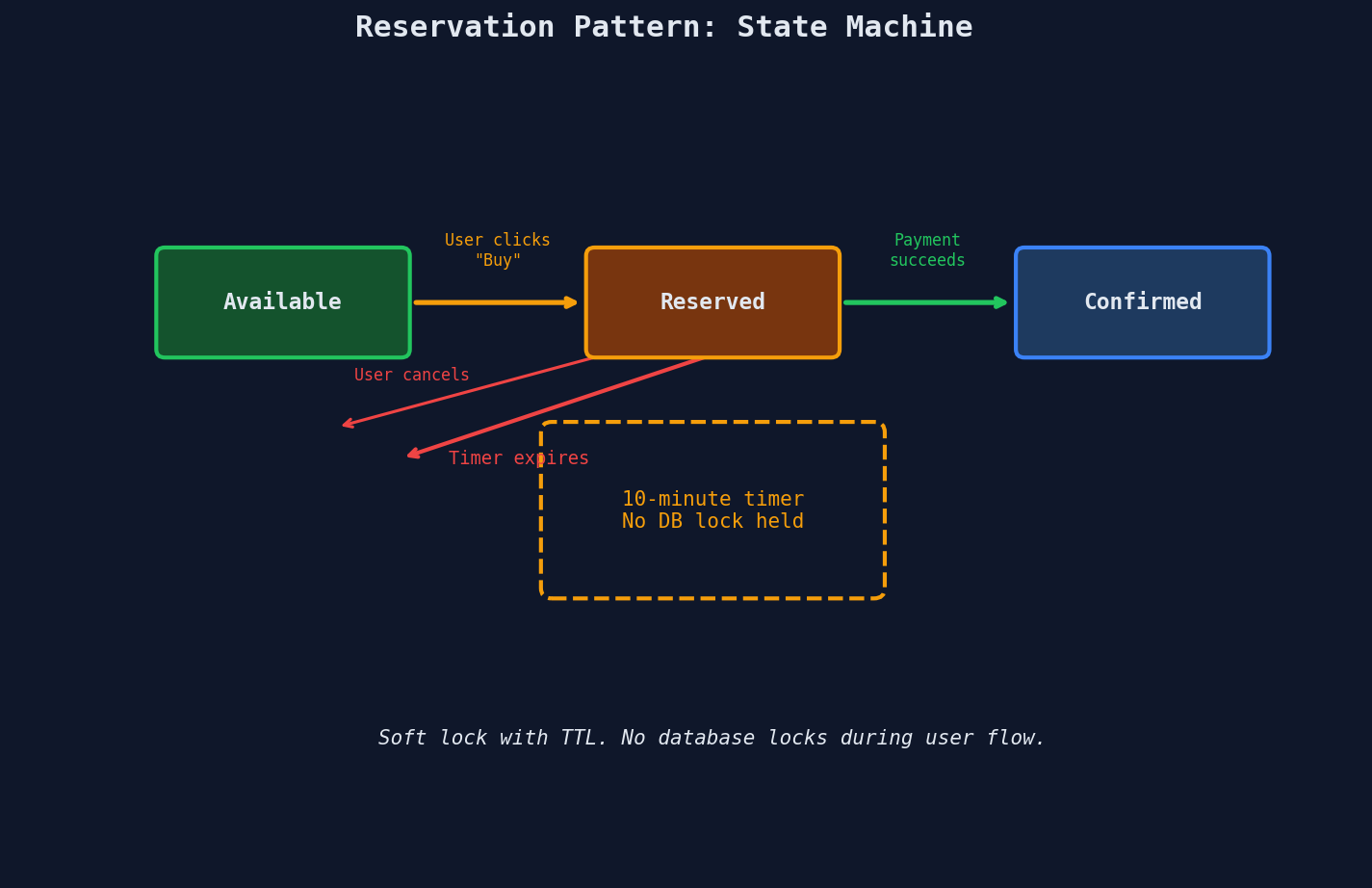
The key insight: no database lock is ever held during the user flow. The "lock" is just a row in a table with an expires_at timestamp. Other transactions can read and write freely. The only thing that's blocked is another user trying to reserve the same seat, and that's handled with a simple unique constraint — not a database lock.
The SQL That Makes It Work
Phase 1: Create the Reservation (Soft Lock)
-- Attempt to reserve seat A15 for user123
-- TTL: 10 minutes from now
INSERT INTO reservations (seat_id, user_id, expires_at, status)
VALUES ('A15', 'user123', NOW() + INTERVAL '10 minutes', 'reserved')
ON CONFLICT (seat_id)
DO NOTHING;
-- If seat already reserved by someone else, this silently fails
-- Check: 1 row affected = got it, 0 rows affected = someone else has it
Why ON CONFLICT DO NOTHING instead of raising an error? Because the seat being unavailable isn't an error — it's an expected outcome. The application checks the affected row count and shows the user "This seat is no longer available" instead of crashing.
cursor.execute("""
    INSERT INTO reservations (seat_id, user_id, expires_at, status)
    VALUES (%s, %s, NOW() + INTERVAL '10 minutes', 'reserved')
    ON CONFLICT (seat_id) DO NOTHING
""", (seat_id, user_id))

if cursor.rowcount == 0:
    return {"error": "Seat already reserved. Try another seat."}
else:
    return {"status": "reserved", "expires_in": 600}
Phase 2a: Convert to Confirmed Purchase
-- User completed payment — convert reservation to purchase
UPDATE reservations
SET status = 'confirmed', confirmed_at = NOW()
WHERE seat_id = 'A15'
  AND user_id = 'user123'
  AND status = 'reserved'
  AND expires_at > NOW();
Every condition in that WHERE clause matters:
| Condition | What It Prevents |
|---|---|
seat_id = 'A15' |
Confirming a different seat |
user_id = 'user123' |
Another user hijacking this reservation |
status = 'reserved' |
Double-confirming an already-confirmed purchase |
expires_at > NOW() |
Confirming after the timer expired (seat may be re-reserved) |
If this UPDATE affects 0 rows, the reservation expired while the user was paying. The application should refund the payment and tell the user the seat is no longer available.
Phase 2b: Cleanup Expired Reservations
-- Background job — runs every minute
DELETE FROM reservations
WHERE status = 'reserved'
  AND expires_at < NOW();
This is a simple cron job or background worker. It sweeps through the table, finds reservations where the timer has expired and the user never paid, and deletes them — making those seats available again.
Lazy vs Eager Expiration
You don't strictly need the background cleanup job. You could use lazy expiration — when someone tries to reserve a seat, first check if the existing reservation has expired:
INSERT INTO reservations (seat_id, user_id, expires_at, status)
VALUES ('A15', 'user123', NOW() + INTERVAL '10 minutes', 'reserved')
ON CONFLICT (seat_id)
DO UPDATE SET
    user_id = 'user123',
    expires_at = NOW() + INTERVAL '10 minutes',
    status = 'reserved'
WHERE reservations.expires_at < NOW();
This overwrites expired reservations in-place. But in practice, you want both: lazy expiration for correctness (so a new user can grab an expired seat immediately) and eager expiration via a background job for cleanliness (so your table doesn't fill up with stale rows).
The Schema
CREATE TABLE reservations (
    seat_id     VARCHAR(10) PRIMARY KEY,  -- one reservation per seat
    user_id     VARCHAR(64) NOT NULL,
    status      VARCHAR(20) NOT NULL DEFAULT 'reserved',
    expires_at  TIMESTAMPTZ NOT NULL,
    created_at  TIMESTAMPTZ NOT NULL DEFAULT NOW(),
    confirmed_at TIMESTAMPTZ,

    CONSTRAINT valid_status CHECK (status IN ('reserved', 'confirmed'))
);

-- Index for the background cleanup job
CREATE INDEX idx_reservations_expiry
ON reservations (expires_at)
WHERE status = 'reserved';
The seat_id being the PRIMARY KEY is the entire concurrency control mechanism. Two users cannot insert the same seat_id — the unique constraint enforces mutual exclusion without any database locks.
How Long Should the Timer Be?
This is a product decision disguised as a technical one. Set it too short and users can't finish paying. Set it too long and seats are held by abandoned carts while real buyers see "sold out."
| Domain | Typical TTL | Why |
|---|---|---|
| Concert tickets | 10 minutes | Ticketmaster's standard. Payment flow is simple (card on file). |
| Airline seats | 15-20 minutes | More complex forms (passenger details, luggage, meals). |
| Hotel rooms | 30 minutes | Multiple rooms, dates, and add-ons to configure. |
| Restaurant reservations | 5 minutes | Just confirming a time slot, minimal input required. |
| Shopping carts (e-commerce) | No reservation | Items aren't reserved. "Low stock" warning instead. Reduces abandoned-cart lockout. |
Ticketmaster gives you exactly 10 minutes to complete your purchase. That countdown timer on the payment page isn't just UX — it's the reservation pattern in action. When the timer hits zero, your seat goes back into the pool, and the next person in the queue gets a shot.
The TTL Trade-off
Too short (2 minutes): Users with slow internet, accessibility needs, or complex payment methods (PayPal redirect, 3D Secure verification) can't finish in time. They lose their seat and have to start over. Frustrating UX, angry support tickets.
Too long (30 minutes for a concert): A user selects 4 seats, starts the payment flow, then gets a phone call and walks away. Those 4 seats are locked for 30 minutes. Multiply by thousands of users and you have a significant chunk of inventory invisible to real buyers. Lower conversion rate, lower revenue.
The sweet spot: Measure the 95th percentile of your payment completion time, add a small buffer. That's your TTL.
The Thundering Herd on Release
Here's a scenario nobody thinks about until it happens in production:
A prime seat (front row center) was reserved but the timer just expired. The background job releases it. At that exact moment, 500 users who've been refreshing the page see the seat appear. All 500 hit "Reserve" simultaneously.
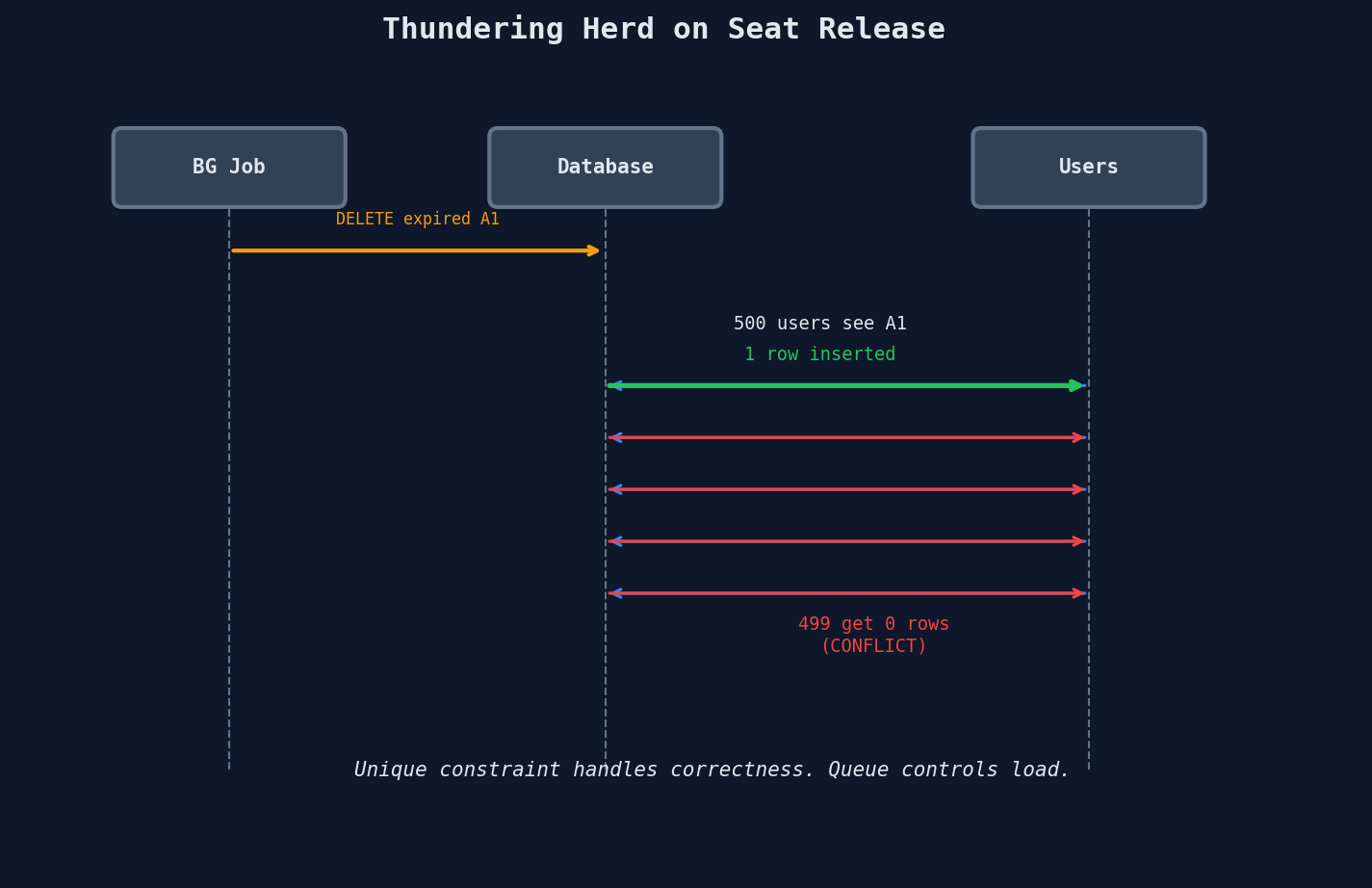
The database handles this correctly — the unique constraint means exactly one INSERT succeeds. But 499 failed requests still hit your database simultaneously. At scale, this is a thundering herd.
The Fix: Queue-Based Admission
Instead of letting everyone fight over the seat directly, put a queue in front of the reservation system. Only let N users into the purchase flow at a time.
| Without Queue | With Queue |
|---|---|
| 500 users hit the DB simultaneously | 500 users enter a virtual queue |
| 499 get instant rejection | Next 5 users are admitted to the purchase page |
| DB handles 500 writes in a burst | If they don't complete, next 5 are admitted |
| Thundering herd on every release | Smooth, controlled load |
Ticketmaster's Verified Fan program and virtual queue system is exactly this pattern. During the Taylor Swift Eras Tour presale, they had 14 million users in queue. The queue controlled admission — only a managed number of users were in the "reservation" phase at any given time. The reservation pattern handled the rest: 10-minute TTL, auto-release on expiry, and the next batch admitted from the queue.
Queue + Reservation = The Full Pattern
In high-demand systems, the reservation pattern is never deployed alone. It's always queue → reservation → payment → confirmation. The queue controls how many users enter the reservation phase. The reservation controls how long they have. Together, they turn an uncontrollable stampede into a manageable flow.
Reservation vs Hard Lock — The Decision Framework
| Factor | Hard Lock (FOR UPDATE) |
Reservation Pattern |
|---|---|---|
| Lock duration | Milliseconds (DB transaction) | Minutes (user flow) |
| What's blocked | Other DB transactions wait | Other users see "unavailable" instantly |
| Timeout mechanism | DB lock timeout (seconds) | Application-defined TTL (minutes) |
| User visibility | Invisible — user doesn't know a lock exists | Visible — countdown timer, "held for 10 min" |
| Failure mode | Connection pool exhaustion, cascading failures | Graceful — expired reservations auto-release |
| Implementation | SELECT FOR UPDATE (1 SQL statement) |
Reservations table + background cleanup job |
| Best for | Inventory decrement, bank transfer, counter update | Seat booking, appointment scheduling, cart holds |
| Human in the loop? | No — fully automated, sub-second | Yes — user needs time to complete a form |
The rule of thumb: if a human is between the "claim" and the "commit," use the reservation pattern. If it's machine-to-machine with no user interaction, a hard lock inside a transaction is simpler and sufficient.
A Real-World Example: Appointment Scheduling
The pattern isn't just for concerts. Here's a doctor's appointment booking system using the same structure:
-- Patient selects 2:00 PM on Thursday
INSERT INTO appointment_holds (
    doctor_id, slot_time, patient_id, expires_at, status
)
VALUES (
    'dr_smith', '2024-03-15 14:00:00',
    'patient_456', NOW() + INTERVAL '5 minutes',
    'held'
)
ON CONFLICT (doctor_id, slot_time)
DO NOTHING;
-- Patient confirms (fills in reason for visit, insurance info)
UPDATE appointment_holds
SET status = 'confirmed', confirmed_at = NOW()
WHERE doctor_id = 'dr_smith'
  AND slot_time = '2024-03-15 14:00:00'
  AND patient_id = 'patient_456'
  AND status = 'held'
  AND expires_at > NOW();
Same pattern, different domain. The TTL here is 5 minutes because confirming an appointment is simpler than entering payment info — you just need to fill in a reason for the visit.
Common Mistakes
Mistake 1: No Expiration
Creating a reservation with no expires_at. If the user never comes back, the seat is locked forever. Every reservation must have a TTL.
Mistake 2: Trusting the Client Timer
Showing a 10-minute countdown in JavaScript but not checking expires_at > NOW() on the server. A user can modify the client timer or replay the confirmation request after expiry. The server must be the source of truth.
Mistake 3: Confirming Without Checking the User
Forgetting AND user_id = 'user123' in the confirmation UPDATE. Without it, User B could confirm User A's reservation by guessing the seat ID. Always verify ownership.
Mistake 4: No Background Cleanup
Relying solely on lazy expiration. If nobody tries to reserve the expired seat, it stays in the table indefinitely. The background job is essential for keeping inventory accurate and the table clean.
Quick Recap
| Concept | Key Takeaway |
|---|---|
| Hard lock problem | SELECT FOR UPDATE holds DB locks for the duration of the transaction — catastrophic if a human is in the loop |
| Two-phase approach | Phase 1: reserve with TTL. Phase 2: confirm or auto-expire |
| Soft lock mechanism | Unique constraint on seat_id — no database lock needed |
| TTL selection | Measure 95th percentile payment time + buffer. Domain-specific (5-30 min) |
| Thundering herd | Queue-based admission controls how many users enter the reservation phase |
| Eager + lazy expiration | Background job cleans up stale rows. Lazy expiration handles edge cases in real-time |
Interview Tip
Any time the interviewer mentions booking, reservations, or limited inventory with a user flow — reach for the reservation pattern. It shows you understand that database locks are for transactions, not for user interactions. Say: "I'd use a soft lock with a TTL — reserve the seat for 10 minutes, run a background job to expire abandoned reservations, and use a unique constraint to prevent double-booking. For high-demand scenarios, I'd add a queue in front to control admission." That single answer covers concurrency control, resource management, and graceful degradation — three things interviewers love to hear together.