Tables, Rows & the Relational Model
TL;DR
A relational database stores data in tables with rows and columns. Every row needs a unique identifier (primary key), and tables connect to each other through foreign keys. This simple structure powers most of the internet.
Think of It Like a Spreadsheet — But With Rules
You've used a spreadsheet before. Rows, columns, cells — nothing fancy. A relational database looks a lot like that, except the database enforces rules about what goes where.
In a spreadsheet, you can put someone's birthday in a phone number column and nobody stops you. In a database, the system itself prevents bad data from getting in. That's the key difference: structure with enforcement.
Let's build up from the basics.
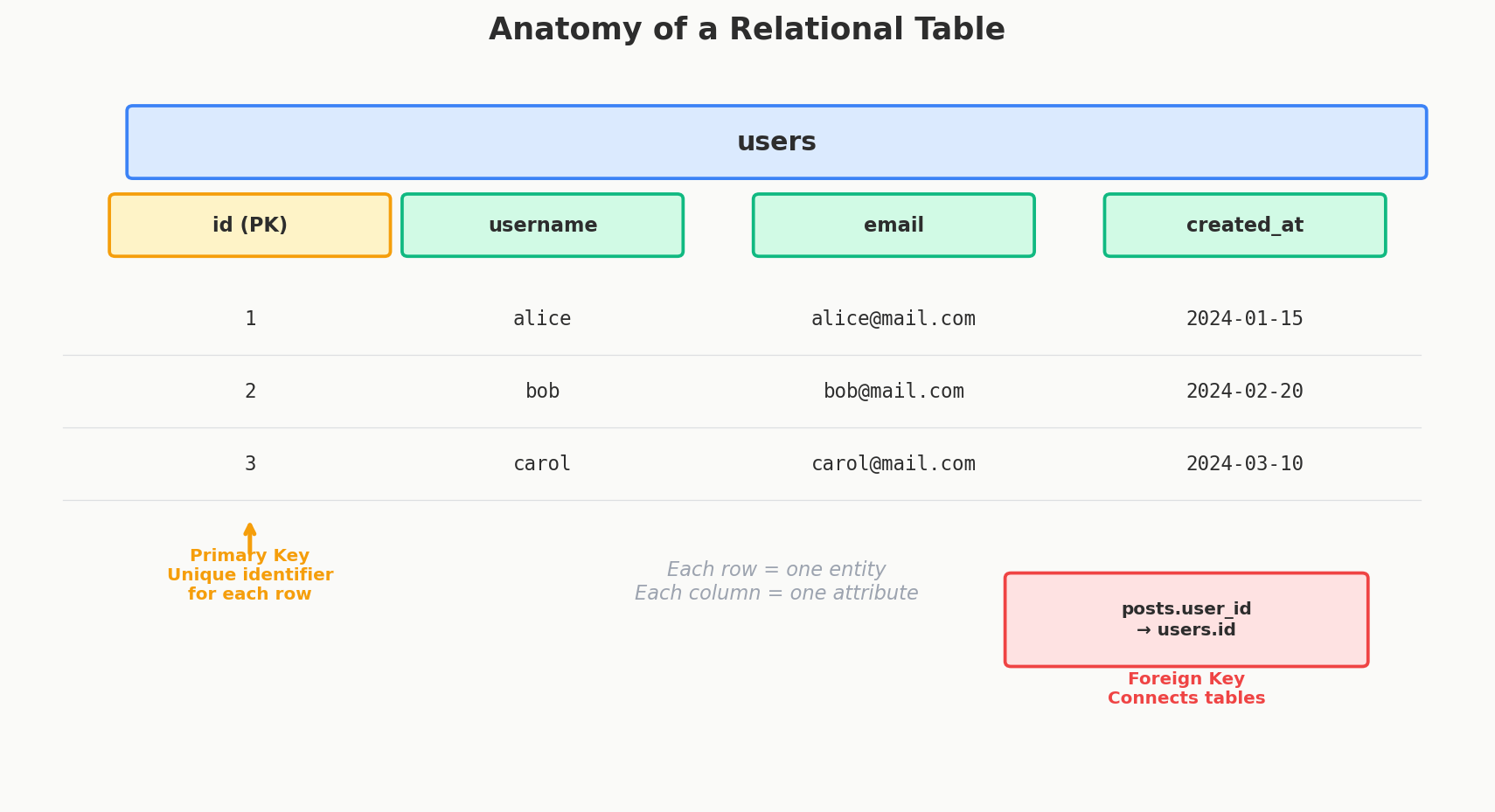
Tables — One Table Per "Thing"
A table represents one type of entity in your system. If you're building Instagram, you might have:
- A
userstable (every registered account) - A
poststable (every photo or video shared) - A
commentstable (every comment on a post) - A
likestable (every like on a post)
Each table has a fixed set of columns — the attributes that describe the entity. The users table might have id, username, email, and created_at. Every user gets the same columns.
Each row in the table is one specific instance of that entity. One row in users = one user. One row in posts = one post.
users
┌────┬──────────┬─────────────────────┬────────────┐
│ id │ username │ email               │ created_at │
├────┼──────────┼─────────────────────┼────────────┤
│  1 │ alice    │ alice@example.com   │ 2024-01-15 │
│  2 │ bob      │ bob@example.com     │ 2024-02-20 │
│  3 │ carol    │ carol@example.com   │ 2024-03-10 │
└────┴──────────┴─────────────────────┴────────────┘
Simple enough. But how do you make sure every row is unique? And how do tables connect to each other?
Primary Keys — Every Row Needs an ID
A primary key is a column (or set of columns) that uniquely identifies each row. No two rows can have the same primary key. It's the row's fingerprint.
The most common approach is an auto-incrementing integer:
CREATE TABLE users (
    id SERIAL PRIMARY KEY,
    username VARCHAR(50) UNIQUE NOT NULL,
    email VARCHAR(100) UNIQUE NOT NULL,
    created_at TIMESTAMP DEFAULT NOW()
);
But auto-incrementing IDs have a subtle problem: they leak information. If you sign up and get user ID 48,293 — you now know roughly how many users the platform has. Competitors love that.
There are three main approaches to primary keys:
| Type | Example | Pros | Cons |
|---|---|---|---|
| Auto-increment | 1, 2, 3, ... | Simple, small, fast | Leaks growth rate, bad for distributed systems |
| UUID | 550e8400-e29b-41d4-a716-446655440000 |
No collisions, generate anywhere | Large (128 bits), bad index locality |
| Snowflake ID | 1542942037289783296 |
Time-sortable + unique, 64 bits | Requires ID generation service |
Twitter invented Snowflake IDs to solve this exact problem. They embed a timestamp, machine ID, and sequence number into a single 64-bit integer. You get the sortability of auto-increment with the distribution safety of UUIDs. Instagram uses a similar scheme.
UUIDv4 and B-Tree Performance
Random UUIDs (v4) scatter inserts across the entire B-tree index, causing constant page splits and poor cache locality. If you use UUIDs, prefer UUIDv7 (time-ordered) or Snowflake IDs — they append sequentially like auto-increment but are globally unique.
Interview Tip
In an interview, just say "I'll use a UUID or a Snowflake-style ID for the primary key." Don't overthink it unless the interviewer specifically asks about ID generation — then mention the trade-offs above.
Foreign Keys — Connecting Tables Together
Tables don't exist in isolation. A post belongs to a user. A comment belongs to a post. These connections are established through foreign keys.
A foreign key is a column in one table that references the primary key of another table. It says: "this value must exist over there."
CREATE TABLE posts (
    id SERIAL PRIMARY KEY,
    user_id INTEGER NOT NULL REFERENCES users(id),
    content TEXT NOT NULL,
    created_at TIMESTAMP DEFAULT NOW()
);
That REFERENCES users(id) is the foreign key constraint. It means:
- Every
user_idinpostsmust match an actualidinusers - You can't create a post for a user that doesn't exist
- You can't delete a user who still has posts (unless you configure cascade behavior)
This is referential integrity — the database guarantees that relationships between tables are always valid. No orphaned posts. No comments pointing to deleted users. The database enforces it, not your application code.
users                              posts
┌────┬──────────┐                 ┌────┬─────────┬──────────────┐
│ id │ username │                 │ id │ user_id │ content      │
├────┼──────────┤    references   ├────┼─────────┼──────────────┤
│  1 │ alice    │ ◄──────────────── 1  │    1    │ Hello world! │
│  2 │ bob      │ ◄──────────────── 2  │    2    │ My first post│
│  3 │ carol    │                 │  3 │    1    │ Another post │
└────┴──────────┘                 └────┴─────────┴──────────────┘
Alice (user 1) has two posts. Bob (user 2) has one. Carol has none. The foreign key user_id is what connects these tables.
What Makes It "Relational"
The word "relational" doesn't mean "tables are related to each other" — although they are. It comes from a mathematical concept called a relation, which is essentially a table of tuples (rows).
But for practical purposes, the name fits: the power of relational databases comes from relationships between tables. You define your data in separate, focused tables — then join them together when you need combined information.
Want all posts with their author's username? That's a join:
This ability to separate data cleanly and recombine it on the fly is what makes relational databases so versatile. You store each fact once, and you can answer almost any question by joining the right tables together.
ACID — The Four Guarantees
Relational databases don't just store data — they make promises about how they handle it. These promises are called ACID:
| Property | What It Means | Real-World Analogy |
|---|---|---|
| Atomicity | A transaction either fully completes or fully rolls back. No halfway states. | Transferring money: both accounts update or neither does. |
| Consistency | The database moves from one valid state to another. Constraints are never violated. | Your bank balance can't go negative if there's a constraint preventing it. |
| Isolation | Concurrent transactions don't interfere with each other. | Two people buying the last concert ticket — only one succeeds. |
| Durability | Once a transaction commits, the data survives crashes, power outages, everything. | Your deposit is safe even if the bank's servers reboot. |
These guarantees are why banks, payment systems, and e-commerce platforms run on relational databases. When money is involved, "it probably worked" isn't good enough.
Interview Tip
When an interviewer asks why you chose a relational database, the first words out of your mouth should be about ACID and data integrity. "I need transactions that guarantee consistency" is a much stronger answer than "it's what I'm familiar with."
The Schema — Your Data's Contract
Unlike a spreadsheet, a relational database requires you to define the structure before you insert data. This is called the schema, and it specifies:
- Which tables exist
- What columns each table has
- The type of each column (integer, text, timestamp, etc.)
- Which constraints apply (NOT NULL, UNIQUE, foreign keys)
This upfront definition is called schema-on-write — the database validates data against the schema at write time. If you try to insert a string into an integer column, it fails immediately.
The alternative, used by document databases like MongoDB, is schema-on-read — you write whatever structure you want and interpret it when reading. More flexible, but the responsibility for data quality shifts from the database to your application code.
Neither is inherently better. But when multiple teams and services touch the same data, having the database enforce the contract catches bugs that application code misses.
Quick Recap
| Concept | What It Does | Why It Matters |
|---|---|---|
| Table | Stores one type of entity | Clean separation of concerns |
| Row | One instance of that entity | Each user, each post, each order |
| Column | One attribute of the entity | username, email, created_at |
| Primary Key | Uniquely identifies each row | No duplicates, fast lookups |
| Foreign Key | References another table's primary key | Enforces relationships, prevents orphans |
| ACID | Four guarantees about transactions | Correctness when it matters most |
| Schema | The structure definition | Validates data before it enters the system |
Interview Tip
In system design interviews, you'll list your "core entities" early on — users, posts, orders, whatever the problem calls for. Each entity typically maps to one table. Start there, add primary keys, then draw the foreign key arrows between them. That's your schema.