Deduplication and Processing
TL;DR
Content-addressable storage (CAS) uses the hash of a file's content as its address -- same content always maps to the same key, giving you automatic deduplication. Block-level dedup extends this by splitting files into blocks, hashing each, and only uploading blocks the server doesn't already have. After upload, async processing pipelines fan out work (resize, transcode, scan) in parallel. And when uploads succeed to storage but fail to register in your database, garbage collection catches the orphans.
Content-Addressable Storage: Hash Is the Address
In a normal file system, you choose where to put a file:
/uploads/user_42/photo.jpg       ← you pick the path
/uploads/user_87/photo.jpg       ← same filename, different path, maybe same content
In content-addressable storage, the content determines the address:
address = SHA-256(file_bytes)
# "e3b0c44298fc1c149afbf4c8996fb924..." → always the same for identical content
If two users upload the exact same 50MB video, the hash is identical. You store it once. Both users' metadata points to the same blob.
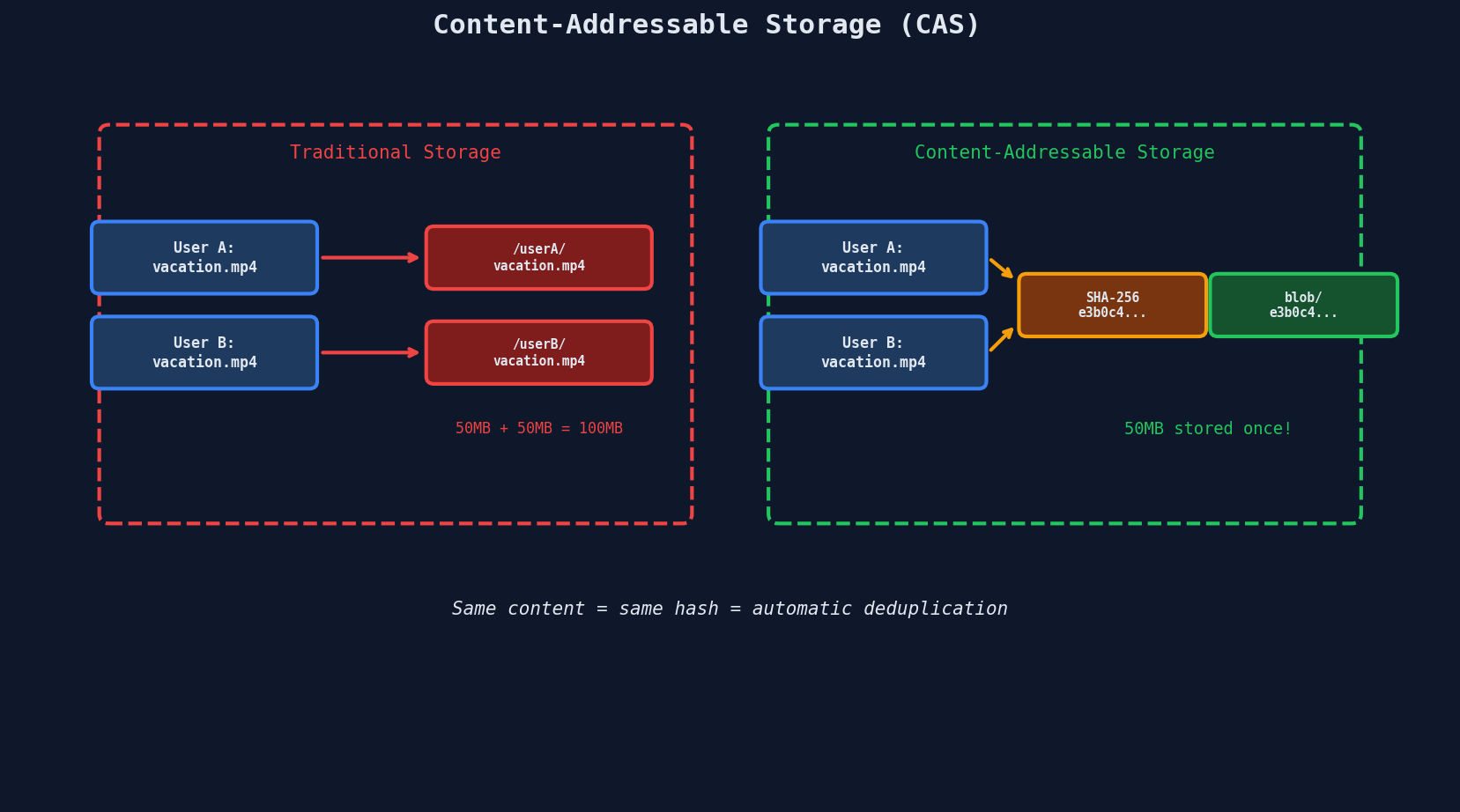
Who uses CAS?
- Git stores every file, tree, and commit as a content-addressed blob.
git hash-objectcomputes the SHA-1 address. - Docker layers are content-addressed. Pulling an image skips layers you already have locally.
Block-Level Deduplication
File-level dedup is all-or-nothing: the entire file must match. Block-level dedup is far more powerful -- it splits files into fixed-size blocks and deduplicates each independently.
The Protocol
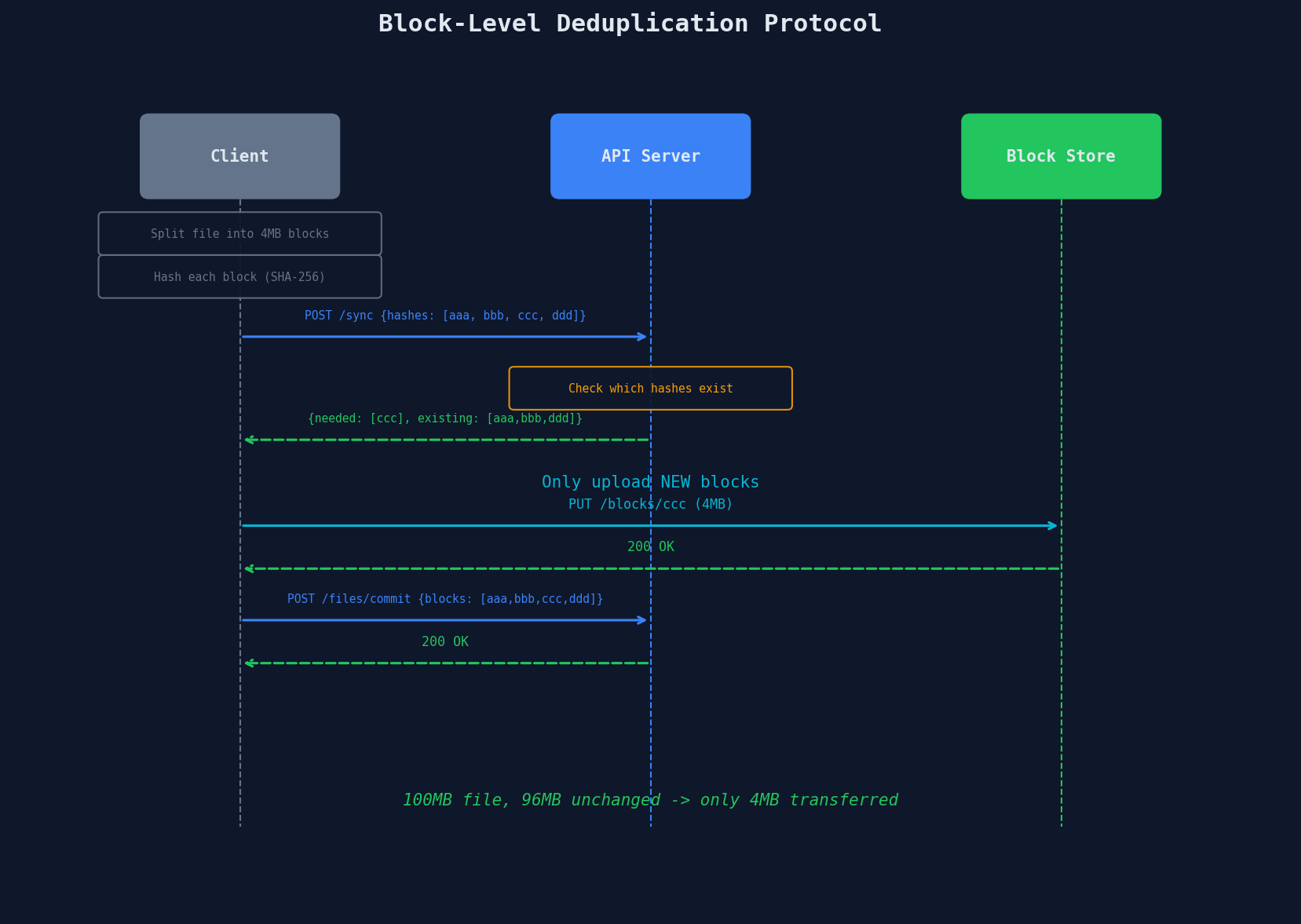
The client uploads only blocks the server doesn't have. For a 100MB file where 96MB is unchanged, the client transfers 4MB.
Implementation Sketch
import hashlib

def split_into_blocks(file_path, block_size=4 * 1024 * 1024):
    """Split a file into fixed-size blocks and hash each."""
    blocks = []
    with open(file_path, "rb") as f:
        index = 0
        while True:
            data = f.read(block_size)
            if not data:
                break
            block_hash = hashlib.sha256(data).hexdigest()
            blocks.append({
                "index": index,
                "hash": block_hash,
                "size": len(data),
                "data": data,
            })
            index += 1
    return blocks

@app.route("/api/sync", methods=["POST"])
def check_blocks():
    """Tell the client which blocks we already have."""
    client_hashes = request.json["block_hashes"]

    # Check block store for existing hashes
    existing = set()
    for h in client_hashes:
        if s3_client.head_object_exists(Bucket="block-store", Key=f"blocks/{h}"):
            existing.add(h)

    needed = [h for h in client_hashes if h not in existing]
    return jsonify({"needed": needed, "existing": list(existing)})
Delta Sync: Only Changed Blocks Transfer
Block-level dedup enables delta sync -- when a user edits a large file, only the modified blocks get uploaded.
| Scenario | Without Block Dedup | With Block Dedup |
|---|---|---|
| Edit 1 paragraph in 50MB doc | Upload 50MB | Upload ~4MB (1 block) |
| Append 2MB to 200MB log file | Upload 200MB | Upload ~4MB (1 new block) |
| Change 1 slide in 80MB deck | Upload 80MB | Upload ~4MB (1 block) |
| Upload identical file again | Upload full file | Upload 0 bytes |
File sync products consistently report ~70% storage savings from block-level deduplication across their user base.
Fixed vs. Content-Defined Chunking
| Approach | How It Works | Pros | Cons |
|---|---|---|---|
| Fixed-size blocks | Split at every N bytes | Simple, predictable | Inserting 1 byte shifts all subsequent block boundaries |
| Content-defined chunking (CDC) | Use rolling hash (Rabin fingerprint) to find boundaries based on content | Insertion/deletion only affects local blocks | More complex, variable block sizes |
The boundary shift problem
With fixed 4MB blocks, inserting 1 byte at position 0 shifts every block boundary. Block 1 is now bytes 1-4MB+1 instead of 0-4MB. Every block hash changes, and the client re-uploads the entire file. Content-defined chunking uses content patterns to find natural boundaries, making it resilient to insertions.
Post-Upload Processing Pipeline
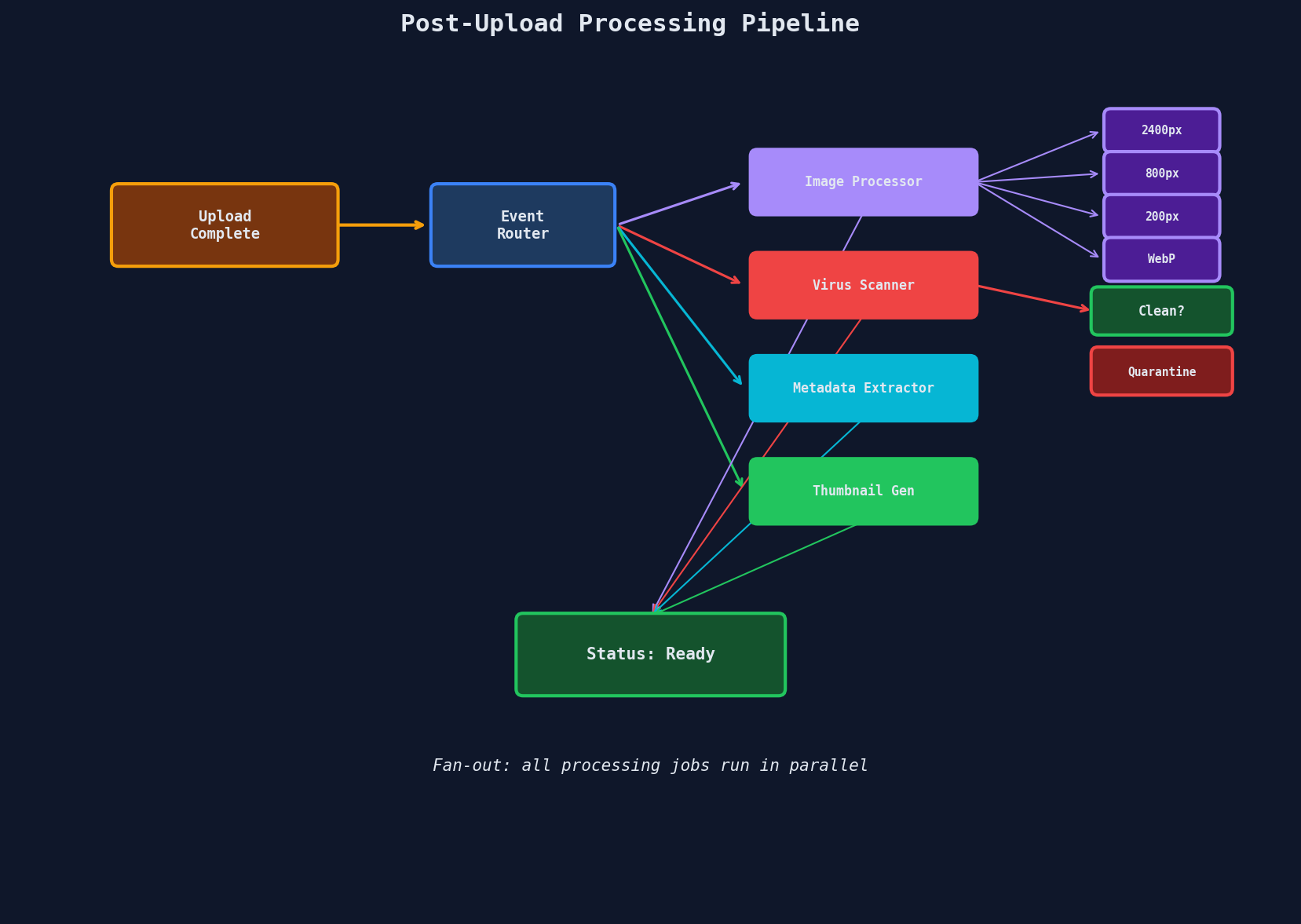
After a file lands in storage, you almost always need to process it. The pattern: upload completion triggers an event, which fans out to parallel async workers.
Key Design Decisions
Fan-out, not sequential. Each processing job is independent. Resizing doesn't depend on virus scanning. Run them in parallel using the worker pool patterns from Chapter 5.
# S3 Event Notification triggers a Lambda or sends to SQS
def handle_upload_complete(event):
    s3_key = event["s3_key"]
    upload_id = event["upload_id"]

    # Fan out to independent processing queues
    jobs = [
        {"type": "resize", "s3_key": s3_key, "sizes": [2400, 800, 200]},
        {"type": "virus_scan", "s3_key": s3_key},
        {"type": "extract_metadata", "s3_key": s3_key},
        {"type": "generate_thumbnail", "s3_key": s3_key},
    ]

    for job in jobs:
        job["upload_id"] = upload_id
        processing_queue.send_message(json.dumps(job))

    db.uploads.update(upload_id, {"status": "processing", "jobs_total": len(jobs)})
Track job completion. When all N jobs finish, mark the file as ready:
def on_job_complete(upload_id, job_type):
    # Atomic increment
    result = db.uploads.find_and_modify(
        {"upload_id": upload_id},
        {"$inc": {"jobs_completed": 1}},
        new=True,
    )

    if result["jobs_completed"] == result["jobs_total"]:
        db.uploads.update(upload_id, {"status": "ready"})
        notify_user(result["user_id"], "Your file is ready")
One Upload, N Outputs
A single video upload might generate dozens of derived files:
| Input | Processing | Outputs |
|---|---|---|
| 4K video (25GB) | Transcode | 1080p, 720p, 480p, 360p variants |
| Extract | Audio track (AAC) | |
| Generate | Thumbnail at 0s, 30s, 60s, 90s | |
| Segment | HLS .ts chunks (4s each) per quality | |
| Create | .m3u8 manifest per quality + master manifest |
A 2-hour 4K video might produce 4,000+ output files. The processing pipeline handles this as parallel jobs, not a single monolithic operation.
Proof Point: Netflix Per-Shot Encoding
Netflix's per-shot encoding analyzes each scene individually — allocating more bits to action sequences and fewer to static shots. This adaptive approach achieves ~20% bandwidth savings at the same visual quality compared to fixed-bitrate encoding. The processing pipeline splits a title into individual shots, encodes each at optimal settings, then reassembles the final output.
Garbage Collection for Orphaned Blobs
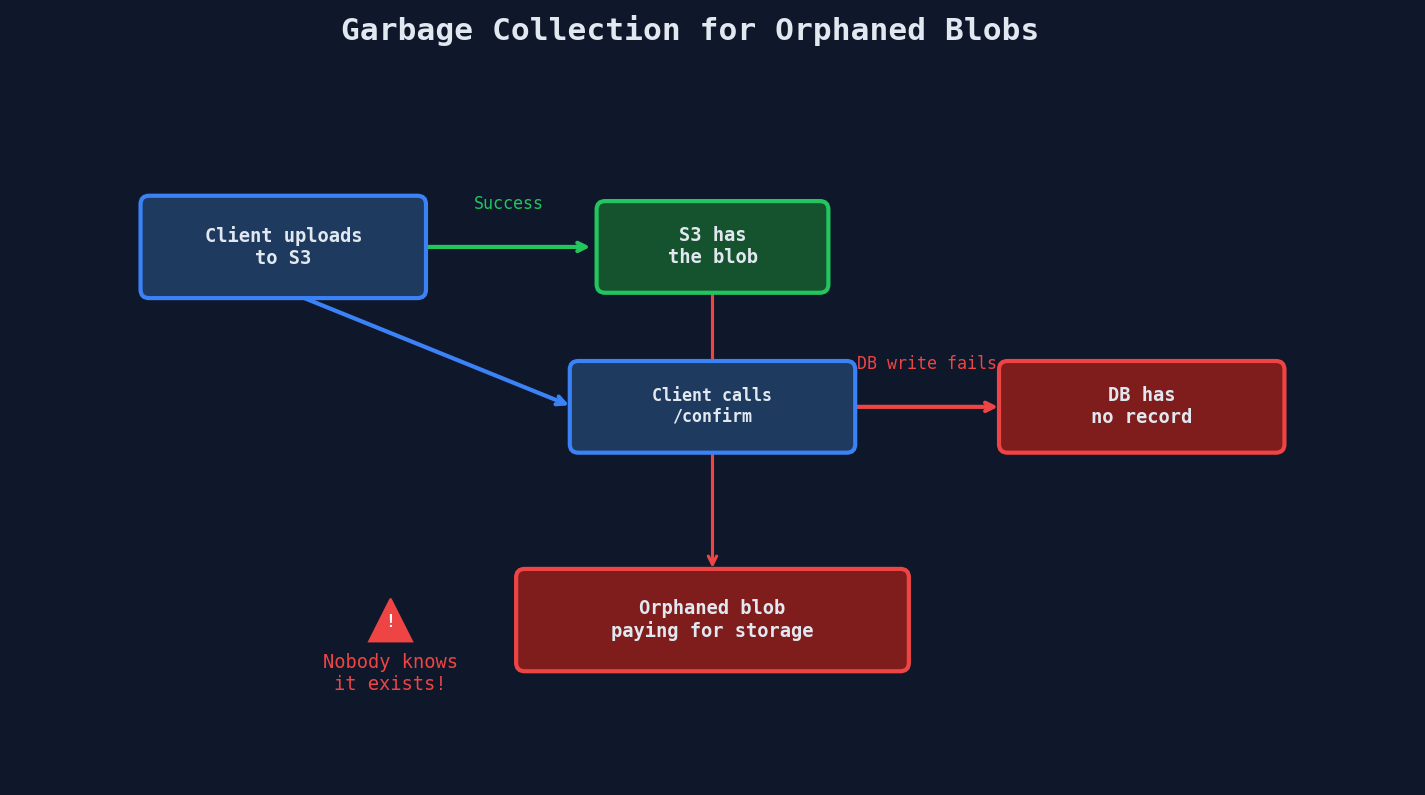
Here's a failure mode that creeps up on you: the upload succeeds in S3, but the database write that records it fails. Now you have a blob in storage with no metadata pointing to it.
Three Strategies for Orphan Cleanup
1. Mark and Sweep (batch job)
Periodically list all S3 objects and check each against the database. Delete objects with no matching record.
def garbage_collect_orphans():
    """Run daily via cron or scheduled task."""
    paginator = s3_client.get_paginator("list_objects_v2")

    for page in paginator.paginate(Bucket="my-bucket", Prefix="uploads/"):
        for obj in page.get("Contents", []):
            s3_key = obj["Key"]
            age = datetime.utcnow() - obj["LastModified"].replace(tzinfo=None)

            # Grace period: don't delete objects less than 24h old
            # (upload might still be in progress)
            if age < timedelta(hours=24):
                continue

            # Check if any DB record references this key
            record = db.uploads.find_one({"s3_key": s3_key, "status": "completed"})
            if not record:
                s3_client.delete_object(Bucket="my-bucket", Key=s3_key)
                log.info(f"Deleted orphan: {s3_key}")
2. TTL Lifecycle Rules
Set an S3 lifecycle policy to auto-delete objects in a staging prefix after N days. Only move files to the permanent prefix after confirmation.
# Upload flow with staging prefix
s3_key_staging = f"staging/{upload_id}/{filename}"    # auto-deleted after 3 days
s3_key_permanent = f"files/{user_id}/{upload_id}/{filename}"  # permanent

# On confirmation, move from staging to permanent
def confirm_upload(upload_id):
    s3_client.copy_object(
        Bucket="my-bucket",
        CopySource=f"my-bucket/{s3_key_staging}",
        Key=s3_key_permanent,
    )
    s3_client.delete_object(Bucket="my-bucket", Key=s3_key_staging)
3. Soft Delete with Grace Period
Never hard-delete immediately. Mark as "pending deletion" and actually delete after a grace period. This protects against race conditions and gives you a recovery window.
| Strategy | Pros | Cons |
|---|---|---|
| Mark and Sweep | Catches everything eventually | Expensive to list large buckets; runs periodically |
| TTL Lifecycle | Zero code at runtime; S3 handles it | Requires staging/permanent prefix split |
| Soft Delete | Safe recovery window | Adds complexity; still need eventual hard delete |
Combine strategies
Use TTL lifecycle for the staging prefix (catches most orphans automatically) and mark-and-sweep as a weekly safety net for anything that slipped through.
Reference Counting for Shared Blobs
With CAS, multiple files can reference the same blob. You can't delete a blob just because one user deletes their file -- other users might still reference it.
# Reference count tracks how many file records point to this blob
def delete_file(file_id):
    file_record = db.files.find_one({"id": file_id})
    blob_hash = file_record["blob_hash"]

    # Remove the file record
    db.files.delete(file_id)

    # Decrement reference count
    result = db.blobs.find_and_modify(
        {"hash": blob_hash},
        {"$inc": {"ref_count": -1}},
        new=True,
    )

    # Only delete the actual blob when no references remain
    if result["ref_count"] <= 0:
        s3_client.delete_object(Bucket="block-store", Key=f"blobs/{blob_hash}")
        db.blobs.delete({"hash": blob_hash})
Interview Tip
Connecting the dots
When asked about file storage in an interview, mention CAS dedup as a storage optimization, then immediately connect it to the processing pipeline: "After upload, we trigger async processing -- resize, transcode, virus scan -- using the worker pool pattern. Each job is independent, so they fan out in parallel. We track completion with an atomic counter and mark the file as ready when all jobs finish." This shows you're thinking about the full lifecycle, not just the upload.
Key Takeaways
| Concept | Details |
|---|---|
| CAS | address = hash(content) -- same content = same address = automatic dedup |
| Block-level dedup | Split into blocks, hash each, upload only new blocks |
| Delta sync | Edit a large file, transfer only changed blocks (~70% savings) |
| Content-defined chunking | Rolling hash finds natural boundaries, resilient to insertions |
| Processing pipeline | Fan out parallel jobs on upload complete; track with atomic counter |
| Orphan cleanup | Mark-and-sweep, TTL lifecycle, or soft delete with grace period |
| Reference counting | Delete blob only when ref_count reaches zero |