The Layered Model
TL;DR
Networking is organized into layers, like floors of a building. Each floor does one job and doesn't worry about what the other floors are doing. You only need to know three of them.
Think of It Like Sending a Package
Imagine you're shipping a birthday gift to a friend across the country.
You don't drive it there yourself. You put the gift in a box, write the address on it, and hand it to a shipping company. The shipping company figures out which trucks, planes, and warehouses to use. The local delivery driver figures out how to get it to the right doorstep.
Each person in this chain does one job and trusts the next person to handle theirs. You don't care which highway the truck takes. The truck driver doesn't care what's inside the box.
Networking works the same way. It's organized into layers, and each layer has one responsibility. This keeps things manageable — without layers, every app developer would need to understand how electrical signals travel through fiber optic cables. Nobody wants that.
The official name for this layered structure is the OSI model, and technically it has 7 layers. But most of them are way too low-level to matter for us. We only care about three.
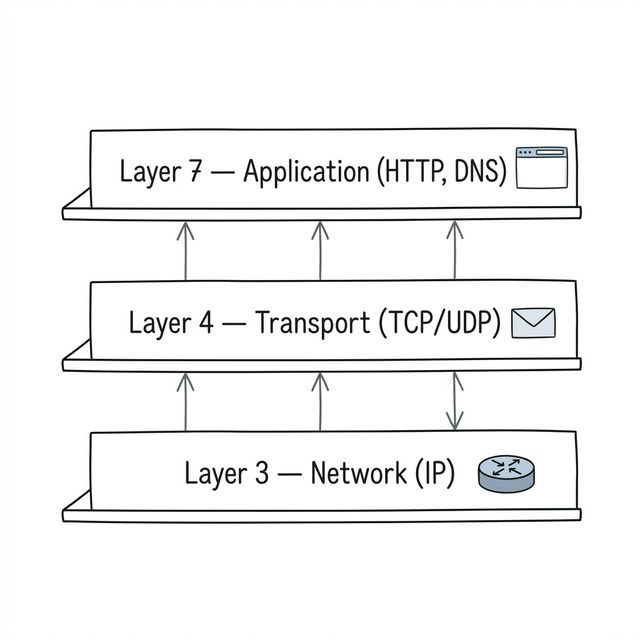
The Three Layers You Need to Know
Let's go bottom to top — just like our package going from the warehouse to your friend's door.
Layer 3: The Network Layer — "Where does this go?"
This is the addressing layer, run by a protocol called IP (Internet Protocol).
Back to our analogy: this is like the address on the package. IP's job is to look at the destination address and figure out how to route your data across the internet, hopping from router to router until it reaches the right machine. This journey introduces ~~latency~~ — the time it takes for data to travel from point A to point B.
IP doesn't care what's inside your data. It doesn't check if anything arrived correctly. It just does its best to get packets from Point A to Point B.
Every device on the internet has an IP address (like 192.168.1.1). That's how the network knows where to send things. We'll talk more about IP addresses in the next lesson.
Layer 4: The Transport Layer — "Did it arrive safely?"
IP gets your data to the right machine, but that's all it promises. Packets might show up out of order, get duplicated, or disappear completely. Not great if you're loading a webpage.
The transport layer sits on top of IP and adds guarantees — or deliberately doesn't, depending on what you need.
Think of it this way: IP is the postal service that delivers letters. The transport layer decides whether you're sending regular mail (might get lost, no tracking) or registered mail (guaranteed delivery, signature required).
The two main protocols here are:
- TCP — Reliable delivery. "I'll make sure every piece of data arrives, in order, no matter what." This is what most of the internet uses.
- UDP — Fast but unreliable. "I'll send it as fast as possible, but if something gets lost... oh well." Used for things like video calls and gaming.
There's also QUIC, a newer protocol that combines the best of both. We'll cover all three in Chapter 2.
Layer 7: The Application Layer — "What does the data mean?"
This is your layer. This is where you work every day.
HTTP (how websites talk), DNS (how domain names get translated to IP addresses), WebSockets (how chat apps get real-time messages), gRPC (how backend services talk to each other) — they all live here.
These protocols decide how your data is formatted and what it means. ~~DNS~~ translates domain names to IP addresses. ~~TLS~~ encrypts the connection. An HTTP response might say "here's a JSON object with user data." The layers below don't care about JSON — they just move bytes around. Layer 7 gives those bytes meaning.
When you're building a REST API, choosing between WebSockets and polling, or deciding whether to use gRPC — those are all Layer 7 decisions.
How They Work Together — Like Russian Nesting Dolls
Here's the cool part. When you send an HTTP request, each layer wraps it up like nesting dolls:
- Your app creates an HTTP request ("GET /users/42")
- Layer 4 (TCP) wraps that in a segment, adding port numbers and tracking info
- Layer 3 (IP) wraps that in a packet, adding the source and destination addresses
When it arrives at the other end, the process reverses. Layer 3 opens its envelope, passes the contents to Layer 4. Layer 4 opens its envelope, passes the contents to the app. By the time your code sees the data, all the networking wrapping has been peeled away.
This layering means you can swap things out without breaking everything else. Upgrade from HTTP/1.1 to HTTP/2? The transport layer doesn't notice. Switch from TCP to QUIC? Your application code barely changes. Each layer minds its own business.
Quick Recap
| Layer | Name | Job | Analogy | Examples |
|---|---|---|---|---|
| 3 | Network | Get data to the right machine | The address on a package | IP |
| 4 | Transport | Make sure it arrives properly (or not) | Regular mail vs registered mail | TCP, UDP, QUIC |
| 7 | Application | Give meaning to the data | The letter inside the package | HTTP, DNS, WebSockets, gRPC |
You don't need to memorize layer numbers. What matters is understanding that different decisions happen at different layers — and knowing which layer you're talking about keeps conversations clear.
Interview Tip
If someone asks "TCP or UDP?" that's a Layer 4 question. "REST or gRPC?" is Layer 7. "How should our load balancer route traffic?" depends on whether it's an L4 or L7 load balancer — a distinction we'll cover in Chapter 5.