Partitioning
TL;DR
Partitioning splits a large table into smaller pieces that still live on the same database server, letting the engine skip irrelevant data and making maintenance dramatically cheaper.
The Filing Cabinet With Labeled Drawers
Imagine a filing cabinet stuffed with ten years of invoices in a single drawer. Finding January 2024's invoices means rifling through everything. Now label four drawers -- 2021, 2022, 2023, 2024 -- and suddenly you pull open exactly the drawer you need.
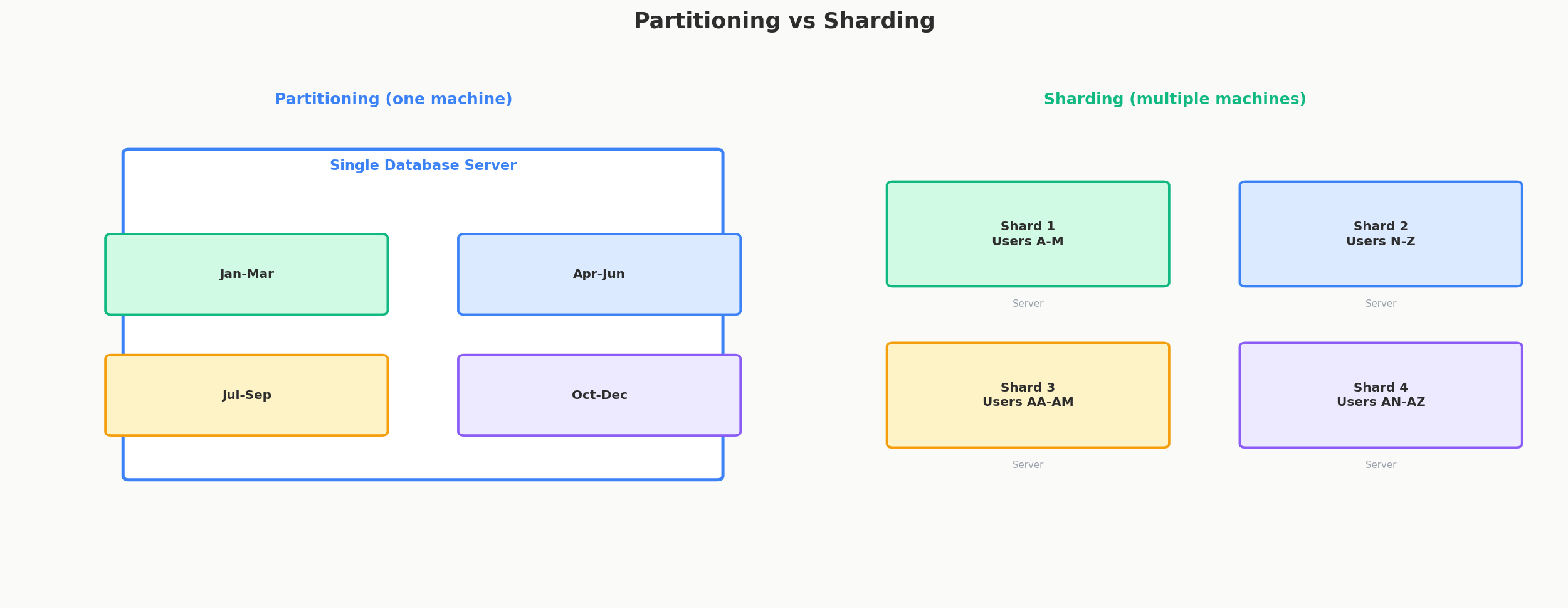
That's partitioning. The data is still in the same cabinet (one database server). You haven't bought a second cabinet (that would be sharding). You've just organized it so the database can ignore what it doesn't need.
What Partitioning Actually Is
Partitioning divides a single logical table into multiple physical segments called partitions. To your application, it still looks like one table -- you SELECT * FROM events the same way you always did. But under the hood, the database stores each partition separately and can read only the ones that matter.
Key point: no additional servers. Partitioning is a single-machine optimization. It improves query speed, simplifies maintenance, and can even help with concurrency -- but it doesn't increase your total storage or write throughput beyond what that one machine offers.
Horizontal vs Vertical Partitioning
There are two fundamentally different ways to split a table:
| Type | What It Splits | Example | When to Use |
|---|---|---|---|
| Horizontal | Rows -- each partition holds a subset of rows | Orders from Q1 in one partition, Q2 in another | Large tables with clear row-level access patterns |
| Vertical | Columns -- each partition holds a subset of columns | Frequently-read user_id, name, email separate from rarely-read bio, avatar_url |
Wide tables where most queries only touch a few columns |
Horizontal partitioning is by far the more common strategy and what most people mean when they say "partitioning." It's what PostgreSQL's PARTITION BY clause does. Vertical partitioning is more niche -- you might see it when a table has 200 columns and queries only ever touch 10 of them, or when you want to separate hot columns from cold ones for caching purposes.
For the rest of this lesson, we'll focus on horizontal partitioning.
PostgreSQL PARTITION BY -- Range, List, Hash
PostgreSQL natively supports three partitioning strategies. Let's walk through each with real SQL.
Range Partitioning
Split rows based on a continuous range of values. The classic use case is time-series data.
CREATE TABLE events (
    id         BIGSERIAL,
    user_id    INTEGER NOT NULL,
    event_type VARCHAR(50) NOT NULL,
    payload    JSONB,
    created_at TIMESTAMP NOT NULL
) PARTITION BY RANGE (created_at);

-- One partition per quarter
CREATE TABLE events_2024_q1 PARTITION OF events
    FOR VALUES FROM ('2024-01-01') TO ('2024-04-01');

CREATE TABLE events_2024_q2 PARTITION OF events
    FOR VALUES FROM ('2024-04-01') TO ('2024-07-01');

CREATE TABLE events_2024_q3 PARTITION OF events
    FOR VALUES FROM ('2024-07-01') TO ('2024-10-01');

CREATE TABLE events_2024_q4 PARTITION OF events
    FOR VALUES FROM ('2024-10-01') TO ('2025-01-01');
Notice the ranges use FROM (inclusive) TO (exclusive) -- no overlaps, no gaps.
When you query WHERE created_at BETWEEN '2024-04-15' AND '2024-05-15', PostgreSQL only reads events_2024_q2. The other three partitions are never touched.
List Partitioning
Split rows based on a discrete set of values. Great for geographic or categorical data.
CREATE TABLE orders (
    id         BIGSERIAL,
    customer_id INTEGER NOT NULL,
    region      VARCHAR(20) NOT NULL,
    total       DECIMAL(10, 2),
    created_at  TIMESTAMP NOT NULL
) PARTITION BY LIST (region);

CREATE TABLE orders_na PARTITION OF orders
    FOR VALUES IN ('us', 'ca', 'mx');

CREATE TABLE orders_eu PARTITION OF orders
    FOR VALUES IN ('uk', 'de', 'fr', 'es', 'it');

CREATE TABLE orders_apac PARTITION OF orders
    FOR VALUES IN ('jp', 'kr', 'au', 'sg', 'in');
If your application serves North American users from a US datacenter, queries filtered by region IN ('us', 'ca') hit only orders_na.
Hash Partitioning
Split rows by hashing a column value. Useful when there's no natural range or list, but you still want even distribution.
CREATE TABLE sessions (
    id         BIGSERIAL,
    user_id    INTEGER NOT NULL,
    token      VARCHAR(255) NOT NULL,
    expires_at TIMESTAMP NOT NULL
) PARTITION BY HASH (user_id);

CREATE TABLE sessions_p0 PARTITION OF sessions
    FOR VALUES WITH (MODULUS 4, REMAINDER 0);

CREATE TABLE sessions_p1 PARTITION OF sessions
    FOR VALUES WITH (MODULUS 4, REMAINDER 1);

CREATE TABLE sessions_p2 PARTITION OF sessions
    FOR VALUES WITH (MODULUS 4, REMAINDER 2);

CREATE TABLE sessions_p3 PARTITION OF sessions
    FOR VALUES WITH (MODULUS 4, REMAINDER 3);
Hash partitioning distributes rows evenly but sacrifices the ability to do range scans efficiently. You can look up a specific user_id and only hit one partition, but WHERE user_id BETWEEN 1000 AND 2000 might touch all four.
Partition Pruning -- The Real Performance Win
The magic of partitioning isn't the split itself -- it's partition pruning. When you include the partition key in your WHERE clause, the query planner eliminates partitions that can't possibly contain matching rows. It never reads them at all.
Only events_2024_q3 appears in the plan. The database didn't scan Q1, Q2, or Q4. If your table has 4 billion rows spread across 16 partitions, and your query touches one partition, you just searched 250 million rows instead of 4 billion. That's the difference between a 30-second query and a 2-second query.
Pruning happens at plan time for literal values and execution time for parameterized queries (PostgreSQL 11+). It works with =, <, >, BETWEEN, and IN operators on the partition key.
Interview Tip
When discussing partitioning in an interview, always mention partition pruning by name. It's the specific mechanism that makes partitioning useful -- saying "the database skips irrelevant partitions" shows you understand the mechanics, not just the concept.
Maintenance -- DROP Instead of DELETE
Here's a benefit that doesn't get enough attention: dropping old data becomes trivial.
Suppose you have a data retention policy -- events older than 2 years get deleted. Without partitioning:
-- Without partitioning: slow, generates massive WAL, locks the table
DELETE FROM events WHERE created_at < '2022-01-01';
-- Could take hours on a billion-row table
With partitioning:
-- With partitioning: instant, no row-level locking
DROP TABLE events_2021_q1;
DROP TABLE events_2021_q2;
DROP TABLE events_2021_q3;
DROP TABLE events_2021_q4;
DROP TABLE is a metadata operation. It takes milliseconds regardless of how many rows are in the partition. No dead tuples, no bloat, no VACUUM needed. This alone makes partitioning worth it for time-series data.
Similarly, adding new partitions for upcoming time periods is cheap:
Many teams automate this with a cron job that creates next quarter's partition before the current quarter ends.
Sub-Partitioning -- Going Deeper
Sometimes one level of partitioning isn't enough. PostgreSQL supports sub-partitioning -- partitioning a partition.
A common pattern: partition by time range at the top level, then sub-partition by hash for even distribution within each time period.
CREATE TABLE logs (
    id         BIGSERIAL,
    service    VARCHAR(50) NOT NULL,
    level      VARCHAR(10) NOT NULL,
    message    TEXT,
    created_at TIMESTAMP NOT NULL
) PARTITION BY RANGE (created_at);

CREATE TABLE logs_2024_q1 PARTITION OF logs
    FOR VALUES FROM ('2024-01-01') TO ('2024-04-01')
    PARTITION BY HASH (service);

CREATE TABLE logs_2024_q1_p0 PARTITION OF logs_2024_q1
    FOR VALUES WITH (MODULUS 4, REMAINDER 0);

CREATE TABLE logs_2024_q1_p1 PARTITION OF logs_2024_q1
    FOR VALUES WITH (MODULUS 4, REMAINDER 1);

-- ... and so on for each sub-partition
This gives you the best of both worlds: time-based pruning for "show me last quarter's logs" and hash-based distribution to prevent one service from dominating a single partition's I/O.
Use sub-partitioning sparingly. Each level multiplies the number of physical tables the planner must consider. 4 quarters x 4 hash partitions = 16 tables. 16 quarters x 8 hash partitions = 128 tables. PostgreSQL handles this fine up to a few hundred partitions, but thousands can slow down planning.
When to Partition
Partitioning is not free. It adds complexity to schema management and can hurt queries that don't include the partition key. Here's a practical decision guide:
| Situation | Partition? | Why |
|---|---|---|
| Table has 10M+ rows and growing | Yes | Pruning gives measurable speedup |
| Queries almost always filter by one column (date, region) | Yes | Natural partition key exists |
| Time-series data with retention policy | Yes | DROP partition for instant cleanup |
| Small table (under 1M rows) | No | Full scans are already fast |
| Queries touch random rows across all ranges | No | Pruning can't help, adds overhead |
| Table has many indexes that are getting slow to maintain | Yes | Smaller per-partition indexes are faster |
Companies like Uber partition their trip data by city and date. Slack partitions message tables by workspace. Cloudflare partitions DNS query logs by time. The pattern is always the same: large table, clear access pattern, one dominant filter column.
Interview Tip
If asked "how would you handle a table that's getting too large?" -- start with partitioning, not sharding. Partitioning is simpler, doesn't require architectural changes, and solves the problem for most teams. Sharding is the nuclear option you reach for when one machine isn't enough.
Quick Recap
| Concept | What It Does | Why It Matters |
|---|---|---|
| Horizontal partitioning | Splits rows across multiple physical segments | Most common; what PostgreSQL PARTITION BY does |
| Range partitioning | Assigns rows by value ranges (dates, IDs) | Perfect for time-series data |
| List partitioning | Assigns rows by discrete values (region, category) | Great for geographic or categorical splits |
| Hash partitioning | Assigns rows by hash of a column | Even distribution when no natural range exists |
| Partition pruning | Skips partitions that can't match the query | The actual performance benefit |
| DROP vs DELETE | Drop entire partitions instead of deleting rows | Milliseconds instead of hours for data cleanup |
| Sub-partitioning | Partitions within partitions | Combine time-range + hash for multi-dimensional access |