Algorithms & Health Checks
TL;DR
A load balancer needs two things: a strategy for who gets the next request (the algorithm) and a way to know who's still alive (health checks). Round Robin is the default for most cases, Least Connections for persistent connections. Health checks are what make load balancers life-saving at 3 AM.
How Does the Load Balancer Choose?
Okay, you've got a load balancer sitting in front of 5 servers. A request comes in. Which server gets it?
That depends on the algorithm. Think of it like different strategies for seating people at a restaurant.
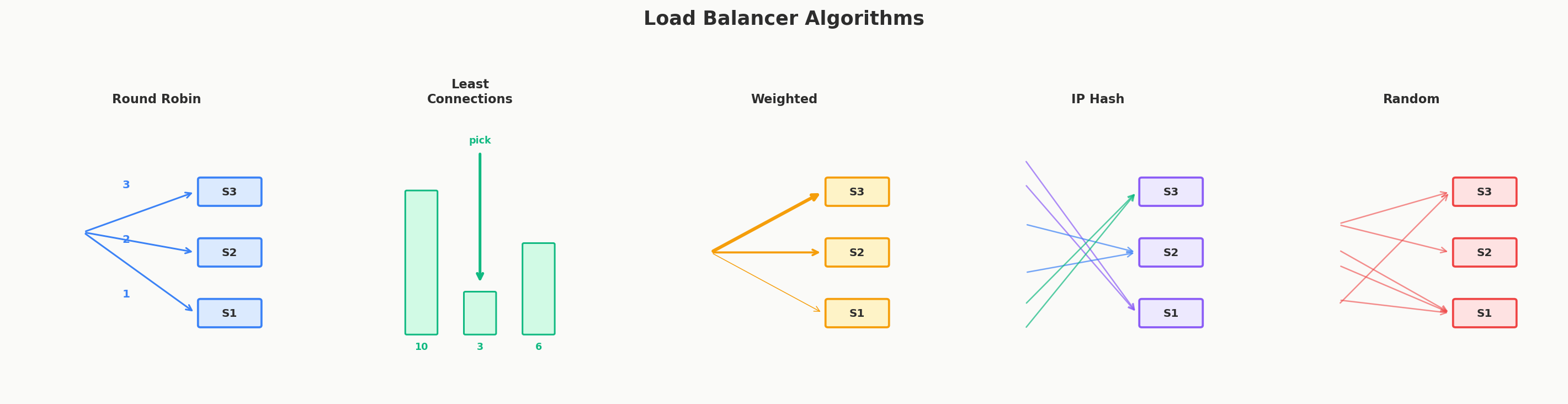
Round Robin — "Take Turns"
Requests go to servers in order: Server 1, Server 2, Server 3, Server 1, Server 2, Server 3...
It's like dealing cards around a table — everyone gets an equal share. Simple, fair, and works great when all servers are roughly equal in power.
Best for: Stateless HTTP APIs where all servers are identical. This is the default choice for most applications.
Random — "Pick Any"
Each request goes to a randomly chosen server. No need to track whose turn it is.
It's like throwing darts at a board of server names. Sounds chaotic, but with enough traffic, the distribution evens out and looks almost identical to Round Robin.
Best for: Same as Round Robin. Pick whichever you prefer.
Least Connections — "Who's Least Busy?"
Send the request to whichever server has the fewest active connections right now.
Think of a grocery store with multiple checkout lanes. You naturally pick the one with the shortest line. That's Least Connections.
This matters a lot for WebSocket and SSE connections — those stay open for a long time. Without Least Connections, imagine one server that happened to get 500 WebSocket connections on a busy day. Even though newer servers are sitting nearly empty, that first server keeps drowning because Round Robin doesn't account for existing connections.
Best for: Persistent connections (WebSockets, SSE) and services where request processing times vary a lot.
Least Response Time — "Who's Fastest Right Now?"
Route to whichever server is responding the quickest. If Server 2 is consistently replying in 5ms while Server 4 is taking 50ms, more traffic goes to Server 2.
This automatically adapts to servers having different hardware or dealing with temporary load spikes.
Best for: Mixed hardware environments or when some servers might be under more strain than others.
IP Hash — "Same Customer, Same Server"
Hash the client's IP address to determine which server handles them. The same client always goes to the same server.
This gives you sticky sessions — useful if your server stores things in memory for each user (like a shopping cart). But be careful: this fights against the whole point of horizontal scaling. If that server goes down, the user's session is gone. In most cases, it's better to store session data externally (like in Redis) and keep your servers stateless.
Best for: Legacy applications that require sticky sessions. Avoid if you can.
Quick Decision Guide
| Situation | Use this | Why |
|---|---|---|
| Stateless HTTP API | Round Robin or Random | Simple, even distribution, no overhead |
| WebSocket / SSE connections | Least Connections | Prevents connection pile-up on individual servers |
| Mixed server hardware | Least Response Time | Routes more traffic to faster servers |
| Legacy session state | IP Hash | Same user → same server (but try to avoid this) |
Anti-Patterns: When the "Smart" Choice Backfires
Picking the right algorithm is important, but knowing when not to use one is equally valuable.
Don't use Least Connections for fast, stateless APIs. If every request takes 2ms to process, tracking connection counts across servers adds overhead that outweighs the benefit. Round Robin distributes fast requests just as evenly without the bookkeeping. Least Connections shines when request durations vary significantly — not when they're all lightning-fast.
Don't use IP Hash just because it sounds smart. Sticky sessions feel convenient ("the user always hits the same server!"), but they create fragile, uneven load distribution. If one server accumulates power users who generate 10x the traffic, IP Hash won't redistribute them. And when that server crashes, all those users lose their session simultaneously. If you need session persistence, store state in Redis — don't bake it into your routing layer.
Don't use Least Response Time without monitoring. If one server is consistently faster because it's not doing any real work (maybe it's misconfigured and returning errors instantly), Least Response Time will route all traffic to it. Pair it with health checks that verify the response is actually correct, not just fast.
Health Checks — "Is This Server Still Alive?"
Load balancers don't just distribute traffic — they also play doctor. They constantly check whether your backend servers are healthy, and if one isn't feeling well, they stop sending it patients.
How It Works
The load balancer periodically pokes each server:
-
TCP health check — "Can I open a connection to you?" This confirms the server is running and accepting connections. Think of it as knocking on the door — someone's home, but you don't know if they're feeling okay.
-
HTTP health check — "I'm sending you
GET /health. Can you answer200 OK?" This confirms the application is actually working — not just that the port is open. Think of it as asking "how are you?" and expecting a coherent answer.
If a server fails several checks in a row, the load balancer marks it as unhealthy and stops sending traffic to it. When it starts passing checks again, it comes back into the rotation automatically.
Why Health Checks Are a Big Deal
Here's the scenario that makes health checks invaluable:
It's 3 AM. One of your five servers crashes. Without a load balancer, 20% of your users start hitting a dead server and seeing errors. Someone gets paged, wakes up, manually removes the server, and goes back to bed grumpy.
With health checks, the load balancer detects the failure in seconds, stops routing to that server, and the remaining four handle the load. Nobody gets paged. Nobody sees errors. When the server comes back up, it automatically re-enters the pool.
That's the difference between "a minor blip that nobody noticed" and "a 3 AM incident that woke up the on-call engineer."
Real-World Load Balancers
In practice, you'll see these:
- Software — HAProxy, Nginx, Envoy. Flexible, configurable, run on regular servers.
- Cloud — AWS ELB/ALB/NLB, Google Cloud Load Balancing, Azure Load Balancer. Managed services that scale automatically.
- Hardware — F5 BIG-IP. Can handle hundreds of millions of requests per second. Very expensive.
Scaling the load balancers themselves — "who load balances the load balancer?" — is a classic interview question. We cover the full answer in the next lesson: DNS failover, floating IPs, ECMP, Anycast, and Kubernetes kube-proxy.
Interview Tip
When you mention a load balancing algorithm, briefly say why you chose it. "I'd use Round Robin because these servers are stateless and identical" or "Least Connections because these are WebSocket connections that stay open." The algorithm itself is less important than showing you understand why you're picking it.