HTTP & HTTPS
TL;DR
HTTP is how your browser talks to servers — "give me this page" and "here it is." It's simple, stateless, and the foundation of almost everything on the web. HTTPS is the same thing but encrypted so nobody can eavesdrop.
The Waiter at a Restaurant
Imagine you're at a restaurant. You look at the menu, decide what you want, and tell the waiter "I'll have the pasta." The waiter goes to the kitchen, gets your food, and brings it back. Transaction done. The waiter doesn't remember you from your last visit. Every order is independent.
That's HTTP (Hypertext Transfer Protocol) in a nutshell. Your browser is the customer. The server is the kitchen. HTTP is the waiter.
- You request something ("give me the homepage")
- The server responds with it ("here's the HTML")
- The connection doesn't remember previous requests
That last point is important. HTTP is ~~stateless~~ — each request stands on its own. The server doesn't automatically know that the person who just asked for /dashboard is the same person who logged in 5 seconds ago. (That's what cookies and tokens are for, but that's a different topic.)
This statelessness is actually a huge advantage for system design. If the server doesn't need to remember anything between requests, any server can handle any request. That makes it easy to add more servers when traffic grows.
What a Raw HTTP Message Looks Like
Here's a real HTTP exchange. You could actually type this yourself using a command-line tool called netcat:
# What the browser sends (Request)
GET /api/users/42 HTTP/1.1
Host: api.example.com
Accept: application/json

# What the server sends back (Response)
HTTP/1.1 200 OK
Content-Type: application/json

{"id": 42, "name": "Ada Lovelace"}
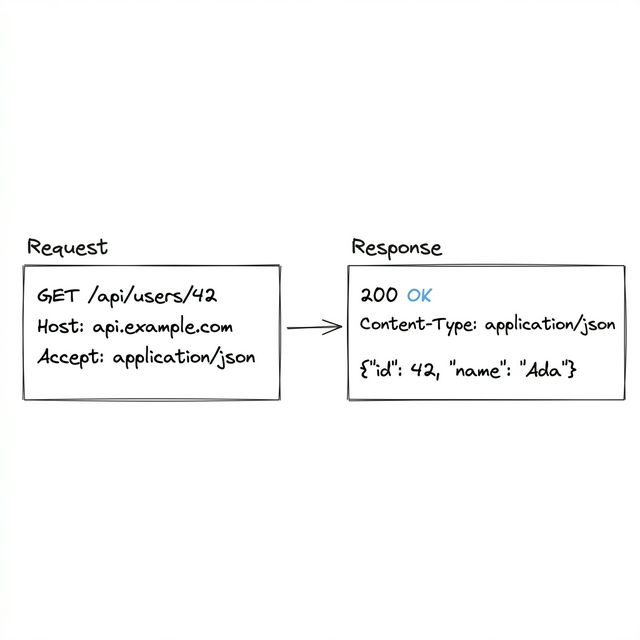
Let's break down the pieces.
Request Methods — "What Do You Want to Do?"
HTTP has a set of methods (sometimes called "verbs") that tell the server what action you want:
| Method | What It Does | Everyday Analogy |
|---|---|---|
GET |
Read/fetch data | "Show me the menu" |
POST |
Create something new | "I'd like to place a new order" |
PUT |
Replace something entirely | "Actually, change my whole order to this" |
PATCH |
Update part of something | "Add extra cheese to my order" |
DELETE |
Remove something | "Cancel my order" |
A concept you'll hear a lot: ~~idempotent~~ operations. That just means "doing it twice has the same effect as doing it once."
GET /users/42is idempotent — reading the same user twice doesn't change anything.DELETE /users/42is idempotent — deleting an already-deleted user is a no-op.POST /usersis NOT idempotent — calling it twice creates two users.
We'll come back to idempotency in Chapter 6 when we talk about retries. It matters a lot there.
Status Codes — "What Happened?"
When the server responds, it includes a number that tells you what happened. You don't need to memorize them all, but these come up constantly:
It worked (2xx):
- 200 OK — Here's what you asked for
- 201 Created — Done, I made the new thing
It moved (3xx):
- 301 Moved Permanently — This page lives somewhere else now. Update your bookmarks.
- 302 Found — This page is temporarily somewhere else.
You messed up (4xx):
- 400 Bad Request — I don't understand what you're asking
- 401 Unauthorized — Who are you? Log in first.
- 403 Forbidden — I know who you are, but you're not allowed
- 404 Not Found — That thing doesn't exist
- 429 Too Many Requests — Slow down, you're sending too many requests
The server messed up (5xx):
- 500 Internal Server Error — Something broke on the server
- 502 Bad Gateway — The server tried to talk to another server and got garbage back
The pattern is simple: 2xx = good, 4xx = your fault, 5xx = server's fault. That's enough to remember.
Headers — Flexible Metadata
Headers are key-value pairs that carry extra information about the request or response. Think of them like the "special instructions" on a delivery order.
Accept: application/json          ← "I want JSON back, please"
Content-Type: application/json    ← "I'm sending you JSON"
Authorization: Bearer abc123      ← "Here's my login token"
Accept-Encoding: gzip, br         ← "I can handle compressed responses"
Headers are one of HTTP's best design decisions. Unlike methods and status codes (which are a fixed set), headers are flexible — you can add whatever you want. This is how HTTP has stayed relevant for 30 years while the web changed dramatically.
The Body — The Actual Content
The body is the payload. For APIs, it's usually JSON. For web pages, it's HTML. For file uploads, it's binary data. Not every request has a body — GET requests typically don't.
HTTPS — "HTTP But Private"
HTTPS is just HTTP with encryption wrapped around it (using something called TLS/SSL). Everything works the same way — same methods, same status codes, same headers. But the contents of your request and response are encrypted in transit.
What HTTPS protects against: - Eavesdropping — Nobody between you and the server can read your data (not your ISP, not the coffee shop WiFi, nobody) - Tampering — Nobody can secretly modify the data while it's moving between you and the server
If you're building anything public-facing, you're using HTTPS. There's no good reason not to.
A Common Security Mistake
Here's something worth knowing: HTTPS encrypts data in transit, but it doesn't validate the contents of a request on the server.
Let's say your API accepts a request like GET /api/users/42 and returns that user's data. What if someone changes it to GET /api/users/99? If your server doesn't check whether the logged-in user is allowed to see user 99's data, you have a security hole. HTTPS won't save you — it just ensures nobody can intercept the request, not that the request itself is legitimate.
The rule: your API should never trust request data without validating it. HTTPS protects the pipe, not the contents.
HTTP Versions (Quick Context)
HTTP has evolved over the years:
- HTTP/1.1 — One request per connection (or you can reuse the connection with
keep-alive). Simple, universally supported. - HTTP/2 — Multiple requests can share one connection at the same time (called multiplexing). Much faster for loading web pages with lots of resources.
- HTTP/3 — Runs on QUIC (a protocol built on UDP) instead of TCP. Fixes a nasty problem HTTP/2 still had: if one packet is lost, TCP freezes all streams on the connection while it waits for retransmission. HTTP/3 handles each stream independently, so a dropped packet only stalls the stream it belongs to. Increasingly common — YouTube, Google, and Cloudflare all use it.
For system design discussions, saying "HTTP" is usually enough. If an interviewer cares about the version, they'll ask.
Interview Tip
A common interview question is "does HTTP/2 multiplexing replace WebSockets?" The answer is no — HTTP/2 is still request-response (the server can't spontaneously push messages to the client). WebSockets provide true full-duplex communication. HTTP/2 makes loading web pages faster; WebSockets make real-time chat possible. They solve different problems. We'll cover this in more detail in Chapter 4.
Interview tip: When designing an API, "HTTP" and "HTTPS" are interchangeable in conversation — always assume HTTPS in practice. The interesting design decisions are about how you use HTTP: which methods, which status codes, how you structure your URLs. That's what we'll cover next with REST.